---
title: For Loop
deprecated: false
hidden: false
metadata:
robots: index
---
# Overview
The for expression is a foreach loop that iterates over an **iterable** (array/list from the data bank), binding each item to an `each` & `index` variable. It executes steps sequentially per iteration, then aggregate outputs into the `output_key` as a list of dicts. It is Ideal for bulk actions like user notifications.
**Output Aggregation Deep Dive**
The for expression outputs a clean list of objects, where one object contains the results of an iteration. An example loop with two actions,`incident_manager_profile` and `updated_manager_profile`, expect:
```json
"for_expression_output_result": [
{
"incident_manager_profile": { "id": "12345", "status": "INACTIVE" },
"updated_manager_profile": { "id": "67890", "status": "ON_CALL" }
},
{
"incident_manager_profile": { "id": "1a2b3c", "status": "INACTIVE" },
"updated_manager_profile": { "id": "4d5e6f", "status": "ON_CALL" }
}
]
```
You can access the variables the same way you access any others in the data bank; e.g., `data.for_expression_output_result[0].incident_manager_profile.status` will yield `INACTIVE`
# Low-Code Editor
Add a For Loop Step, bind iterable, define loop variables, and add expressions inside.
You can only bind an iterable in `in`, you cannot create a list on the fly using DSL such as `["a", "b"]`, only data bank variables work.
You can create a precursor `script action` to output a list and pass it to `in` .
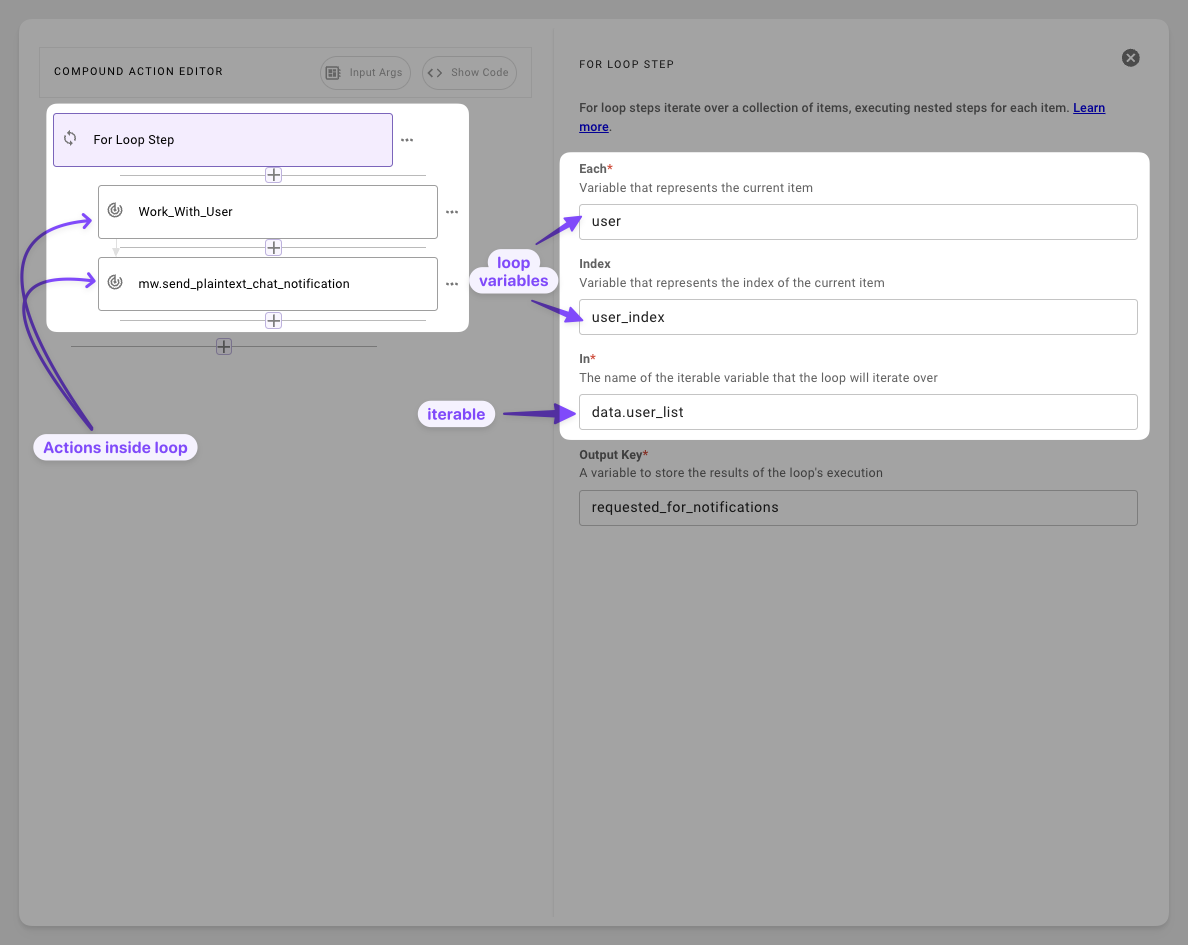
1. **Bind the Iterable `(in)`**: Only `data bank` variables work, inline lists like `["a","b"]` will fail.
2. **Define `each` & `index`**: Set `each` for item (e.g., `user`) and index (e.g., `user_index`), these are only scoped to the for loop.
3. **Add expression & Set `output_key`**: Add expressions to each step. Make sure to add readable output keys.
# Syntax Reference
#### Schema
```yaml
for:
each: ITEM_VAR_NAME* # str: Current item (e.g., 'user')-scoped to steps
index: INDEX_VAR_NAME* # str: Optional position (e.g., 'user_index')—use for ordering
in: DATA_BANK_ITERABLE* # str: Ref to array var (e.g., 'data.users')—no inline literals!
output_key: RESULTS_VAR* # str: Aggregates as list[dict] of step outputs
steps: # list: Expressions per iteration (optional, but useful)
- EXPRESSION_1 # e.g., action with {{each.record_id}}
- EXPRESSION_2
```
#### Fields
| Field | Type | Mandatory | Description |
| :----------- | :--------- | :-------- | :------------------------------------------------------------------------------------------- |
| `each` | string | Yes | item binder - accessed as `var.prop` within steps |
| `index` | string | Yes | Index binder (even if unused, set to dummy such as `idx`) |
| `in` | string | Yes | Data bank reference only (upstream outputs) |
| `output_key` | list[dict] | Yes | List of per-iteration dicts: `[ {step_key: val}, ... ]`. Access: `data.results[i].step_key`. |
| `steps` | list[expr] | No | Loop body; empty yields empty dicts |
# Practical Examples
### Example 1: Actions in Batch
Run actions for each user in a list
#### Compound Action
```yaml
steps:
- action:
action_name: mw.batch_get_users_by_email
output_key: user_results
input_args:
user_emails:
- '"jdoe@example.com"'
- '"sdom@example.com"'
- '"jnde@example.com"'
- for:
each: user
index: user_index
in: data.user_results.user_records # From upstream fetch
output_key: requested_for_notifications
steps:
- action:
action_name: mw.send_plaintext_chat_notification
output_key: notification_output
input_args:
user_record_id: user.lookup_id
message: '''Hi, this is a batch message!'''
```
#### Expected Output
```json
requested_for_notifications: [
{ "notification_output": { "status": "sent", "user": "user1" } },
{ "notification_output": { "status": "sent", "user": "user2" } },
{ "notification_output": { "status": "sent", "user": "user3" } }
]
```
The compound actions fetches the records of the users and consequentially uses a for loop to send a message to each user.
# Example 2: Outage Ticket Processing
Batch-update manager for open tickets
#### Sample input argument
```
outage_tickets: [ {"system_id": "OUT-123"}, {"system_id": "OUT-456"} ]
```
#### Compound Action
```yaml
for:
each: ticket
index: index
in: data.outage_tickets
output_key: outage_ticket_process_results
steps:
- action:
action_name: get_incident_manager_for_outage
input_args:
outage_id: ticket.system_id
output_key: incident_manager_profile
- action:
action_name: update_incident_manager_profile
input_args:
manager_id: data.incident_manager_profile.id
status: '''ON_CALL'''
output_key: updated_manager_profile
```
#### Expected Output
```json
outage_ticket_process_results: [
{
"incident_manager_profile": { "id": "7bd99d76-...", "status": "INACTIVE" },
"updated_manager_profile": { "id": "7bd99d76-...", "status": "ON_CALL" }
},
{
"incident_manager_profile": { "id": "839b82da-...", "status": "INACTIVE" },
"updated_manager_profile": { "id": "839b82da-...", "status": "ON_CALL" }
}
]
```
The for loop iterates through each ticket, it finds the incident manager for the ticket and updates the status of the incident manager to `ON_CALL`