---
title: Notify
deprecated: false
hidden: false
metadata:
robots: index
---
The notify expression is currently in Limited Preview and is to only be used with Ambient Agents at this time. If not used with ambient agents, you may encounter unpredictable behavior.
# Overview
**Notify** pulls compound actions into the chat spotlight, sending messages to specific users with embedded actions, shown as buttons, that can perform various actions when clicked.
### Action Types
| Type | Function |
| :---------------------- | :----------------------------------------------------------------------------------- |
| **Content Action** | Deliver an inline message. Ideal for links or summaries |
| **System Action** | Triggers an action or compound action with input arguments |
| **Conversation Action** | Starts a conversation process. Inputs args must be declared as slots in the process. |
> ❗️ _IMPORTANT NOTE:_
>
> #### _Requirements for Calling a Conversation Action_
>
> _To ensure your action is triggered correctly, please note the following:_
>
> * _**Use the Conversational Process Name**: When calling the action, specify the name of the conversational process itself, not the name of the plugin._
> * _**Publish the Process as a Plugin**: The conversational process will not be triggered by the notify key unless it has also been published as a plugin._
> * _**Conversational Action input_args**: These must be declared as slots in the conversational process in order to reference the data passed in as input args._
# Low-Code Editor
Add a **Notify** step, define the recipient, the content of the message they are receiving, and what actions they'll be provided with.
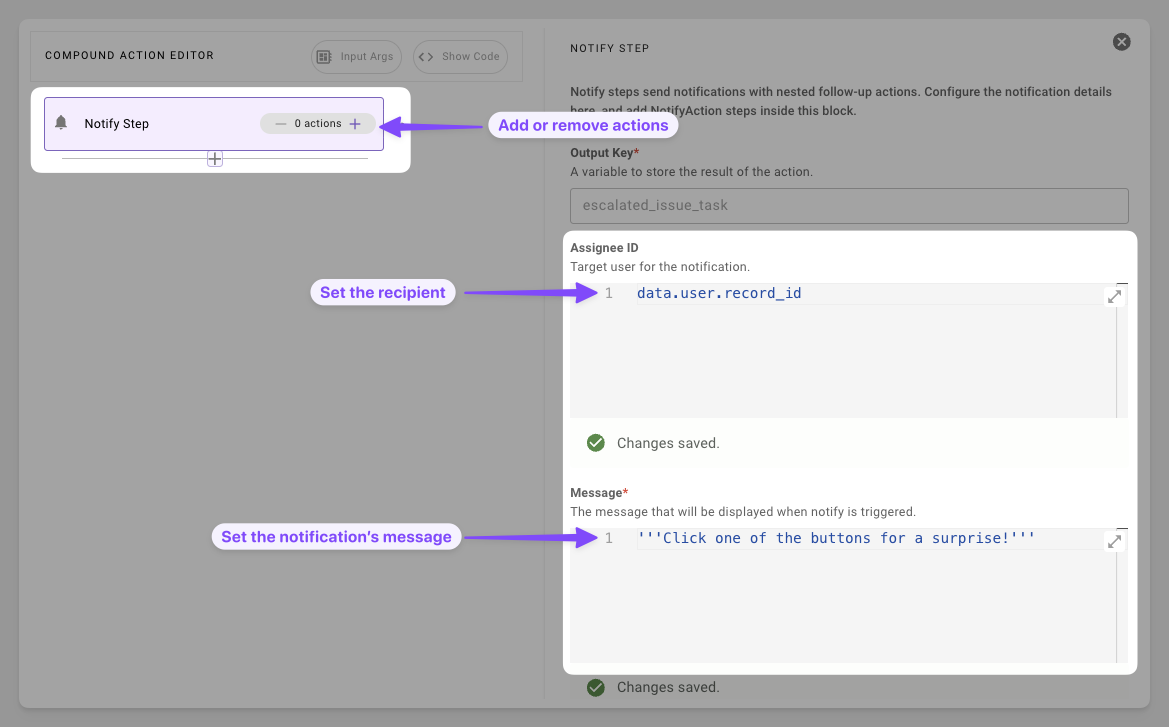
1. **Prepare Essentials**: Set the notification's recipient and informational message.
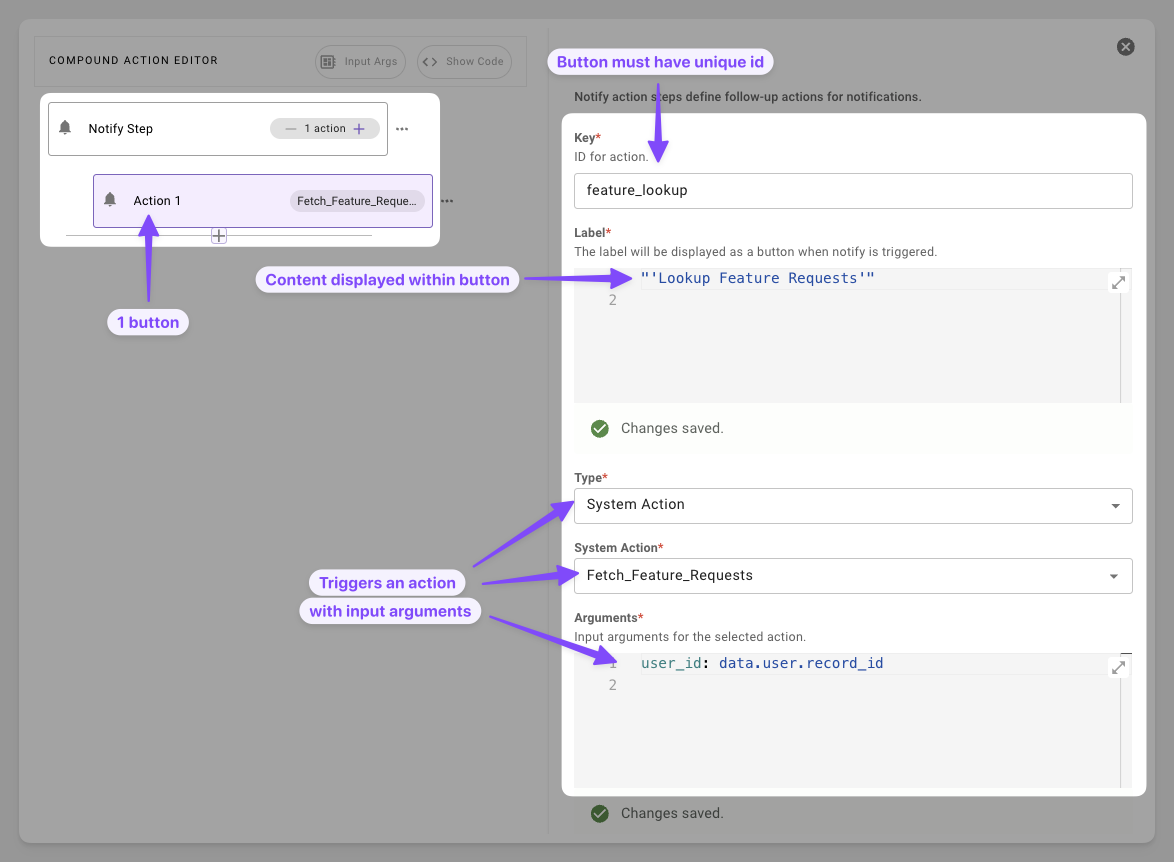
2. **Add Actionable Task**: Add a button that can trigger an HTTP, compound, or script action.
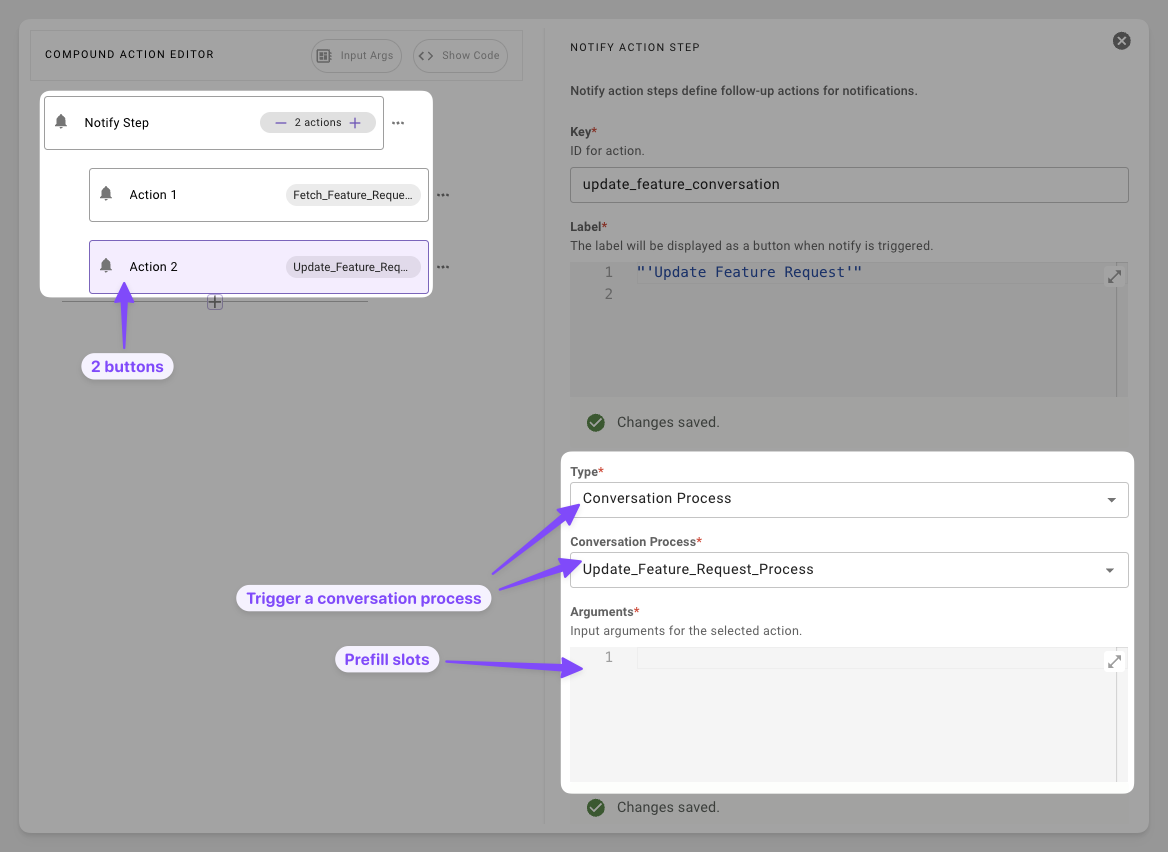
3. **Start a Conversation**: Add a button that invokes a conversational flow with the user.
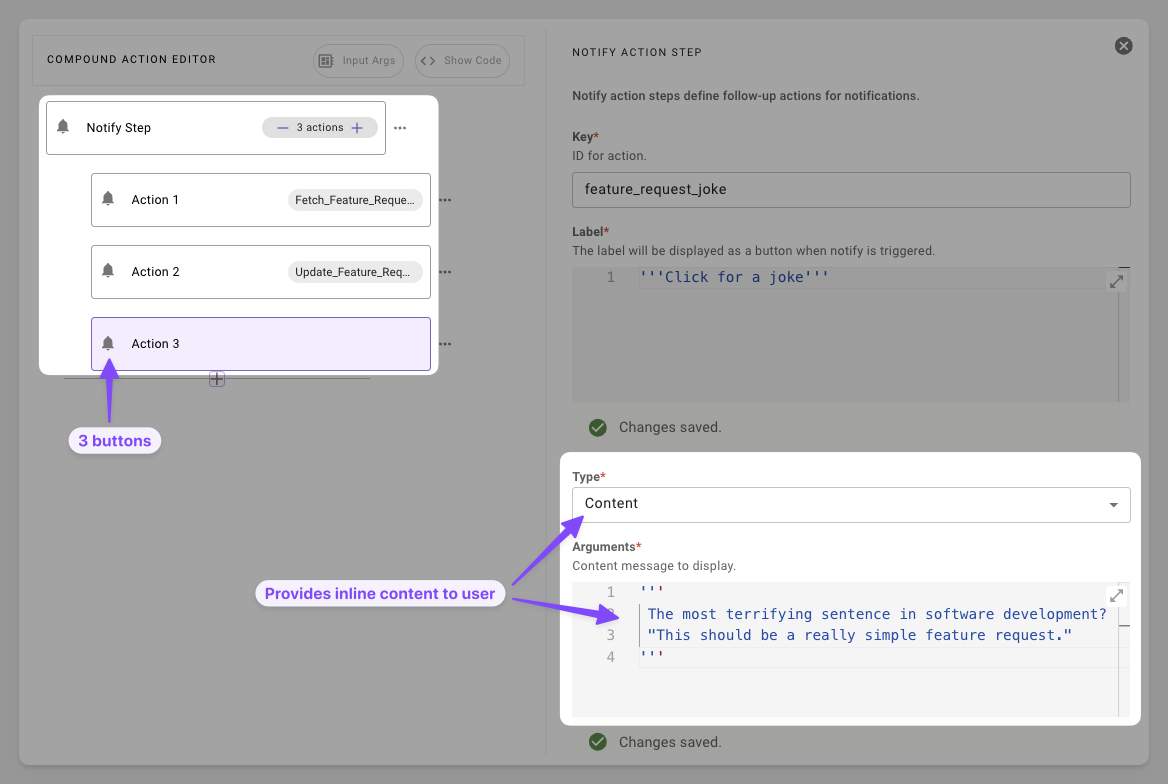
4. **Add More Content**: Provide a button that provides inline content that doesn't require fetching or starting a conversation.
# Syntax Reference
#### Schema
```yaml
notify: # Delivers message + buttons to user
output_key: RESULT_VAR* # str: Stores interaction results
recipient_id: USER_ID* # str: e.g., data.user.id
message: MSG_EXPR* # DSL str or RENDER() template
resources: # Optional list[dict] only available in pro-code
- name: RESOUCE_NAME # str: no dsl evaluation just type out string
datatype: DATA_TYPE # datatype: no dsl evaluation just type out string
value: VAL # DSL of datatype declared above
actions: # Optional list[dict]
- key: ACTION_KEY # Unique str ID
label: BUTTON_TEXT # Display DSL str
# ONE of:
content_action:
message: CONTENT_MSG
system_action:
action_name: ACTION_NAME
input_args:
key: VAL
conversation_action:
conversation_process_name: PROCESS_NAME # Published plugin
input_args:
slot_name: VAL # Match process slots
```
#### Fields
| Field | Type | Mandatory | Description |
| :------------- | :--------- | :-------- | :--------------------------------------------------- |
| `output_key` | string | Yes | Capture's button outcome. **Currently returns NULL** |
| `recipient_id` | string | Yes | ID of the target user |
| `message` | string | Yes | DSL expression field |
| `actions` | list[dict] | No | Buttons displayed to user |
| `resources` | list[dict] | no | Pass additional context to the reasoning engine |
#### Resources Schema
| Field | Type | Mandatory | Description |
| :--------- | :----- | :-------- | :------------------------------------------------------------------------------ |
| `name` | string | Yes | Name of the resource |
| `datatype` | string | Yes | Datatype of value; options [here](/docs/data-types) |
| `value` | any | Yes | DSL expression field: Value of data to pass as context |
#### Action Types
| Field | Keys | Use Case |
| :-------------------- | :---------------------------------------- | :--------------------------- |
| `content_action` | `message` | Quick info drops. |
| `system_action` | `action_name`, `input_args` | Invoke actions |
| `conversation_action` | `conversation_process_name`, `input_args` | Start conversation processes |
# Resources
Resources are an optional field that can be used in the pro-code syntax. These are used for passing additional data as context for the LLM. These can be used situationally for giving the llm additional data to reference when using a follow up action such as passing a string to the LLM for SDA reasoning.
`"instructions": "Analyze the data for the top commented on tickets"`
### Example 1: Enforcing specific analysis on an action button click
```yaml
# input args: data.tickets
notify:
output_key: user_choice
recipient_id: data.target_user.id
message:
RENDER():
template: "Click the button below for insights on the top commented tickets"
args:
id: data.ticket.id
resources:
- name: instructions
datatype: string
value: '"Analyze the data for the top commented on tickets"'
actions:
- key: view
label: "'View Tickets'"
system_action:
action_name: retrieve_all_tickets
input_args:
support_tickets: data.tickets
```
# Practical Examples
### Example 1: Simple Ticket Alert
Notify assignee with a link
```yaml
notify:
output_key: alert_sent
recipient_id: data.target_user.id
message:
RENDER():
template: "Hello {{name}}, [T-{{id}}]({{link}}) assigned to you. Follow runbook."
args:
name: data.target_user.first_name
id: data.ticket.display_id
link: data.ticket.url
```
**Expectation**: User will receive a simple notification message with the ID of the ticket they were assigned
### Example 2: Multi-Option Response
Offer multiple options to the user
```yaml
# input args: data.ticket
notify:
output_key: user_choice
recipient_id: data.target_user.id
message:
RENDER():
template: "Ticket {{id}} assigned—act now."
args:
id: data.ticket.id
actions:
- key: view
label: "'View Ticket'"
content_action:
message:
RENDER():
template: "View ticket {{id}}"
args:
id: data.ticket.id
- key: convert
label: "'Convert to Bug'"
system_action:
action_name: convert_support_issue_to_known_bug
input_args:
support_ticket: data.ticket
```
**Expectation**: User will receive a notification about a ticket that was assigned to them. They will be provided two buttons, one to look at the ticket and one to convert the ticket.
### Example 3: Handoff to Conversation
Alert the user and collection more information
```yaml
# input args: data.ticket
notify:
output_key: handoff_result
recipient_id: data.target_user.id
message:
RENDER():
template: "[{{id}}]({{url}}) assigned—need details?"
args:
id: data.ticket.display_id,
url: $CONCAT(["https://notion.so/", data.ticket.sys_id], "")
actions:
- key: send_back
label: "'Send Back'"
conversation_action:
conversation_process_name: collect_reason_for_send_back_and_send_case_back_to_case_owner
input_args:
support_ticket: data.ticket
```
**Expectation**: User receives the notification and are prompted to start a conversational process to send back the ticket for more information.