---
title: Data Retrieval Cookbook
deprecated: false
hidden: false
metadata:
robots: index
---
## Pattern Overview
The **Data Retrieval pattern** is how Agent Studio plugins connect a natural language request to the right query against an external system like ServiceNow, Workday, or a data warehouse. Instead of dumping all available data, the plugin carefully pulls back the specific records or fields needed to answer the user’s request, while applying business logic, filters, and performance safeguards along the way.
In practice, this pattern can power both **simple lookups** and **complex analytics**.
For example, a simple lookup plugin might fetch a clean list of current applicants for an open job requisition from Workday, showing just the names, stages, and last updated dates.
```json
[
{
"name": "Alice Chen",
"stage": "Phone Screen",
"last_updated": "2025-09-15"
},
{
"name": "Brian Lopez",
"stage": "Onsite Interview",
"last_updated": "2025-09-18"
},
{
"name": "Sofia Patel",
"stage": "Offer Extended",
"last_updated": "2025-09-20"
}
]
```
### Conversational LLM output
> “You currently have three applicants in the pipeline.
>
> Alice Chen is at the phone screen stage, last updated on September 15.
>
> Brian Lopez is further along and has an onsite interview scheduled, updated on September 18.
>
> And Sofia Patel already has an offer extended, with the latest update on September 20.”
You could scale up to a heavy analytics scenario, like analyzing thousands of rows in a data warehouse to surface insights into Net Promoter Score (NPS) trends—summarizing the overall score, highlighting changes across regions, and extracting themes from customer comments. Below is an example of how a heavy analytics scenario can work well conversationally.
### **Given a snippet of a large dataset returned by an API**
| Respondent | Region | Score | Comment |
| ---------- | -------- | ----- | ---------------------------------------- |
| 001 | Americas | 9 | “Love the product, great support.” |
| 002 | EMEA | 3 | “Hard to integrate with our stack.” |
| 003 | APAC | 7 | “Good overall, but slow response times.” |
| 004 | Americas | 10 | “Fantastic experience.” |
| 005 | EMEA | 4 | “Too expensive for the value.” |
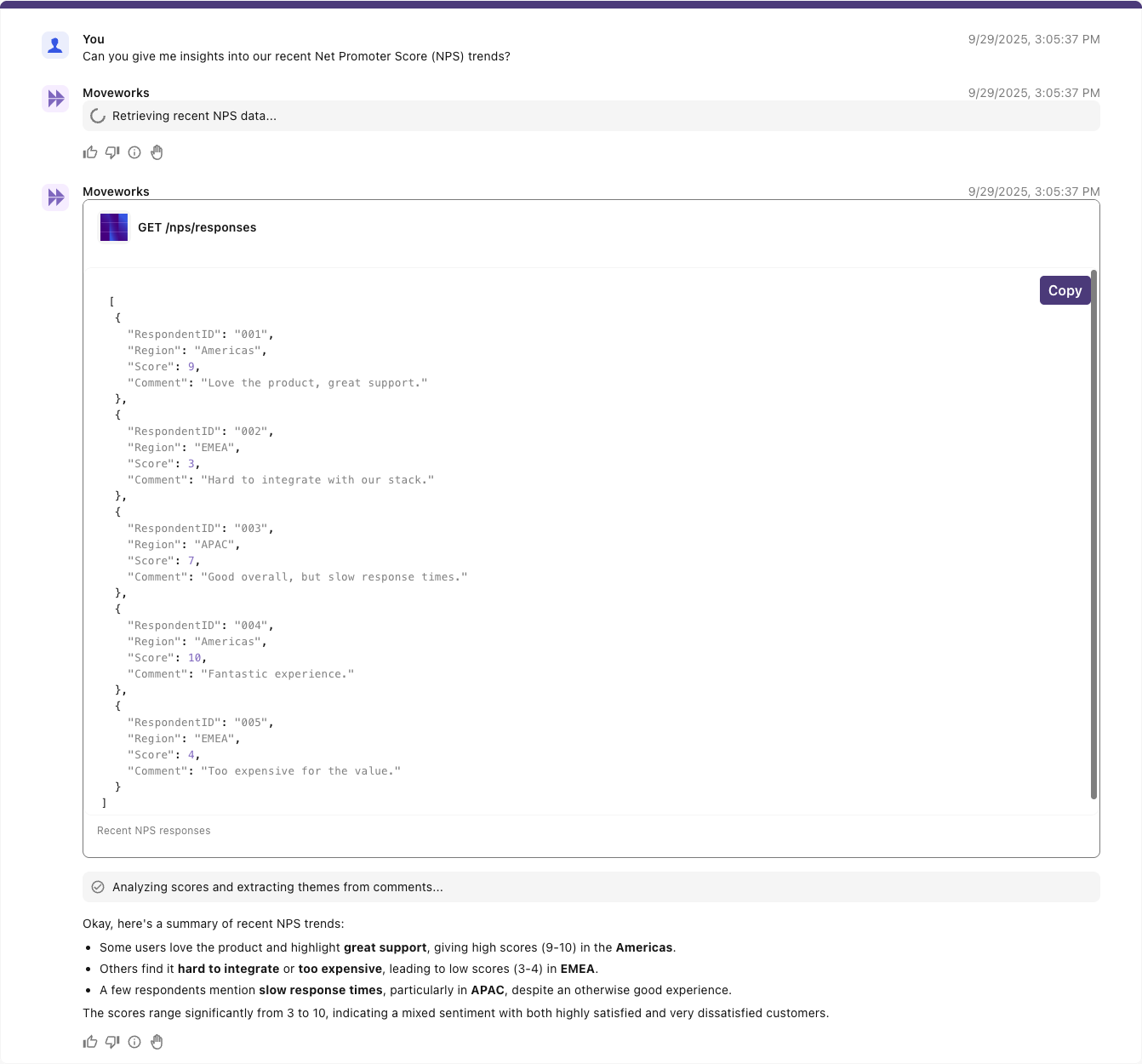
### **Conversational summarization**
_(Reasoning engine tries to summarize large dataset without structured analysis)_
### **Data-aware explanation (with [SDA](/docs/code-interpreter))**
_(Reasoning Engine powered by the Data Retrieval pattern with [Structured Data Analysis](/docs/code-interpreter))_
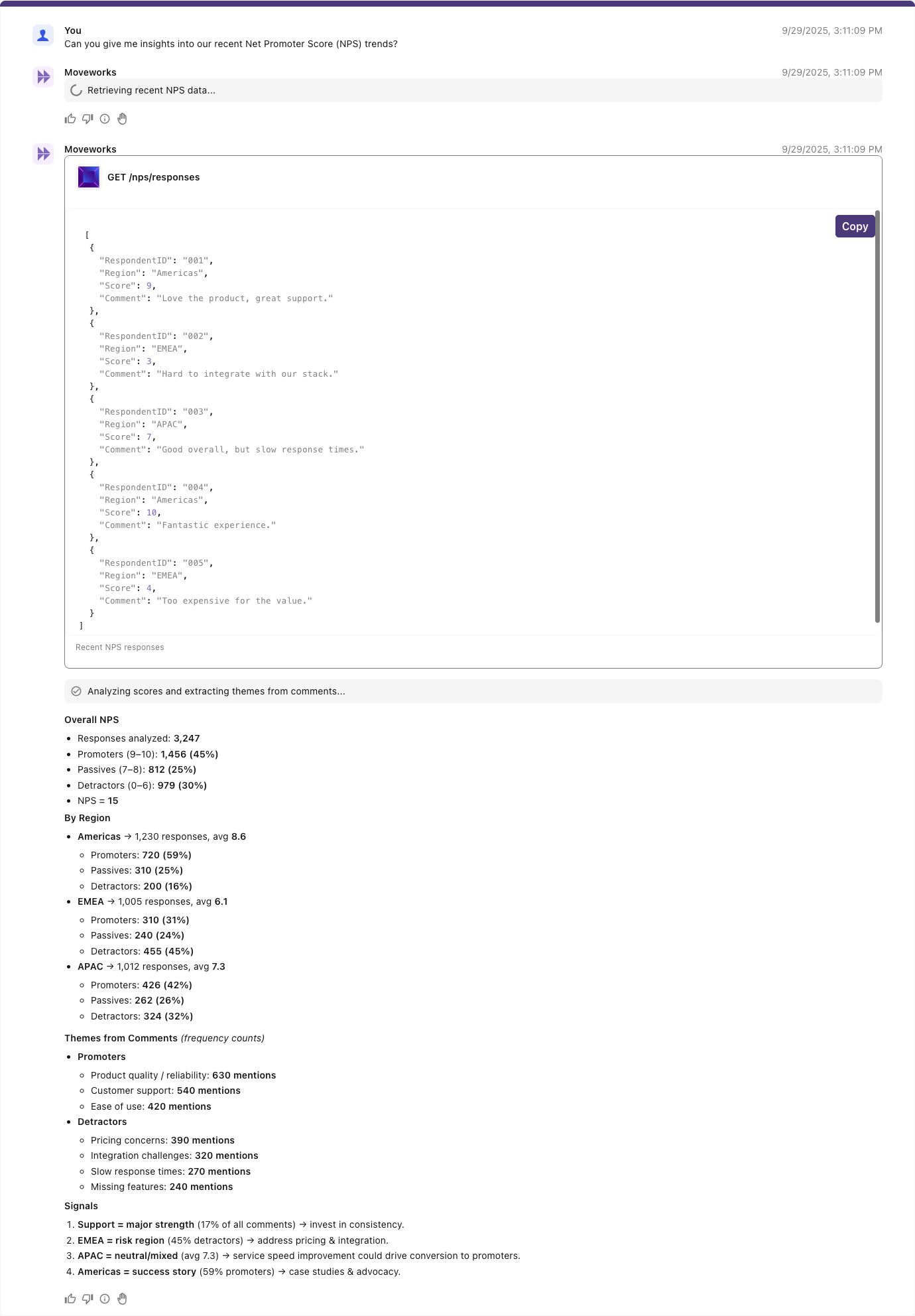
Whether the task is small or large, the principle is the same: translate user intent into a precise, efficient query, return only what’s relevant, and present results in a structured way that the model and the end-user can trust
***
## Query Language Generation
When building retrieval plugins, we combine [**slots**](/docs/slots) and **static typed query components** for reliability and precision.
* **Static components**: define the non-negotiable parts of a query (e.g., object type, mandatory fields for downstream reasoning).
* **Slots**: dynamically filled from user input (e.g., dates, account names, owner emails).
This blend is expressed in the [Moveworks data mapping language](/docs/moveworks-bender-language-reference) and [DSL](/docs/moveworks-dsl-reference), which let developers define reusable templates with placeholders that the reasoning engine populates at runtime.
Plugin consumers are the business owners of the plugin. They supply the business logic by deciding which fields must always be included and which can remain optional. Encoding these rules up front ensures queries are accurate and efficient, returning only the necessary data, reducing payload size, minimizing latency, and avoiding irrelevant attributes.
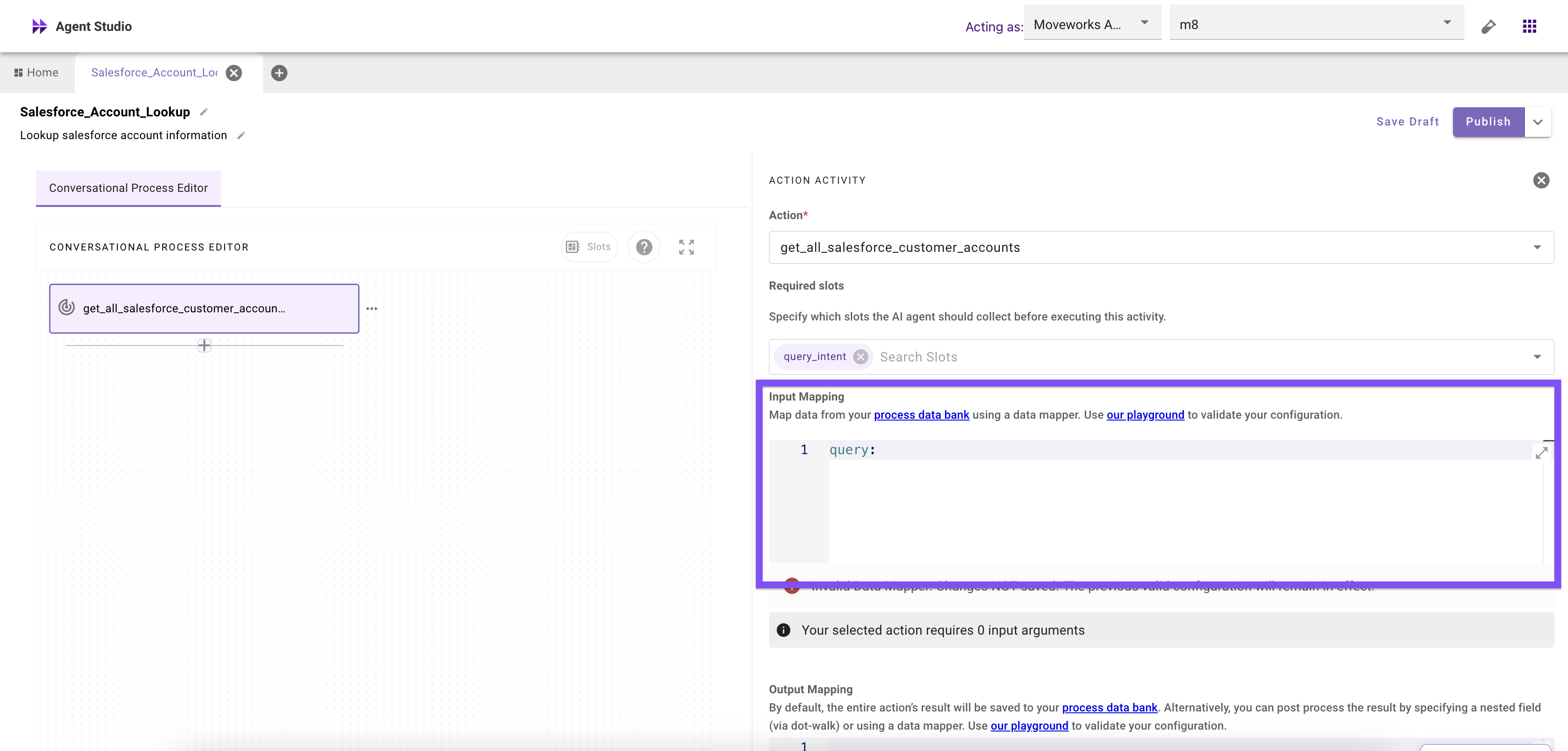
This manipulation of the query logic should happen as the query is passed into the action in your conversational process as an input mapping with Moveworks Data Mapper as highlighted below
```yaml
query: $CONCAT(["SELECT", data.account_name, "FROM Opportunity"]," ")
```
***
### _**These examples demonstrate how these can work in actions**_
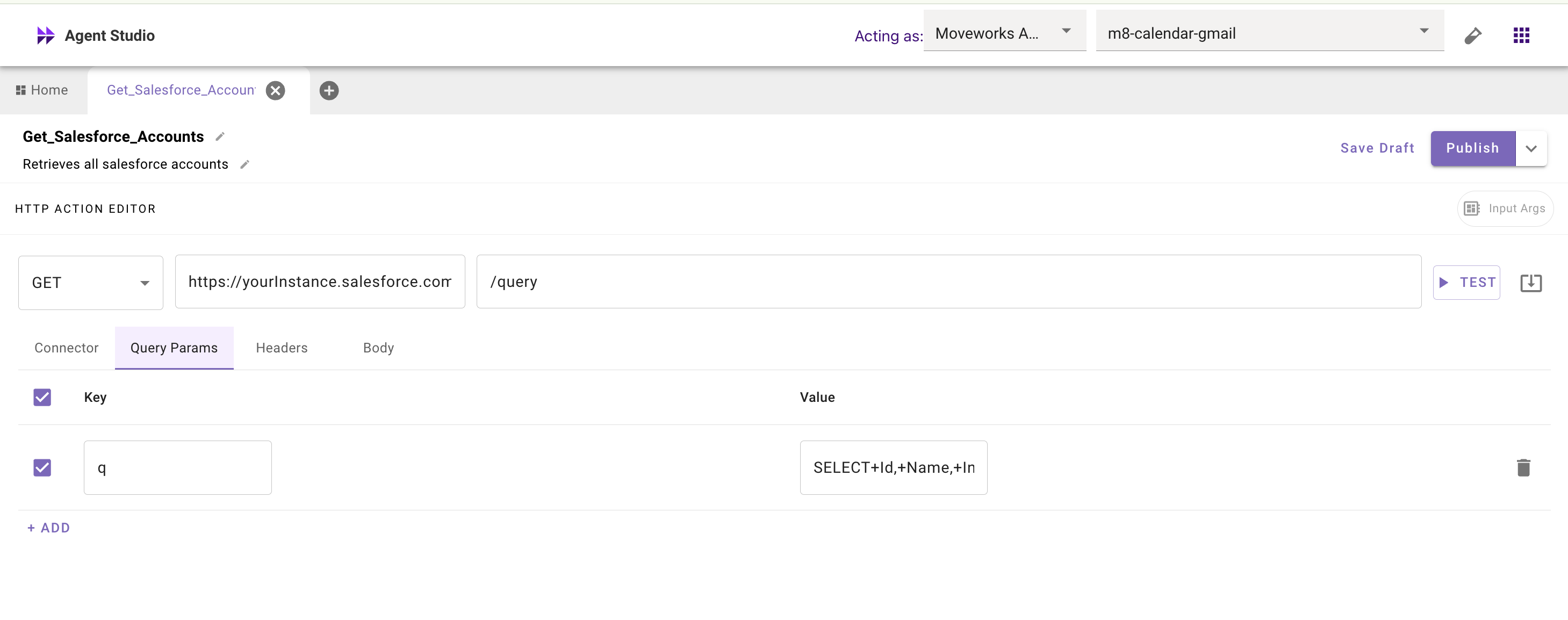
**Hardcoded query**
The entire query is hardcoded in the action and should always return all data.
**Slot-filled component**
Single component in the query supplied by the conversational/compound action
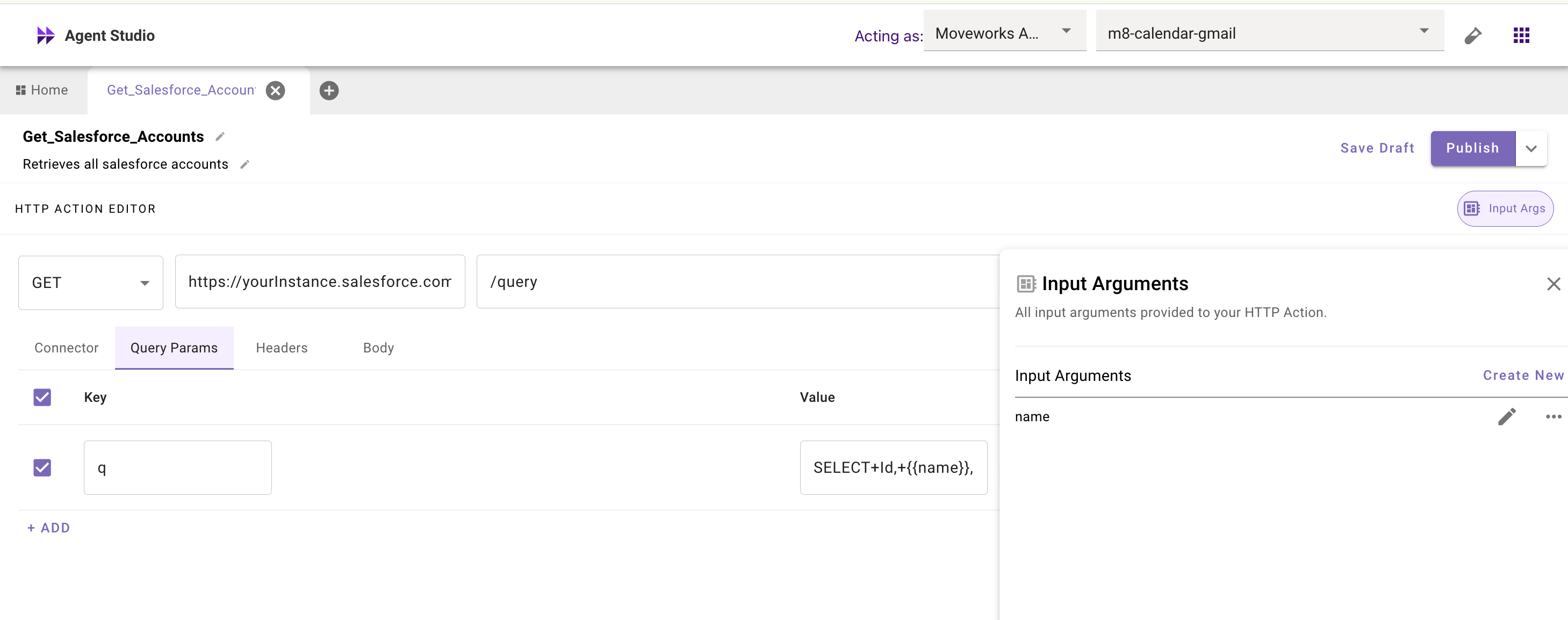
**Fully dynamic query**
Entire statement supplied by the conversational/compound action
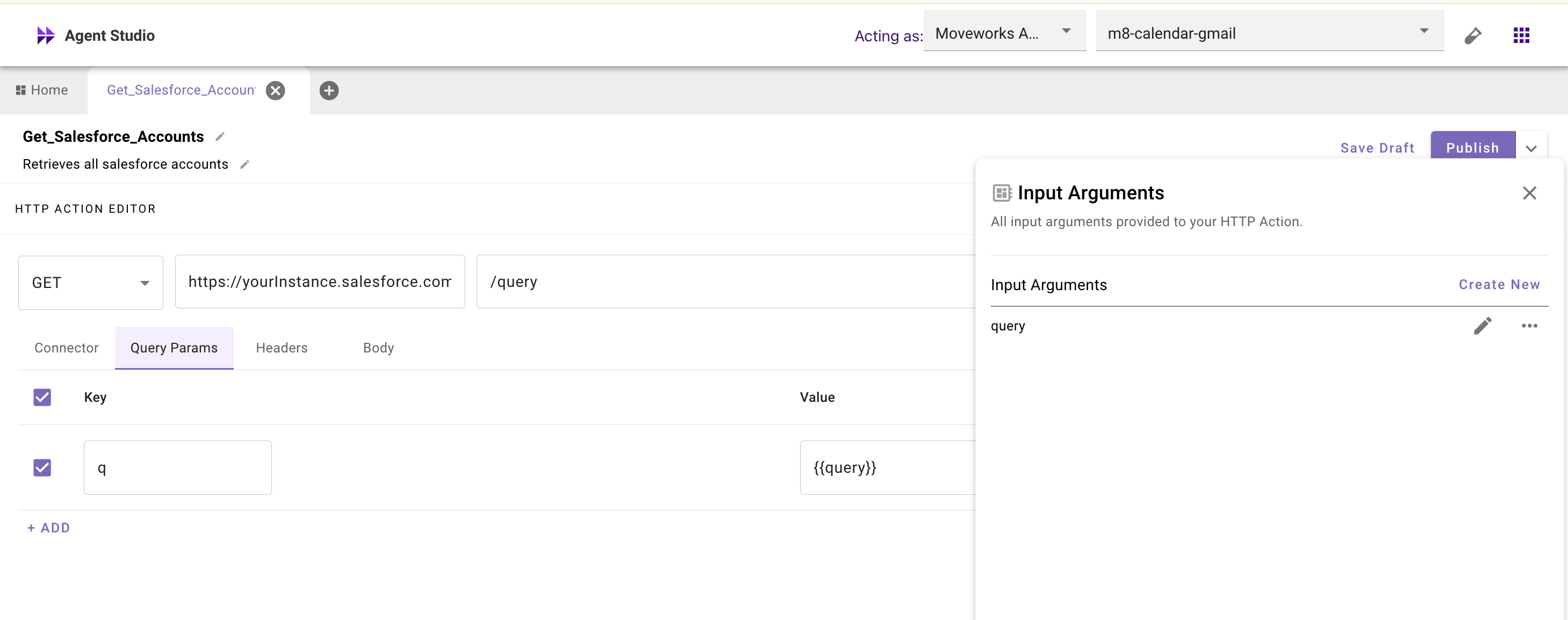
***
### Simple Queries
For simple use cases, the query can be **fully static** or involve only a **single slot** . A fully static query might always return the same fixed set of fields such as fetching the list of all open requisitions, or returning the current user’s profile record. A single-slot query adds just one dynamic element, like filtering opportunities by a user-provided close date, or pulling applicants for a specific role. These are straightforward to configure because the business logic is minimal: you define the core fields once, ensure they’re always included, and allow one slot to vary based on user input. This keeps the template lightweight, predictable, and fast to execute.
> Example simple query input mapping (SOQL)
***
### Complex Queries
For advanced scenarios, queries often combine multiple slots with conditional logic. A Salesforce opportunity query, for instance, might include `close_date_range`, `owner_email`, and `include_notes`. If the user specifies a date filter, it’s applied; if they also request account team details, fields like `Owner.Name` and `CSM__r.Name` are added dynamically.
The Moveworks Data Mapper handles these [optional](/docs/optional-slots) “property slots” and enforces business rules such as which attributes are safe to fetch or which filters must be hardcoded. The goal: return only what’s needed to answer the request, avoiding overfetching while still letting users add conditions in natural language.
> Example advanced input mapping (SOQL)
>
> ```yaml
> query:
> EVAL():
> args:
> select_sql:
> RENDER():
> template:
> - "SELECT {{ field_list }} FROM Opportunity"
> args:
> field_list:
> CONCAT():
> items:
> - Id
> - Name
> separator: ", "
> filters:
> FILTER():
> items:
> - CONDITIONAL():
> condition: data.close_date_before != "ANY"
> on_pass: |
> $CONCAT(["CloseDate >= ", data.close_date_before])
> on_fail: '""'
> - CONDITIONAL():
> condition: data.close_date_after != "ANY"
> on_pass: |
> $CONCAT(["CloseDate <= ", data.close_date_after])
> on_fail: '""'
>
> expression: |
> IF $LENGTH(filters) > 0 THEN
> $CONCAT([select_sql, " WHERE ", filters.$CONCAT(" AND ", true)])
> ELSE
> select_sql
>
> ```
***
## Property Selection In Action Input Arguments
### Two patterns when deciding on single plugin per business use case vs one plugin to many business use cases
**A. One Plugin per Attribute Set**
This approach creates a single, purpose-built plugin for a defined set of attributes. Each plugin has a fixed property list, which means queries are straightforward, with little to no conditional logic. Because the schema is predictable, these plugins are easy for the reasoning engine to handle, making them highly reliable and fast to execute. The simplicity keeps complexity low and ensures consistent results. However, the trade-off is scalability: every new attribute set requires its own dedicated plugin, which can quickly lead to a proliferation of many small, narrowly scoped plugins.
**Input arguments for Plugin for AE’s to perform lookup**
```yaml
query: '"SELECT StageName, Amount, CloseDate, Owner.Name, Champions__c, Notes__c
FROM Opportunity
WHERE CloseDate = THIS_QUARTER'"
```
**Input arguments for Plugin for SDR’s to perform lookup**
```yaml
query: '"SELECT Account.Owner.Name, StageName, Tech_Stack_Flags__c, Notes__c
FROM Opportunity
WHERE IsActive__c = true'"
```
**B. Property Group Slots (Recommended for Breadth)**
Instead of creating a separate plugin for each attribute set, this pattern uses conditional logic to insert groups of semantically related fields—called property group slots—based on the persona or the user’s utterance. This approach allows a single plugin to flex across multiple use cases without exploding into dozens of narrow plugins. It gives breadth and flexibility: account executives, SDRs, renewals managers, and executives can all query the same plugin, but each gets the fields returned relevant to their role. The key is balance keeping the slot count low improves performance and reasoning quality.
**Example SOQL groupings:**
* **AE:** `SELECT StageName, Amount, CloseDate, Owner.Name, Champions__c, Notes__c
FROM Opportunity WHERE CloseDate = THIS_QUARTER`
* **SDR:** `SELECT Account.Owner.Name, StageName, Tech_Stack_Flags__c, Notes__c FROM Opportunity WHERE IsActive__c = true`
* **Renewal:** `SELECT Renewal_Date__c, Contract_End_Date__c, Growth_ARR__c, User_Count__c FROM Opportunity WHERE Renewal_Date__c < NEXT_90_DAYS`
* **Exec :** `SELECT Team__c, Key_Touch_Fields__c, Growth_ARR__c, Exec_Notes__c FROM Opportunity WHERE Amount > 100000`
Input arguments in Action for single a plugin using user department on the user records:
```yaml
query:
RENDER():
template: {{ selected_sql }}
args:
selected_sql:
LOOKUP():
key: meta_info.department.$LOWERCASE()
mapping:
ae: >
"SELECT StageName, Amount, CloseDate, Owner.Name, Champions__c, Notes__c
FROM Opportunity WHERE CloseDate = THIS_QUARTER"
sdr: >
"SELECT Account.Owner.Name, StageName, Tech_Stack_Flags__c, Notes__c
FROM Opportunity WHERE IsActive__c = true"
renewal: >
"SELECT Renewal_Date__c, Contract_End_Date__c, Growth_ARR__c, User_Count__c
FROM Opportunity WHERE Renewal_Date__c < NEXT_90_DAYS"
exec: >
"SELECT Team__c, Key_Touch_Fields__c, Growth_ARR__c, Exec_Notes__c
FROM Opportunity WHERE Amount > 100000"
default: >
"SELECT Name, Title, Department, Manager.Name, Email, Phone
FROM User WHERE IsActive = true"
```
This could also be done by creating a slot in the conversational process for what type of lookup the user is attempting by creating a slot named “query_intent” with a description like “The intent of the users lookup for fields relating to one of these personas either “renewal”, “executive”, “sales development rep”, “account executive” or “generic”. The value of this slot is one of the personas identified or generic if unidentifiable from the query”
```yaml
query:
RENDER():
template: {{ selected_sql }}
args:
selected_sql:
LOOKUP():
key: data.query_inten$LOWERCASE()
mapping:
ae: >
"SELECT StageName, Amount, CloseDate, Owner.Name, Champions__c, Notes__c
FROM Opportunity WHERE CloseDate = THIS_QUARTER"
sdr: >
"SELECT Account.Owner.Name, StageName, Tech_Stack_Flags__c, Notes__c
FROM Opportunity WHERE IsActive__c = true"
renewal: >
"SELECT Renewal_Date__c, Contract_End_Date__c, Growth_ARR__c, User_Count__c
FROM Opportunity WHERE Renewal_Date__c < NEXT_90_DAYS"
exec: >
"SELECT Team__c, Key_Touch_Fields__c, Growth_ARR__c, Exec_Notes__c
FROM Opportunity WHERE Amount > 100000"
generic: >
"SELECT Name, Title, Department, Manager.Name, Email, Phone
FROM User WHERE IsActive = true"
default: >
"SELECT Name, Title, Department, Manager.Name, Email, Phone
FROM User WHERE IsActive = true"
```
The logic you choose should be determined based on what aspects you want to be deterministic vs probabilistic there may be scenarios where you want guardrails on the query and will always enforce the query based on user profile attributes or the scope of which fields are determined by the user and reasoning engine are more limited it is not one size fits all. The other thing to be cognizant of is over-asking of slots, in a lot of cases it will provide better user experience to statically determine more slots or infer them rather than require the user provide them.
***
## Slots, Validation, and Resolvers
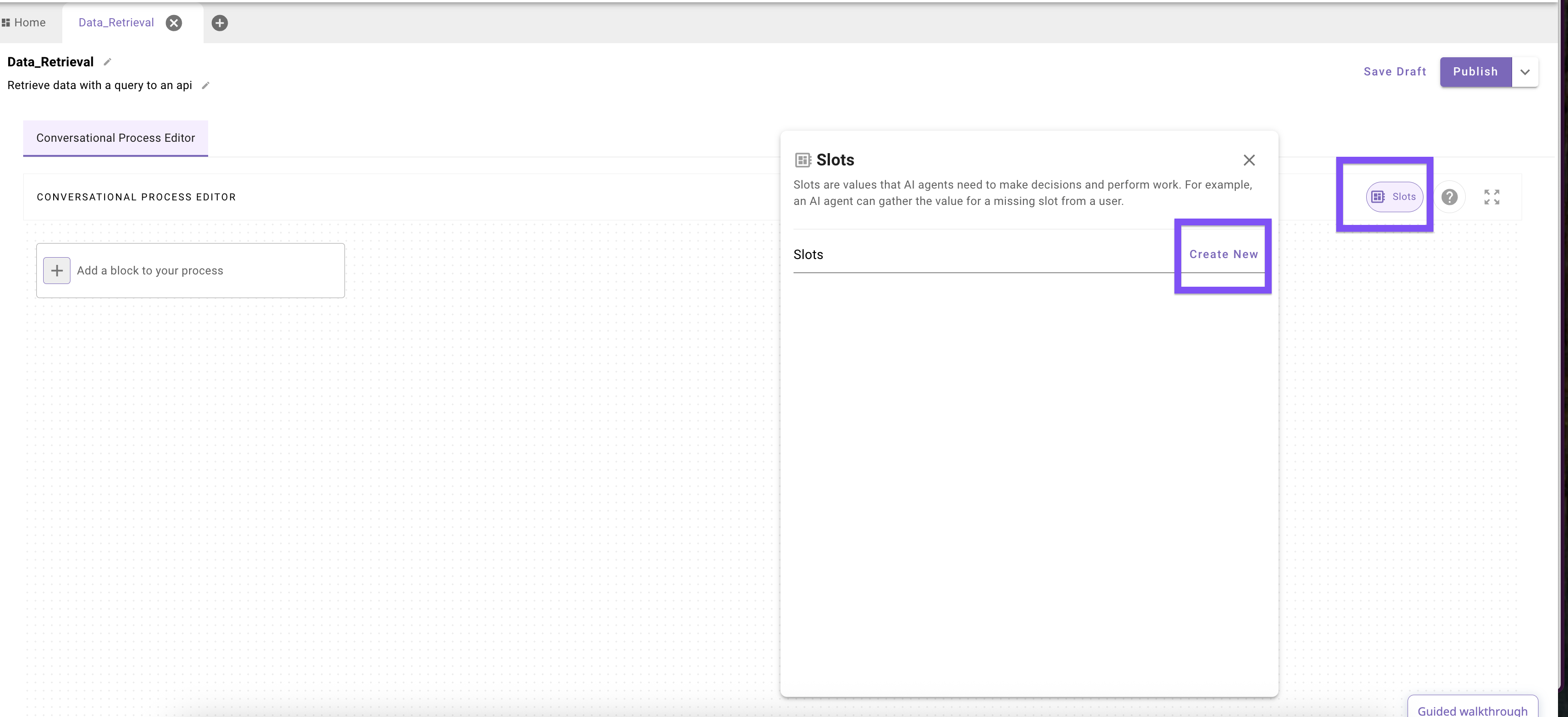
### 1. [Slots](/docs/slots): The Foundation
If you think of conversational processes as programs, then you can think of Slots as your program’s _variables_. The [Moveworks Reasoning Engine](/docs/agentic-reasoning-engine)’s job is to navigate the fluidity/ambiguity of a natural language conversation and fill appropriate (often [structured](https://platform.openai.com/docs/guides/structured-outputs)) values for Slots so that the conversational process can run smoothly and operate on the right information. For data retrieval processes, Slots can be a powerful mechanism to properly collect critical information that needed to execute a query.
The value for a Slot can involve pulling information directly from the user or even retrieving dynamic objects from other systems (e.g. using a Resolver to get a ServiceNow ticket)”. To get a value for a Slot, the reasoning engine heavily relies on the slot **name**, **description**, and **data type** that you provide in the configuration:
* **Good slot names** are expressive and unambiguous in name, and often allude to the slot’s broader purpose in one go (`close_date`, `customer_name`, `contract_term_months`). This is a primary indicator to the reasoning engine of _what the slot truly represents_ and _why it matters_. (Tip: programming conventions for “good variable naming” often apply here).
* **Clear descriptions** eliminate ambiguity and tell the remaining story of the slot. You want to set up the reasoning engine for success: instead of saying _“The date”_, say _“The target due date for the project task, to be extracted in RFC 3339 timestamp format (e.g., 2025-09-22T00:00:00Z)”_. This tells the Moveworks Reasoning Engine not just the type of date that the slot represents, but also additional key formatting information so the value can be appropriately expressed when it’s later used as input in a downstream API.
* **Explicit data types** (e.g., `string`, `number`, `boolean`, `array`) indicate to the reasoning engine how the ultimate value for the slot should be shaped, and ensures the value is compatible for downstream uses. Based on the data type (especially if the type is complex), the reasoning engine can also lean on special mechanisms (Resolvers) attached to the type to optimize the value retrieval for the Slot.
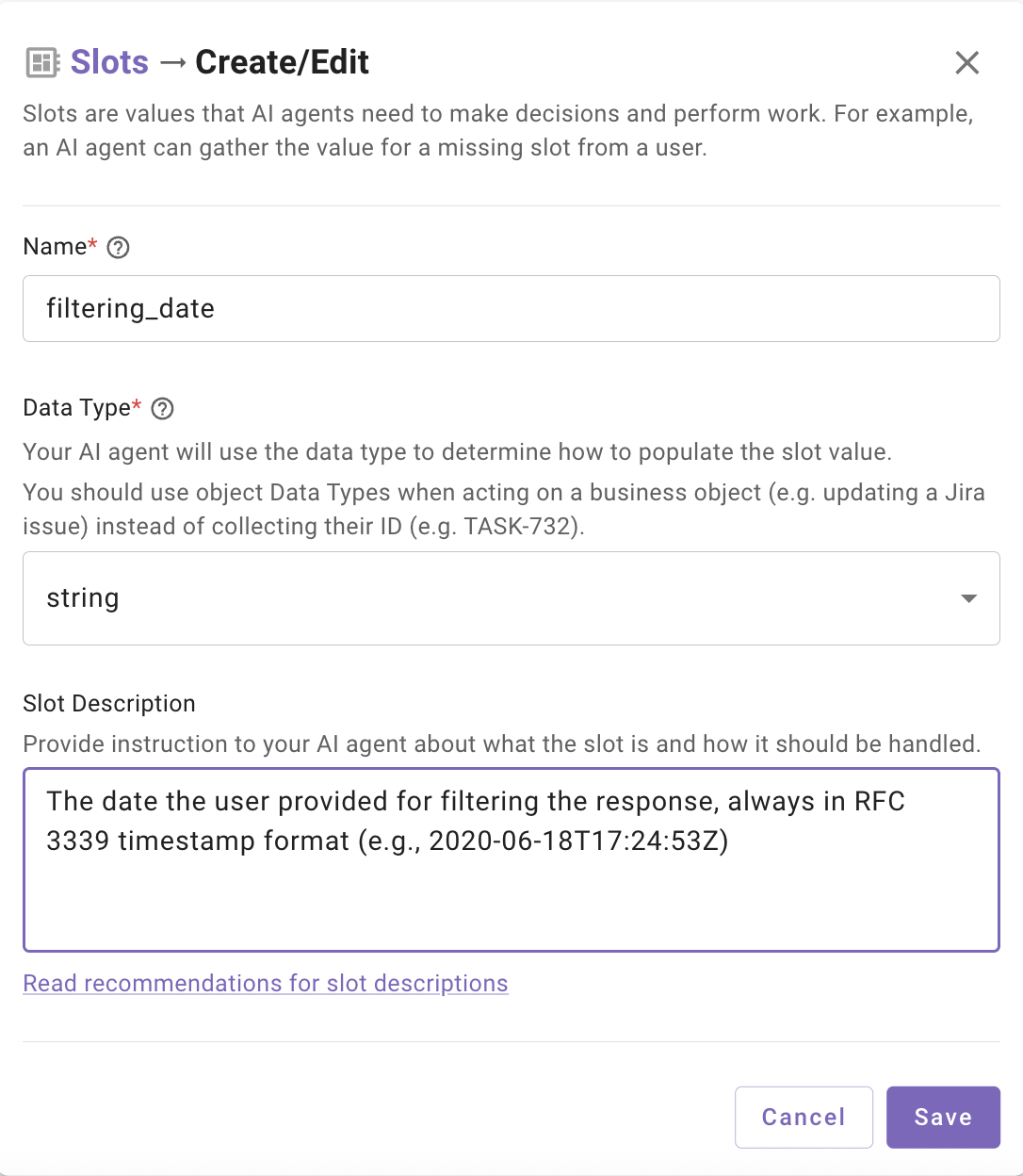
**Example:**
```yaml
- name: filtering_date
description: "The date the user provided for filtering the response, always in RFC 3339 timestamp format (e.g., 2020-06-18T17:24:53Z)"
data_type: string
```
If the user says _“tomorrow”_, the LLM will output `2025-09-23T00:00:00Z` in the specified format rather than the raw text.
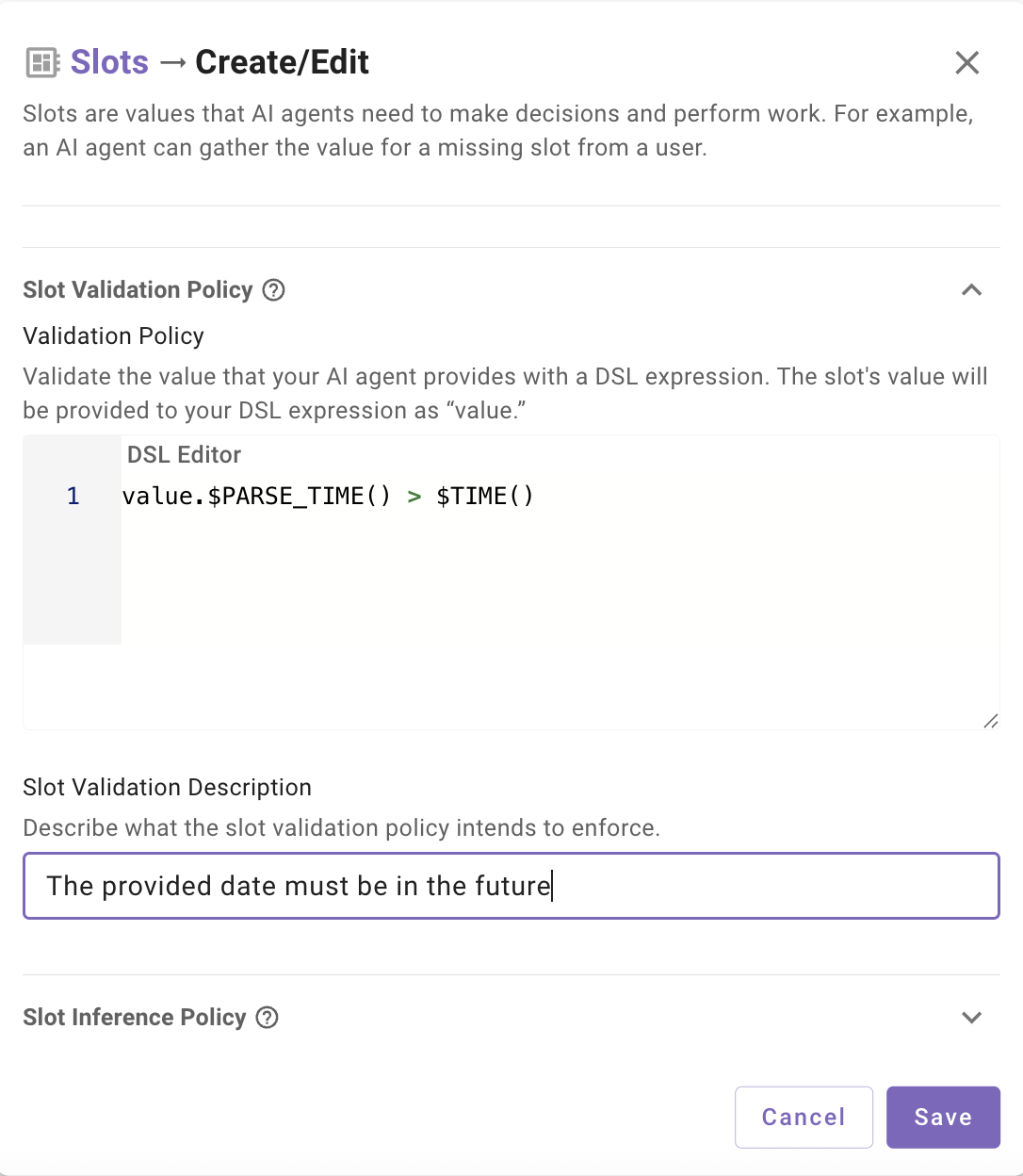
### 2. [Slot Validation](/docs/slots#/slot-validation-policy): Guardrails for Business Logic
Slots need to be appropriately precise and adherent to constraints in order to meet the structured needs of data retrieval processes. The reasoning engine’s is adept at correlating fluid/complex conversational context with a variety of configuration info (e.g. slot name/description/type metadata) to generate a formal slot value. However, due to its probabilistic nature and varying precision, it’s not as ideal for taking care of precise operations or exact computations on its own.
To enforce rules or compute results over multiple slots, we need to lean on Slot Validation Policies, powered by Moveworks DSL. Encoding a formal policy will enforce rules deterministically and perform more reliably than overprompting slot descriptions with logical instructions (e.g. “Make sure the date is in the future and after the contract start date”). An explicit validation policy ensures that slots produce values that are not just valid in format, but also compliant with business rules.
**Example:**
```yaml
- name: start_date
description: "The date the user provided, in RFC 3339 format (e.g., 2025-09-22T00:00:00Z)"
data_type: string
slot_validation_policy: value.$PARSE_TIME() > $TIME()
```
Here the slot captures any user-provided date, but the validation policy enforces that it must not be in the past by using DSL we take the slot collected value `“value”` , use `$PARSE_TIME()` to convert the string to unix format, then use a comparison against `$TIME()` (the current time in unix format). This pattern also works for cross-field checks (`end_date > start_date`) or validating against values in the [**data bank**](/docs/plugin-process-data-bank) (like comparing to a previously retrieved contract date).
**Important note is if you compare 2 slots against each other in this way you must ensure the other slot has been collected already.**
***
### 3. Resolver Strategies: Extending Slots
Resolvers extend the behavior of slots by offering an explicit mechanism to determine the value of a slot. Instead of leaving everything to inference, a resolver can either force a value to be selected from a fixed list (static resolver) or retrieved from a live dataset (dynamic resolver).
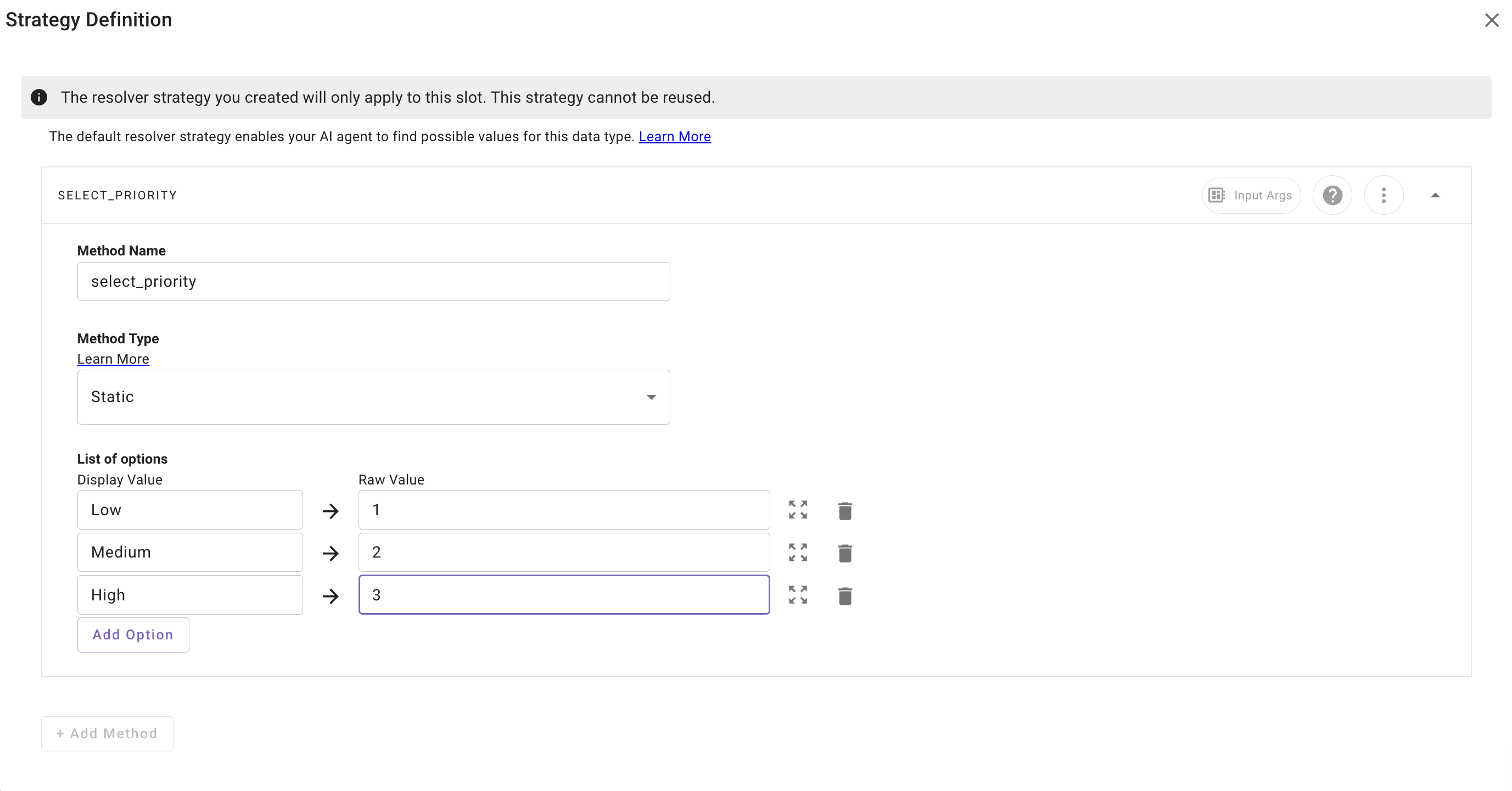
* [**Static Resolvers**](/docs/resolver-strategies#/configuring-a-static-resolver): Used when the valid values are known and stable. You define a list of allowed options, and the user is presented the list to select from.
* Example: `priority = low, medium, high`.
* Great for categories, statuses, and enums.
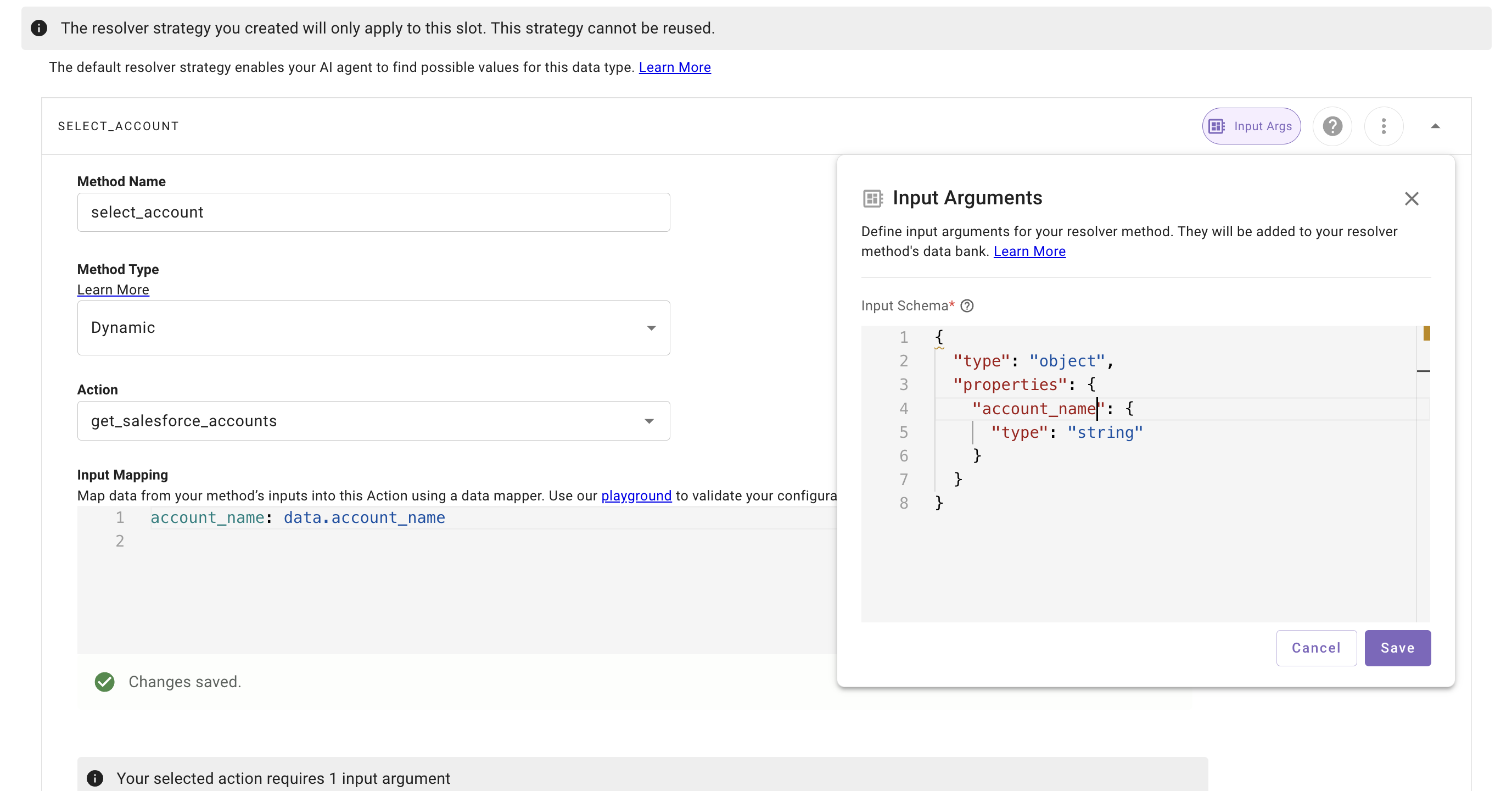
* [**Dynamic Resolvers**](/docs/resolver-strategies#/configuring-a-dynamic-resolver): Used when the slot value should originate from an external system. The resolver makes an action call (e.g., “list Jira issues assigned to the user”), retrieves structured options, and then will fill the slot with the desired option, working with the user as necessary (e.g. match to user’s intent, ask the user to select from the retrieved options).
* Example: User says _“my highest priority bug”_ → resolver looks up their Jira issues, compares them, and selects the right record.
* Perfect for dynamic objects like tickets, accounts, applicants, or documents. Strongly recommend this for strong types such as a `User`, `serviceNowTicket`, etc.
* Dynamic resolvers will call the action configured in the resolver when the slot collection happens.
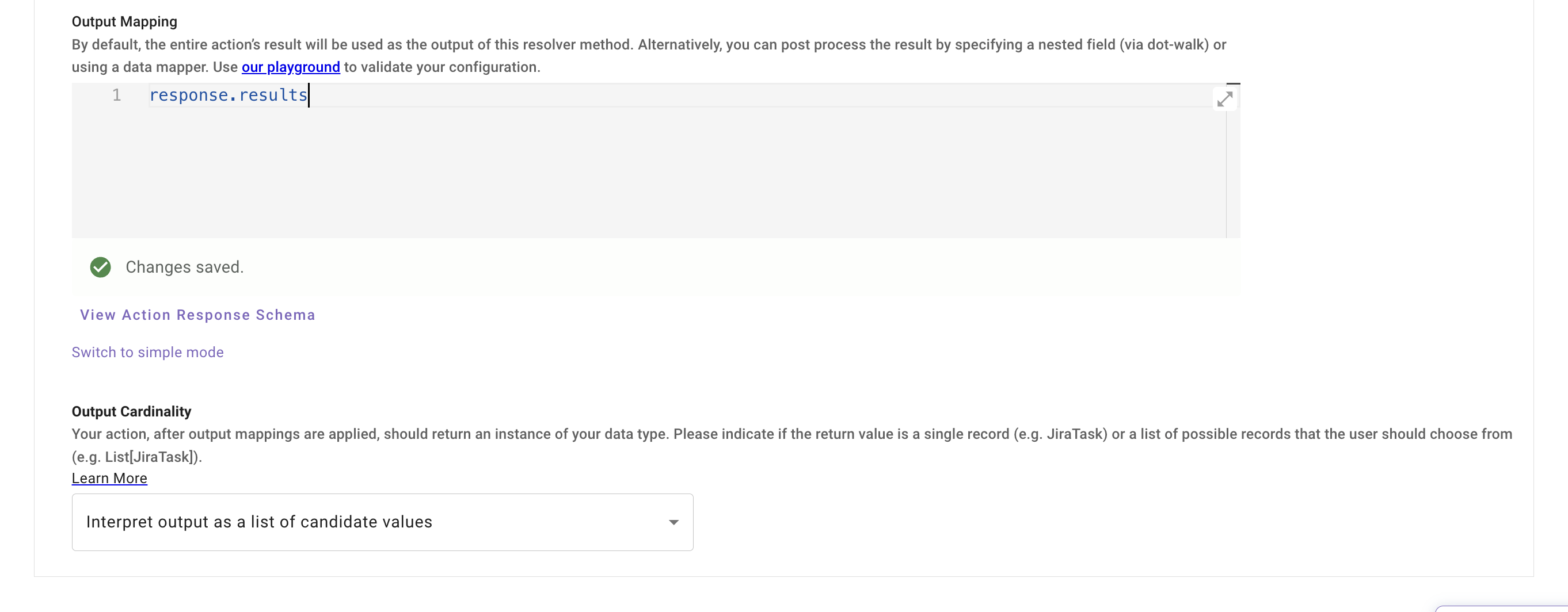
**Note:** the output mapper must always point to an array if the output cardinality is set to _interpret as a list of candidate values._
**Given an action with an output like**
```yaml
{
"hasErrors": false,
"results": [
{
"referenceId": "ref1",
"id": "0015g00000N1ABC",
"success": true,
"errors": [],
"fields": {
"Name": "Acme Corporation",
"Industry": "Technology",
"BillingCity": "San Francisco",
"Phone": "+1-415-555-1234",
"Website": "https://www.acme.com"
}
},
{
"referenceId": "ref2",
"id": "0035g00000M9XYZ",
"success": true,
"errors": [],
"fields": {
"FirstName": "John",
"LastName": "Doe",
"Title": "CTO",
"Email": "john.doe@example.com",
"Phone": "+1-415-555-1111"
}
}
]
}
```
The output mapping would be **response.results**
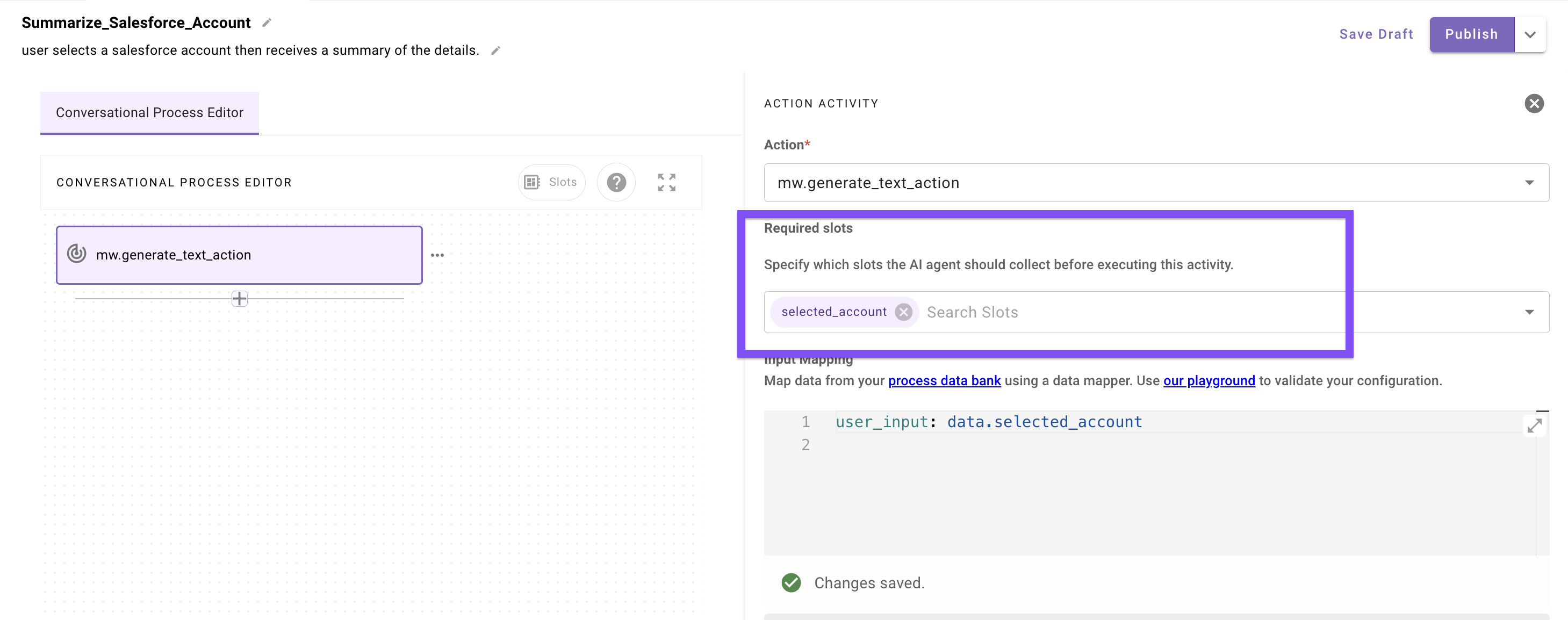
* **Resolvers will prompt the user during conversation for a selection if there isn’t enough context provided by the user to disambiguate on its own**
* **The collection of either type will happen in conversation at the point when they are set as _required slots_ inside an action or decision policy in a conversational process**
### 4. Putting It All Together
Slots, validation, and resolvers are all tools in the same toolbox, but each is suited to a different layer of the problem.
### When To Use Just A Basic Slot (name + description+ simple type)
Use a plain **slot** when:
* The user’s input can be inferred directly from natural language without any business rules or external lookups.
* Formatting and type expectations are enough to make the value useful (e.g., converting “tomorrow” into an RFC-3339 timestamp).
* There are no strict constraints on the value to deterministically enforce.
**Example:** Capturing an email address, a date, or a free-text search term.
***
### When To Add Validation
Add a **slot validation policy** when:
* You need to enforce rules about the captured value (e.g., must be a future date, must be greater than zero, must fall within a certain range).
* You want to achieve consistent slot values to meet strict business constraints, but different users might express their information in varying ways.
* You’re validating against other fields or previously collected data.
**Example:** Ensuring `end_date` is later than `start_date`.
***
### When to Use a Resolver
Introduce a **resolver** when:
* The value cannot just be inferred by the reasoning engine, it must come from a constrained set of valid options.
* For **static resolvers**, the list of valid values is known and unchanging (e.g., `priority = low, medium, high`).
* For **dynamic resolvers**, the valid values depend on external systems and change frequently (e.g., retrieving the list of current Jira issues, Salesforce opportunities, or Workday applicants).
**Example:** Resolving “my open tickets” into a specific `JiraIssue` object returned by a lookup action.
***
## Filter Semantics
**How filters are built**
* **Static components**: non negotiable predicates.
* **Slots**: user-driven values resolved at runtime.
* **Composition**: `STATIC AND SAFETY AND (CONTROLLED_VOCAB) AND (IDENTITY_OR_OWNERSHIP) AND (USER_SLOTS)`
* **Defaults**: treat missing/unknown as `ANY` → filter omitted.
* **Order of ops**: resolve vocab → apply safety → add identity → then user slots.
***
### A. Controlled Vocab Mappings
**Goal**: Normalize messy natural language to canonical filters.
**Pattern**
* Maintain a lookup table from slot values → predicate fragments.
* Accept synonyms and fall back to `ANY` (omit filter) if unmapped.
**Examples (SOQL)**
* _“customers”_ → `Type IN ('Customer','Customer via MSP','Customer via Parent')`
* _“prospects”_ → `Type IN ('Prospect','Trial','POC')`
* _“partners”_ → `Type IN ('Partner','Reseller')`
**Example mapping (YAML / Data Mapper)**
```yaml
filters:
CONTROLLED_VOCAB():
items:
- CONDITIONAL():
condition: data.account_classification != "ANY"
on_pass:
LOOKUP():
key: LOWER(data.account_classification)
mapping:
customer: '"Type IN ('Customer','Customer via MSP','Customer via Parent')"'
prospect: '"Type IN ('Prospect','Trial','POC')"'
partner: '"Type IN ('Partner','Reseller')"'
any: '""' # omit
on_fail: '""'
```
***
### B. Safety / Trust Filters
**Goal**: Hard guarantees that results are fresh, relevant, and policy-safe.
**Pattern**
* Always-on predicates; not controlled by the user.
* Enforce recency, status, visibility, and tenancy.
**Examples (SOQL)**
* Active/current records: `CurrentOrUpcoming_Active__c = TRUE`
* Hide archived: `IsArchived__c = FALSE`
* Tenant scope: `OrgId__c = {{TENANT_ID}}`
* Recency guard: `LastModifiedDate = THIS_YEAR` (or parametric window)
**Example (YAML / Data Mapper)**
```yaml
safety_filters:
FILTER():
items:
- '"CurrentOrUpcoming_Active__c = true"'
- '"IsArchived__c = false"'
- $CONCAT(["OrgId__c = ", meta_info.tenant_id, "'"])
- CONDITIONAL():
condition: data.recency_window_days != "ANY"
on_pass: $CONCAT(["LastModifiedDate >= ", data.recency_window_days])
on_fail: '""'
```
***
### C. Identity / Ownership Filters
**Goal**: Resolve “my X” to **all relevant ownership fields**, not just Owner.
**Pattern**
* Register all fields that imply ownership or responsibility.
* OR them together; keep each predicate selective.
**Common fields**
* `Owner.Email`, `CSM__r.Email`, `SE__r.Email`, `Implementation_Lead__r.Email`, `Renewal_Manager__r.Email`, `AE__r.Email`, `BDR__r.Email`
**Examples (SOQL)**
* _“my accounts”_
```sql
(Owner.Email = meta_info.user.email_addr
OR CSM__r.Email = meta_info.user.email_addr
OR SE__r.Email = meta_info.user.email_addr
OR Implementation_Lead__r.Email = meta_info.user.email_addr
OR Renewal_Manager__r.Email = meta_info.user.email_addr)
```
* Combine with safety + classification:
```sql
WHERE IsArchived__c = false
AND CurrentOrUpcoming_Active__c = true
AND Type IN ('Customer','Customer via MSP','Customer via Parent')
AND (
Owner.Email = meta_info.user.email_addr OR
CSM__r.Email = meta_info.user.email_addr OR
SE__r.Email = meta_info.user.email_addr OR
Implementation_Lead__r.Email = meta_info.user.email_addr OR
Renewal_Manager__r.Email = meta_info.user.email_addr
)
```
**Example (YAML / Data Mapper)**
```yaml
identity_filter:
RENDER():
template: >
WHERE IsArchived__c = false
AND CurrentOrUpcoming_Active__c = true
AND Type IN ('Customer','Customer via MSP','Customer via Parent')
AND (
Owner.Email = {{ user_email }} OR
CSM__r.Email = {{ user_email }} OR
SE__r.Email = {{ user_email }} OR
Implementation_Lead__r.Email = {{ user_email }} OR
Renewal_Manager__r.Email = {{ user_email }}
)
args:
user_email: meta_info.user.email_addr
```
***
## Limitations & Pagination
**General guidance**
* **Prefer one call**: Retrieve all necessary data in a single query when possible, then filter or manipulate results after.
* **Guardrails**: Apply selective filters (date ranges, ownership, classification) and return only required fields to keep payloads lightweight.
* **No `while` support**: Compound actions do not support looping until a condition is met (e.g., “keep fetching until next_page token is null”).
***
**“For Each” in a [compound action](/docs/compound-actions)**
When you need to make multiple calls (e.g., enriching a list of users or account IDs with detailed lookups), use the [`for`](/docs/for) construct inside a [**compound action**](/docs/compound-actions). This lets you iterate deterministically over a known list and collect results.
```yaml
for:
each: acct_id # current item variable for each iteration
index: acct_index # optional index, useful for ordering
in: data.account_ids # reference to an array produced by a prior step
output_key: accounts_detailed # aggregated results will collect here
steps:
- action:
name: fetch_account
output_key: accounts
args:
query:
RENDER():
template: >
SELECT Id, Name, Owner.Name, ARR__c, Renewal_Date__c
FROM Account
WHERE Id = {{ account_id }}
args:
account_id: acct_id
- return:
output_mapper:
account_list: data.accounts
```
***
**Static arrays for known limits**
If your dataset is **static with a known upper bound**, you can create a fixed array for pagination. For example, if the dataset is always 1,000 records and the API limit is 200 per call, you can predefine a 5-element array:
```yaml
for:
each: page_marker
index: page_index # use index to calculate offset
in: ["dummy","dummy","dummy","dummy","dummy"] # static array of 5 items
output_key: paged_results
steps:
- action:
name: fetch_accounts
output_key: accounts
args:
query:
RENDER():
template: >
SELECT Id, Name
FROM Account
ORDER BY Id
LIMIT {{ limit }}
OFFSET {{ offset }}
args:
limit: 200
offset: page_index * 200 # 0, 200, 400, 600, 800
- return:
output_mapper:
account_list: data.accounts
```
This approach works when:
* The dataset size is **stable and predictable**.
* You can calculate offsets deterministically.
* You don’t need dynamic “until empty” behavior.
***
## Property Matching (Fuzzy, Aliases, Acronyms)
### What it is
Property matching is about converting what a user says in natural language—like _“T Mobile”_, _“T-mobile”_, or _“SNow”_—into the **canonical identifiers** that an external system expects. This is a constant challenge because users often rely on nicknames, acronyms, or misspellings that don’t match the exact stored values. Without reliable matching, queries risk returning empty sets or irrelevant data.
***
### How to Approach It
**Approach 1: At Query time (in input arguments)**
**Substring matching**
If fuzzy matching is unavailable on the system side, you can issue substring targeted queries (e.g., `LIKE '%SNow%'`, `LIKE '%T-Mobile%'`) . This can work for substring matches but will often fail on acronyms or abbreviations like “SNow” for Service Now. This works best for commonly typed fields that users will likely always provide proper values.
**Approach 2: At response time in the payload**
**Simple / Small Datasets (\< ~7k tokens)**
For smaller sets of candidate values (e.g., names, project codes, accounts), you can pull the full list from the system and let the **LLM evaluate directly**. This “enumerate & select” method works well within token limits, as the reasoning engine can compare user input against all possible options to identify the best match.
**Larger or Complex Datasets (> ~7k tokens)**
When the candidate list is too large, rely on **Structured Data Analysis (SDA)** to chunk, rank, and filter values before final selection. SDA can handle thousands of rows, applying heuristics and embeddings to propose likely matches, then confirming with the model.
***
### Guardrails & Best Practices
* **Prefer fuzzy matching at the API level** whenever possible. This ensures the dataset is narrowed before it ever reaches the model, which saves tokens and improves precision.
* **Always return top-k candidates** when ambiguity exists, and let the reasoning layer, user, or generative action resolve conflicts.
* **Never overfetch:** only bring back the candidate values truly needed to disambiguate, rather than entire records with unnecessary fields.
***
## Response Formatting
The goal is to deliver just enough, well-typed data for the Reasoning Engine to reason, summarize, or write SDA code. In addition to returning trimmed fields, you can append an **extra key** such as `instructions_for_display` to explicitly guide the LLM on _how_ to use the data. This can include instructions for analysis, how verbose or concise to be, or even what text formatting to apply.
***
### Principles
* **Minimize payloads.** Use Moveworks **data mapper + DSL** to project only the fields needed for the user’s ask (and for downstream summarization). Drop raw IDs, internal keys, verbose metadata, timestamps, and blobs unless they’re essential to the answer.
* **Use well-typed keys.** Field names should be descriptive, consistent, and self-explanatory. This gives the reasoning engine clear signals about how to interpret the data—whether for summarization, comparison, or code generation. For example, `account_name`, `nps_score`, and `close_date` are immediately meaningful, whereas generic keys like `field1` or opaque IDs are not.
* **Stabilize shape.** Keep a consistent, compact schema across responses so follow-up turns can be chained reliably. Flatten nested structures as much as possible while maintaining logical groupings (e.g., return `contract_start_date` and `contract_end_date` as separate top-level fields rather than embedding a nested contract object).
* ie: Overnested
```json
{
"meta": {
"status": {
"ok": true,
"request": {
"id": "req_01J9ZABC12345",
"operation": "create_customer_with_orders"
}
}
},
"data": {
"customer": {
"profile": {
"details": {
"id": "cust_5001",
"name": { "first": "Alice", "last": "Johnson" },
"contact": {
"email": { "primary": "alice.j@example.com" },
"phone": { "mobile": "+1-202-555-7890" }
}
}
},
"orders": {
"list": [
{
"order": {
"info": {
"id": "ord_1001",
"product": { "name": "Laptop Pro 15" },
"quantity": { "value": 1 },
"price": { "amount": 1499.99 },
"date": { "placed": "2025-09-01" }
}
}
},
{
"order": {
"info": {
"id": "ord_1002",
"product": { "name": "Wireless Mouse" },
"quantity": { "value": 2 },
"price": { "amount": 39.99 },
"date": { "placed": "2025-09-02" }
}
}
}
]
}
}
},
"metadata": {
"timestamps": { "created_at": "2025-09-25T14:03:12Z" },
"warnings": [],
"errors": []
}
}
```
ex: Flattened and structured well
```json
{
"ok": true,
"request_id": "req_01J9ZABC12345",
"operation": "create_customer_with_orders",
"created_at": "2025-09-25T14:03:12Z",
"customer": {
"id": "cust_5001",
"name": "Alice Johnson",
"email": "alice.j@example.com",
"phone": "+1-202-555-7890"
},
"orders": [
{
"id": "ord_1001",
"product_name": "Laptop Pro 15",
"quantity": 1,
"price": 1499.99,
"order_date": "2025-09-01"
},
{
"id": "ord_1002",
"product_name": "Wireless Mouse",
"quantity": 2,
"price": 39.99,
"order_date": "2025-09-02"
}
],
"warnings": [],
"errors": []
}
```
* **Summarize at the edge.** Where possible, use **DSL to perform deterministic calculations** (counts, aggregations, percentages, thresholds) before returning results. This ensures the model sees concise, ready-to-use summaries instead of raw tables or unstructured data.
* **Append instructions for display.** Add a dedicated key like `instructions_for_display` to explicitly tell the LLM how to handle the data. For example: “Summarize accounts grouped by region with concise bullet points” or “Render results in a table with columns for account, NPS score, and trend.” This reduces ambiguity and ensures outputs follow business or stakeholder preferences.
From this example dataset, a good **output mapper** would:
* Drop unnecessary system fields (`Id`, `LastModifiedDate`, `SystemModstamp`, nested `Owner.Id`).
* Flatten nested objects like `Owner` and `Contract__c`.
* Convert fields into **well-typed keys** such as `account_name`, `region`, `nps_score`, `delta_qoq`, `owner_name`, `contract_start_date`, etc.
* Optionally append `instructions_for_display` to guide the LLM on formatting (e.g., show results in bullet points with account, region, NPS score, and trend delta).
**Example Action output data**:
```json
[
{
"Id": "001xx000003DyzQAA0",
"Name": "T-Mobile US, Inc.",
"Region__c": "North America",
"ARR__c": 1450000,
"NPS_Score__c": 72,
"NPS_Bucket__c": "Promoter",
"Delta_QoQ__c": 0.12,
"Owner": {
"Id": "005xx000001AbcFAAS",
"Name": "Jane Doe",
"Email": "jane.doe@moveworks.ai"
},
"Contract__c": {
"StartDate": "2024-01-15",
"EndDate": "2025-01-14",
"TermMonths": 12
},
"LastModifiedDate": "2025-09-15T12:34:56.000Z",
"SystemModstamp": "2025-09-15T12:34:56.000Z"
},
{
"Id": "001xx000004AbcFAA0",
"Name": "Acme Corp",
"Region__c": "North America",
"ARR__c": 980000,
"NPS_Score__c": 45,
"NPS_Bucket__c": "Neutral",
"Delta_QoQ__c": -0.03,
"Owner": {
"Id": "005xx000002XyzFBB0",
"Name": "John Smith",
"Email": "john.smith@moveworks.ai"
},
"Contract__c": {
"StartDate": "2023-11-01",
"EndDate": "2024-10-31",
"TermMonths": 12
},
"LastModifiedDate": "2025-09-10T08:15:00.000Z",
"SystemModstamp": "2025-09-10T08:15:00.000Z"
}
]
```
Example output mapping:
```yaml
total: response.$LENGTH()
accounts:
MAP():
items: response
converter:
account_name: item.Name
region: item.Region__c
nps_score: item.NPS_Score__c
nps_bucket: item.NPS_Bucket__c
delta_qoq: item.Delta_QoQ__c
account_owner_email: item.Owner.Email
contract_start_date: item.Contract__c.StartDate
contract_end_date: item.Contract__c.EndDate
instructions_for_display: >
"Summarize the top 20 accounts in bullet points .
Include account_name, region, nps_score, and delta_qoq.
Be concise and avoid unnecessary commentary."
```
***
## Moveworks Reasoning Engine (plugin responses)
### Token Constraints
The reasoning engine operates under a **7,000 token limit**. This means that the **combined output of any action call plus any instructions or metadata** must fit within this boundary. If responses exceed that size, the Reasoning Engine alone cannot handle them effectively and SDA will kick in to run analysis on the data before the Reasoning Engine summarizes the plugin output.
***
### How the Engine Builds Responses
When generating a response, the reasoning engine takes into account:
* **Action title** (what the action is called)
* **Action description** (what it’s designed to do)
* **Structured data returned** (fields and values mapped in your output)
* **Additional instructions** (e.g., `instructions_for_display`)
It then summarizes or reformats this data in whatever way it deems most useful to the user. The cleaner and more structured your data, the better the summarization and follow-up responses will be.
***
### Designing for Conversation
Because the reasoning engine is tuned for a conversational experience, **long, exhaustive outputs are discouraged**. Instead:
* Aim to return a **summary or top K results** (usually 5–10 items) by default.
* When a list is longer, the **output itself will usually include a prompt to the user** such as _“show more”_ or _“show condensed details”_. This lets the user decide whether they want additional items or a different view.
* Avoid sending extremely verbose payloads, as they are difficult for users to parse in chat and may push you past the token limit.
***
### Handling Large Outputs
If a dataset exceeds the **7,000 token threshold**, the reasoning engine will not be able to process it effectively. In these cases, the system automatically falls back to **Structured Data Analysis (SDA)**. SDA is designed to handle very large inputs—potentially thousands of rows—and can run deeper analyses or answer follow-up questions without attempting to display everything inline.
***
### Best Practices
* Keep action responses **small and focused**.
* Use **instructions_for_display** to steer how results should be summarized or formatted.
* Default to **summaries and top K** results rather than full datasets.
* Design queries so the **initial response is immediately useful**, with the option to drill down further.
* Expect the reasoning engine to **prompt users automatically** with “show more” or “show condensed details” when longer lists are available.
* Let SDA handle cases where the dataset is **too large for the reasoning engine** to handle.