
Citations
⚠️ Citations only work in Compound Actions
You will need to add a compound action to your Conversation Process if you would like to be able to return citations in your plugin
What are citations?
Citations enhance user trust by providing verifiable references to the data returned by AI agents. They consist of in-line verification links anchored to business objects (e.g., a User card or task record) displayed in the AI’s response. Citations are highly recommended whenever plugins return data to ensure transparency and reliability.
Key Benefits
- Trust: Links to source systems allow users to verify information.
- Clarity: Business objects are presented clearly, often as cards or clickable references.
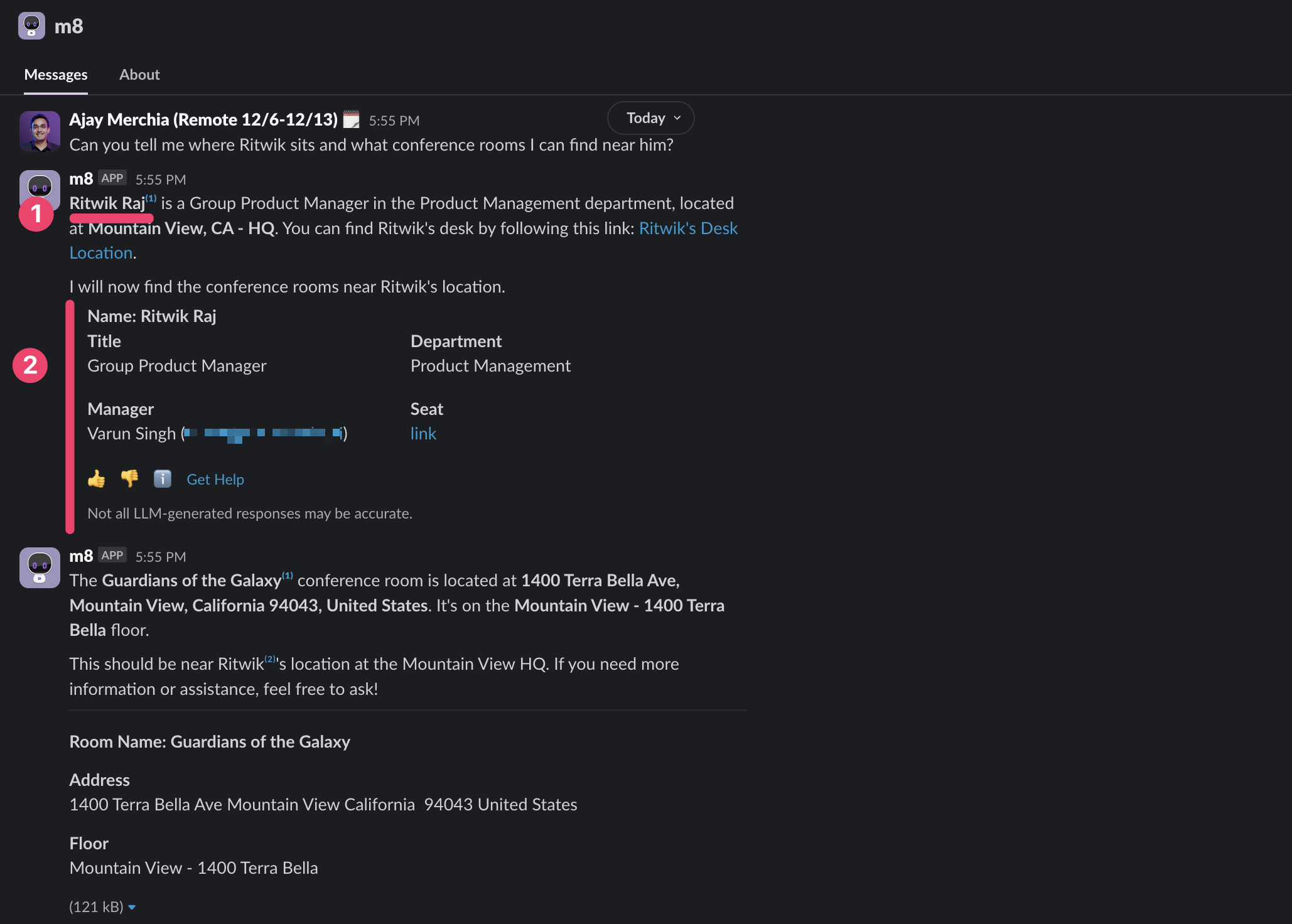
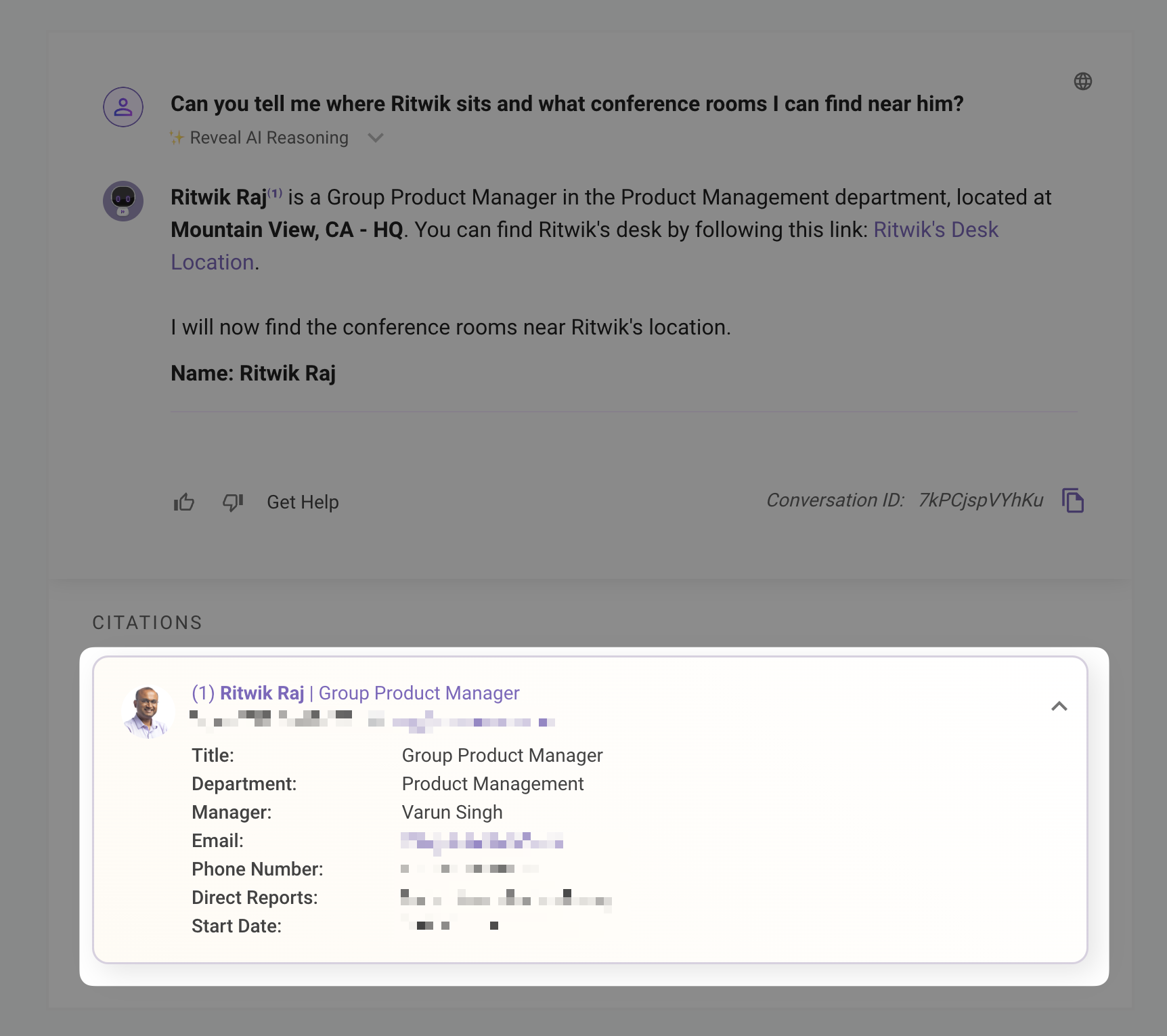
Configuring Citations
Citations are automatically created from the return statement in your Compound Action or output mappers in a Conversation Process. You have two options:
Citation Object Schema
Each citation object must include:
id(Required): A unique, string-based identifier for the business object.friendly_id(Optional): A human-readable string to describe the object.
Best Practices:
- Unique IDs: Ensure the
idis unique to avoid anchoring to unintended parts of the Assistant’s response (e.g., avoid generic IDs like “1” that may appear elsewhere, such as in “1 hour”). - Single Object per Citation: Each citation should represent one business object to prevent confusion.
Returning a Single Object
Use the result key to return a single citation object.
Example:
Say the output of action_result was:
To meet the citation schema it requires the id and friendly_id and using the MERGE function allows us to do that.
Output with Citation
Returning a List of Objects
Use the results key to return multiple citation objects, processed with the MAP function to apply the citation schema to each item.
Example
Output without Citation
Output with Citation
Troubleshooting
Citation Not Appearing
- Incorrect Schema: Ensure each citation object includes a string-based
id. If the schema is invalid, data underresultorresultswill be removed from the response. Verify using the DSL and Mapper Playground. - ID Not in Response: The AI anchors citations to verbatim instances of
idorfriendly_idin its response. If the ID (e.g.,TOP_10_COMPANY_PALO_ALTO) appears elsewhere (e.g., “View the top 10 companies in Palo Alto”), the citation may fail. Add instructions in the Plugin Result Instructions or plugin description to include theidorfriendly_idverbatim.
Example Fix
Citation Anchoring to Wrong Item
- Non-Unique IDs: If the id or friendly_id is not unique (e.g., id: “1” appears in “1 hour” in the response), the citation may anchor incorrectly. Use specific, unique IDs (e.g., TASK-17431) to avoid conflicts.
Example Fix in Output Mapper
Best Practices
- Unique Identifiers: Choose id values that are unlikely to appear in the AI’s natural language response (e.g., UUIDs or prefixed IDs like
TASK-123). - Clear Friendly IDs: Use
friendly_idvalues that are human-readable and descriptive (e.g., “Write Product Requirements” instead of “Task 1”). Single Object per Citation: Avoid creating multiple citations for the same business object to prevent user confusion.