***
title: Moveworks Agent Operations and Health Guide
deprecated: false
hidden: false
metadata:
robots: index
-------------
# Monitoring and Health
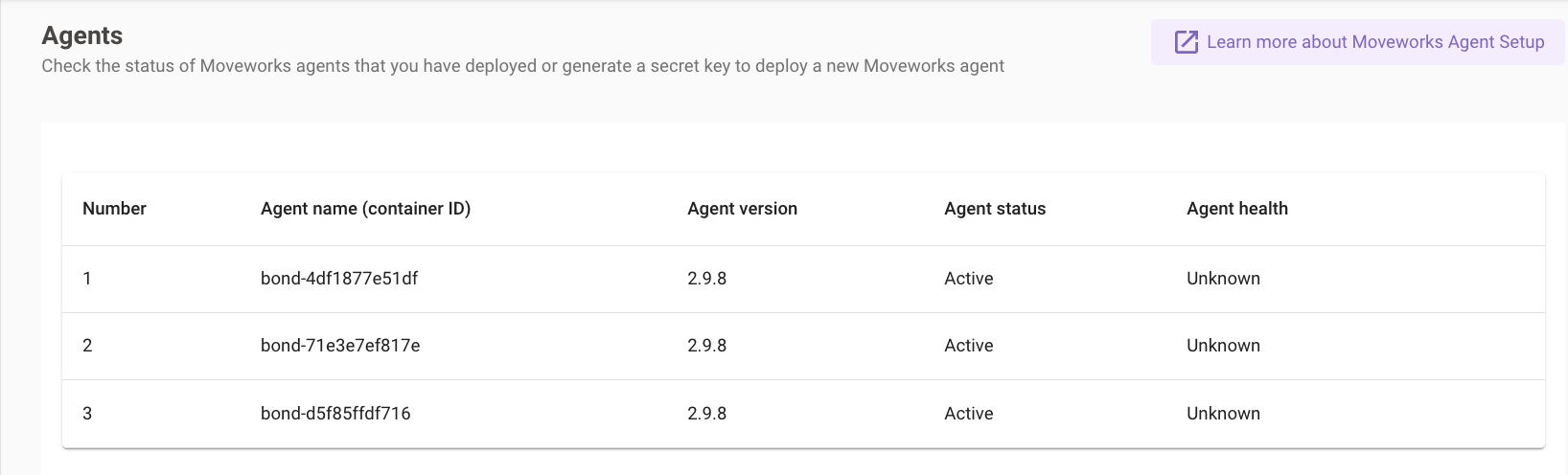
1. Navigate to the Agents module in the left navigation bar under *Core Platform*.
2. In the Agents module you will see a table with a view of all the agents that are deployed and reachable.
## Agent Health Definitions
The Agent Health refers to the agents ability to serve requests from the Moveworks platform.
**Healthy** - the agent is able to successfully serve requests > 90% of the time.
**Unhealthy** - if out of 100 calls that Moveworks makes to the agent, 10 or more times a connection could not be established.
**Unknown** - Typically unknown implies that the agent is not in use yet i.e: 0 calls have been made to the AD Agent, so the health check does not know if it is healthy or not.
It's important to distinguish that a Moveworks agent's Health refers to its ability to serve requests, and does not correspond to the health of the container itself.
## Agent Status
The Agent Status refers to whether the agent is Active or Inactive.
**Active** - agent container is running and connected to upstream Moveworks platform.
**Inactive** - Any agent that fails to connect to Moveworks or has stopped running is set to inactive, it will stay in this list for around 30 minutes before disappearing.