---
title: File Slots
deprecated: false
hidden: false
metadata:
robots: index
next:
pages:
- slug: http-action-files
title: HTTP Action Files
type: basic
---
> ❗ File Slots are currently in Limited Preview!
>
> _To get access, please request through our [Community](https://community.moveworks.com/p/file-slots-limited-preview)_
The `File` slot type enables plugins to receive file attachments from users. It is resolved only when the user interacts with the dedicated "Upload file" button in the assistant interface.
# File Object Structure
When a an attachment is added to the File slot, it generates this object structure:
```json
{
"file_name": string, // Name used when uploading to the external system's API
"location": string, // File location
"content": string, // base-64 encoded
}
```
# Supported file extensions (case-insensitive)
(case-insensitive)
`.png`, `.jpg`, `.jpeg`, `.pdf`, `.txt`, `.csv`, `.xlsx`, `.xlsm`, `.xls`, `.xltx`, `.xltm`
**Callout**: Only these extensions are allowed as ticket attachments. Attempts to upload unsupported types will fail validation.
# Upload Interface
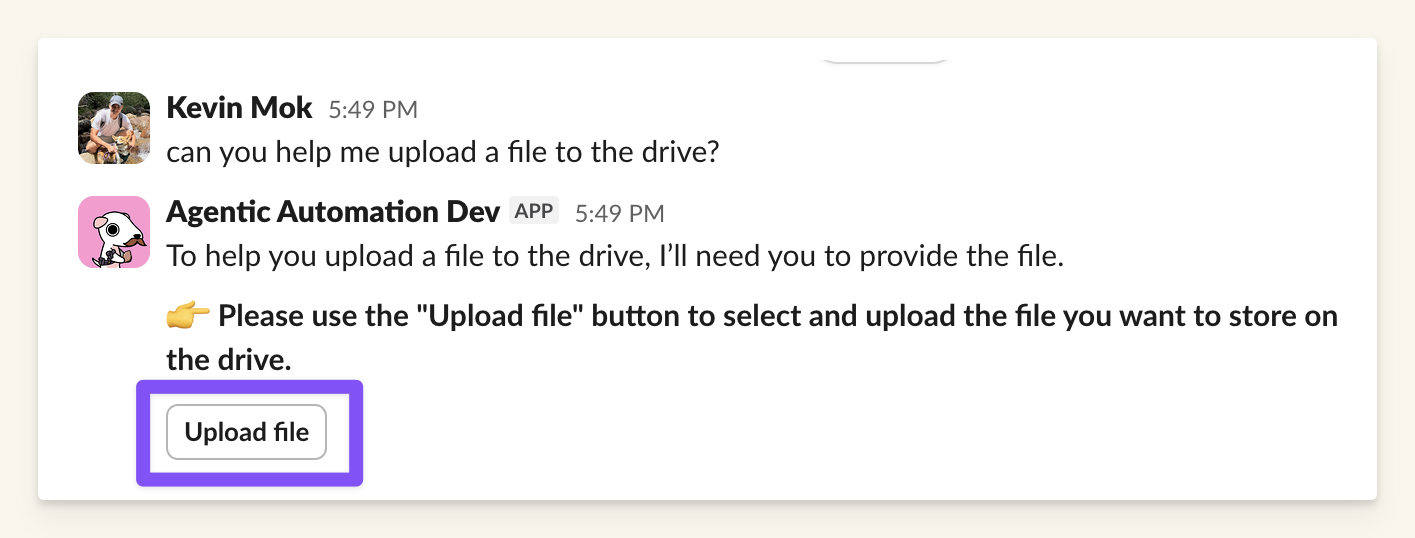
> _Users must use the **"Upload file"** button._
# Limitations
| Limitation | Details |
| :----------------------------------- | :------------------------------------------------------------------------------------------------------------------------------------------------------------------------------------------------------------------ |
| **No file delivery to users** | Files cannot be sent back to end users in chat responses. |
| **No content manipulation** | The system cannot read, parse, or modify file contents beyond base64 encoding. |
| **Upload only via dedicated button** | Uploading files directly in chat (e.g., Slack drag-and-drop) will not populate the `File` slot — it triggers BriefMe instead. Use only the **"Upload file" pop-up** that appears when the `File` slot is requested. |
| **Multiple files not supported** | `List[File]` is not supported. Even if the platform (e.g., Slack) allows selecting multiple files in the upload dialog, only the first file is processed. Subsequent files are ignored. |
***
# Workarounds
## Use Case: Avoid Local File Download
**Problem:**
You do not want users to download files to their machine. Instead, you want users to paste a link (e.g., from Google Drive, OneDrive, or internal file server) directly into the assistant.
**Limitation:**
The platform **cannot download** files from external URLs on behalf of the user.
**Solution:**
Use a string slot named `file_link` instead of `File`.
#### Customer API responsibility:
Your API will **need** to handle the file download from the link passed by the user.
* Download file from `file_url`
* Validate content/type
* Process as needed
_This bypasses local upload entirely. No file is stored or transmitted through the assistant._