---
title: System Triggers Logs & Troubleshooting Guide
deprecated: false
hidden: false
metadata:
robots: index
---
**Limited Preview: Webhook Triggers & System Triggers**
Webhook Triggers and System Triggers Webhook Listener are currently in Limited Preview and may change without notice. Access is invite-only. Self-nomination form is [here](https://community.moveworks.com/p/webhook-triggers-limited-preview). Production use is approved but may be subject to interruptions or breaking changes.
This guide explains the log types available for **webhook triggers** and **scheduled triggers** (system triggers) and how to use them to debug issues across each plugin’s lifecycle -- from the moment an event is received or a schedule fires to the execution of your actions.
# **Webhook Trigger Plugin Lifecycle**
When a webhook event is sent from an external app (e.g., Salesforce, ServiceNow, Workday), it passes through these main stages before your plugin runs:
1. [New] `listener.webhook.trigger` – Raw HTTP request received by Moveworks
2. [New] `listener.webhook.processor.update` – Event validated, transformed, and published (or rejected/debounced)
3. [New] `listener.webhook.plugin.trigger` – Plugins evaluated and triggered based on the event
4. [Existing] `compound_action.trigger` → `compound_action.step.execute` → `action.*` – Execution of the plugin’s actions.
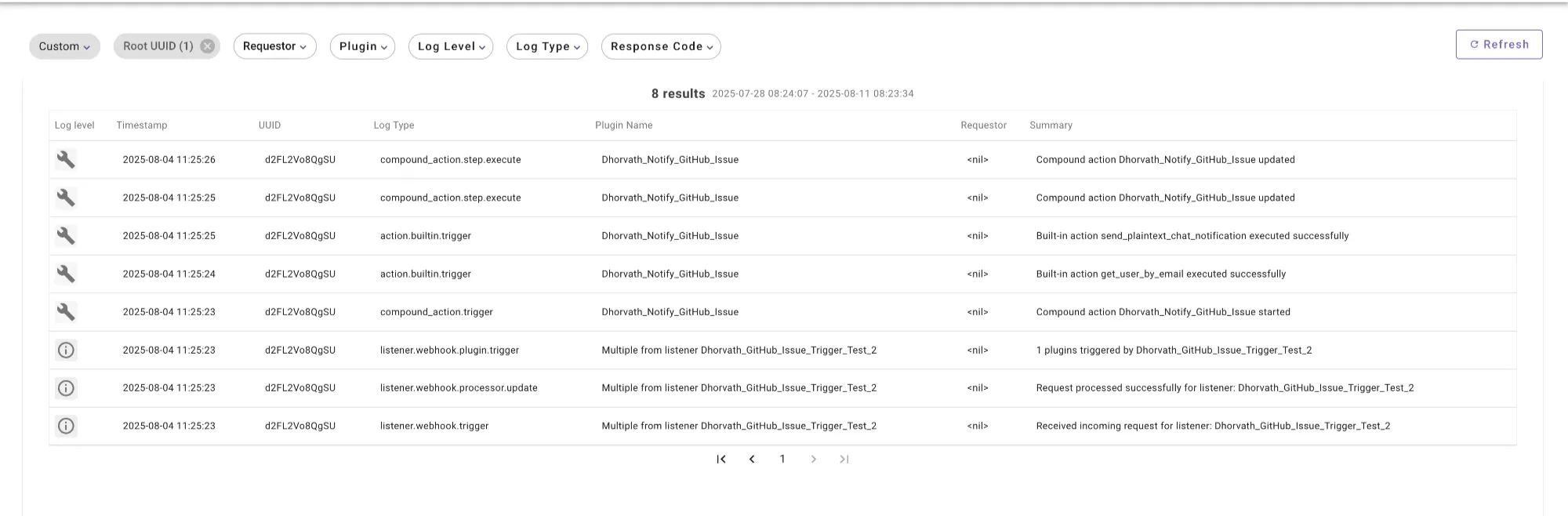
If you are not seeing the new log types e.g. `listener.webhook.trigger` show up in your logs you likely do not have the [Agent Studio Elevated Logs Viewer](/docs/manage-roles-and-permissions-for-moveworks-applications#/standardadministrator-and-user-roles-and-permissions) and/or Agent Studio Log Viewer permission(s) enabled. For more details view our [Roles and Permissions](/docs/manage-roles-and-permissions-for-moveworks-applications#/standardadministrator-and-user-roles-and-permissions) docs.
**Note:**
* Use Agent Studio Elevated Log Viewer only when necessary, as it grants visibility into potentially sensitive webhook payload data.
* Agent Studio Log Viewer must be enabled as well.
## **New Log Types**
### `listener.webhook.trigger`
**Purpose**
Indicates that Moveworks has received a raw webhook request at your configured listener URL.
**Log Body Example**
```json
"root": {
"error_message": "",
"headers": {
"map": {
"X-Github-Event": "issues",
"X-Github-Delivery": "abc123",
"Content-Type": "application/json",
"User-Agent": "GitHub-Hookshot/12345"
}
},
"http_method": "POST",
"listener_metadata": {
"request_id": "aaaaa-bbbbb-cccc",
"listener_id": "xxxxx-yyyyy-zzzzz",
"listener_name": "My_GitHub_Issue_Listener"
},
"parsed_body": {
"action": "opened",
"issue": {
"id": 3290072009,
"number": 11,
"title": "New issue created",
"state": "open",
"html_url": "https://github.com/example-org/example-repo/issues/11"
},
"repository": {
"id": 914634154,
"name": "example-repo",
"full_name": "example-org/example-repo",
"html_url": "https://github.com/example-org/example-repo"
},
"sender": {
"login": "octocat",
"id": 3278918,
"html_url": "https://github.com/octocat"
}
},
"query_params": {},
"raw_body": "",
"received_at": "2025-08-04T16:25:23Z"
}
```
**Attribute Descriptions**
* `listener_metadata` – Metadata about the listener that received the request, including:
* `listener_id` – Unique ID of the listener.
* `listener_name` – Name of the listener as configured in Moveworks.
* `request_id` – Unique ID for this specific incoming request.
* `received_at` – Timestamp when Moveworks received the event.
* `http_method` – HTTP method used by the webhook request (e.g., `POST`).
* `headers` – Key-value pairs sent in the webhook request headers by the provider (e.g., `X-Github-Event`, `Content-Type`).
* `query_params` – Any query parameters included in the listener URL when the event was sent.
* `raw_body` – The exact payload as received from the webhook provider, before parsing.
* `parsed_body` – The parsed JSON object representing the webhook event payload.
* `error_message` – Any error message if Moveworks could not read or validate the request. Empty string if successful.
**What issues does this help debug?**
* Confirms whether Moveworks received the webhook at all.
* Validates whether the request body was received and parsed correctly.
* Shows the HTTP method, headers, and key payload fields for troubleshooting source system configuration.
**If this log is missing, possible causes**
1. Listener URL not correctly configured in your source system.
2. Payload could not be parsed (invalid JSON or unsupported format).
3. CRC challenge or handshake failure (if required by the provider).
4. Authentication failure or rate limiting (unsecured listeners are limited to `1 req / 10 sec`; secure listeners have higher limits).
5. Signature verification failure (if signature validation is enabled).
### **`listener.webhook.processor.update`**
**Purpose**
Indicates how Moveworks processed the raw webhook event after it was received, including whether it was published, rejected, or debounced.
**Log Body Example**
```json
"root": {
"error_message": "",
"event_metadata": {
"listener_metadata": {
"request_id": "6adf6f8c-c076-4cba-8df6-bb25fb00a00d",
"listener_id": "349c1220-aef5-43b1-9318-ebe53537c0fb",
"listener_name": "My_GitHub_Issue_Listener"
},
"event_uuid": "d8vpkoKRVliC",
"created_at": "2025-08-04T16:25:23.056654Z"
},
"event_payload": {
"raw_body": "",
"parsed_body": {
"action": "opened",
"issue": {
"id": 3290072009,
"number": 11,
"title": "New issue created",
"state": "open",
"html_url": "https://github.com/example-org/example-repo/issues/11"
},
"repository": {
"id": 914634154,
"name": "example-repo",
"full_name": "example-org/example-repo",
"html_url": "https://github.com/example-org/example-repo"
},
"sender": {
"login": "octocat",
"id": 3278918,
"html_url": "https://github.com/octocat"
}
},
"headers": {
"X-Github-Event": "issues",
"X-Github-Delivery": "abc123",
"Content-Type": "application/json"
}
},
"process_update": {
"published_update": {
"published_at": "2025-08-04T16:25:23.072620Z"
}
}
}
```
**Attribute Descriptions**
* `event_metadata` – Metadata about the processed event:
* `listener_metadata` – The listener that received the original request.
* `event_uuid` – Unique ID assigned to this event.
* `created_at` – Time the event was first recorded by Moveworks.
* `event_payload` – The event data after initial processing:
* `raw_body` – Exact webhook payload as received.
* `parsed_body` – JSON-parsed version of the webhook payload.
* `headers` – Request headers from the webhook provider.
* `error_message` – Any processing error message (empty if processing succeeded).
* `process_update` – Indicates the processing outcome:
* `published_update` – Event was published for further evaluation.
* `failure_update` – Event failed processing (includes `failure_reason`).
* `debounced_update` – Event dropped because a newer duplicate event was processed first.
**What issues does this help debug?**
* Confirms that a webhook was successfully processed and published.
* Identifies if the event failed processing and why.
* Shows whether the event was dropped due to debounce rules.
**If this log is missing, possible causes**
1. Event was never received (`listener.webhook.trigger` missing).
2. Event failed at the listener stage due to auth, format, or CRC issues.
3. Internal processing failure before log emission (rare).
### **`listener.webhook.plugin.trigger`**
**Purpose**
Indicates which plugins were evaluated for a processed webhook event, and whether they were successfully triggered, skipped, failed, or expired.
**Log Body Example**
```json
"root": {
"error_message": "",
"event_metadata": {
"listener_metadata": {
"request_id": "12345678-abcd-1234-abcd-1234567890ab",
"listener_id": "abcd1234-5678-90ab-cdef-1234567890ab",
"listener_name": "My_Webhook_Listener"
},
"event_uuid": "evt-abc123xyz",
"created_at": "2025-08-04T16:25:23.056654Z"
},
"expired": [],
"failed_to_trigger": [],
"skipped": [],
"successfully_triggered": [
"plugin-uuid-1234abcd5678efgh"
]
}
```
***
**Attribute Descriptions**
* `event_metadata` – Metadata about the event:
* `listener_metadata` – Details of the listener that received the original webhook request.
* `event_uuid` – Unique ID assigned to the processed event.
* `created_at` – Timestamp when the event was first recorded.
* `successfully_triggered` – List of plugin UUIDs that were triggered successfully.
* `failed_to_trigger` – List of plugin UUIDs that matched conditions but failed to run.
* `skipped` – List of plugin UUIDs skipped due to skip conditions.
* `expired` – List of plugin UUIDs skipped because the event’s time-to-live (TTL) expired.
* `error_message` – Any error message encountered during plugin evaluation (empty if successful).
**What issues does this help debug?**
* Confirms which plugins were triggered for a given webhook event.
* Identifies plugins that were skipped, failed, or expired before execution.
* Helps trace why a particular plugin did not run.
**If this log is missing, possible causes**
1. The event did not pass the processing stage (`listener.webhook.processor.update` missing or failed).
2. No plugins matched the event’s trigger conditions.
3. Internal error prevented plugin evaluation (rare).
## **Troubleshooting by Scenario**
### **Scenario A – My plugin never runs**
1. **Check`listener.webhook.trigger`**
* Missing? → Verify listener URL, auth, and payload format.
2. **Check`listener.webhook.processor.update`**
* Was it published? If not, see `failure_reason`.
3. **Check`listener.webhook.plugin.trigger`**
* Was your plugin in `successfully_triggered`?
* If skipped/failed: adjust trigger conditions or fix mapping.
### **Scenario B – My plugin starts but fails mid-run**
1. From `listener.webhook.plugin.trigger`, find `root_uuid` or `event_metadata`.
2. Look at **`compound_action.trigger`** and **`compound_action.step.execute`**.
3. Identify which step failed (e.g., `action.http` 401 → fix credentials).
### **Scenario C – Events triggering inconsistently**
1. Compare `listener.webhook.trigger` timestamps with any `debounced_update` entries.
2. If many events are debounced → reduce redundant sends from source or adjust debounce configuration.
## **Tips for Working with Webhook Logs**
* Use **`log_context`** in all logs to filter for a single event across stages.
* **Inconsistent UUIDs:** Sometimes an event’s UUID is inconsistent across the webhook trigger plugin lifecycle. (Known issue: at `plugin.trigger` the UUID may switch). This is a known issue and a fix is in progress.
* Secure your listener to increase rate limits and prevent throttling.
## **Reference: Full Lifecycle Flow (Webhook)**
```
listener.webhook.trigger
↓
listener.webhook.processor.update
↓
listener.webhook.plugin.trigger
↓
compound_action.trigger
↓
compound_action.step.execute
↓
action.http / action.script / action.builtin
```
# Scheduled Trigger Plugin Lifecycle
## The Scheduled Trigger Lifecycle
A typical scheduled run produces the following logs in order:
1. New: **`scheduled.plugin.trigger`** ← _new for schedules_
2. Existing: **`compound_action.trigger`**
3. Existing: **`action.*`** (e.g., `action.builtin.trigger`, `action.http.trigger`, etc.)
4. Existing: **`compound_action.step.execute`** (one or more as steps progress)
## New Log Type
### `scheduled.plugin.trigger`
**Purpose**
Emitted by the scheduler when a schedule fires and your plugin is enqueued to run.
**Log Body Example**
```json
"root": {
"created_at": "2025-10-01T17:10:00Z",
"error_message": "",
"event_uuid": "IFzfagizKmyq",
"schedule_id": "e3164c63-2035-4f68-b7c1-b49da27204f5"
}
```
**Attribute descriptions**
* `created_at` – UTC timestamp when the schedule fired.
* `event_uuid` – Unique ID for this scheduled firing.
* `schedule_id` – The schedule configuration that produced this run.
* `error_message` – Non-empty if the scheduler encountered an error before handoff.
**What this helps debug**
* Confirms the schedule **actually fired** at the expected time.
* Disambiguates which **schedule** (if you have multiple) produced a run.
* Gives you a handle (`event_uuid`) to correlate with adjacent logs by time and plugin name.
**If this log is missing, possible causes**
1. The schedule is **disabled** or **expired**.
2. The `Start at` time is in the **future** or outside the recurrence window.
3. The run was **skipped** due to concurrency/backfill policy (e.g., a prior run still in-flight).
4. Transient platform issue before the scheduler emitted a log (rare).
## Existing Logs You’ll See During a Scheduled Run
### `compound_action.trigger`
Indicates the compound action (your workflow) started.
**Example (trimmed)**
```json
"root": {
"created_at": "2025-10-01T17:10:00Z",
"status": "WORKFLOW_STATUS_PENDING",
"root_uuid": "2d7d383f-9db1-4e94-8395-3ef17d57ed8e",
"workflow_id": "-FL5gBipYh1N",
"step_statuses": {
"dhorvath_test_scheduled_triggers_cron": "WORKFLOW_STATUS_PENDING",
"dhorvath_test_scheduled_triggers_cron.1-get_user_by_email": "WORKFLOW_STATUS_PENDING"
}
}
```
**Tips**
* Use `root_uuid` to follow the rest of the run end-to-end.
* `status` and `step_statuses` show initial orchestration state.
***
### `action.builtin.trigger` (and other `action.*`)
Emitted for each action call (built-in, HTTP, script, etc.).
**Example – `get_user_by_email`**
```json
"root": {
"action_name": "get_user_by_email",
"created_at": "2025-10-01T17:10:01Z",
"input_args": { "user_email": "dhorvath@moveworks.ai" },
"response": { "user": { "record_id": "4402919472709613755", "full_name": "David Horvath" } },
"error_message": ""
}
```
**Example – `send_plaintext_chat_notification`**
```json
"root": {
"action_name": "send_plaintext_chat_notification",
"created_at": "2025-10-01T17:10:01Z",
"input_args": {
"message": "I'm testing scheduled triggers. This is super duper fun.",
"user_record_id": 4402919472709613600
},
"response": { "notification_tracker_uuid": "49tDkl6J0RlOX96S" },
"error_message": ""
}
```
**Tips**
* `input_args` confirm what was actually sent to the action.
* `response` surfaces downstream IDs (e.g., `notification_tracker_uuid`) for follow-up.
***
### `compound_action.step.execute`
Status updates as steps complete.
**Example – step 1 completes**
```json
"root": {
"created_at": "2025-10-01T17:10:02Z",
"from_status": "WORKFLOW_STATUS_PENDING",
"to_status": "WORKFLOW_STATUS_PENDING",
"root_uuid": "2d7d383f-9db1-4e94-8395-3ef17d57ed8e",
"payload_data": { "status": "ACTION_STATUS_DONE" },
"step_statuses": {
"dhorvath_test_scheduled_triggers_cron.1-get_user_by_email": "WORKFLOW_STATUS_COMPLETE",
"dhorvath_test_scheduled_triggers_cron.2-send_plaintext_chat_notification": "WORKFLOW_STATUS_PENDING"
}
}
```
**Example – workflow completes**
```json
"root": {
"created_at": "2025-10-01T17:10:02Z",
"from_status": "WORKFLOW_STATUS_PENDING",
"to_status": "WORKFLOW_STATUS_COMPLETE",
"root_uuid": "2d7d383f-9db1-4e94-8395-3ef17d57ed8e",
"payload_data": { "status": "ACTION_STATUS_DONE" },
"step_statuses": {
"dhorvath_test_scheduled_triggers_cron": "WORKFLOW_STATUS_COMPLETE",
"dhorvath_test_scheduled_triggers_cron.1-get_user_by_email": "WORKFLOW_STATUS_COMPLETE",
"dhorvath_test_scheduled_triggers_cron.2-send_plaintext_chat_notification": "WORKFLOW_STATUS_COMPLETE"
}
}
```
**Tips**
* Track progress via `step_statuses` and final `to_status`.
* If a failure occurs, the `error_message` or `payload_data.error` section will contain details.
***
## Troubleshooting by Scenario (Schedules)
### A) “My schedule didn’t fire”
1. Look for **`scheduled.plugin.trigger`** at the expected time.
* Missing? Check that the schedule is **enabled**, **not expired**, and its **time zone** is correct.
* Confirm `Start immediately`/`Start at` behavior and that the first run time has passed.
2. If you expect catch-up of missed runs, verify your org’s **backfill/concurrency policy** and whether a prior run was still in progress.
### B) “The schedule fired, but nothing ran”
1. Find **`scheduled.plugin.trigger`**, then look within ±5 seconds for **`compound_action.trigger`** for the same plugin.
2. If **`compound_action.trigger`** is missing, check platform health or org limits; also verify the plugin wasn’t unpublished or disabled between scheduling and execution.
### C) “A step/action failed”
1. Open **`compound_action.step.execute`** entries for `error_message` / `payload_data.error`.
2. For external calls, inspect the corresponding **`action.*`** log for request/response details (e.g., 401/403/404 equivalents, validation messages).
3. Re-run manually with the same inputs to confirm if the failure is transient or due to configuration.
### D) “Runs are overlapping or being skipped”
* If your run duration exceeds the interval, the platform may **queue** or **skip** subsequent runs based on concurrency/backfill policy. Reduce frequency or optimize the workflow to avoid overlap.
## Reference: Full Lifecycle Flow (Schedules)
```
scheduled.plugin.trigger
↓
compound_action.trigger
↓
action.builtin / action.http / action.script (zero or more)
↓
compound_action.step.execute (one or more)
```
# Notify Logs
Coming soon