---
title: Forms Integration - ServiceNow
excerpt: ''
deprecated: false
hidden: false
metadata:
title: ''
description: ''
robots: index
next:
description: ''
---
# Overview
You use Moveworks Form Integration with ServiceNow to:
* Enable powerful automations, leveraging Workflows or Flow Designer.
* Trigger custom approval workflows in ServiceNow
* Structure inputs from your employees for faster time to resolution.
## What types of forms does Moveworks ingest?
Moveworks Bot will ingest Catalog Items available in your Service Catalog, based on the catalogs configured in Moveworks. When Moveworks ingests forms, it applies a number of filters based on attributes on each catalog item:
* **visible_standalone** = true
* **hide_sp** = false
* **category** is active
* **category** is not empty
* **catalog** is active
* **catalog** is not empty
* **catalog** or **tag** is not filtered out (based on what you have configured in your Moveworks implementation)
* **sys_class_name** is one of the following:
* `sc_cat_item`
* `pc_software_cat_item`
* `pc_hardware_cat_item`
* `sc_cat_item_producer`
* `sc_cat_item_guide`
Once these forms are ingested, Moveworks will link your employees to them by redirecting them to `{base_service_portal_url}?id=sc_cat_item&sys_id={form_sys_id}`.
**Note:** This URL can configured to link to a custom Service Portal or ESC Portal.
## When does Moveworks start ingesting Forms?
Moveworks starts ingesting forms **every day at 6pm Pacific time**. The entire process takes place over a few hours, and ingests new catalog items, as well as any updates or removals that may have happened over the course of the day.
> 📘 Note on triggering
>
> This is only to make the form available for basic triggering (using the form title for example). Typically it takes a few days to a week for the form to become more robust in triggering for different user utterances. If you continue to see issues well after the form has been made available in your ServiceNow instance, please contact Moveworks Support at [support@moveworks.ai](mailto:support@moveworks.ai).
## Form Filling
### Supported fields
> 📘 Note on inactive fields
>
> If you set the field in your ServiceNow instance to inactive (`active` = `false`) or always hidden (`hidden` = `true` or `visible` = `false`), **Moveworks will ignore this setting**. Please remove the field if it is truly inactive, or add a UI policy (with condition = `true`) that hides the field.
Moveworks converts your [ServiceNow variables](https://docs.servicenow.com/en-US/bundle/sandiego-servicenow-platform/page/product/service-catalog-management/reference/r_VariableTypes.html) into internal supported types where possible.
* Moveworks does not support fields that have names longer than 75 characters
* Moveworks does not display the text of a container field header unless it is a checkbox group
### Form Field Type Conversion
| System | External Field Type | Moveworks Type |
| :--------- | :--------------------- | :------------------------------------ |
| ServiceNow | Group | Supported: No experience implications |
| ServiceNow | Yes/No | Dropdown: Single Choice |
| ServiceNow | Multi Line Text | Text: Multi-line |
| ServiceNow | Multiple Choice | Dropdown: Single Choice |
| ServiceNow | Numeric Scale | Dropdown: Single Choice |
| ServiceNow | Select Box | Dropdown: Single Choice |
| ServiceNow | Single Line Text | Text: Single line |
| ServiceNow | Checkbox | Checkbox: Single Choice |
| ServiceNow | Reference | Dropdown: Single Choice |
| ServiceNow | Date | Date |
| ServiceNow | Datetime | Datetime |
| ServiceNow | Label | Supported: No experience implications |
| ServiceNow | Break | Unsupported |
| ServiceNow | Macro | Unsupported |
| ServiceNow | UI Page | Unsupported |
| ServiceNow | Wide Single Line Text | Text: Single line |
| ServiceNow | Macro with Label | Unsupported |
| ServiceNow | Lookup Select Box | Dropdown: Single Choice |
| ServiceNow | Container Start | Supported: No experience implications |
| ServiceNow | List Collector | Dropdown: Multiple Choice |
| ServiceNow | Lookup Multiple Choice | Dropdown: Single Choice |
| ServiceNow | HTML | Text: Single line |
| ServiceNow | Container Split | Unsupported |
| ServiceNow | Masked | Unsupported |
| ServiceNow | Email | Text: Single line |
| ServiceNow | URL | Text: Single line |
| ServiceNow | IP | Unsupported |
| ServiceNow | Duration | Unsupported |
| ServiceNow | Requested For | Dropdown: Single Choice |
| ServiceNow | Attachment | Unsupported |
For all drop downs, Moveworks ingests all the options from the reference tables, applying any **simple** reference qualifiers (static filters on the underlying table) will be okay. Make sure not to use any dynamic comparators either (as pictured below) if you want your form to be fillable in chat. Complex reference qualifiers are not supported.

If there are more than **100,000** options after applying the reference qualifier, ingestion is skipped and the form is marked as **not fillable**.
> 📘 Note on container_start + container_end fields
>
> The `container_start` variable is used to group a set of variables. When a form uses a `container_start` field, Moveworks will render any variables in that group that part of the supported list. Most forms that use the `container_start` variable typically have a `container_end` variable as well, however the `container_end` variables are supported.
>
> If there’s a variable between `container_start` and `container_end` that is not supported although Moveworks supports the `container_start`variable, the bot will not be able to render the form natively in chat.
### Supported dynamic behavior
**Basic UI policies are supported given that they:**
1. Contain no JavaScript
2. Are not applied to any container-like field types (including Checkbox containers).
> 🚧 Client UI Scripts are not supported
>
> Be sure to disable client UI scripts on any forms that you want fillable in bot.
### Additional details on Checkbox group containers
1. Checkboxes that are in a group and marked as required. Moveworks will always mark all checkboxes in a checkbox group as optional.
2. UI policies that apply to a checkbox group container. Moveworks currently only honors UI policies that apply to variables or variable sets.
1. **Note:** Moveworks does not follow UI policies that apply to containers.
### Submitting on behalf of the user
To submit on behalf of the user, Moveworks will provide the submitter as a field in the submission.
* First, Moveworks will look for an exact match for a **requested_for** variable.
* Then, Moveworks will look to see if any variable name contains **requested_for** (e.g. **u_requested_for**). If there are multiple, the field closest to the bottom of the form will be used.
Once the field is defined, that field will be pre-populated when the form is rendered and used when submitting the form.
### Simple Reference Qualifiers are supported
Moveworks offers support for simple reference qualifiers on all types of reference fields, given that they contain less than 100,00 options **after the reference qualifier is applied**. For user fields with unsupported reference qualifiers, Moveworks will default to using the full list of users.
## ServiceNow Permission Requirements
In order for us to display your forms within your bot we will need your help getting the right permissions setup. The required attributes listed below are not exhaustive. In addition, Moveworks expects a certain schema of nested attributes. Additional table access may also be required as the Moveworks form skill evolves.****
**sc_cat_item**
* Attributes needed: sys_id, active, hide_sp
**sc_catalog**
* Attributes needed: sys_id, active, title
**sc_category**
* Attributes needed: sys_id, active, title
**item_option_new**
* Attributes needed: default_value, sys_id, question_text, description, mandatory, active, type, choices, lookup_table, lookup_value, reference_qual_condition, variable_set
**catalog_ui_policy**
* Attributes needed: sys_id, active, catalog_item, variable_set, catalog_conditions, reverse_if_false, order, applies_catalog, global
**catalog_ui_policy_action**
* Attributes needed: sys_id, catalog_item, variable_set, mandatory, cleared, disabled, visible, order, ui_policy
**sys_ui_policy**
* Attributes needed: sys_id, short_description, description, ui_type, script_true, script_false, reverse_if_false, sys_name, run_scripts, order, active, on_load, conditions
**sys_db_object**
* Attributes needed: sys_id, name, super_class
**sys_dictionary**
* Attributes needed: element, display, name
In addition to the above tables, the Moveworks service account will need “read” access to all tables that are referenced in Reference / Choice / List collector fields (to be able to display the options to the user) and need access to the form via the Service Catalog API:
GET: **[https://{}.service-now.com/api/sn_sc/v1/servicecatalog/items/](https://\{}.service-now.com/api/sn_sc/v1/servicecatalog/items/)\**
* Attributes needed: sys_id, variables, picture, categories, catalogs, visible_standalone, sys_class_name, ui_policy, client_script, title, name, short_description, description
## FAQ
**Q: How does the requestor get populated when a form is filled in Moveworks?**
**A:** When a user chooses to fill out a form in the Moveworks bot, the requestor on the resulting ticket will always be the user chatting with the bot. Which variable is used to capture the requestor is based on how your form is configured:
* First Moveworks will look for an exact match for a **requested_for** variable. If this is present, that is pre-populated when the form is rendered in the WebUI and used when submitting the form.
* If this field does not exist, Moveworks will look to see if any variable name contains **requested_for** (e.g. **u_requested_for**) and the last match that is found is the field used to pre-populate the requestor.
* If all forms use a specific (custom) field for the requestor, Moveworks can be configured to always look for this specific field and use it to capture the requestor.
* You can do this by navigating to **Forms > Advanced Settings** under the **Ticketing Automation** Module. Look for the **Form requester field names** field.
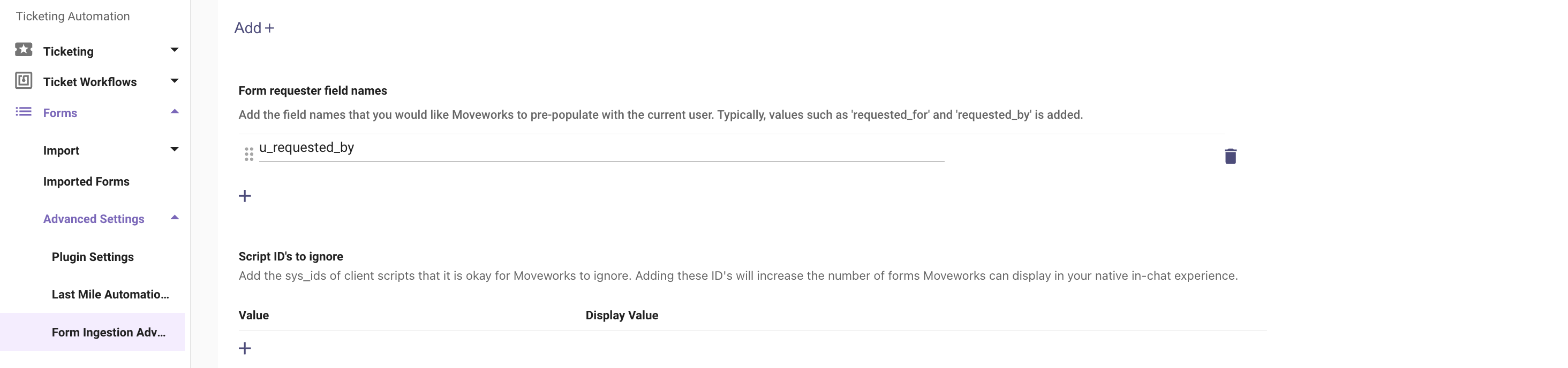
* Here you can define the name of the custom field which needs to be pre-populate with the current user info.
**Q: Does Moveworks support Two-Step Checkout? (only applicable for the Legacy Service Catalog UI)**
**A:** No, this must be disabled.
* This behavior is governed by the system property `glide.sc.checkout.twostep`.
* If this is **enabled**, this prevents the bot from correctly submitting catalog items that don’t have a “Requested For” field on behalf of the user - when submitted, they will incorrectly have “Requested For” populated as the bot account.
* Thus make sure `glide.sc.checkout.twostep` is set to **false**.
**Q: Does Moveworks support Attachment Upload for Ingested Forms**
**A:** No, This is not supported.
**Q: Does Moveworks support record producers?**
**A:** Yes, as long as the record producer meets the following requirements:
1. The record producer must create a ticket that is available in Moveworks Concierge.
2. The record producer must be built with Generated Record Data from Variables only, not from a Template.
3. The record producer script must **not use the function** `gs.getUserId()` or any other _GlideSession APIs_ functions. This can lead to strange behavior where the caller field on the resulting ticket belongs to the service account rather than the employee that filled out the record producer. Instead, Moveworks recommends adding a field on the Record Producer for the requesting user e.g: `requested_for` .
**Q: Does Moveworks support the`meta` field?**
**A:** No, not at the moment.
**Q: My ServiceNow form is ingested and listed in Moveworks Setup, but it isn't surfacing in the Moveworks bot. Why?**
**A:** When a form is "Serving" but not appearing, it usually indicates a permissions mismatch or User Criteria restriction. Moveworks mirrors your ServiceNow security model to ensure users only see what they are entitled to.
**Troubleshooting Steps**
1. **Verify User Criteria** Moveworks strictly adheres to the "Available For" and "Not Available For" related lists on your ServiceNow Catalog Item. If the user (or the Moveworks Service Account) is restricted here, the form will not surface.
2. **Check Catalog & Category Status** Ensure the form is assigned to an Active Category and Catalog. If the parent category is inactive or hidden, the form may be ingested but remain unreachable.
3. **Confirm Search Settings** Ensure the "Hide on Service Portal" or "No Search" flags aren't inadvertently checked in ServiceNow, as these can sometimes impact how items are indexed.
**Action Required**: To make sure that all permissions are accessible, please refer to the APIs accessed by Moveworks listed above.
**Q: How should I configure my Record Producer?**
**A:** Record Producers can be filed by Moveworks using a default payload which leverages.
1. Record Producer’s Table Name is set to a table that is configured in Moveworks backend.
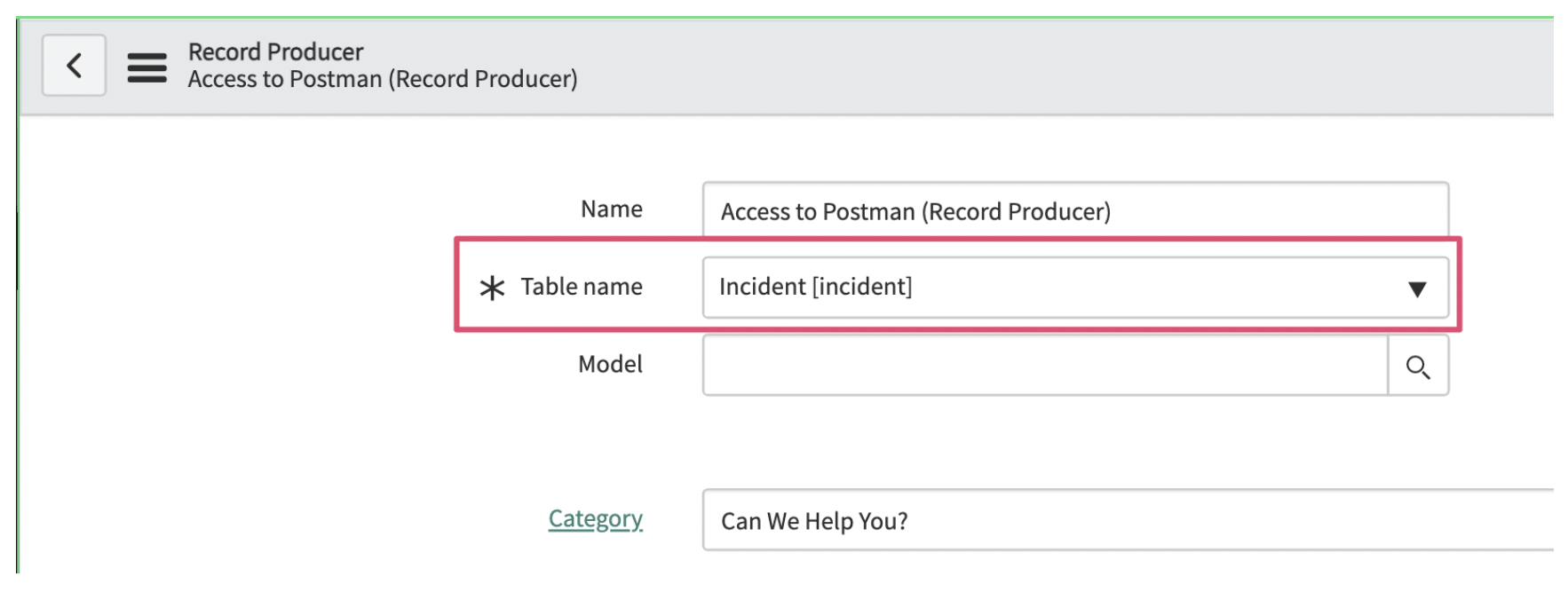
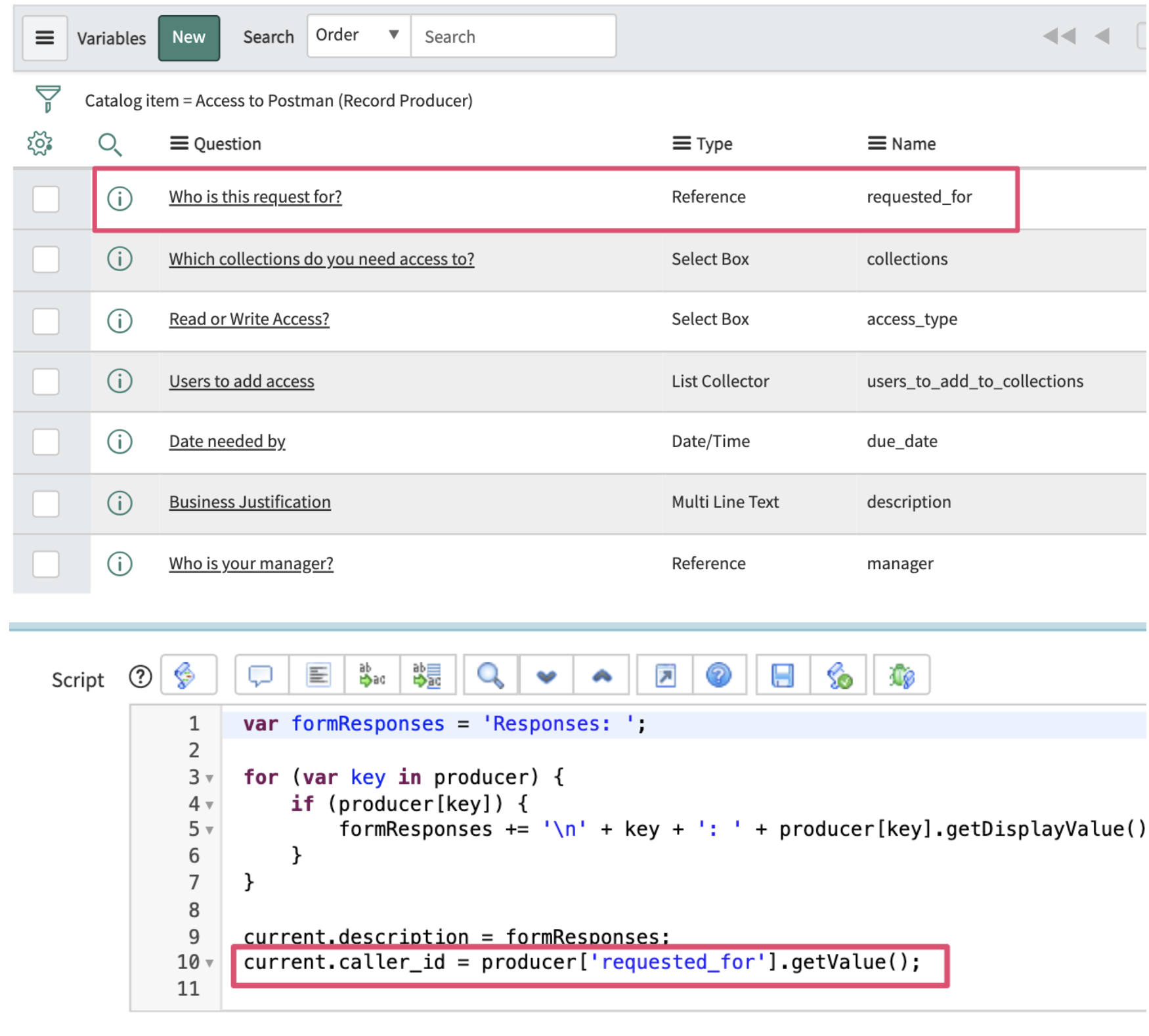
2. Record Producer has a variable dedicated to the submitter of the form. The submission script uses that attribute to populate the subject of the ticket (in this case the caller_id).
3. Category & Catalog are both set on the Record Producer.
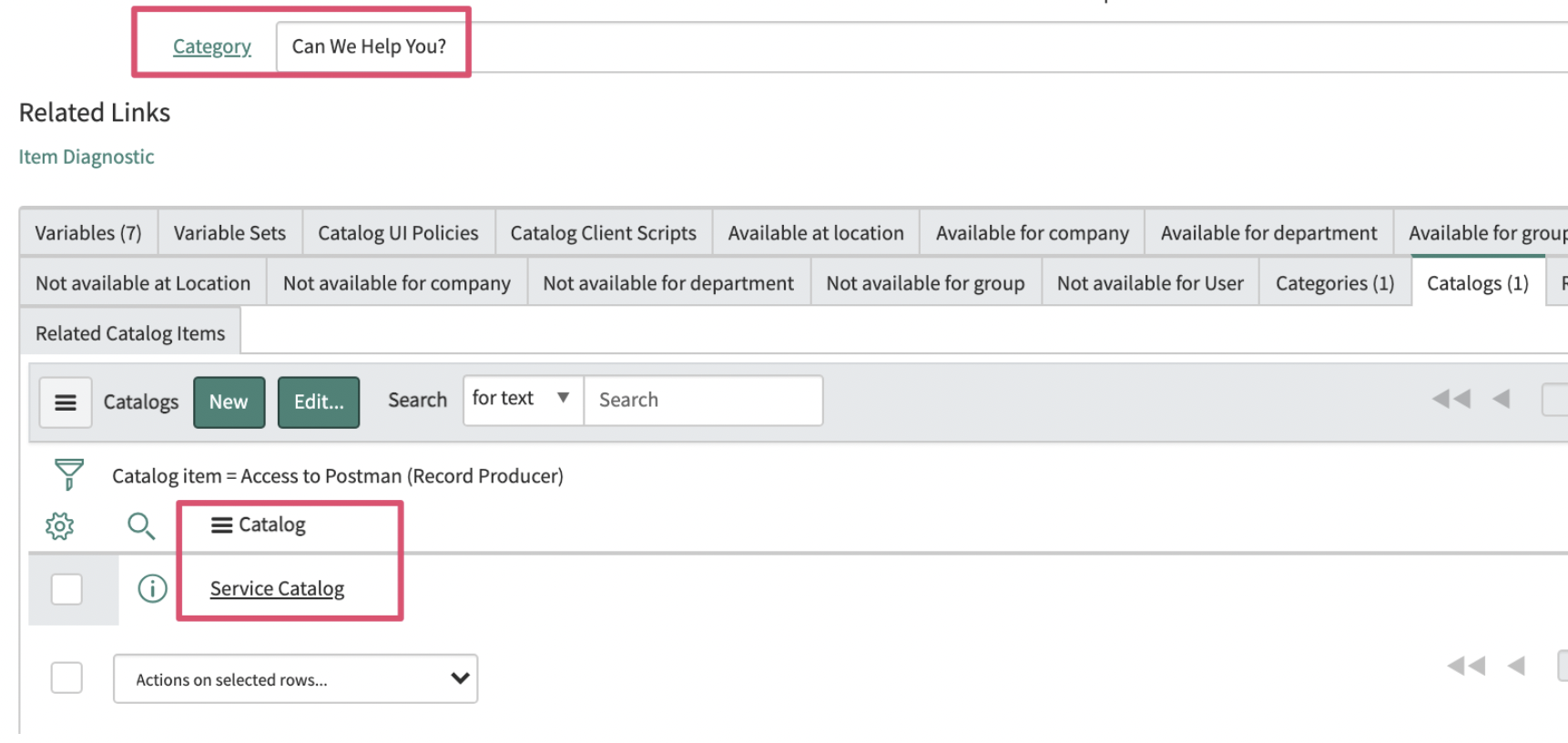
4. No Catalog Client Scripts on the Record Producer.

5. Once you have your Record Producer ID you can set it up for creation by following this guide on [How To Configure Record Producers for Ticket Creation](/docs/how-to-guides-for-ticketing-plugin#/how-to-configure-record-producers-for-ticket-creation)