
Input Arguments
Input arguments define the external data a Compound Action requires to run, sourced from plugin triggers (e.g., webhooks) or upstream callers like a conversation process. They act as entry points, ensuring workflows receive validated, typed inputs, think user email for personalization or ticket IDs for routing, before diving into steps. By declaring them upfront, you enable dynamic execution while enforcing structure, reducing runtime errors and easing integration.
In the Editor, you set up Input Arguments by pressing on the Input Args button.
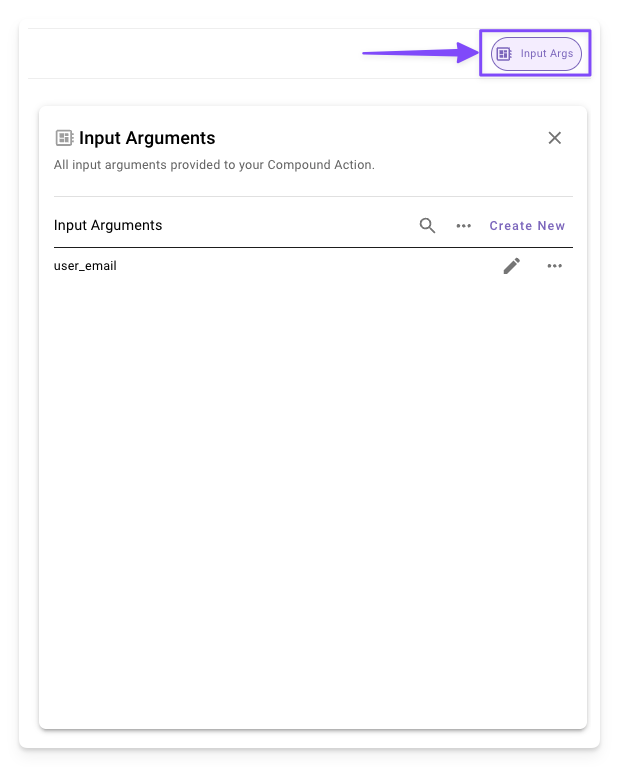
Setting Up Input Arguments
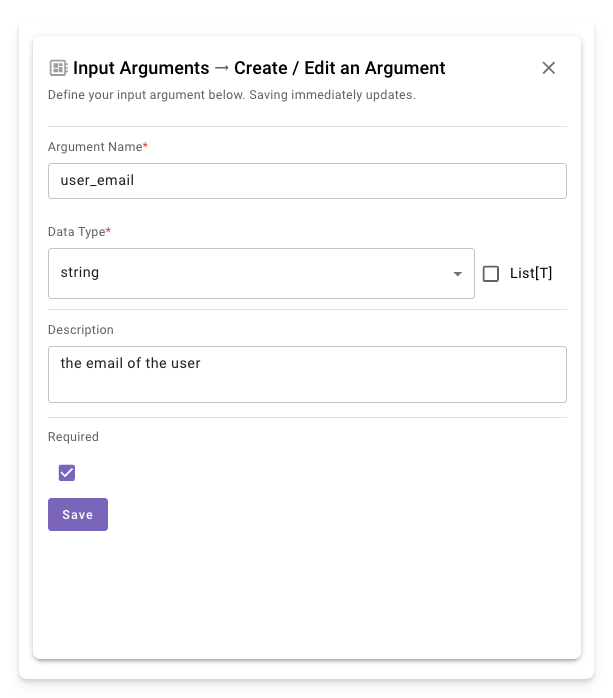
Access the Input Args panel in the Compound Action Editor to add, edit, or remove them. Click the Input Args button in the editor header to open the panel. Each argument needs a name, data type, optional description, and required flag. Saving updates the config instantly.
-
Create New: Click “Create New” to open a new form to create an argument.
-
Define Details: Enter name (e.g.,
user_email), select the type, add a description, and toggle required.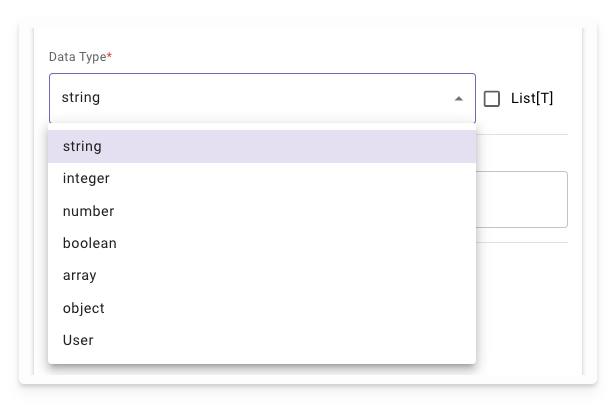
Available Data Types
See Data Types to check the available types in compound actions.
Usage in Compound Actions
Inputs get stored in the data bank and flow into steps via data mapping (e.g., data.user_email in action args).