
Analytics
Moveworks Analytics allow admins to gain insight into various areas of the bot’s performance, including resolution, acceleration, and adoption.
Dashboards
- Executive Insights — This dashboard provides key metrics such as number of issues resolved, issues accelerated, and time savings for the service desk.
- Bot Performance Insights — This dashboard provides information on the performance of the Moveworks bot.
- Answers Insights — This dashboard shows the effectiveness of the Answers skill in leveraging KBs and addressing user troubleshooting requests, and also includes individual user interactions to allow for troubleshooting.
- Triage Insights — This dashboard shows the effectiveness of the Triage skill in autonomously routing and categorization of tickets.
- Slack Channels Insights — This dashboard shows the issues raised by users in Slack channels that the bot reached out on and the resolution outcomes.
Note: The dashboards refresh daily at 4:00PM PT with the prior day’s data, meaning they are on a one-day lag. This is due to the processing and aggregation of data that is presented in the different dashboards.
What if I want to use my own dashboards / BI tool to view bot data?
If you want to use your own Business Intelligence (BI) tool to analyze data, you can set them up with a daily SFTP drip. Please reference the Tableau and SFTP Setup Guide for details. The data is still the same data that appears in the dashboards mentioned above.
Resolution
In order to understand the usage and impact of the bot, across all systems and integrations, Moveworks has a standard method of measuring how the bot resolves issues. The method in which Moveworks counts resolution has a high degree of details and complexity. This is due to the fact that work-related issues can vary, due to the nature of system environments, and ways an issue can be resolved in those systems.
Resolution is counted based on a set of resolution skills: Answers, Form Filling, Access Software, Access Groups and Access Account. What counts as resolution differ from skill to skill, and what system the skill is integrated into. Some systems may only allow the bot and the skill to assist the user to a certain degree.
In order to provide a rich variety of capabilities, Moveworks bot integrates with a series of systems of varying levels of integration and functionalities. For example, some systems allow bot to lead the user through the whole process of resetting their password, while others only allow the bot to redirect a user to another portal where they can reset their password outside of the Moveworks platform.
Form Filling
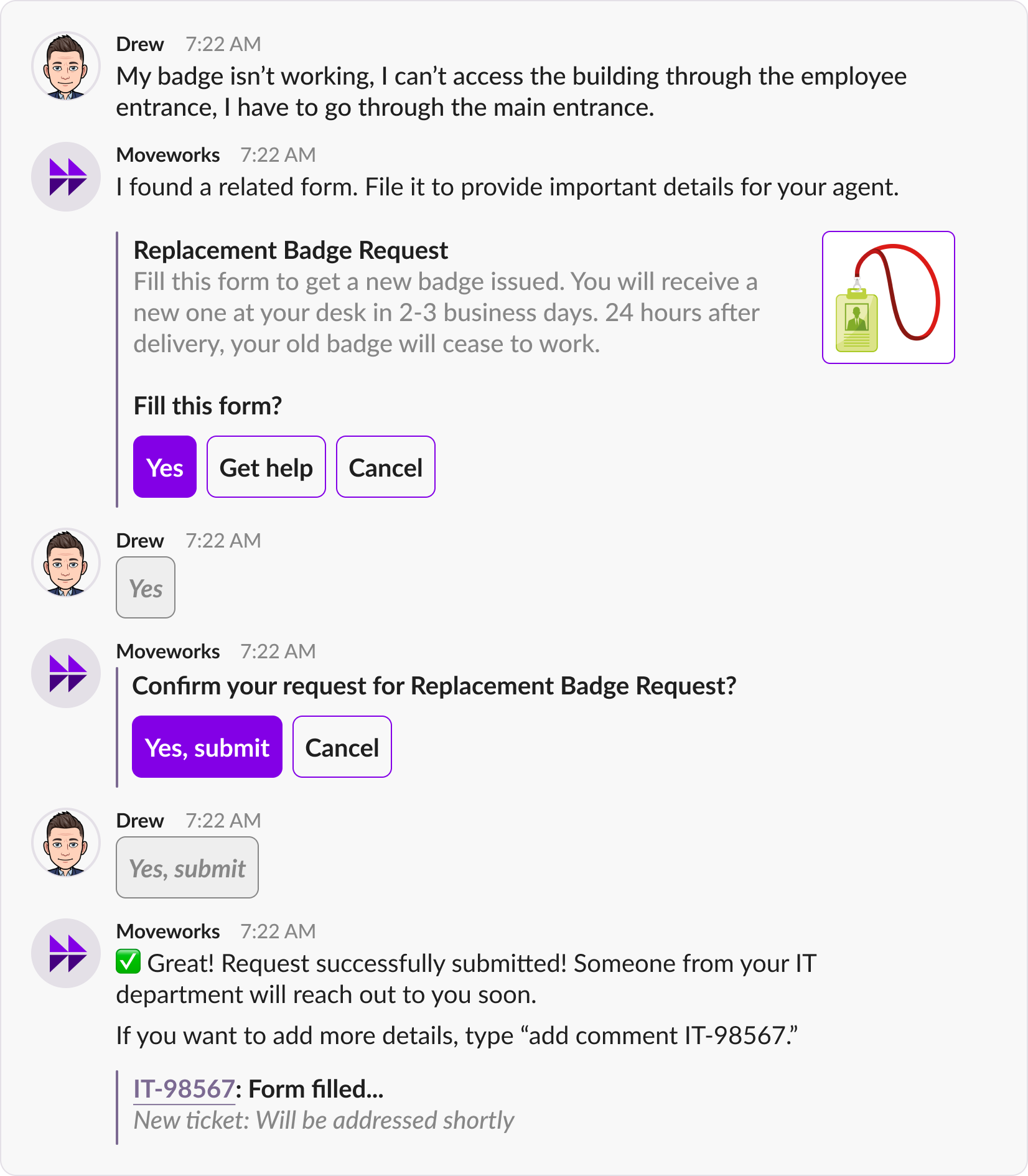
Moveworks Form Filling skill helps employees file the correct forms to request a catalog item, such as a piece of hardware, software application, or any other item that can be provisioned by a filling a from.
The following scenarios count toward resolution by the Form Filling skill:
- If a user completes and files a Form directly in bot, in web UI, or in a rich chat popup.
- If a user is redirected to an ITSM system integrated with the bot (in which bot can track the Form being submitted), and then files a Form in that system.
- If a user clicks on a link and is redirected from bot chat to a system where the bot can not track a Form.
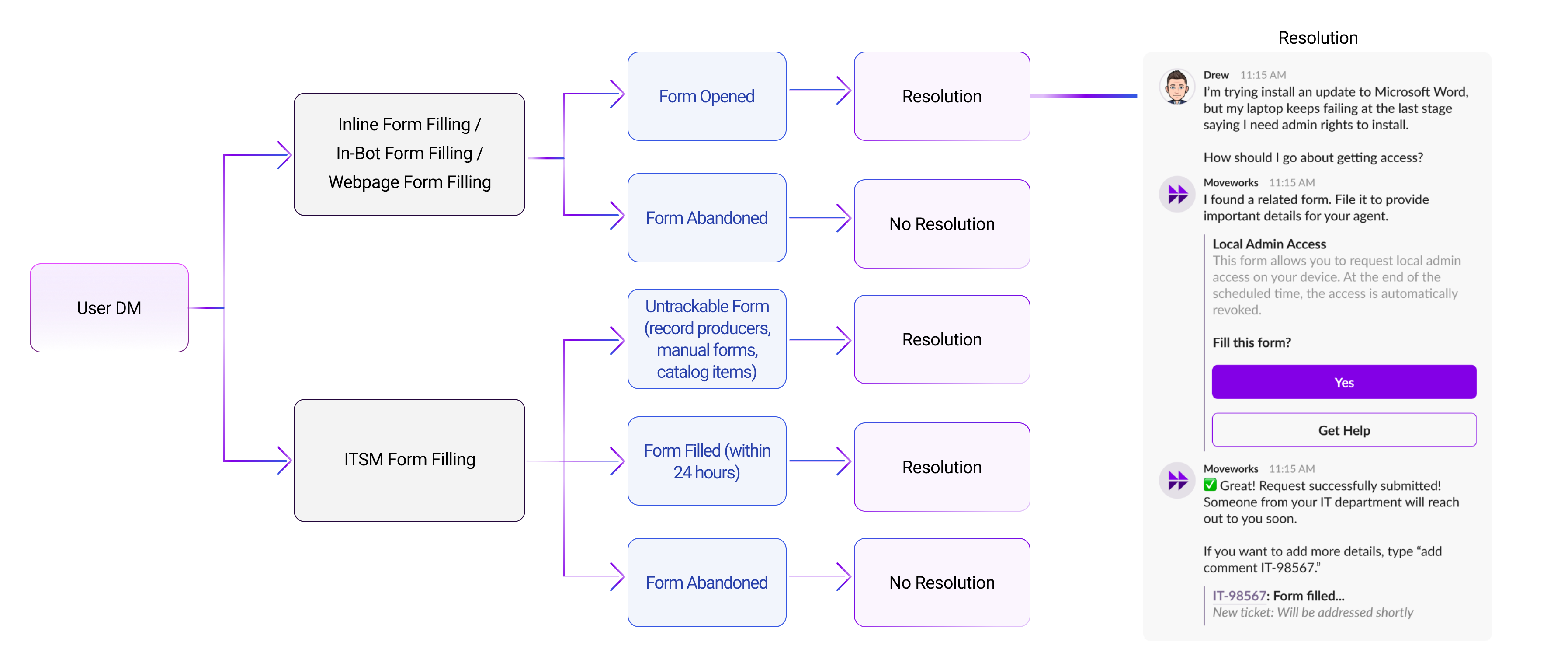
Why is Form Filling counted towards resolution?
The benefit of Forms is that it carries structured data that can be consumed and automated on the backend to deliver requested catalog item. However, if a user files the same request as an Incident (unstructured ticket), then an agent has to resolve it, which is costly to the organization. The Form Filling skill prevents misfiled requests.
Answers
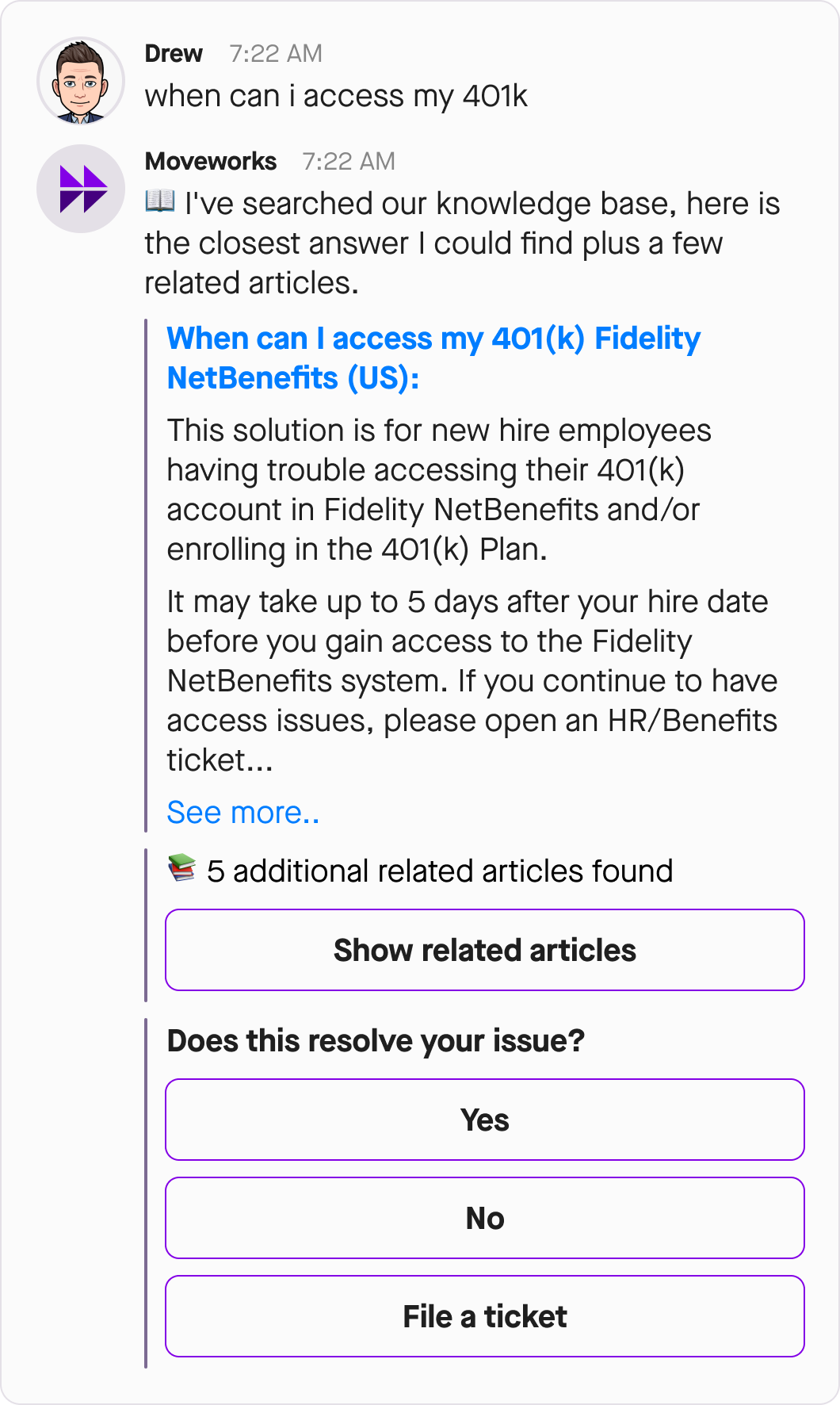
The Answers skill can serve an article, snippet, or several snippets from a knowledge base (including public knowledge and FAQs) that provides possible solutions to an issue.
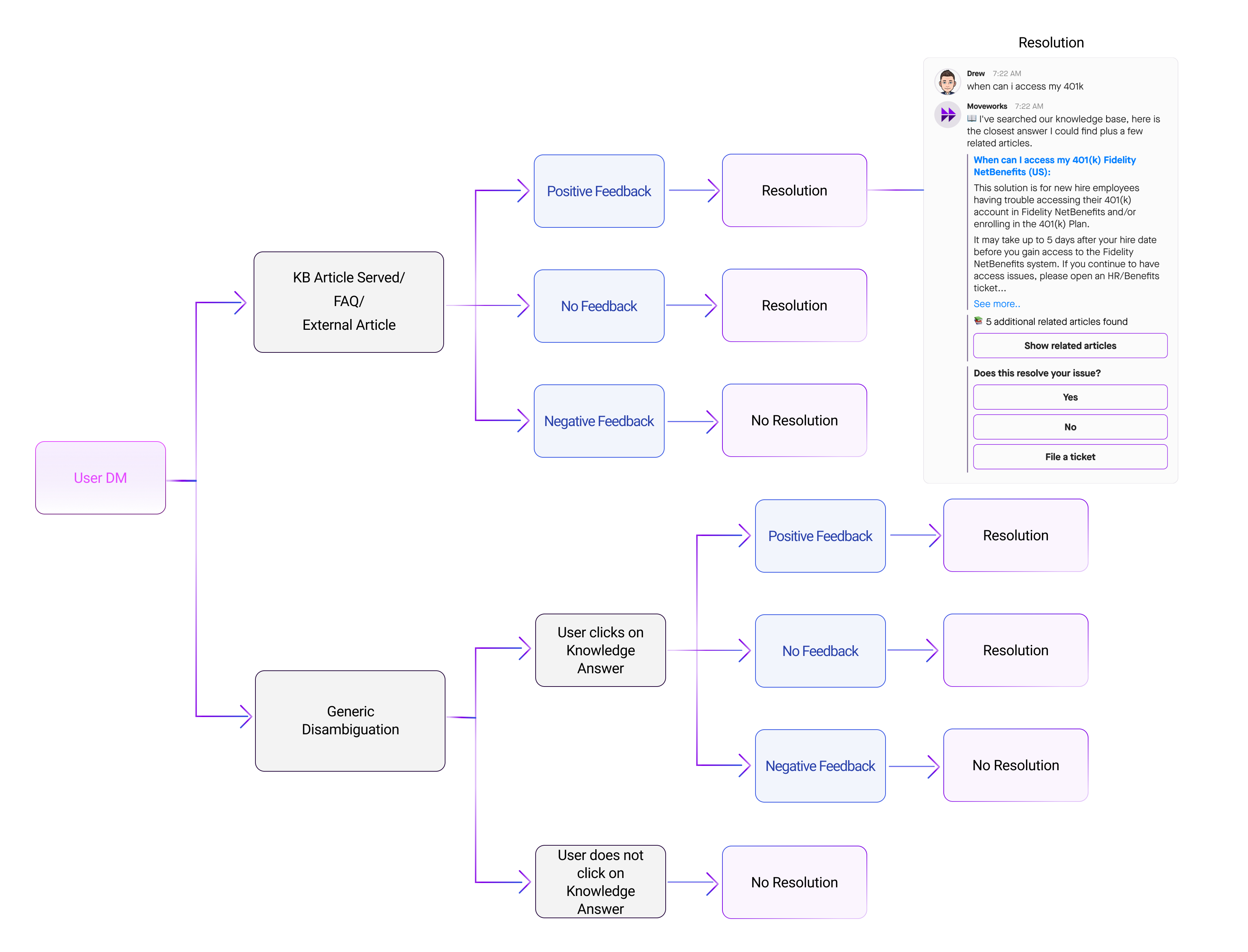
This counts towards resolution if all the following conditions are met:
-
There is an indication that user saw the knowledge served. This prevents us from inflating the resolution that would happen if we counted cases when a solution is served for an intercepted ticket, but user never uses the bot to see it.
-
User does not follow up by escalating the issue through filing a ticket or going to Live Agent Chat.
-
User does not give negative feedback indicating that the solution was not helpful.
If the solution is provided for an issue stated in an IT Channel, there is the stricter condition that user must provide positive feedback to confirm that the solution was helpful. Otherwise, the served KB will not be counted toward resolution.
Software Access
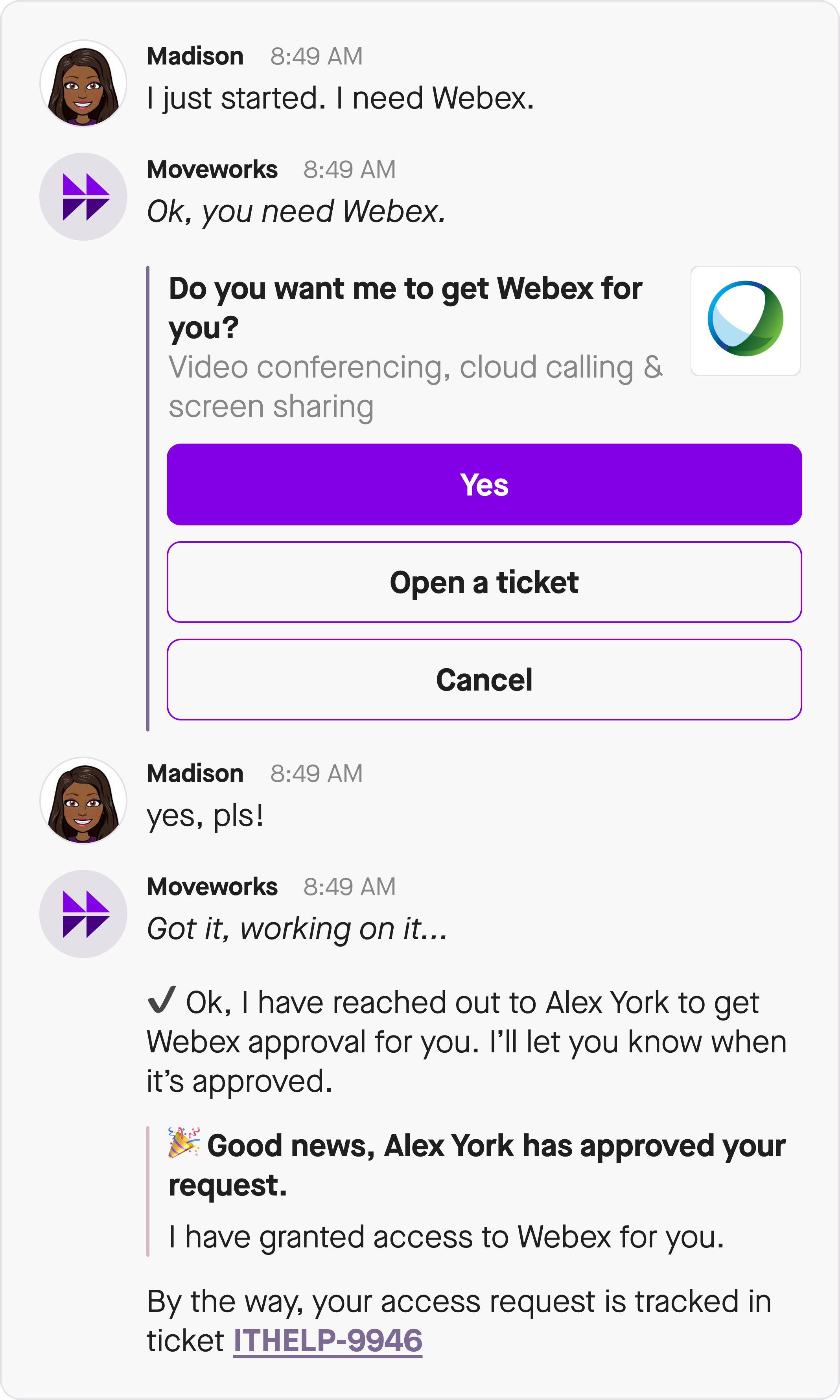
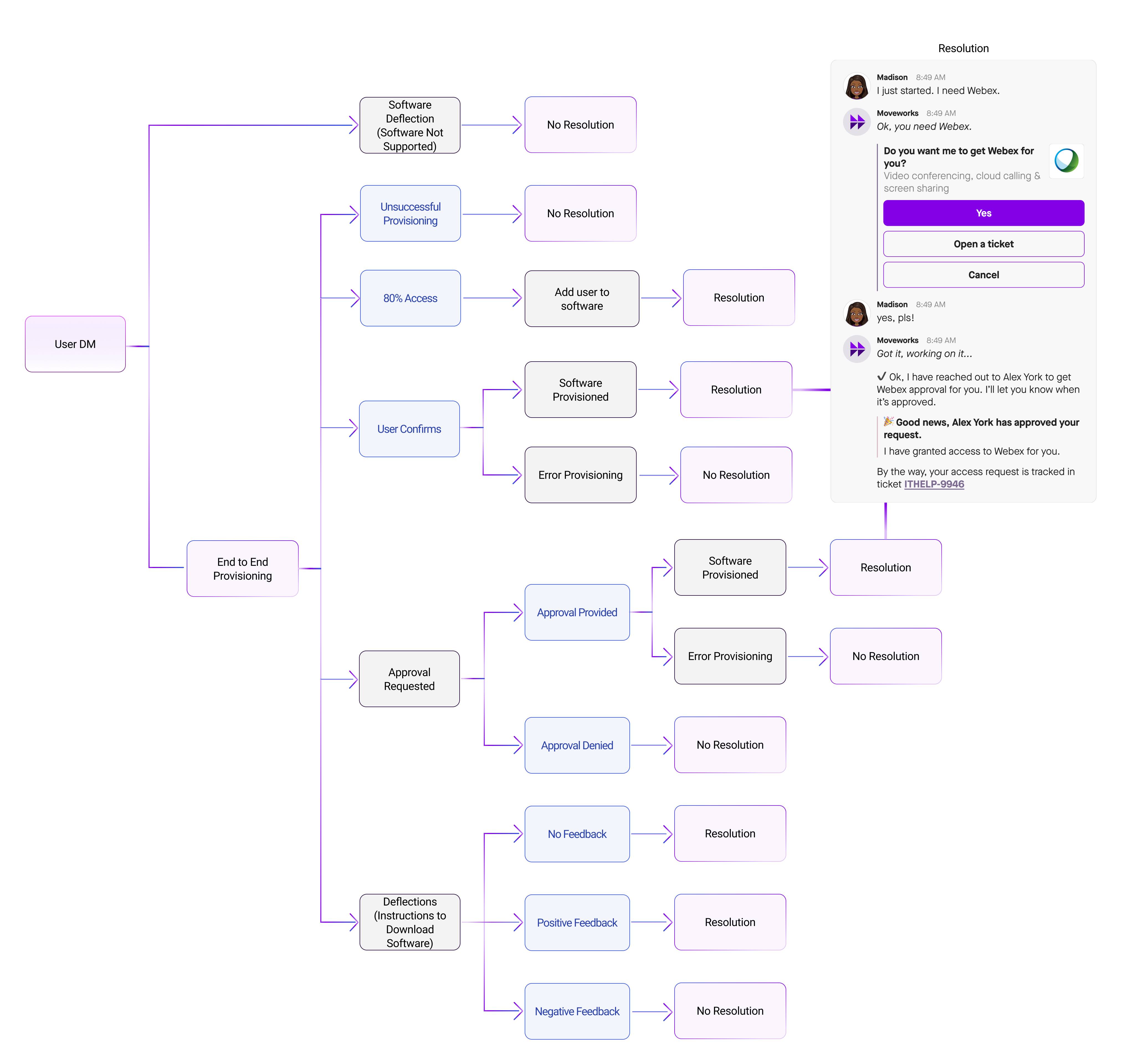
Software Access provided by bot is counted toward resolution in any of these scenarios:
- No approvals needed for the access and software app is provisioned for the user.
- Approval is required for the access, approval is received, and software app is provisioned for the user.
- Self-serve instructions to install software are provided to the user (i.e., SCCM link).
Group Access
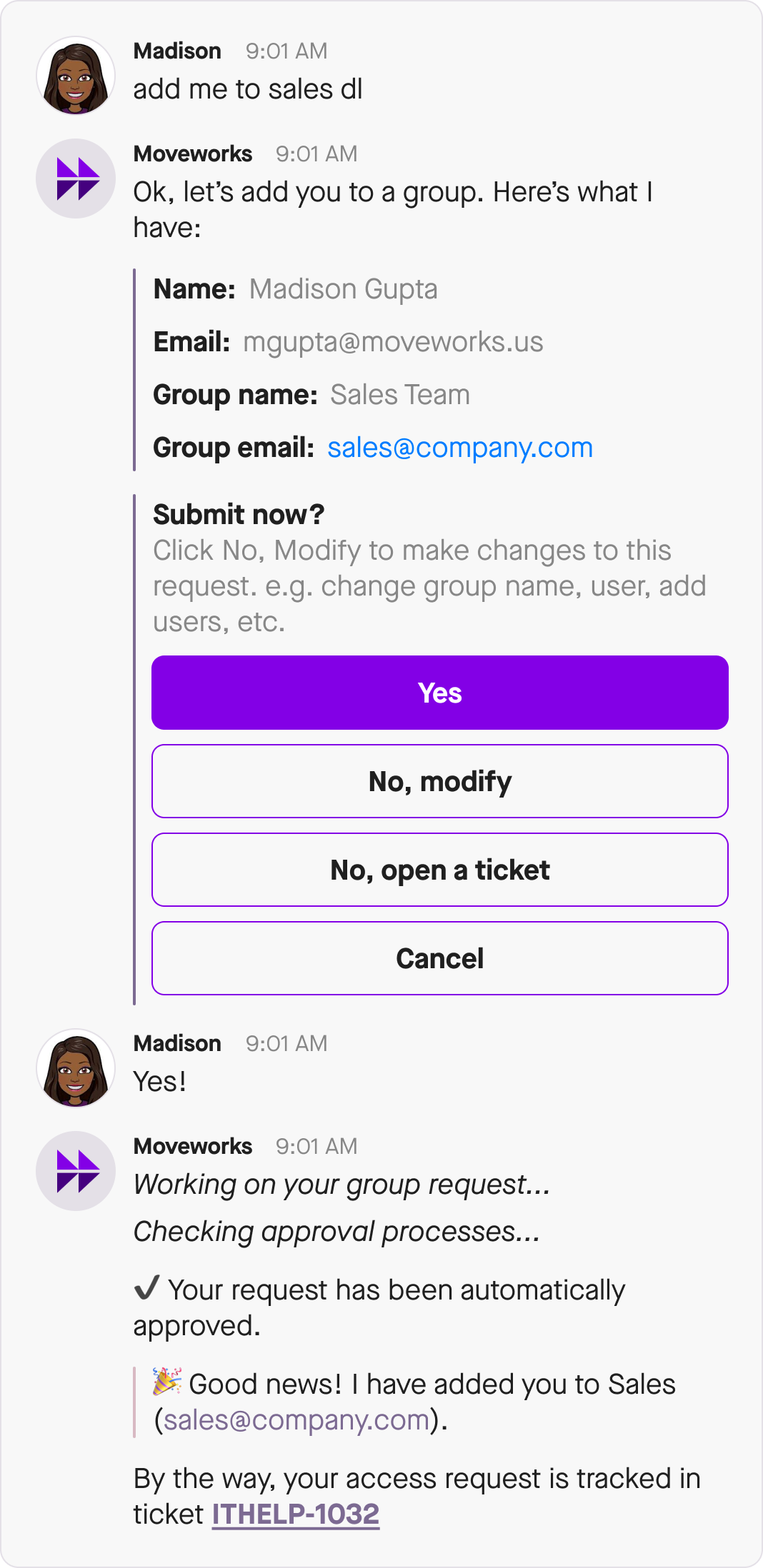
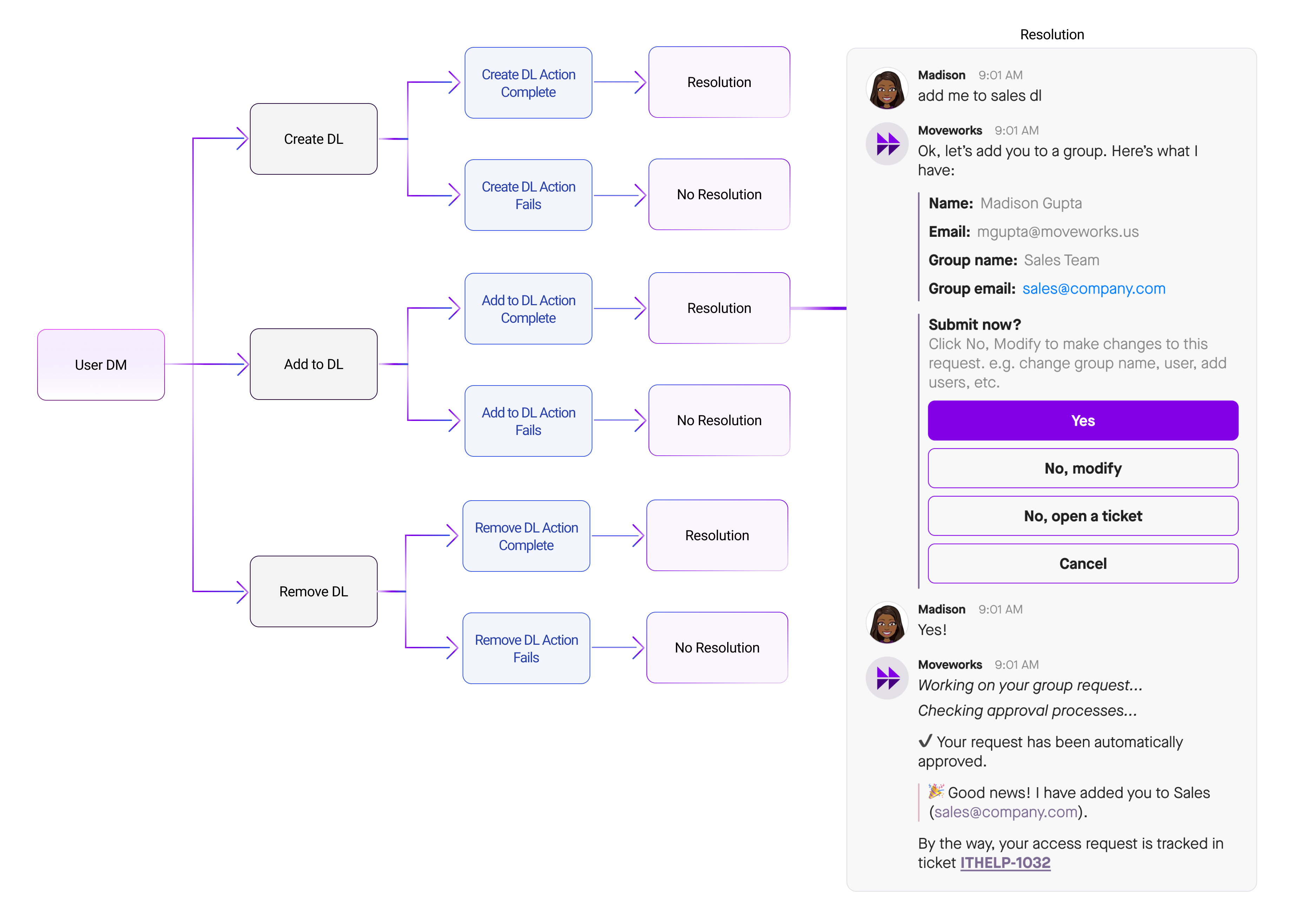
Group Access provided by bot is counted toward resolution in any of these scenarios:
- A new group is created for the user.
- No approval needed to add an email to the group and email is added to the group.
- Approval is required to add an email to the group, approval is received, and email is added to the group.
- User is redirected to a portal to add an email to group or to create a new group (depends on integration).
Account Access
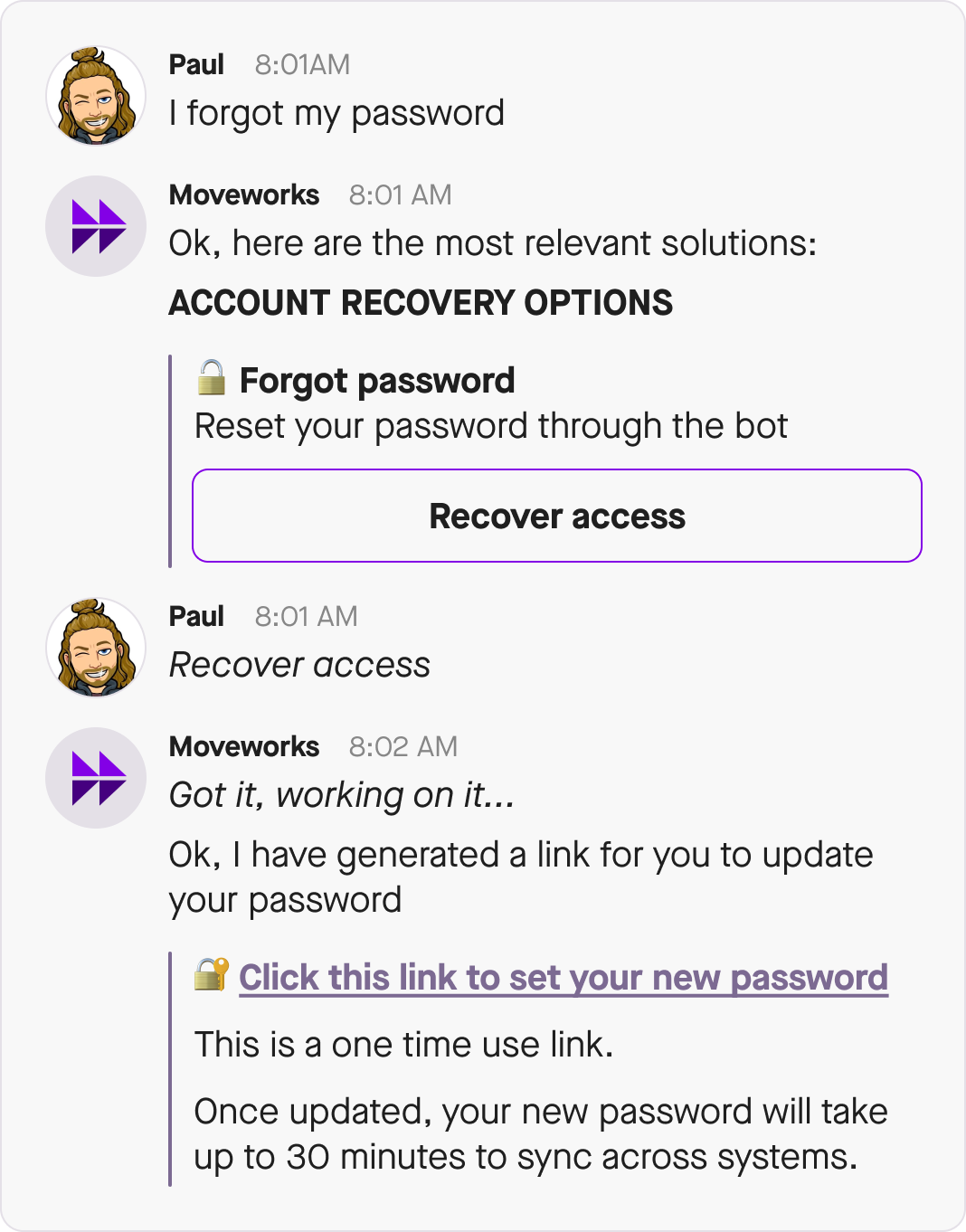
Account Access includes several types of actions (resetting a password, unlocking a locked account, resetting MFA) that are based on various levels of integrations with an Identity and Access Management (IDAM) system.
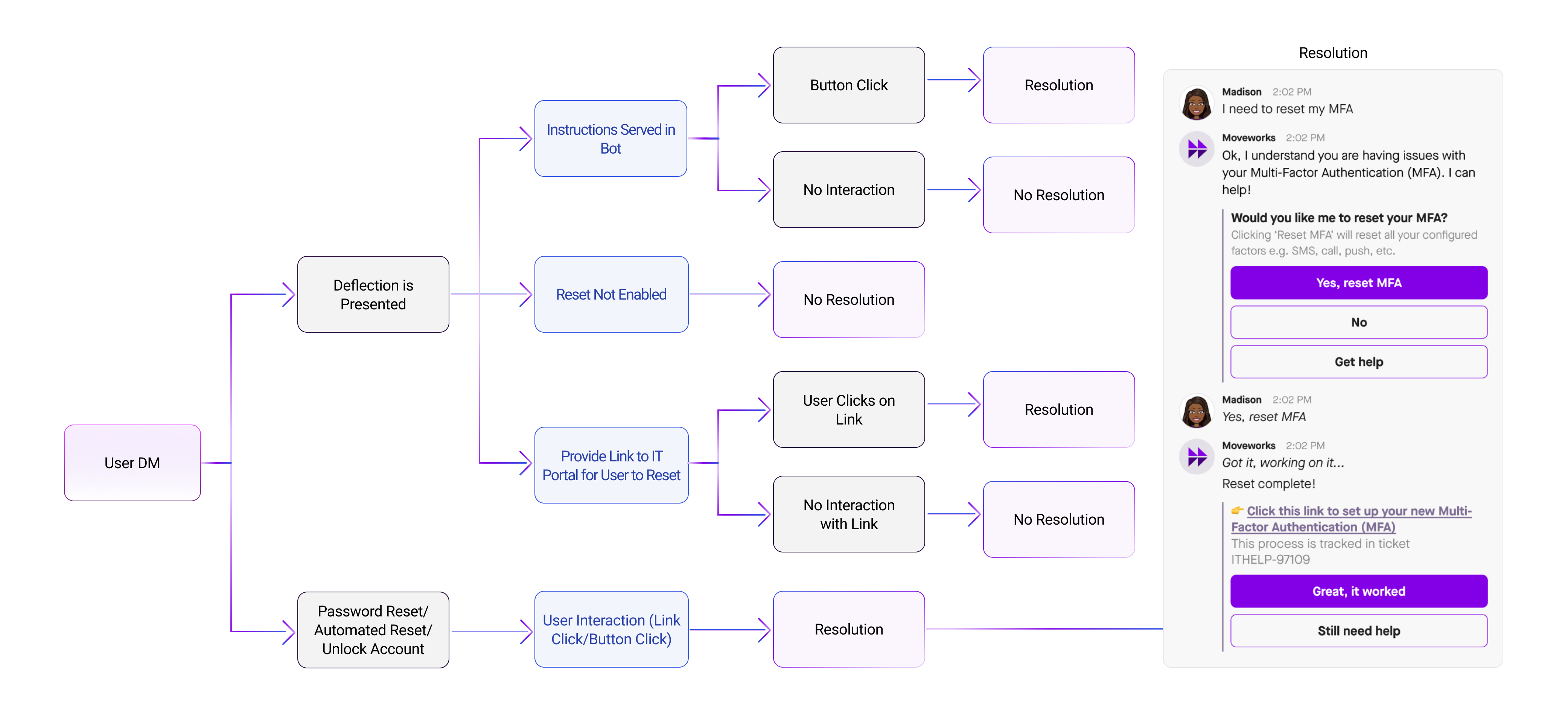
Integrations with IDAM systems vary widely and as a result, so Moveworks recognizes three ways an account access issue being resolved by the bot:
-
API integration: If an integration allows Moveworks to update user credentials directly, this action is counted toward resolution. In particular, when the bot generates a link to reset user password, and the user is forced to reset their password; this flow is counted toward resolution. Another case of this is when the bot unlocks a locked user account.
-
Redirection to self-serve system: If bot is only allowed to redirect user to another self-serve system where they can reset their password or MFA, then resolution is counted when user clicks on the link to this system.
-
Deflection + attribution: If neither of the above is possible, the bot can only serve instructions without trackable link and independently monitor whether the recipient of these instructions reset their password. (The latter is done through the information collected into user roster from the customer identity systems.) In this case, resolution is counted if bot sends such instructions and user resets their password within 24 hours of receiving instructions. This is called a 24-hour attribution scenario.
Lookups
Cases when the bot served information about an employee or conference room are called Lookups. These cases arenot counted toward resolution since normally these questions are not being answered by an agent.
Resolution Rate
Moveworks calculates the Resolution Rate so that admins can see if the bot is resolving issues at a satisfactory rate or not.
The Resolution Rate is determined by taking the resolution numerator (the number of issues resolved by the bot) and dividing that by the resolution denominator (the number of issues that the bot could potentially solve) to produce the resolution rate percentage.
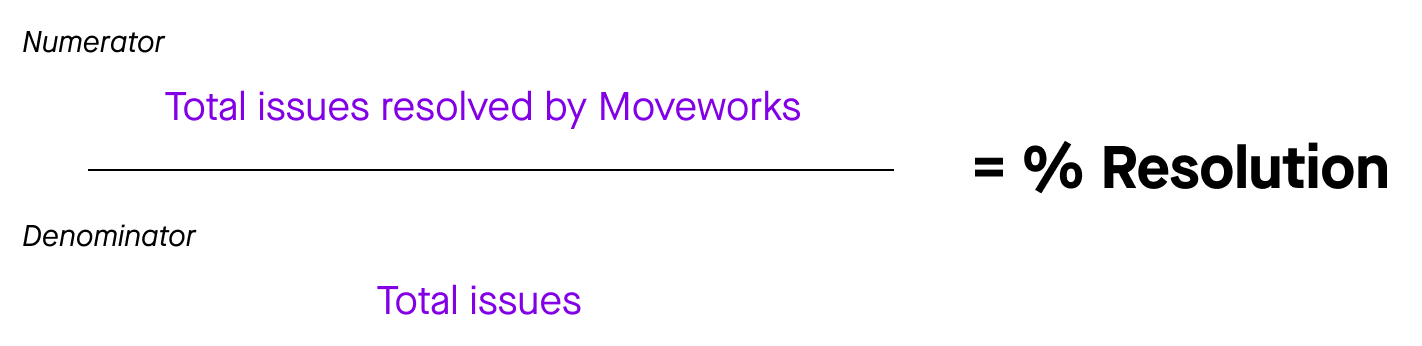
Resolution Numerator
The Resolution Numerator is the total number issues resolved by the Moveworks bot. See the Resolution section to learn what Moveworks counts as resolution and count towards the Resolution Numerator.
Resolution Denominator
The Resolution Denominator is the total number of issues the bot can solve. These issues are taken from tickets created in the ITSM system during the reporting period that are within the bot’s scope to solve, as well as issues raised in chat to the bot.
Tickets are polled from the ITSM system, and the resolution_ticket_filter filter determine whether a ticket is in the bot’s scope and can be counted towards the Resolution Denominator. This filter uses ticket attributes (assignment_group, catalog_item, etc.) to figure out whether a ticket can be solved by the bot. Typically the filter excludes non-related tickets such as tickets assigned to L2 and higher assignment groups and/or tickets of certain types (for example CALL). This filter is configurable, please speak with your Moveworks Customer Success team to learn how.
In some cases, a user describes to the bot an issue, and the bot provides an Answer (or self-serve instructions), but user chooses to only indicate solution as not helpful and not file a ticket. These issues are not recorded in the ITSM but are still counted towards the Resolution Denominator.
Acceleration
Ticket Interactions
In addition to tracking Resolution metrics, Moveworks also provides tracking of Acceleration. The bot accelerates the process of delivering employee services by streamlining various types of interactions. For example, users can perform all ticket operations directly in chat using the bot, this includes submitting a ticket to acknowledging a notification. These interactions speed up the time it takes for a user to get help. Although the user is not getting their issue resolved in that moment, these interactions reduce the time it takes to get help.
These are the types of ticket interactions that are tracked and counted towards Acceleration:
- Ticket submitted in bot: Number of tickets that were submitted to the ITSM system through the bot by employees.
- Comment added: Number of comments that were added by employees from the bot.
- Ticket closed in bot: Number of tickets which employees closed from the bot.
- Check Status: Number of times an employee checked ticket status from the bot.
- Tickets approved: Number of approvals on ServiceNow RITM tickets granted or rejected from the bot.
- Live Chat clicked: Number of times employees were redirected to Live Chat with agents.
- Ticket weblink clicked: Number of times when a user was redirected to view a ticket in the ITSM system.
- Click on Got it Thanks: Number of times an employee acknowledged a notification on ticket update.