
Getting Access to Moveworks Control Center
There are two configuration options to get access to Moveworks Control Center:
[RECOMMENDED] SSO-based access through Okta or Azure OIDC
Pre-requisites:
- Prior to requesting access to Moveworks Control Center, SSO-based access must be setup and configured. Moveworks offers a standard SAML SSO integration, that can be leveraged by an Identity SSO provider. Below are published guides for integrating via Azure and Okta SSO, but your Moveworks team can help you connect to your SSO system of choice.
- Your Moveworks team will then complete your SSO setup on the Moveworks backend. This also includes onboarding someone as your Organization Admin for Control Center.
- This person will then be able to grant access to the different Control Center modules to the rest of your organization, as well as add new Org Admins.
Once the above pre-requisites are in place, please follow the directions below to get access:
- Reach out to your IdAM application owner to request access to the Moveworks Control Center application
- Once you have received access to Moveworks Control Center, you can ask your Org Admin for access to relevant roles
The following modules can be enabled for users within Moveworks Control Center:
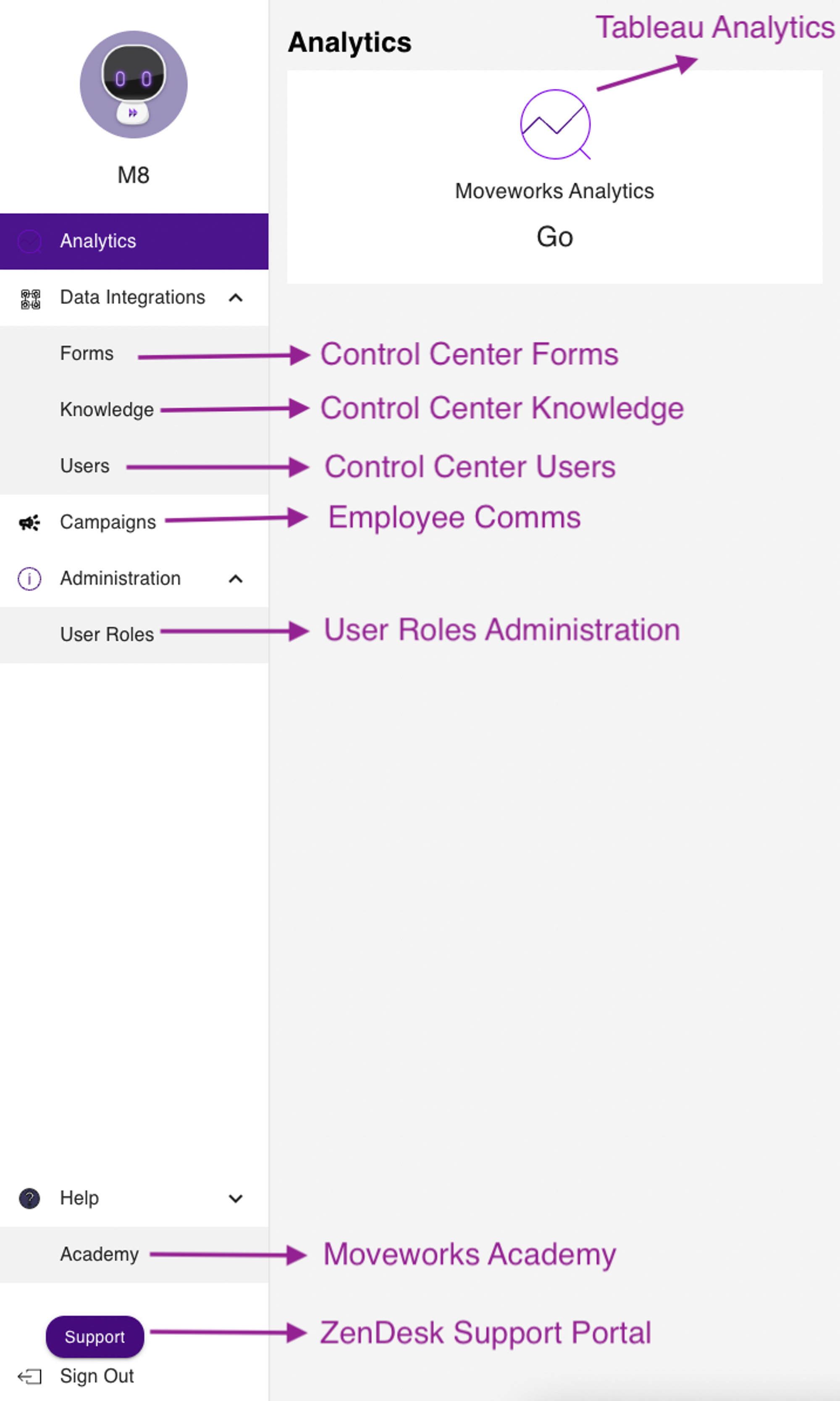
[LEGACY] Through Moveworks Trust Portal
If you do not yet have SSO-based access set up for your organization, please submit a ticket to support@moveworks.ai or reach out to your Org Admin or Customer Success team for access to Moveworks Control Center.
Moveworks Support team will reach out once your account is available.