
Channel Resolver Analytics
What is Channel Resolver?
The Channel Resolver skill enables the Moveworks AI Assistant to join public Slack channels and assist users with their support issues. Users can share their issues in a public channel, and the Moveworks AI Assistant can intercept these posts, reaching out directly to the user through DM with steps for resolution. Channel Resolver is multi-turn in nature; users can also ask follow-up questions and query for more specific details on the DM reachout. Currently, Channel Resolver is supported only on Slack, and not on other chat platforms.
The Channel Resolver can:
- Provide a summarized answer by using knowledge articles or files the user has access to.
- Send relevant forms that the user has access to.
- Share relevant access workflows available in the channel.
- File tickets for end users in two ways:
- Manual ticketing: A ticket is filed on behalf of the end user who initiated the thread when a user or an IT agent reacts with a 🎫 emoji on the thread (this is customizable).
- Automatic ticketing: A ticket is always filed for messages posted in the public Slack channel. The AI Assistant files a ticket on behalf of the end user who started the thread and reacts with a 🎫 emoji on the thread (this is customizable).
Please refer to this documentation to understand the channel resolver experience in Copilot: /docs/channel-resolver-copilot
Channel resolver analytics
Moveworks also provides admin insights on channel resolver usage and details on what questions are being asked by the end users in public slack channels.
Navigate to the route section under AI Assistant analytics to access channel resolver analytics
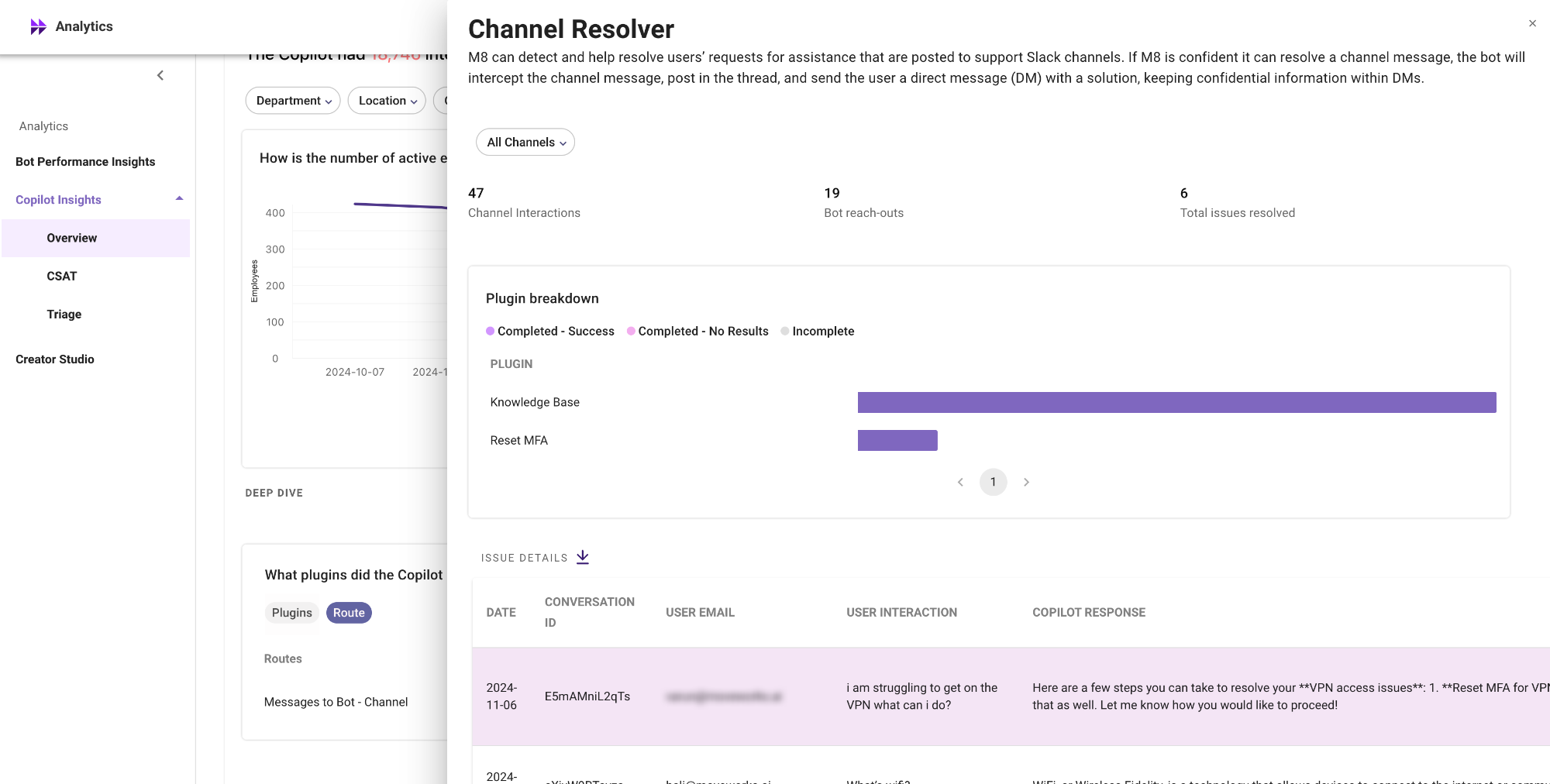
What are the different metrics visible on channel resolver analytics
The metrics are majorly divided into 3 buckets
- Overall channel resolver performance metrics
- Plugin performance in slack channels
- Detailed interactions table on channel interactions
The dashboard also provides functionality to filter metrics for specific channels. The dropdown menu will populate with all your channels where NGCP CR is enabled, from which a particular channel can be selected.
Summary metrics
- Channel interactions: Total number of utterances where a user has posted a message in the channel.
- AI Assistant reach-outs: Total number of utterances where the AI Assistant has successfully reached out to the user in DM.
- Total issues resolved: Total number of utterances where the AI Assistant has reached out to the users in DM and the user has clicked on the issue resolved button in the DM reachout.
Plugin breakdown
This breakdown details which plugin the AI Assistant used when reaching out to the user in DM. The plugins are ranked according to their usage in this metric.
This helps in understanding top plugins used in channels
Issue details (Interactions)
The issue details table deep dives into interactions recorded in the slack channels. The table covers the following attributes
ℹ️ This table covers only the initial interaction, which is the message sent by the user in the public Slack channel. Subsequent direct message interactions are stored in the Interactions table, accessible via the “View Interactions” button.
How to enable channel resolver analytics
🚧 Today enabling this dashboard is not self-servable. Please connect with your CSE or reachout to the Moveworks support team to enable this dashboard.