
HTTP Action Files
Learn how to handle file uploads in HTTP Actions using multipart/form-data encoding and the File tab mapping system.
Overview
When a File slot is resolved in a plugin, the file is not sent in the HTTP request body. Instead, it is passed as a dedicated file argument using the encoding method required by the target API. This is handled automatically by the HTTP Action editor via the File tab.
The File tab constructs a file dictionary where:
- Keys = field name expected by the target API
- Values = the File object
A File slot resolves to a single file, so the dictionary contains one entry. To upload several files in one request, use a List[File] slot and map them as described in Mapping Multiple Files below. See File Slots for how to make a slot accept multiple files.
Supported Encoding Types
File Object Structure
This object is referenced in the File tab as file.
Mapping in the File Tab
The data keyword is unnecessary when accessing your input argument in the File Mapping section
Use the File tab to map the incoming file to the API’s expected field name.
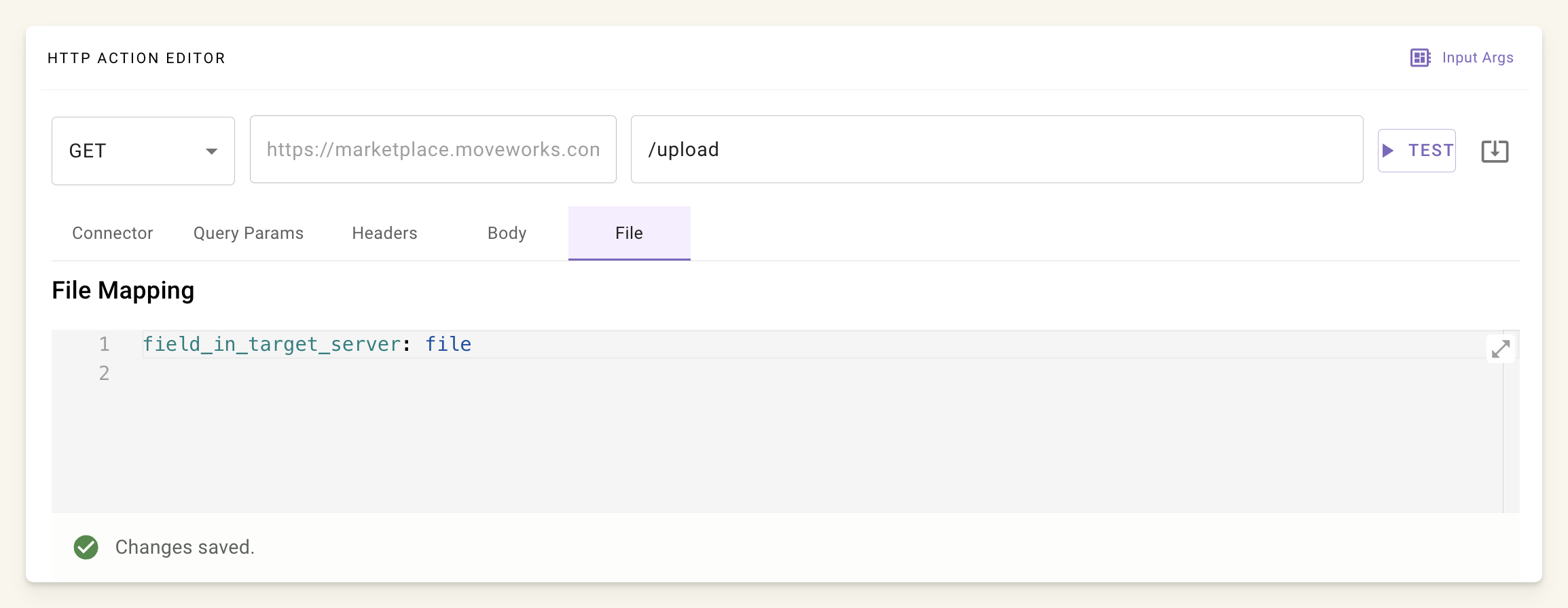
In the File tab, define:
Example: API expects field attachment
Generated Request (cURL equivalent):
The HTTP Action editor constructs this automatically from the File tab mapping.
Example: API requires extra fields
Based on this cURL request to upload an attachment to a ServiceNow table
You need to fill up 3 fields:
You will need to map the file in the File tab:
And map the remaining fields in the Body tab:
Example: Send base64 encoded string
To send the base64 encoded string of the file, you will need to follow the same steps by mapping the file in the File tab and pass the base64 content in the Body of the request with the following syntax files.file_input_arg_name.content
Based on an API that requires the following fields:
You will map the file in the File tab:
And map the remaining fields and content in the Body tab:
Important: The key you access within files must match the key you mapped in the File tab. In the example above, we use files.file.content because we mapped the key as file in the File tab. If you had mapped it to attachment instead, you would need to access it as files.attachment.content. The pattern is always files.[your_mapped_key].[property] where [property] can be content, file_name, or location.
One caveat is that this will create a new input_arg in your input arguments panel. Make sure to delete that dummy argument there.
Mapping Multiple Files
To upload more than one file in a single request, set the slot’s data type to List[File] (see File Slots). A File slot only ever assigns one file, so multiple files require a list slot. Most REST APIs accept multiple files over multipart/form-data. You map them in the File tab using one of the patterns below, depending on what the target API expects.
Pattern: Separate fields per file
Use this when the API expects each file under its own distinct field name (e.g., file1, file2). Map each file argument to its own key in the File tab:
Generated Request (cURL equivalent):
Pattern: Array of files under one field
Use this when the API expects all files under a single repeated field name (e.g., files). Map the field to an array of your file arguments in the File tab:
Generated Request (cURL equivalent):
Pattern: Map a List[File] slot directly
When the upload comes from a single List[File] slot, map the slot’s input argument straight to the API’s field name. Every file in the list is sent under that field:
This sends each file in the list as a separate part under the files field, equivalent to the repeated-field cURL request above.
Filename Handling
Callout: The uploaded filename is fixed to file.file_name at upload time.
You cannot change it via the File tab.
Options to Control Filename
Let API handle filename
Send filename separately in JSON body:
cURL Equivalent (Generated Internally)
For an HTTP action with:
- URL:
POST https://upload.example.com/submit - Body:
{ "user": "john" } - File mapping:
doc→file
Best Practices
- Always use File tab — never embed in JSON.
- Rename early if needed.
- Use
TESTbutton — check your service for the uploaded file.