For AI agents: a documentation index is available at the root level at /llms.txt and /llms-full.txt. Append /llms.txt to any URL for a page-level index, or .md for the markdown version of any page.
Logo
DeveloperAcademyCommunityStatus
ReferenceGuides
ReferenceGuides
  • Agent Studio
    • Overview
    • Quickstart Guides
    • Core Concepts
    • Conversation Process
    • Actions
    • Connectors
    • System Triggers
    • Agent Architect
    • Cookbooks
    • Development and Testing
    • AI Agent Marketplace
    • Developer Tools
  • Agentic AI
    • LLM Fundamentals
    • The Agentic Reasoning Engine
      • How the Reasoning Engine Works
      • Processing Tool Responses
      • Reasoning Loops
        • Plugin Selection
        • Multi-Plugin Response
      • Reasoning Engine Upgrade Program
    • Memory Constructs
    • Conversational Context
    • Guardrails
    • Grounding and Hallucinations
    • Continuous Learning
    • LLMs & SLMs
    • Steerability Tools
    • Multilingual Support
  • Core Platform
    • User Identity
    • Moveworks Agent (On-Prem)
    • Approvals Engine
    • Entity Catalog
    • Moveworks Data Objects
    • Security Information and Event Management (SIEM) Logs Overview
DeveloperAcademyCommunityStatus
On this page
  • Does the Assistant treat native and custom plugins differently?
Agentic AIThe Agentic Reasoning EngineReasoning Loops

Plugin Selection

||View as Markdown|
Was this page helpful?
Edit this page
Previous

Multi-Plugin Response

Next
Built with

Plugin selection refers to the AI Assistant’s ability to autonomously determine which plugins to call to execute the plan for the user’s request.

It is part of the two inner reasoning loops - planning iteration and execution iteration:
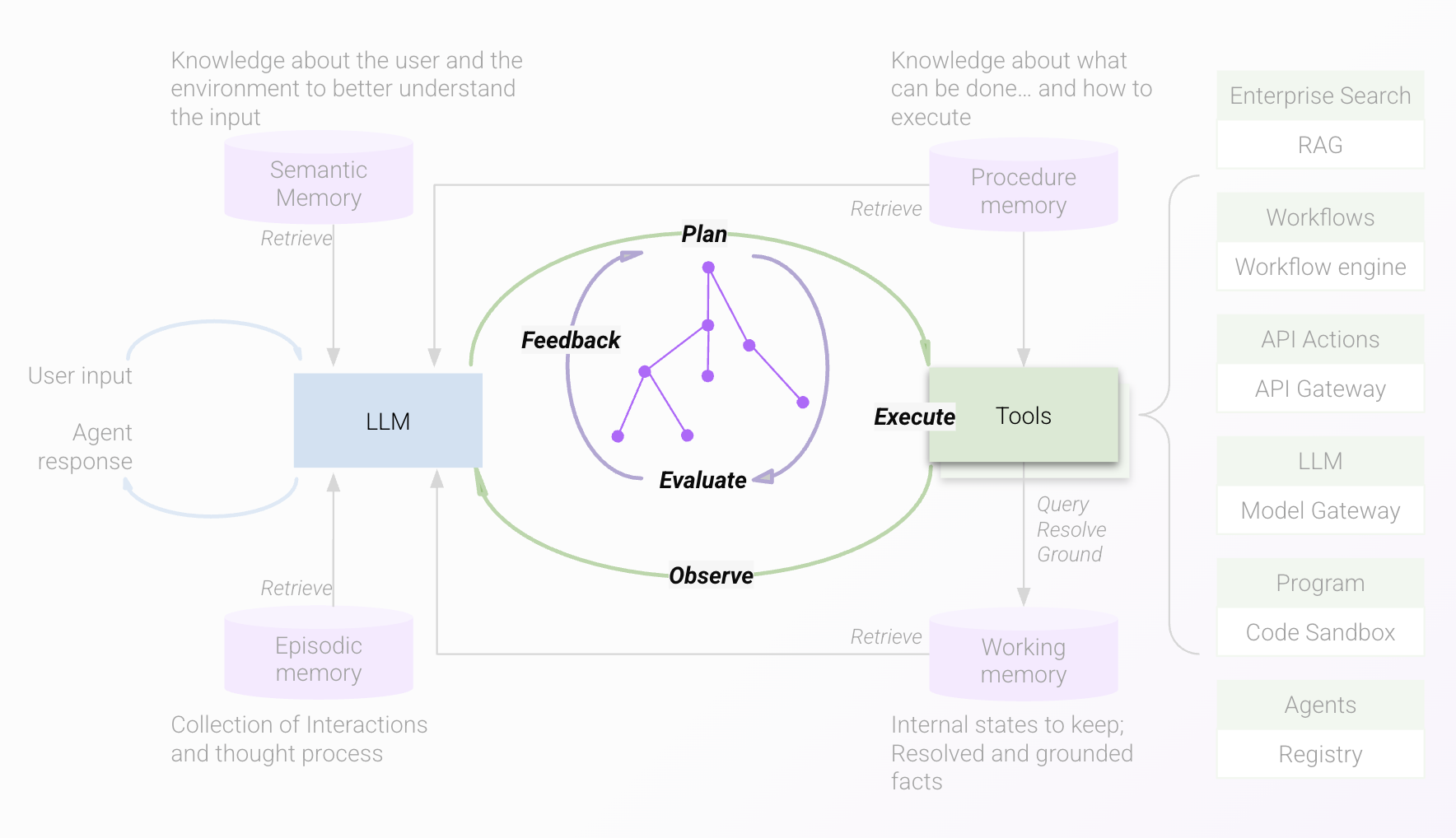
Here, the innermost planning iteration loop defines a plan that involves selecting

  1. the plugins to call
  2. the arguments to pass to the selected plugins

This selection is based on the available plugins to call in the environment, which varies from customer to customer. It specifically leverages the description of each plugin (native or custom) and the positive and negative examples provided to determine whether the plugin is a good match for the user request.

The AI Assistant can choose multiple plugins at once, a feature called multi-plugin response.

The second loop, called the planning execution loop, then takes the plan devised in planning iteration and executes it by calling the identified plugins, and then observing the outcome. Based on this, it can call other plugins, or return to the user with a response or ask for input.

Does the Assistant treat native and custom plugins differently?

No, the reasoning treats these plugins the same way - plugin descriptions and examples are critical for both.

Currently, it is not possible to modify these parameters for native plugins. This means that for cases where you might see both types of plugins competing for the same request, you can

  1. Offer both types to the user
  2. Modify the examples for the custom plugin to cover a different set of utterances from the native plugin
  3. Keep the native plugin active and use steerability tools to guide the reasoning to select one over the other for specific requests
  4. Disable the native plugin if the functionality is sufficiently covered with the custom plugin.