
Action
Overview
Actions are the core executable units in compound actions, think of them as your agent’s “doers”. Use this expression to invoke predefined actions.
Key concepts
- Action Types: Supports three types callable via
action_name: HTTP actions (for API calls), script actions (for custom logic), and Compound Actions (for reusable workflows). - Execution Flow: The expression runs the specified action, storing results in an output key variable for downstream use. Delays handle asynchronous behaviors pausing the execution of the flow.
- Dynamic Elements: Pass variables from prior steps or user data using Moveworks Data Mapping; outputs capture full API responses or script results.
Low-Code Editor
Add an action step to the editor, then use the right-hand panel to wire it up. Below, follow the annotated steps to build a simple feature request update (e.g., via an HTTP action). Follow the steps to build a simple action expression.
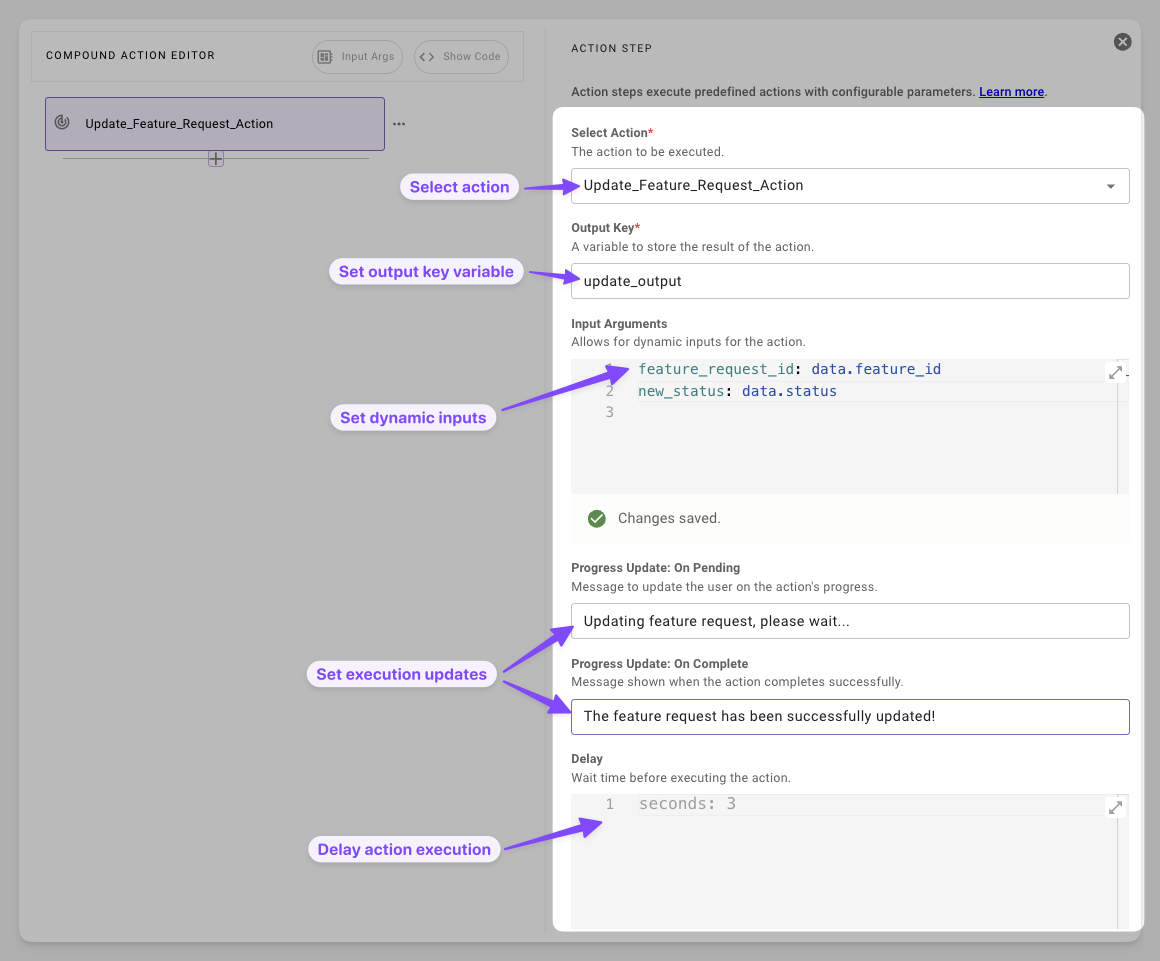
- Select Action: Choose from your predefined actions. Tip: If it’s a new action, define it first.
- Set Output Key Variable: Name a variable to capture the result. This stores the API response or script output for later steps. Tip: Use descriptive names like
update_outputto avoid debugging headaches. - Set Dynamic Inputs Map inputs via code editor fields such as
feature_request_id: data.feature_id. Common Pitfall: Ensure vars exist upstream. - Set Execution Updates Customize user-facing messages for pending (“Updating feature request, please wait…”) and complete (“The feature request has been successfully updated!”) states.
- Delay Action Execution Add a wait (e.g., 3 seconds) via units like seconds or minutes.
Syntax Reference
Schema
Fields
The combined delay across all units (seconds, minutes, hours, days) cannot exceed 30 days.
- Static values (e.g.,
days: "45"): The editor validates these inline and blocks you from saving. - Variable values (e.g.,
days: "data.wait_days"): The platform can only validate these at runtime. If the resolved value exceeds 30 days, the delay step fails with a runtime error when it executes.
If you drive the delay from user input or upstream data, clamp the value in a prior script action to avoid runtime failures.
Practical Examples
Example 1: Basic HTTP Action
Retrieve user info via API, with progress feedback
Expected Output
The API response is stored in the user_details output key defined above and is now available in the data bank for any downstream steps.
Example 2: Script Action
Run a script action that add two strings together
Python script
Action
Example 3: Nested Compound Action
Run a compound action that approves and notifies a ticket