
Compound Action Data Bank

View as Markdown

When you’re building your Compound Action, you can reference additional variables which will be provided by Moveworks when the Compound action executes. This is the Compound Action Data Bank.

meta_info

You can access the meta_info key from any part of the Compound Action. It’s structure takes the following form.

JSON
{
"meta_info": {
"user": { ... }
}
}

meta_info.user

We can access the user attributes of the current user (the one who invoked the plugin) with the following notation meta_info.user.{{attribute}}. View all of the available user attributes here.

1steps:
2 - action:
3 action_name: some_action
4 output_key: some_action_resp
5 input_args:
6 name: meta_info.user.first_name
7 - return:
8 output_mapper:
9 name: meta_info.user.first_name
10 role: meta_info.user.role
11 department: meta_info.user.department
12 some_attr: meta_info.user.custom_data.some_attr

data

You can access the data key from any part of the Compound Action. It’s structure takes the following form.

json
1{
2 "data": {
3 ...input_variable_names,
4 ...output_keys
5 }
6}

data.{{input_variable_name}}

Your Compound Action’s Input Variables are inserted at the top level of the data key. So for example, if you defined 2 input variables (name & age)…
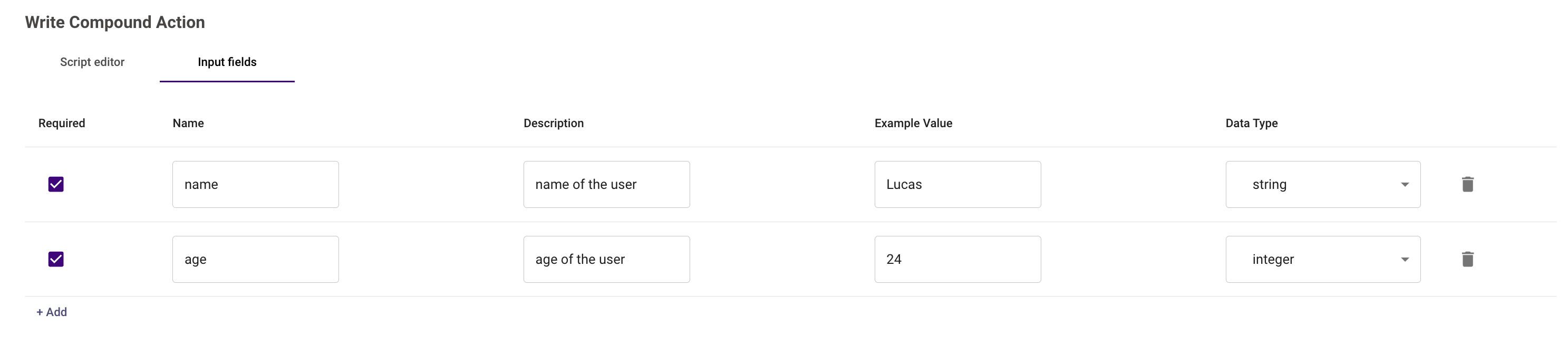
You could reference it in your Compound Action as data.name and data.age

yaml
1- return:
2 output_mapper:
3 name: data.name
4 age: data.age

data.{{output_key}}

Expressions “save” their data to an output key so you can reference them later. Some expressions that utilize output keys include

  1. Actions (Built-in, HTTP, etc.)
  2. For expressions
  3. Raise expressions

These keys can be accessed using the notation data.{{output_key}}, facilitating data flow and handling within the compound action.

action Example

In this example, we pass data through the output key from one action to the next.

1steps:
2 - action:
3 action_name: get_user_device
4 output_key: device
5 input_args:
6 user_email: meta_info.user.email_addr
7 - action:
8 action_name: clean_recycle_bin_on_device
9 output_key: remote_action_result
10 input_args:
11 device_id: data.device.asset_uuid # data.device is the output key of the first action

for Example

When you use a for expression, the output keys of all steps within that for expression are inserted into the for expression’s output_key as a list of dictionaries.

For example, if you had the following compound action…

1steps:
2 - action:
3 action_name: get_open_outages
4 output_key: outage_tickets
5 # Assume response structure is [ {"ticket_id": "OUT-123", ...}, {"ticket_id": "OUT-456", ...}, ... ]
6 - for:
7 each: ticket
8 index: index
9 in: data.outage_tickets
10 output_key: outage_ticket_process_results
11 steps:
12 - action:
13 action_name: get_incident_manager_for_outage
14 input_args:
15 outage_id: ticket.system_id
16 output_key: incident_manager_profile
17 # Assume response structure is { "id": "7bd99d76-d5a6-4ed9-bea5-7f513bf35c6a", "status": "INACTIVE" }
18 - action:
19 action_name: update_incident_manager_profile
20 input_args:
21 manager_id: data.outage_ticket_process_results[index].incident_manager_profile.id
22 status: "ON_CALL"
23 output_key: updated_manager_profile

The resulting data bank under data will look like this:

JSON
{
"data": {
"outage_tickets": [ {"ticket_id": "OUT-123", ...}, {"ticket_id": "OUT-456", ...}, ... ]
"outage_ticket_process_results": [
{
// Process results for "OUT-123"
"incident_manager_profile": { "id": "7bd99d76-d5a6-4ed9-bea5-7f513bf35c6a", "status": "INACTIVE" },
"updated_manager_profile": { "id": "7bd99d76-d5a6-4ed9-bea5-7f513bf35c6a", "status": "ON_CALL" }
},
{
// Process results for "OUT-456"
"incident_manager_profile": { "id": "839b82da-38f2-41f4-91ec-db70de7c3c56", "status": "INACTIVE" },
"updated_manager_profile": { "id": "839b82da-38f2-41f4-91ec-db70de7c3c56", "status": "ON_CALL" }
}
]
},
...
}