
For Loop
Overview
The for expression is a foreach loop that iterates over an iterable (array/list from the data bank), binding each item to an each & index variable. It executes steps sequentially per iteration, then aggregate outputs into the output_key as a list of dicts. It is Ideal for bulk actions like user notifications.
Output Aggregation Deep Dive
The for expression outputs a clean list of objects, where one object contains the results of an iteration. An example loop with two actions,incident_manager_profile and updated_manager_profile, expect:
You can access the variables the same way you access any others in the data bank; e.g., data.for_expression_output_result[0].incident_manager_profile.status will yield INACTIVE
Low-Code Editor
Add a For Loop Step, bind iterable, define loop variables, and add expressions inside.
You can only bind an iterable in in, you cannot create a list on the fly using DSL such as ["a", "b"], only data bank variables work.
You can create a precursor script action to output a list and pass it to in .
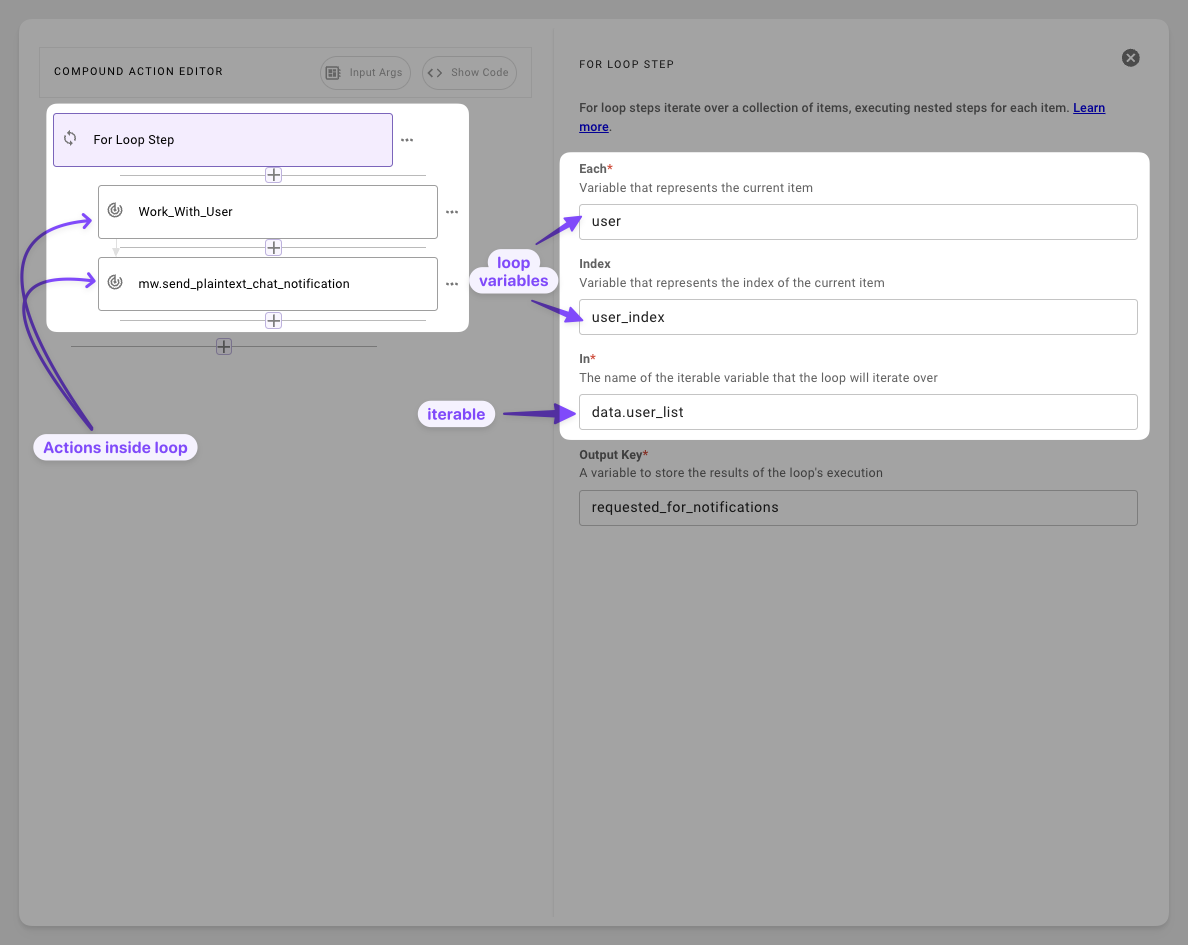
- Bind the Iterable
(in): Onlydata bankvariables work, inline lists like["a","b"]will fail. - Define
each&index: Seteachfor item (e.g.,user) and index (e.g.,user_index), these are only scoped to the for loop. - Add expression & Set
output_key: Add expressions to each step. Make sure to add readable output keys.
Syntax Reference
Schema
Fields
Accessing loop output
The output_key list is assembled while the loop runs. Each iteration appends one dict whose keys are the output_key values of the steps in that iteration, so the list is available both inside the loop (for earlier iterations) and after the loop finishes.
- After the loop: reference entries by position, for example
data.results[0].step_key. - Inside the loop, from a previous iteration: combine the loop
indexwith theoutput_key. For example,data.results[index - 1].step_keyreads the output of the stepstep_keyfrom the previous iteration. This is useful for pagination or chained calls where each iteration needs a value produced by the one before it. There is no previous entry on the first iteration (indexis0), so handle that case separately, for example with aswitch. - Nested compound actions: when a step inside the loop calls another compound action, the data mapped in that compound action’s
returnbecomes the value stored under the step’soutput_keyin the iteration dict. For example, if the step hasoutput_key: page_resultand the nested compound action returns{ "next_cursor": "abc" }, the previous iteration’s cursor isdata.results[index - 1].page_result.next_cursor.
Output looks empty in the execution logs?
The accessed-variables view in the compound action logs only shows data that was read by a later step. If nothing in the compound action references data.<output_key>, the loop output appears blank even though it was written. To inspect it, add a step that reads it, such as a return whose output_mapper references data.<output_key>.
Exiting a loop early
A return inside steps breaks out of the loop: the remaining iterations are skipped and the compound action ends with the data mapped in that return. Use it to stop iterating once you have found what you need, for example inside a switch case.
Practical Examples
Example 1: Actions in Batch
Run actions for each user in a list
Compound Action
Expected Output
The compound actions fetches the records of the users and consequently uses a for loop to send a message to each user.
Example 2: Outage Ticket Processing
Batch-update manager for open tickets
Sample input argument
Compound Action
Expected Output
The for loop iterates through each ticket, it finds the incident manager for the ticket and updates the status of the incident manager to ON_CALL