
Switch

View as Markdown

Overview

The switch expression is a control flow expression that evaluates a list of boolean conditions in order. The first true condition executes its steps; if none match, it runs the optional default. Each case pairs a condition with a list of expressions; empty steps allow silent passes.

Low-Code Editor

Add a switch step, define DSL conditions per case and add expressions inside each case.
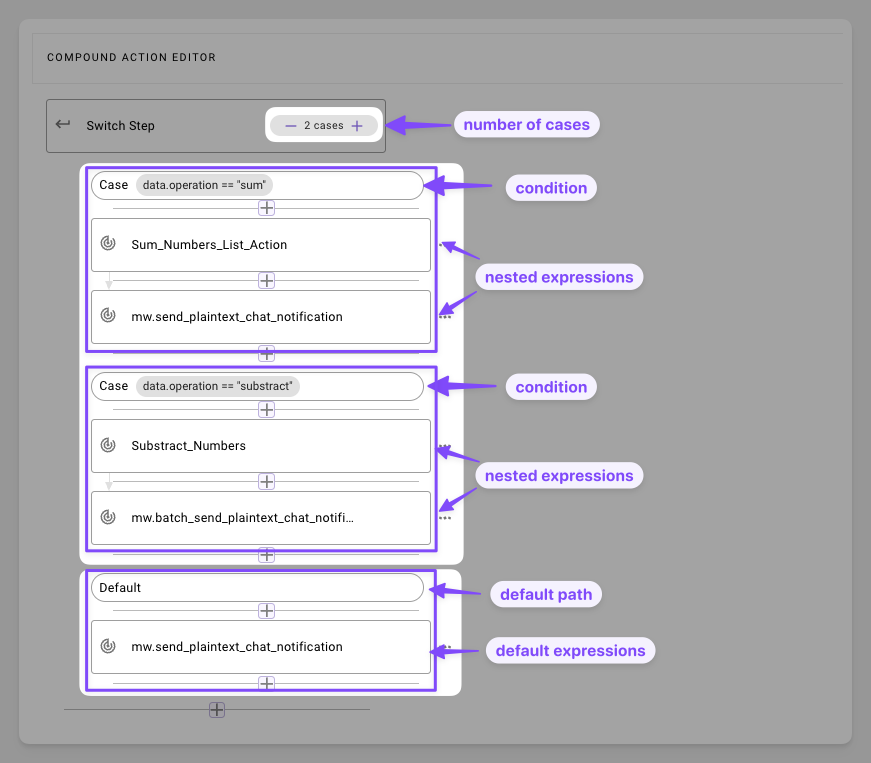
  1. Define the Number of Cases: Click on the ”+” or ”-” symbol to add or remove cases.
  2. Define Condition in a Case: Select a case block; enter a boolean DSL expression in the editor (e.g., data.operation == "sum")’
  3. Add Steps in the Case: Click ”+” inside the case to add expressions.
  4. Configure the Default: Add fallback steps. Omit for silent skips on no-match.

Syntax Reference

Schema

1switch:
2 cases: # list: Sequence of condition-step pairs (required)
3 - condition: DSL_BOOLEAN_EXPR # boolean: DSL expr (e.g., "data.user_id == meta_info.user.id")
4 steps: # list: Nested expressions (e.g., actions)
5 - EXPRESSION_1
6 - EXPRESSION_2
7 - condition: ANOTHER_EXPR
8 steps:
9 - EXPRESSION_3
10 default: # dict: Fallback if no cases match (optional)
11 steps: # list: Default expressions
12 - EXPRESSION_4

Fields

FieldTypeMandatoryDescription
caseslist[dict]YesSequential checks: First true runs its steps
conditionbooleanPer caseDSL expressions
stepslist[expr]NoList of expressions to execute. Can be empty []
default.stepslist[expr]NoCatch-all list of expressions.

Practical Examples

Example 1: Simple ID Match

Notify only if the user is not the requestor

1switch:
2 cases:
3 - condition: meta_info.user.id == data.requestor.record_id
4 steps: [] # Skip if self-add
5 default:
6 steps:
7 - action:
8 action_name: mw.send_plaintext_chat_notification
9 output_key: notification_sent
10 input_args:
11 user_record_id: data.user.record_id
12 message:
13 RENDER():
14 template:"Hey {{user_name}}, {{requestor_name}} added you to a special group"
15 args:
16 user_name: meta_info.user.full_name
17 requestor_name: data.requestor.full_name

Expectation: If there’s a match, stay silent; If not, send a message to the user

Example 2: Role-Based Welcomes

Tailor onboarding by access level.

1switch:
2 cases:
3 - condition: data.user.access_level == "admin"
4 steps:
5 - action:
6 action_name: send_admin_welcome
7 output_key: admin_msg
8 input_args:
9 user_id: data.user.id
10 message: '''Welcome, Admin! Full dashboard access unlocked.'''
11 - condition: data.user.access_level == "member"
12 steps:
13 - action:
14 action_name: send_member_welcome
15 output_key: member_msg
16 input_args:
17 user_id: data.user.id
18 message: '''Welcome, Member! Dive into your profile perks.'''
19 default:
20 steps:
21 - action:
22 action_name: send_generic_access_notification
23 output_key: generic_msg
24 input_args:
25 user_id: data.user.id
26 message: '''Account ready—start exploring!'''

Expectation: Routes to specific action and welcome message based on user’s access level.

Example 3: Temperature Thresholds

Alert or log based on sensor data

1switch:
2 cases:
3 - condition: data.temperature <= 5
4 steps:
5 - action:
6 action_name: alert_cold_temperature
7 output_key: cold_alert
8 input_args:
9 message: '''Alert: Very cold—check heating!'''
10 - condition: data.temperature > 5 AND data.temperature <= 25
11 steps:
12 - action:
13 action_name: log_moderate_temperature
14 output_key: mod_log
15 input_args:
16 message: '''Moderate temp: All good.'''
17 default: # >25 implied
18 steps:
19 - action:
20 action_name: alert_high_temperature
21 output_key: high_alert
22 input_args:
23 message: '''Alert: High temp—activate cooling!'''

Expectation: Based on the temperature send an alert or log.