
Data API
Notifications data via API is going live on 1st April’2026.
Check out this post for more information : https://community.moveworks.com/stakeholder-tools-exi-mw-setup-ks-analytics-115/big-news-proactive-insights-are-coming-to-the-data-api-3286
V1 Data API is now released
The Data API is now available in the V1 version. If you are still using the Beta2 or Beta1 version please migrate your active workflows to this version.
For customer using Beta2
There is no change in the API structure, you can even use the same credentials that were shared with you during the beta program. The only change you need to make on your end is to update the API URL
Beta2 URL : https://api.moveworks.ai/export/v1beta2/records/conversations
V1 URL : https://api.moveworks.ai/export/v1/records/conversations
For customer using Beta1
Beta1 API is severely outdated at this point. If you are still using this API migrate to the beta2 version as fast as possible.
We have published a new course on Data API here. This aims to give you a complete overview of what is Data API and what can you achieve using Data API.
We have recently introduced a new capability to support $count in Data API. This query provides details on the number of records that are available based on the filter that is parsed to a Data API entity. Read more here : link
Overview
The Data API is a product offered by Moveworks that is designed to allow customers to ingest AI Assistant conversations and interaction data through a REST API. The Data API exposes all interactions, including user utterances, button clicks, link clicks, and UI form submissions. It also provides information on the plugins invoked by the LLM, resources used to generate summarized responses, and users who have been ingested into Moveworks and have access to the AI Assistant.
What is a rest API?
A REST API (Representational State Transfer Application Programming Interface) enables systems to communicate over HTTP using a set of architectural principles. It is stateless, meaning each request from a client to the server must contain all necessary information. The key HTTP methods used are GET (retrieve data), POST (create data), PUT (update data), and DELETE (remove data). Resources are accessed via standard URLs, and JSON format is typically used for data exchange. REST APIs are known for their simplicity, scalability, and flexibility, making them ideal for web services and mobile applications.
Learn more about REST API here.
API version
The current version of the Data API is v1, served under https://api.moveworks.ai/export/v1/records/. The earlier v1beta1 and v1beta2 versions are superseded — migrate any remaining workflows to v1. To read more on the API lifecycle management please refer to this documentation.
Which REST Endpoints are exposed via Data API
The Data API exposes base tables related to AI Assistant conversations data. The following tables are exposed through individual REST endpoints. Only the GET method is supported on these endpoints.
How is the Data Model structured
The Data Model follows an hierarchical approach to allow additional data for nested object. The relationship can be understood by the following image.
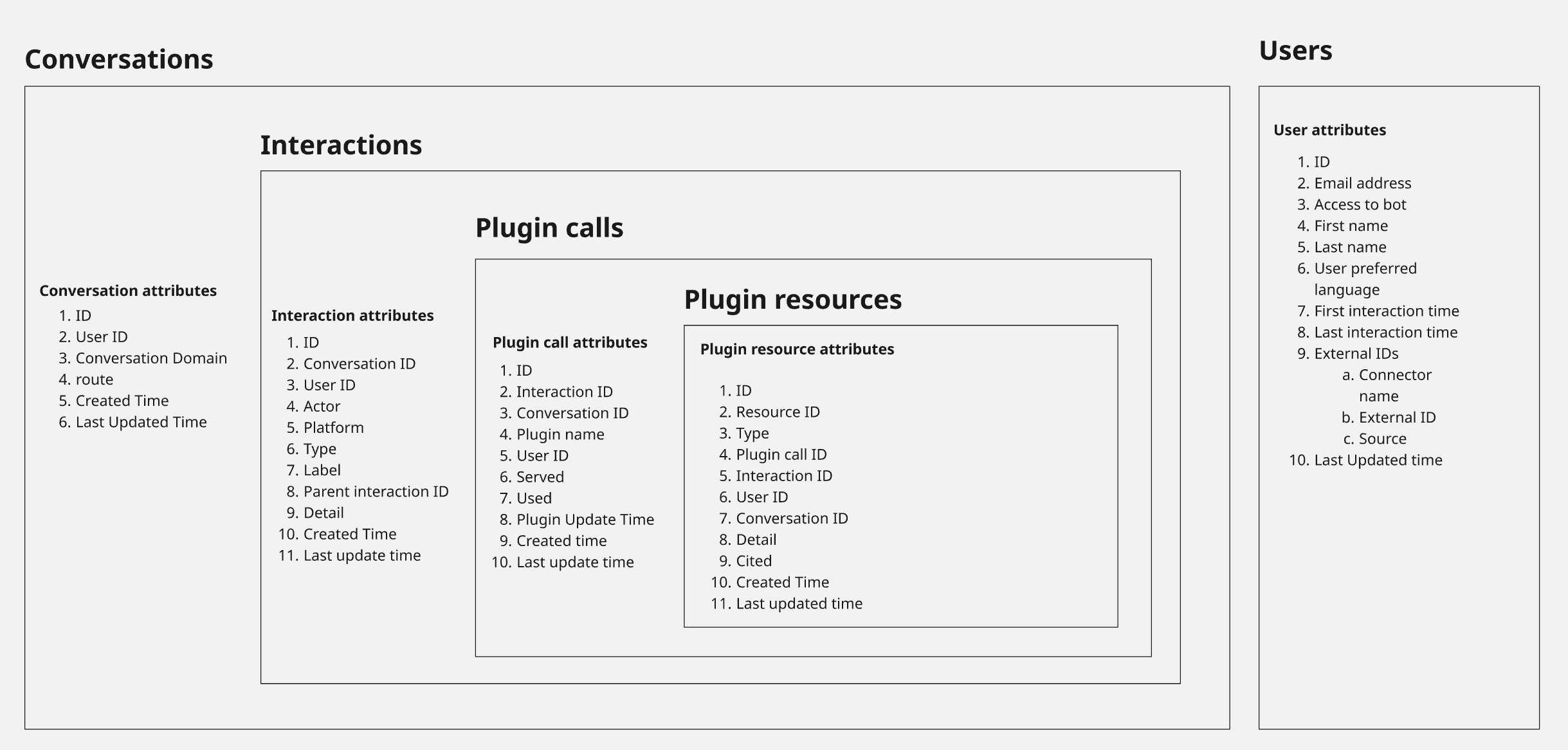
The parent object shares 1-Many relationship with the subsequent child object. Users API fetches data from a standalone table which provides details around the user ingested into Moveworks.
API structure
All REST endpoints will respond in JSON format defined by OData. Each JSON object represents a new unique entry in that table
- If there is no entries present in the table, the value array is empty.
- All attributes in each entity either contains a “value” or will be
NULL. There will be no empty strings or empty JSON if data is not present for a certain field. - Most attributes are exposed as STRING, nested JSON with STRING key <> value pair, or array of STRING. The only exceptions are the flag fields, which are exposed as JSON booleans:
servedandusedon plugin calls,citedon plugin resources, andaccess_to_boton users. - Timestamps are ISO 8601 strings in UTC, for example
2026-09-15T09:12:04.118Z.
Data Dictionary
The following tables cover what attributes are available in through individual REST API’s. To understand the exact attribute names for each REST endpoints please refer to the API documentation.
Conversations
Fields inside the conversation detail JSON object
detail is populated only for system-triggered conversations, and its keys depend on type. User-initiated DM conversations return Null.
For the full list of type values and which of them return an empty detail, see the conversation type reference.
Example conversation records
A comms notification:
A user-initiated DM conversation, where type and detail are Null:
CSAT data
CSAT (Customer Satisfaction) data is exposed across the Conversations and Interactions entities. The table below summarizes where each piece of CSAT data lives.
CSAT surveys are sent weekly to a sampled subset of active users with a 1–5 star rating scale. Users can update their rating; only the latest rating is reflected in the analytics app. See Customer Satisfaction Survey (CSAT) for survey behavior and eligibility.
Interactions
Fields inside the “detail” JSON object
Which detail keys appear for each interaction type
The detail object is shaped by the interaction. Only the keys listed below are returned for a given type/label combination; keys that do not apply are absent rather than Null.
For link clicks, detail.type carries the type of the resource behind the link. Alongside the plugin resource types, it can also be RESOURCE_TYPE_INTERNAL_LINK for assistant-internal actions such as GET_HELP, INFO and OTHER_HELP — these have no matching row in the plugin resources entity.
Example interaction records
A free-text utterance, showing the detected domain and topic plus the assistant that served it:
An assistant response in the same conversation:
A file upload, showing file_types:
A ticket filed through an in-chat form (label = file_ticket), where detail.detail holds the created ticket ID:
A user attestation acknowledgment, where detail.detail holds the title of the form the user accepted:
Plugin calls
Example plugin call record
Plugin resources
Field included in the “detail” JSON object
Which detail keys appear for each resource type
The remaining resource types listed above do not carry a detail object; detail is Null for them.
Example plugin resource records
A cited knowledge article:
A ticket created by the assistant, showing ticket_type:
Users
The User API provides a daily export of your user roster. User records may repeat across days, with the last_updated_at field indicating the date of ingestion. We recommend using an upsert operation to ingest user data and handle repeated records efficiently.
Example user record
FAQ
Is there any applicable TTL ?
Yes, Data API has a TTL for 30 days. This means that you can use Data API to fetch data upto 30 days back.
What is the SLA for Data API to provide new data in the API response ?
The Data API follows a 24-hour SLA, consistent with the Moveworks Analytics platform. The table below outlines the expected SLA for our analytics pipelines. Please note that this SLA is subject to change based on the timing of the latest analytics pipeline run.
Is there a sample data for Data API?
To access the sample data click on this link and download the “Sample responses” ZIP through the Github repository. This will contain JSON responses for - Conversations, Interactions, Plugin-calls, Plugin-resources and Users file. Please note we have anonymized the user details so the email address, first name and last name are replaced with a placeholder value.