Release Notes 2025
December 2025 Product Release Notes
Agent Studio: Custom TTL & Protected Routes for API Mocker
Our API Mocker now support custom TTL & protected routes so you can build more long-lasting APIs for your test plugins. You can also “protect” your APIs if you’re logged in, and prevent other users from overwriting the endpoints you create!
Agent Studio: Agent Architect now powered by Gemini 3 Pro & 3 Flash
We now support both Gemini 3 Pro and Gemini 3 Flash in Agent Architect. No action needed from customers.
Agent Studio: DSL & Mapper Data Bank
A data bank where you can see all of the data available for mapping between steps in your plugins. Read more about this feature here.
Agent Studio: Ambient Agents Scheduled Trigger
Invoke an Ambient Agent on a scheduled cadence (daily, weekly, or custom). Read more about this feature here.
Agent Studio: GPT 5.2 support for LLM Actions
This is available in US & EU on OpenAI Direct + US on Azure OpenAI. Azure is still working to get GPT-5.2 up in the other data centres. Once available, we’ll expand support! Nothing needs to be done to turn it on, just slip the right model ID in your LLM actions.
Read more about LLM Actions here.
Agent Studio: OAuth 2.0 Authorization Code Grant Type (User Consent Auth)
Enable developers and admins to connect to business systems that require user permission to act on their behalf. You can read more about how to configure User Consent Auth here.
AI Assistant: GPT-5.1 Reasoner Upgrade
OpenAI released GPT-5.1 on November 13. We’re excited to share we’ve conducted a full set of evaluations to assess its performance relative to GPT-5 and GPT-4.1.The GPT-5 series of large language models stands out for delivering state-of-the-art reasoning. Better reasoning (i.e. thinking and decision making) represents a major leap for agentic tasks, offering improved instruction following, more effective plugin (tool) use.
We’ve upgraded the AI Assistant’s reasoner to GPT-5.1. No setup work or downtime is required to see this change, as this has already been made in your AI Assistant.
See our updated Community post here.
Analytics: Data Governance Layer
This release combines enhanced RBAC controls with flexible, customizable views—giving super admins more control over sensitive data and enabling teams to share only the insights that matter to the right stakeholders. This means:
- Super admins can clearly control who has full access to all interactions.
- Teams can receive only the insights relevant to their domain without exposing unnecessary or sensitive information.
- Organizations can practice more precise and flexible data governance while keeping analytics useful and shareable.
Read our community post around this feature here.
November 2025 Product Release Notes
Agent Studio: Blocking Actions in Conversational Processes
Introduces a mechanism to define blocking actions within conversational processes, ensuring critical steps complete before proceeding — improving reliability and control in multi-step flows.
Agent Studio: Low-Code Compound Action Editor
Developers can write compound actions (required for Ambient AI agents) without learning our pro-code YAML-based syntax. Learn more about compound actions and how to trigger the Low-Code Editor view here.
Agent Studio: Resolver Logs
Detailed debug logs for your slot resolvers.
AI Agent Marketplace: Mermaid Diagram Support
Agent Architect can now render mermaid diagrams.
AI Agent Marketplace: JSON-YAML Toggling
Users can now toggle YAML or JSON for Bender generation in the Agent Architect.
October 2025 Product Release Notes
Agent Studio: JWKS Auth
Connect Moveworks to other systems following a JSON Web Key Sets authentication approach. Read more about it here.
Agent Studio: General Access to 2.0
All customers got access to Agent Studio 2.0 on September 24th. No action is required from customers. Read the new Agent Studio overview here.
AI Agent Marketplace: iFrame Support for Purple Chat
You can now embed Purple Chat conversation mocks in external websites, documentation, presentations, or anywhere you need to showcase AI assistant interactions!
- Create your Purple Chat mock at marketplace.moveworks.com/purple-chat
- Copy the full URL with the conversation data included
- Replace
/purple-chatwith/embed/purple-chatin the URL - Embed it in an iframe wherever you need it!
Analytics: Updated feedback analytics
To give customers more immediate signals regarding user feedback, we are upgrading how we track feedback received in your Assistant.
- Previously: We counted feedback after a user clicked thumbs up/down and submitted the follow-up form.
- Now: We are capturing every single thumbs-up and thumbs-down click as a feedback event.
Customers can expect a substantial increase in their captured feedback volume.
September 2025 Product Release Notes
AI Assistant: QuickGPT & Brief Me now in self-service
QuickGPT & Brief Me are now configurable via self-service. Read more about configuring Productivity Boost here.
Agent Studio 2.0: updates
All customers now have access to Agent Studio 2.0.
- Read the overview here.
- Get started using our Quickstart Guides here.
- Learn the best ways to design your use cases based on what you want to accomplish through our Cookbooks here.
- Register for our hackathons here.
Triage 2.0: AU officially supported
Triage 2.0 now supports US, EU, CA, AU, and GovCloud regions. If you are an existing Triage customer, Triage 2.0 will be part of your upgrade as part of the next model retrain.
August 2025 Product Release Notes
AI Assistant: Shorter Progress Updates
The AI Assistant will now provide fewer, more concise progress updates for backend tasks like ticket creation, password resets, and custom plugin actions. This change reduces conversational clutter and keeps the focus on the task’s outcome, ensuring a cleaner and more efficient user experience.
This feature is now available to all Slack and Microsoft Teams customers.
Before / After Example:
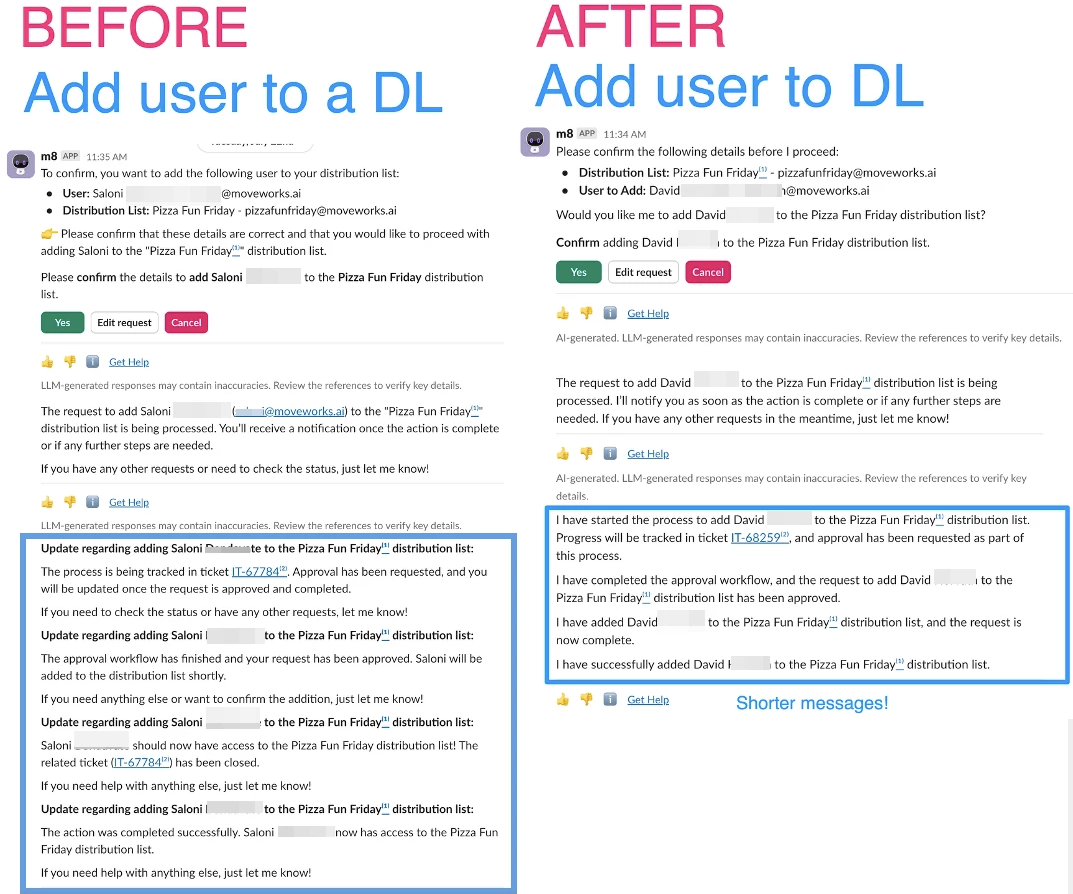
For more info, read our AI Assistant UX Upgrades post in Moveworks Community.
AI Assistant: Live Agent UX Updates
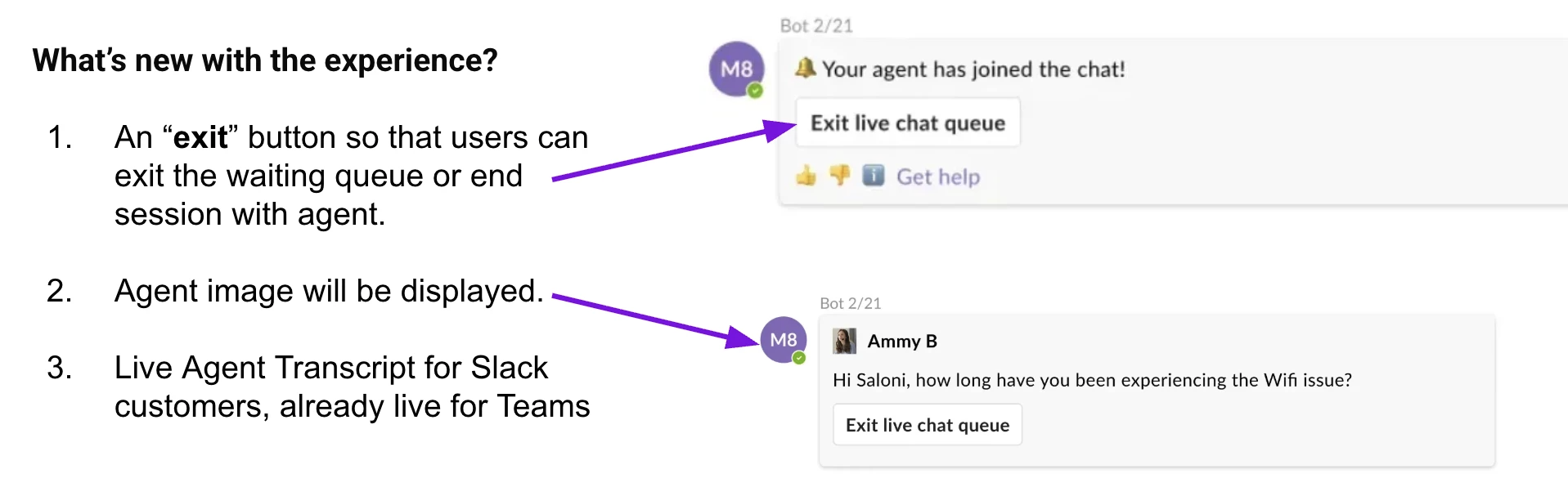
What’s new with the live agent experience?
- An “exit” button so that users can exit the waiting queue or end session with agent.
- Agent image will be displayed.
- Live Agent Transcript will be available for Slack customers, already live for MS Teams customers.
Moveworks Setup: API Playground with Built-In API Collections
What is API Playground?
API Playground is a new tool in Moveworks Setup designed to help users test and validate API requests. Think of it as a sandbox environment where you can interact directly with the APIs of external systems without affecting live data, all from within the Moveworks platform. It’s built with a curated library of vetted API endpoints called API Collections, which provides a ready-to-use set of common API calls for major integrations. This is a crucial tool for anyone building or troubleshooting custom plugins.
Key Features and Benefits:
The API Playground offers several key advantages for both customers and partners:
- Curated API Collections: The core of the playground is its library of pre-approved and tested API endpoints. This means you don’t have to start from scratch when looking for the right endpoint to fetch users from Okta or create a ticket in ServiceNow. These collections save time and ensure you are using the correct and reliable endpoints.
- Built-in Connectors: The tool uses Moveworks’ existing, built-in connectors, which are already configured for authentication with your integrated systems. This eliminates the need for manual OAuth setup or token management for testing purposes, allowing you to focus on the API request itself.
- Validation and Troubleshooting: This is particularly valuable for partners. You can quickly validate if a connector is working correctly or troubleshoot issues with a specific API call. For example, if your custom plugin is failing, you can use the playground to test the exact API request and see the raw response, helping you pinpoint the problem quickly.
- Broad System Support: The playground currently supports a wide range of popular integrations, including ServiceNow, Jira, Confluence, Okta, Zendesk, Salesforce, and Microsoft Graph, with continuous rollouts for more systems.
Accessing the API Playground:
To access this new feature,
- Navigate to MW Setup in your Moveworks environment
- Go to Connectors section
- Select API Playground
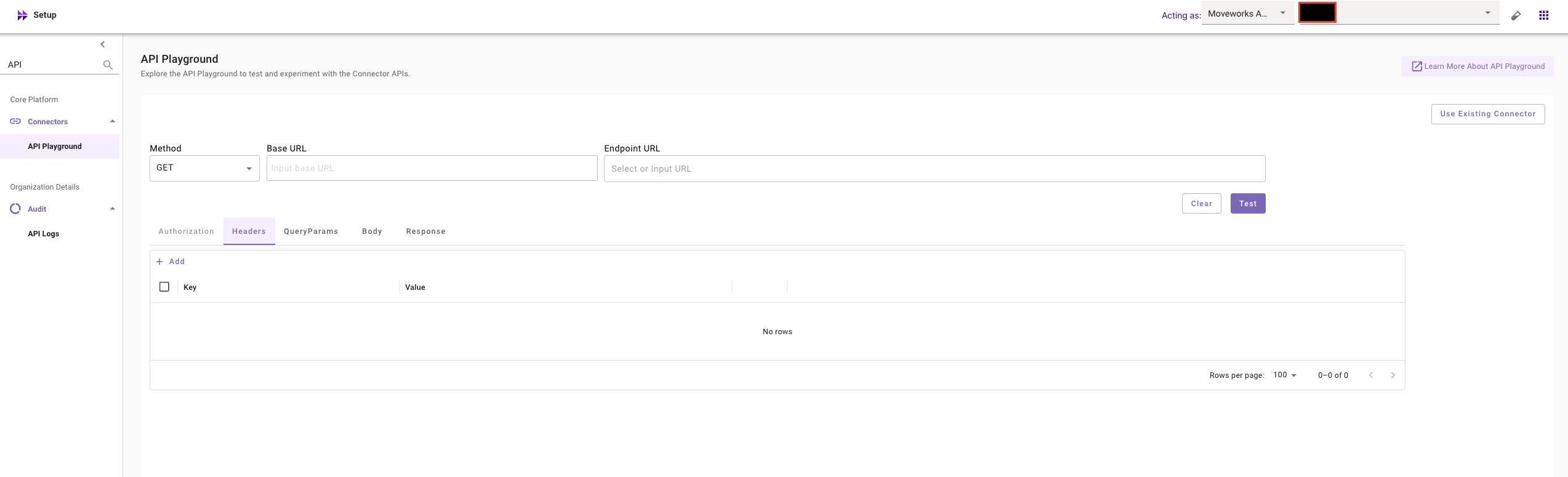
The feature is now available to all customers on both Slack and Microsoft Teams. It represents a significant step forward in giving developers and administrators the tools they need to build and maintain robust integrations.
For more info, read our MW Setup: API Playground doc on Help Site, and also go through our API Playground announcement in Moveworks community.
Moveworks Setup: Consolidated Slack Token Setup
What’s Changed?
We’ve streamlined the process for managing Slack tokens, making your setup and maintenance easier and more reliable.
Previously, you had to update Slack tokens in two separate places: the Connectors screen and the Chatbot configs. We have now consolidated token management to a single location: the Slack Connector screen.
Benefits
This update offers a number of key benefits:
- Fewer errors: A single source of truth prevents token mismatches.
- Simplified maintenance: All token updates are handled from one centralized screen.
- Improved reliability: This eliminates the risk of chatbot outages due to inconsistent credentials.
This change is automatic and requires no action on your part. All existing Slack integrations will continue to function normally. Future token updates can be managed exclusively through the Slack Connector screen.
For more info, read the MW Setup: Consolidated Slack Token Setup post in Moveworks Community.
Moveworks Setup: Home Page
We’re excited to announce the launch of our new Moveworks Setup Homepage. This feature provides a centralized overview of all your AI Assistant capabilities, giving you a single source of truth for your entire configuration.
What’s New for Admins?
- Comprehensive Visibility: You can now easily see which AI Assistant capabilities your organization is using. This makes it simple to track utilization and make informed decisions, reducing the time spent on manual reporting.
- Centralized & Actionable Info: Get a single, consolidated view of critical information. The homepage allows you to monitor the health of connected systems, identify dips in content serving, and stay alerted to active issues.
- Simplified Onboarding: New admins can quickly understand the current state of their Moveworks AI Assistant without relying on the Customer Success team.
- Accelerated Self-Service: The easy-to-navigate overview empowers you to take control of your configuration, helping you accelerate the adoption and expansion of AI Assistant features.
- Quick Navigation: Jump directly from the homepage to specific configuration areas to take prompt action.
Important Note:
The homepage reflects the current state of your configurations only. It does not reflect commercial agreements or guarantee operational health. A skill marked as Enabled simply indicates it’s configured.
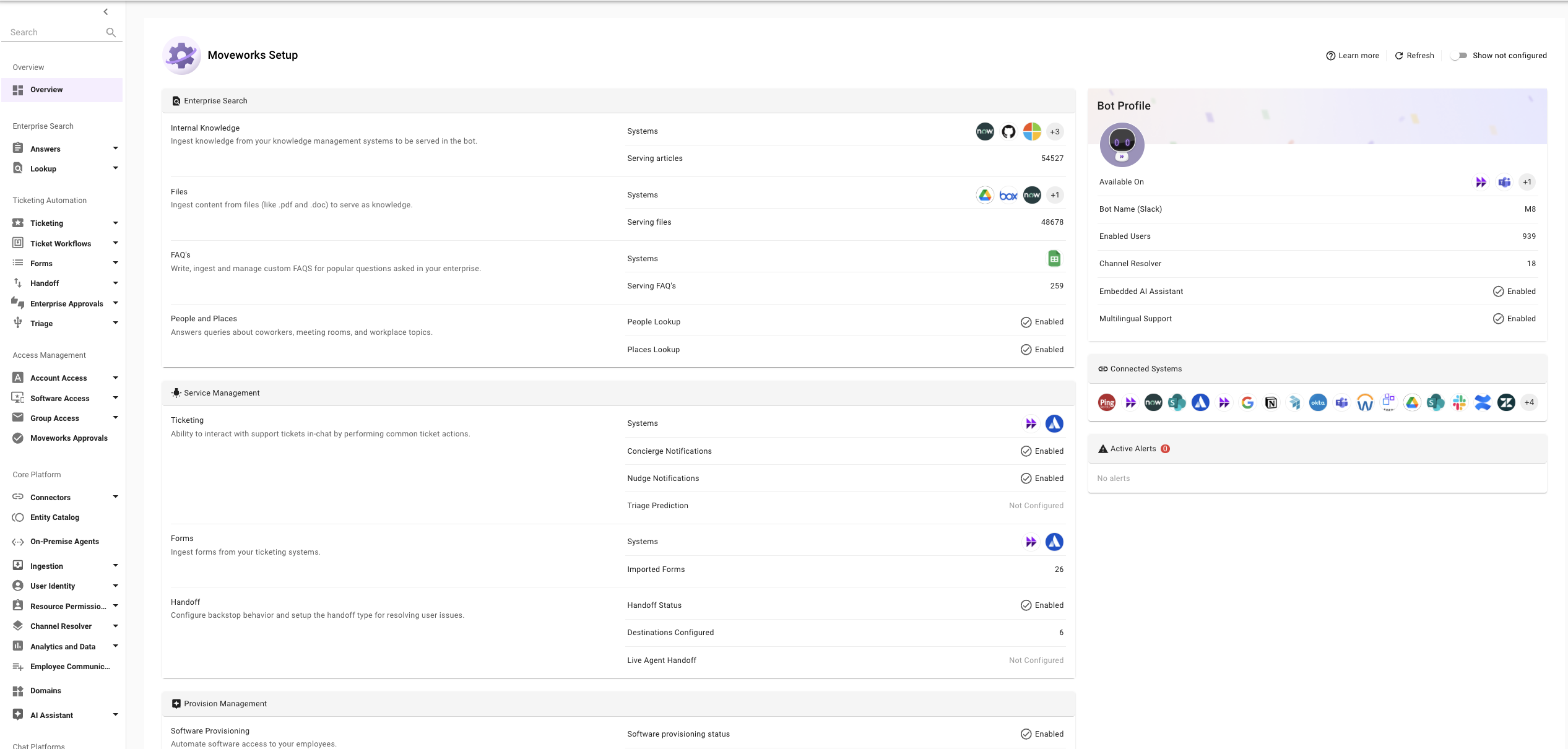
For more info, read the MW Setup: Home Page doc in Help Site, and go through our Home Page announcement in Moveworks Community.
Moveworks Setup: Data Ingestion View
We’re excited to announce the launch of the Data Ingestion View in Moveworks Setup. This new beta feature gives admins unprecedented visibility into how data from enterprise systems is ingested by Moveworks, enabling proactive monitoring and faster troubleshooting.
Why This Matters?
Moveworks relies on up-to-date data from your systems to power its AI Assistant capabilities, such as Enterprise Search and Forms. The Data Ingestion View provides visibility into the crucial first phase of this process: the raw crawling and fetching of resources.
This helps admins:
- Monitor health of all configured systems.
- Identify and address issues that could prevent data from reaching the bot.
- Ensure the AI Assistant has the most accurate information available.
Key Features
With the Data Ingestion View, you can:
- Monitor Ingestion Runs: View the status and cadence of both Full and Incremental ingestion runs. Green bars indicate success, while red bars indicate failures, marking the overall ingestion health as Unhealthy.
- Access Error Summaries: Quickly identify common error themes for failed runs, such as incorrect credentials or permission issues, with a simplified error message.
- Redirect to Configurations: Easily navigate from the logs directly to the relevant connector or resource ingestion settings for efficient management.
How to Access? The Data Ingestion View is available now. Simply log into Moveworks Setup and navigate to the Core Platform section in the left navigation menu.
Note: The metrics in this view show the health of raw record ingestion and should not be compared with the “Ingested Knowledge, Files, Users, or Forms” screens, which show records available in the index after all internal processing.
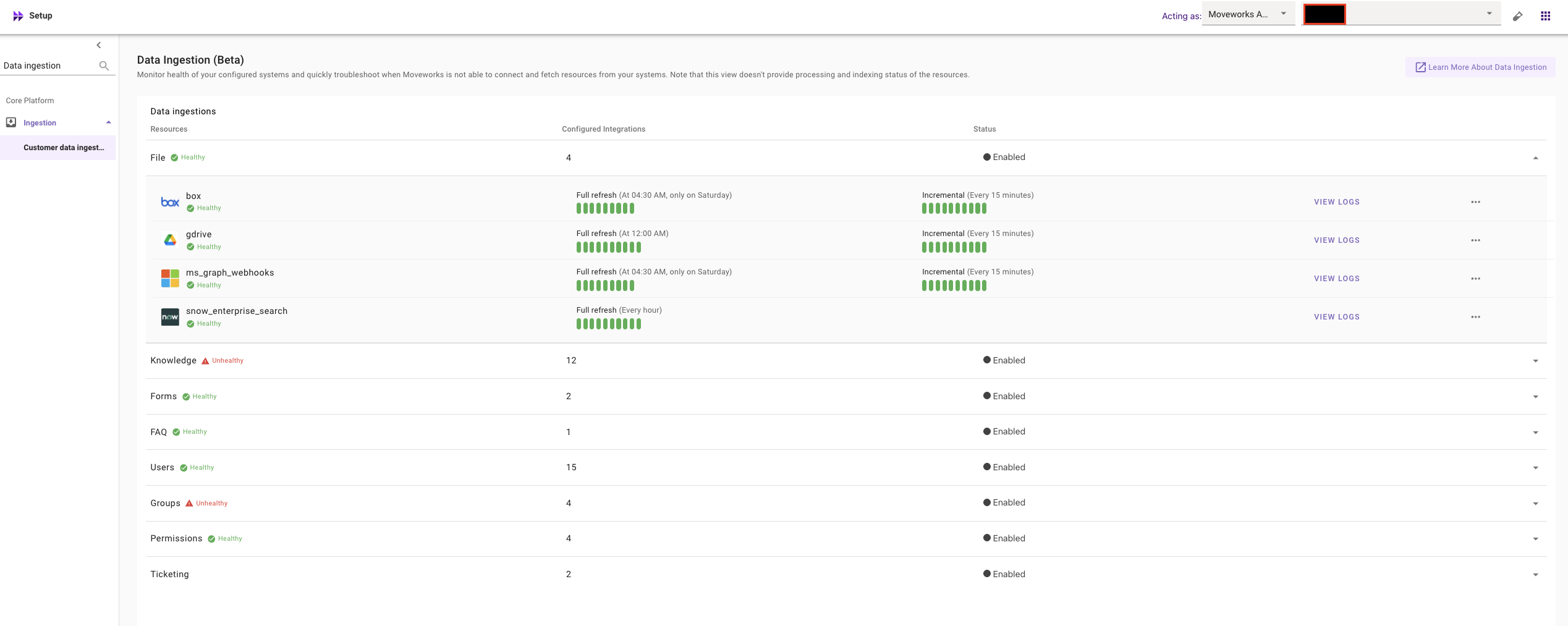
For more info, read the MW Setup: Data Ingestion View doc on Help Site, and go through our Data Ingestion View announcement in Moveworks Community.
Content Integrations: Improving Ingestion Speed in ServiceNow with permissions
We’ve made a significant update to how ServiceNow articles are handled, which will drastically improve the efficiency of content synchronization.
Previously, a content indexing method caused a lengthy blackout period of up to 24 hours when new article versions were published. This meant new or updated content was not immediately available to your AI Assistant.
We have now resolved this issue by changing the indexing method (for article sys_id). The new process will significantly reduce the blackout period to a much shorter duration, ensuring that new articles and their updates are available in the AI Assistant far more quickly. This keeps your knowledge base more current and reliable.
This update is now fully deployed and requires no action from you.
For more info, read this post in Moveworks Community.
Agent Studio: Built-In Action Logs
What’s New?
Added comprehensive logging for built-in/default actions in Agent Studio, providing enhanced visibility into internal action execution within plugins and compound actions. Key Changes
- New Log Type: Introduced built-in action logs alongside existing HTTP, script, and plugin logs
- Enhanced Visibility: All built-in actions now generate detailed audit events showing request inputs and responses
- Universal Coverage: Logs are captured for all built-in actions regardless of debug or error level
Granular Troubleshooting: Plugin and compound action executions now display additional logs for any internal built-in action calls
What are the benefits?
- For End Users: Greater insight into plugin/compound action execution flow
- For Developers: More granular debugging capabilities and clearer troubleshooting information
Overall: Enhanced transparency and visibility across all action types in Agent Studio
This is now live for all customers using Agent Studio.

July 2025 Product Release Notes
AI Assistant: Smarter, Clearer Messages
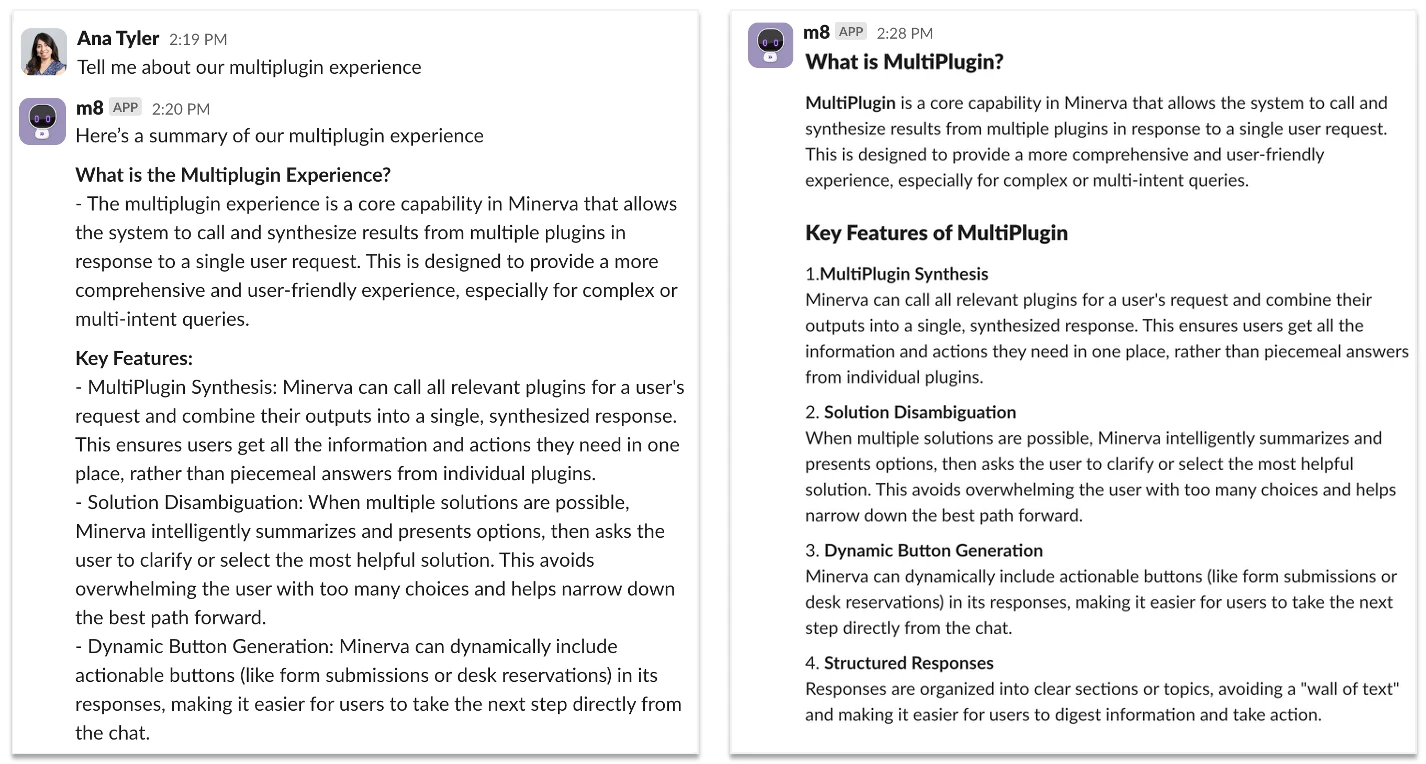
We’re updating how the AI Assistant formats its messages to make them easier to read. Instead of dense blocks of plain text, responses will soon include structure like section headers, bullet points, code lines, code blocks, and bolded key details. These improvements make it easier for employees to scan information quickly, understand what matters, and act with confidence.
Before / After Examples:
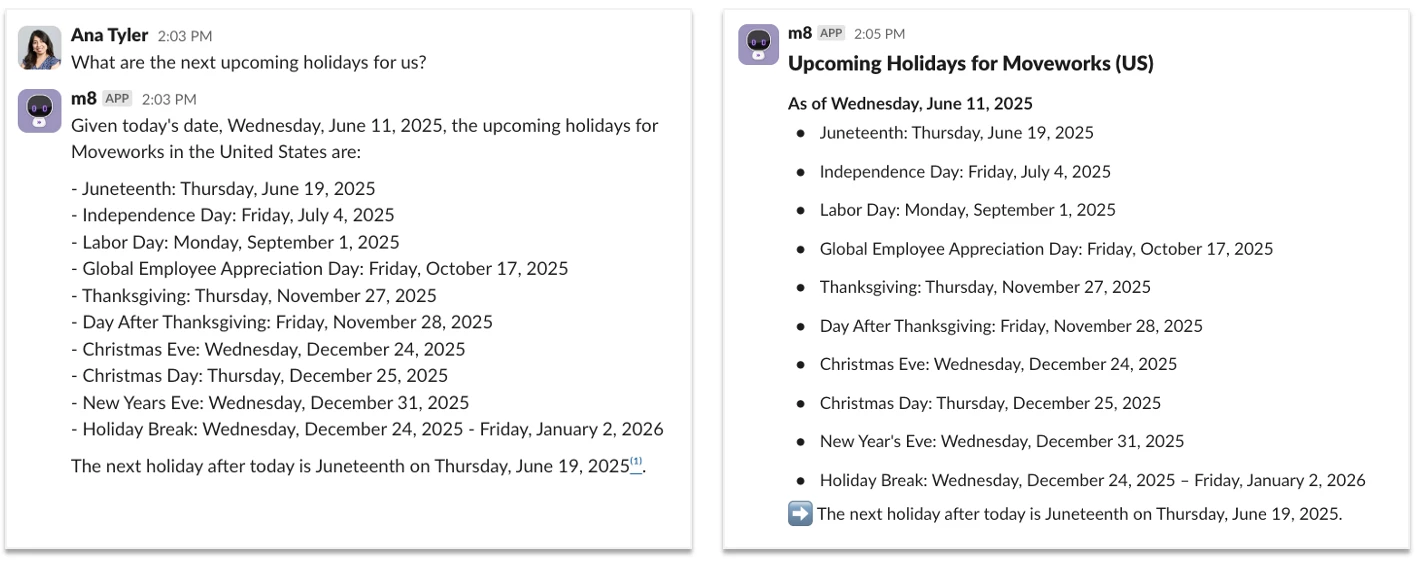
AI Assistant: Added Transparency in Reasoning Steps
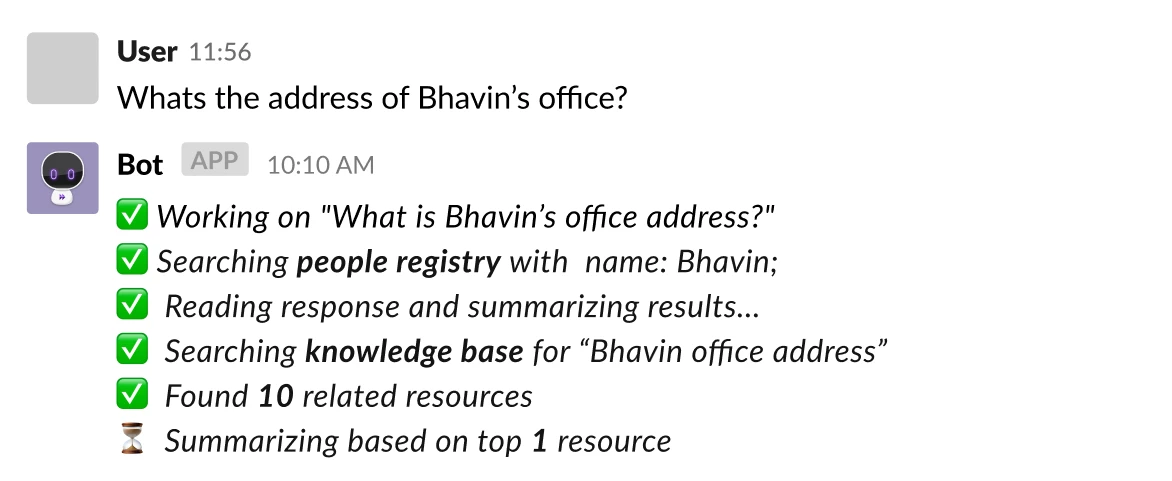
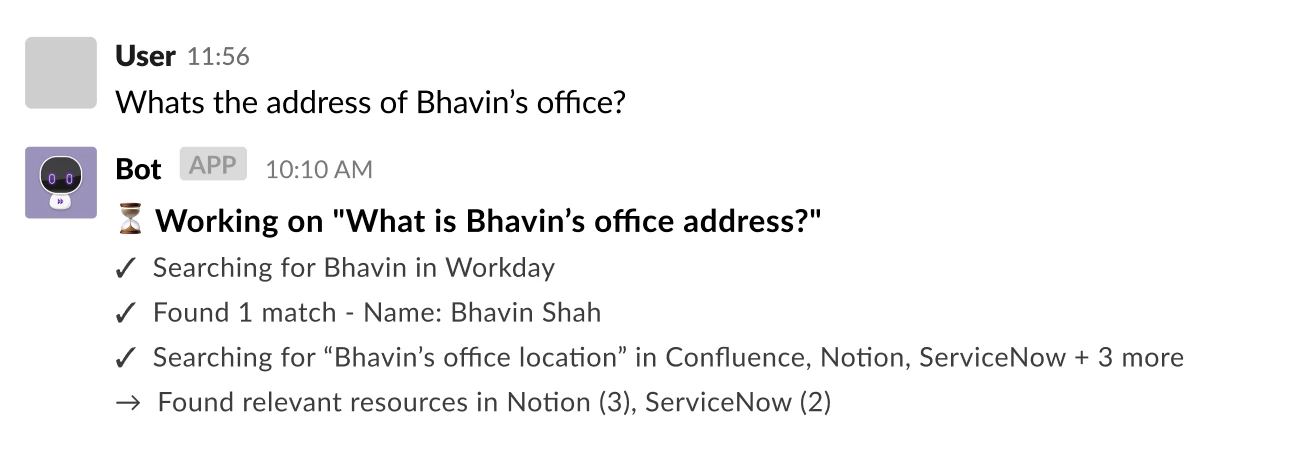
Employees will now see which systems the Assistant is searching in (ex. Confluence, ServiceNow, or SharePoint) and what steps it’s taking to generate a response. You’ll also see improved copy and wording in these progress messages, with additional visual polish coming soon.
What’s changing:
- Transparent knowledge sources, instead of seeing “Searching knowledge base” now you’ll see system names “Searching across Confluence, Jira, Notion + 5 more”. Assistant will continue to only search through the system a user has access to.!—>
- A visual design refresh is also underway, so these progress updates are easier to scan and take up less space.
Additional improvements will roll out incrementally over the next few months so stay tunned for additional updates in this area.
Before:
After:
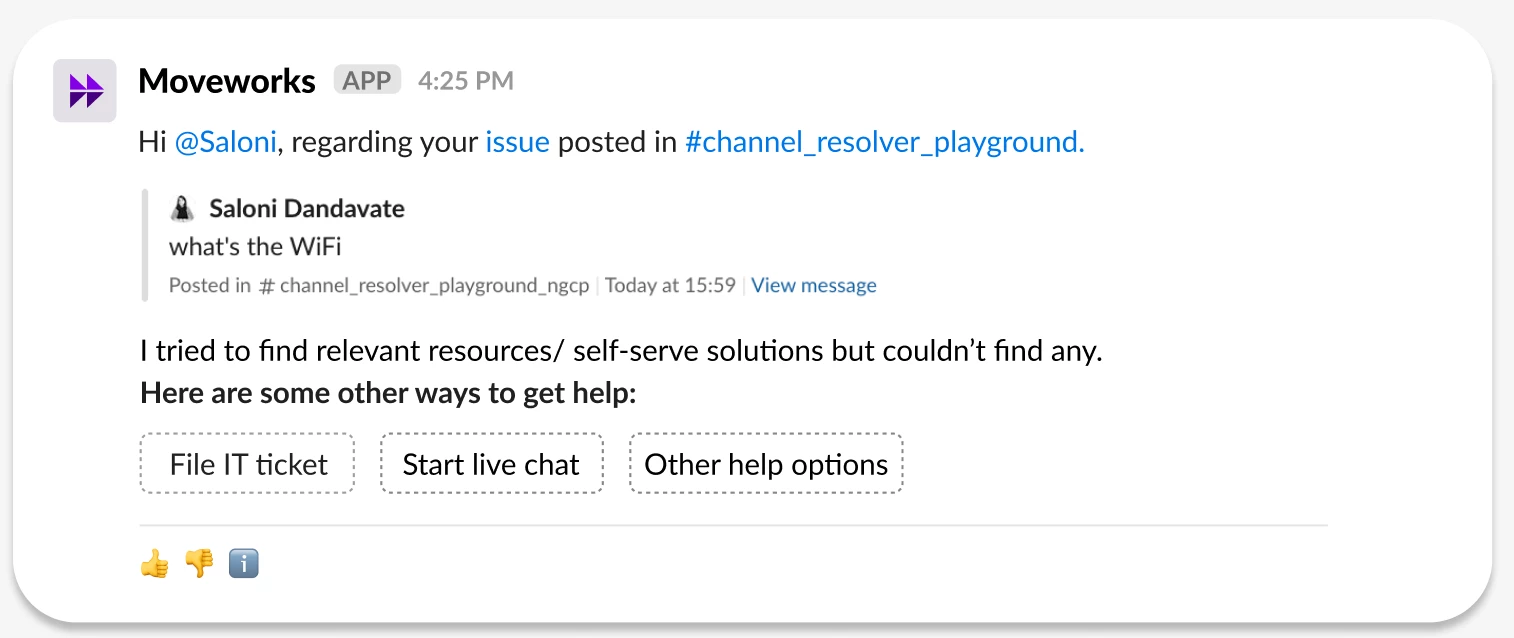
AI Assistant: Smart Handoff via Channel Resolver
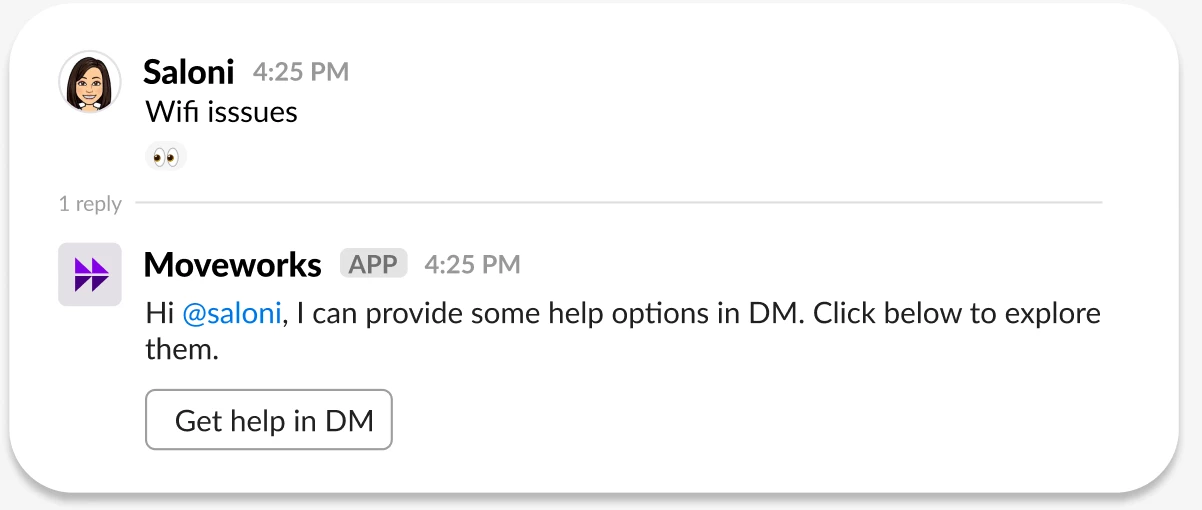
Moveworks AI Assistant intelligently interprets user messages in public Slack channels and responds based on relevant knowledge and configured workflows. However, there are instances where a software is not yet integrated, or no helpful articles or workflows are available. In such cases, the AI Assistant now offers smart handoff to continue the conversation in a direct message (DM), giving end users a clear path forward—without waiting for a human agent to join the original thread.
With this feature, users can choose to either:
- File a ticket, or
- Chat with a live agent based on the issue they originally posted in a public Slack channel.
Key Behaviours:
- The AI Assistant will only initiate a DM handoff when no relevant knowledge or workflow match is found.
- It will not respond to messages associated with disabled domains.
- The original thread will be marked with a “no resolution” emoji and will not be updated if the user chooses to file a ticket or contact a live agent from the DM.
Important Notes:
This feature is not compatible with automatic ticketing configurations. In such setups, the system directly files a ticket without attempting handoff.
Moveworks Setup: Module How-To Guides Are Live!
We’re excited to introduce a brand-new resource designed to make your life easier:
Moveworks Setup: Module How-To Guides — your go-to collection for step-by-step implementation guides across Moveworks’ OOTB modules! 🛠️✨
Whether you’re just getting started or diving deep into complex use cases, these new and updated guides are here to empower self-service configuration like never before.
Check them out here 👉 Moveworks Setup: Module How-To Guides
These guides are designed to give customers the confidence to configure modules independently by offering clear, step-by-step instructions. With less reliance on Moveworks teams, you can move faster and smarter. Here’s what makes these how-to guides special:
- 💯 Fully self-service and simple to follow
- 🧩 Updated to reflect the latest product capabilities
- 🔍 Embedded Guides into the respective Setup Module page for seamless discoverability
- 🤖 The Guides have also been added to the External Knowledge for Moveworks, This empowers your personal AI Assistant to answer any Configuration related queries for Moveworks associated with these guides in a summarized format.
Moveworks Setup: UX entry point update
We’ve made some UX changes to help streamline the user experience by providing a consistent entry path into MW Setup across all access points.
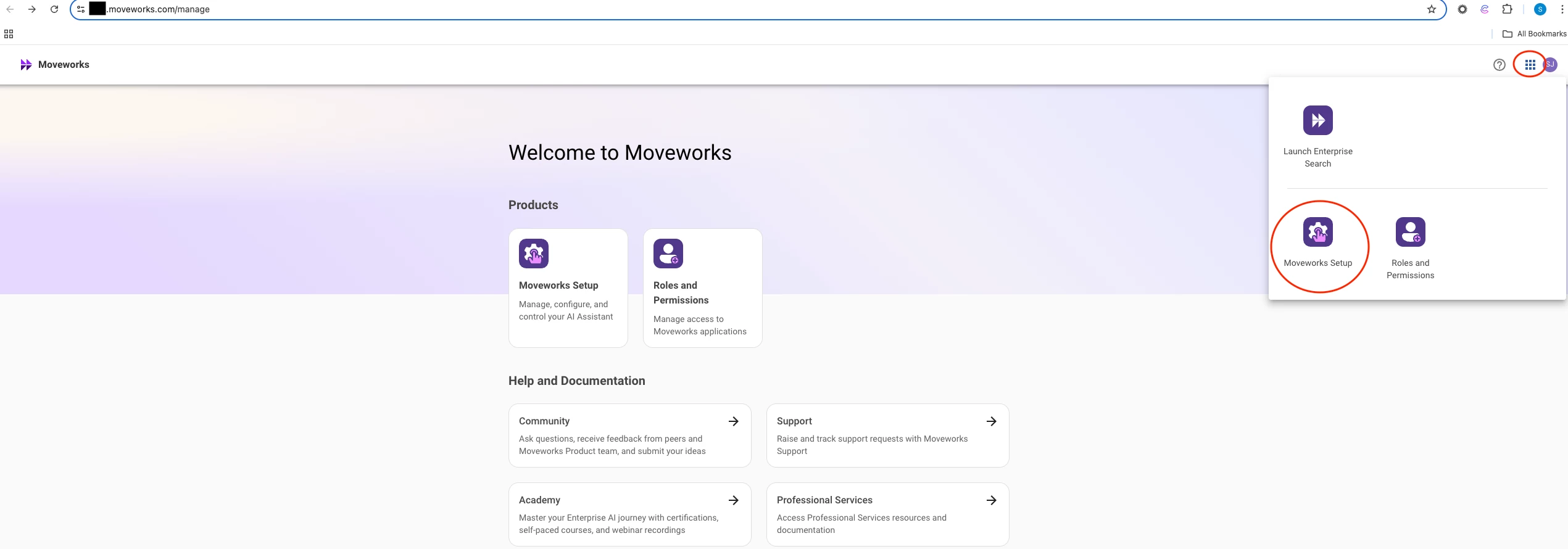
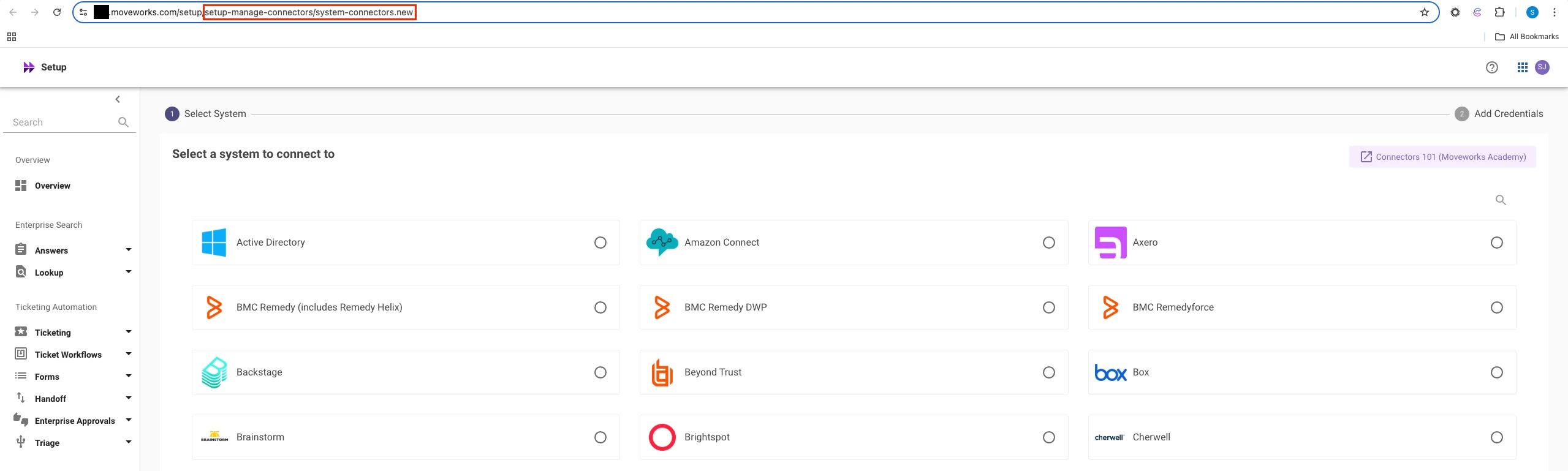
- The MW Setup entry point has been moved from the gear icon to the app dropdown on the login page (
org_name.moveworks.com/manage). Users will now be automatically redirected to theSystem Connectorspage in Setup via the login page app drawer. Additionally, the gear icon has been removed from the login page.
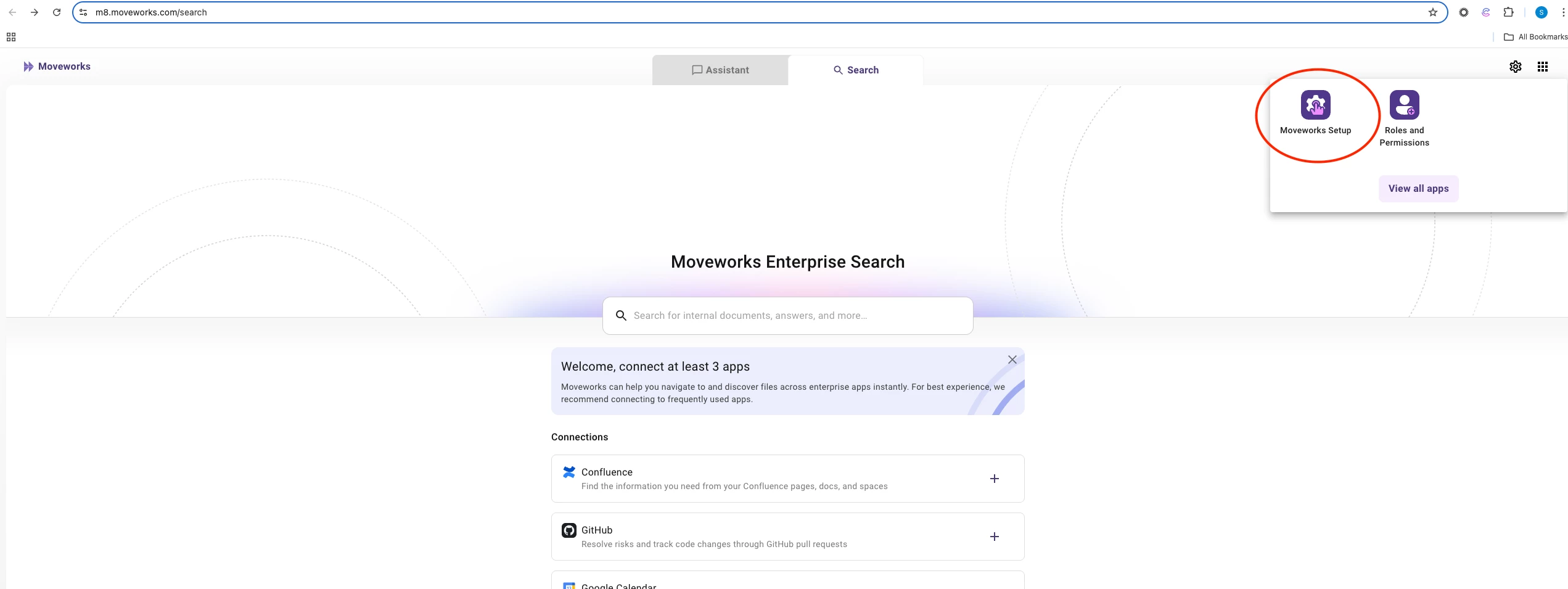
- MW Setup can also be directly accessed from Assistant and Search routes (
org_name.moveworks.com/assistant,org_name.moveworks.com/search)
- Customers can also bookmark the MW Setup page for quick access:
https://org_name.moveworks.com/setup
Agent Studio: Announcing the Agent Studio Developer Level 1 Certification Course
We’re thrilled to introduce our brand-new Moveworks Agent Studio Developer: Level 1 Certification course, designed to empower you to build powerful, production-ready Plugins using Agent Studio. Whether you’re a developer just starting out or looking to elevate your automation skills, this beginner-friendly course is your gateway to creating AI agents that drive real business value.
What’s the Course About?
This hands-on, guided learning experience covers the essentials of building Plugins in Agent Studio. You’ll dive into:
✅ Core Concepts: Understand important terms, including triggers, launch rules, conversation processes, and activities.
✅ Practical Skills: Configure slots, resolvers, and user attributes to personalize experiences.
✅ Automation Power: Leverage HTTP and built-in actions to streamline workflows.
✅ Best Practices: Learn syntax, debugging, and deployment tips to ensure success.
✅ Marketplace Mastery: Install and deploy pre-built plugin templates from the AI Agent Marketplace.
By the end, you’ll build and deploy your own agent, interact with it through your AI Assistant, and submit a screenshot to earn your Level 1 Certification! 🎓
Why Get Certified?
This course isn’t just about learning—it’s about doing. You’ll walk away with:
- The ability to create plugins that solve real-world business challenges
- Confidence in using Agent Studio’s low-code tools and installable templates to transform business processes
- A shiny certification to showcase your skills to your team and beyond!
Plus, you’ll join a growing community of certified developers who are transforming how work gets done with Moveworks. 🌟
How to Get Started
- Agent Studio Developer Certification I - The curriculum includes several modules, from Agent Studio Fundamentals to troubleshooting, with clear documentation and hands-on exercises.
- Agent Studio Overview - A standalone intro course intended for both technical and non-technical stakeholders.
Agent Studio: Script Logs Now Available for Script Actions
We’re excited to announce the rollout of Script Logs, a new log type designed to improve visibility into executions of Apithon-based Script Actions (our internal, customer-safe Python scripting interface).
What are Script Logs?
Script Logs capture debug-level traces of scripts executed via the action.script.trigger API, including:-
- ✅ Error messages – Captures runtime issues directly from your script
- 🧪 Result output – The final result returned by the script
- 📥 Input variables – The exact variables passed to your Apithon script at runtime, such as time ranges, calendar IDs, or other dynamic context
You’ll see these under the “Script” log type with plugin names like Mfm_Google_Calendar_Events, and clear summaries (e.g., “Script executed successfully”).
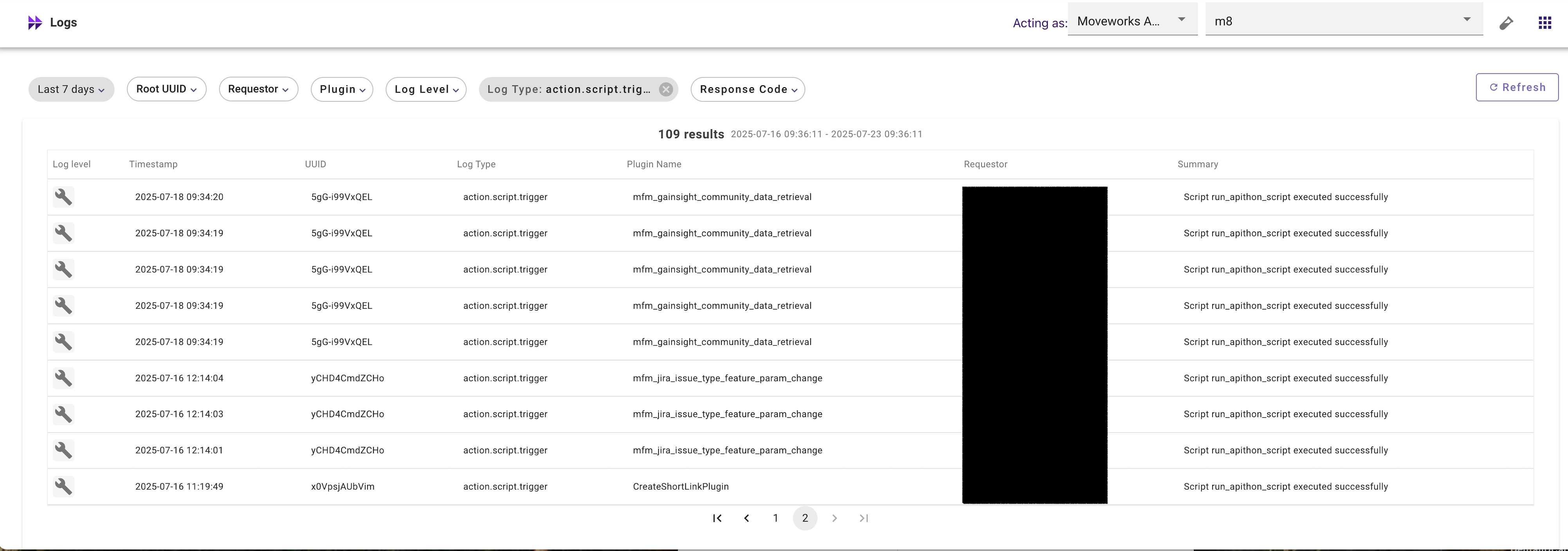
Read more about our Log Types here.
June 2025 Product Release Notes
AI Assistant: Web Search now available in Quick GPT
Fetch live web results using Quick GPT in your AI Assistant. This new capability in Quick GPT allows the Assistant to pull in web results with citations when answering questions that require up-to-date information. Think of it like Google’s AI Overview, but embedded in the place where you find company info or take action at work.
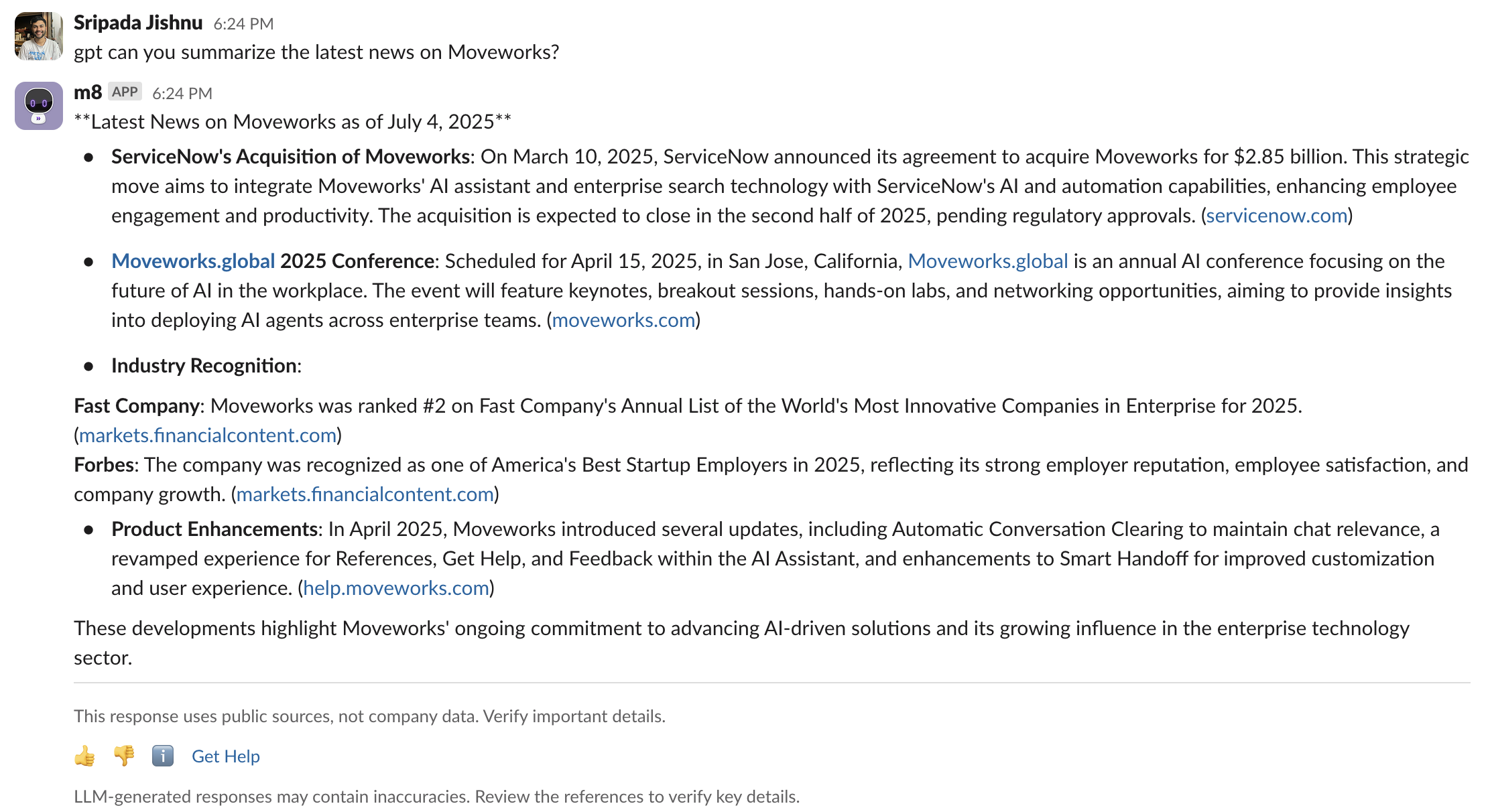
Web search gives you the latest insights you need about current events, market news, or trend shifts while staying in the flow of work. Citations are included, so you can verify important details. Web search is covered by Moveworks’ zero day data retention for a trustworthy search experience.
For more info, read our:
- Web Search Blog
- Web Search Community post
- Moveworks Help documentation on how to use Quick GPT
AI Assistant: New upgrade to GPT 4.1
Moveworks AI Assistant is now using GPT‑4.1 as part of its Reasoning Engine. This model upgrade brings smarter responses, better reasoning, and faster performance — helping your assistant get even better at solving complex tasks across your enterprise.
What are the benefits with GPT 4.1?
- Faster performance: Up to 38% lower average latency compared to GPT‑4.0, resulting in snappier, more responsive interactions across common assistant tasks.
- Better response quality: Improved comprehension and reasoning across long and complex queries
- Stronger reasoning execution: Improved ability to determine which plugin is best suited to answer a given question, leading to smarter selection, better argument filling, and higher task success rates.
For more info, read our GPT 4.1 upgrade post in Moveworks Community.
AI Assistant: Smart Handoff for Channel Resolver
New support for handoff through Channel Resolver is now available. Previously, when the Moveworks AI Assistant couldn’t find relevant knowledge or helpful workflows via the Channel Resolver, it would simply add a “no resolution” emoji to the thread, requiring end users to wait for a Slack agent to manually assist.
With this new enhancement, the AI Assistant can now initiate a smart handoff directly in a DM when no relevant information is found in the channel. This allows end users to immediately request additional help by either connecting with a live agent or filing a ticket (provided automatic ticketing is not enabled).
Key Features:
- New configuration available in Moveworks setup at the channel level
- AI Assistant initiates DM handoff only when no relevant information is found and based on user signal for additional help
- Does not respond to messages from disabled domains
- Original thread remains marked with “no resolution” emoji and stays unresolved if user proceeds to file a ticket or contact a live agent
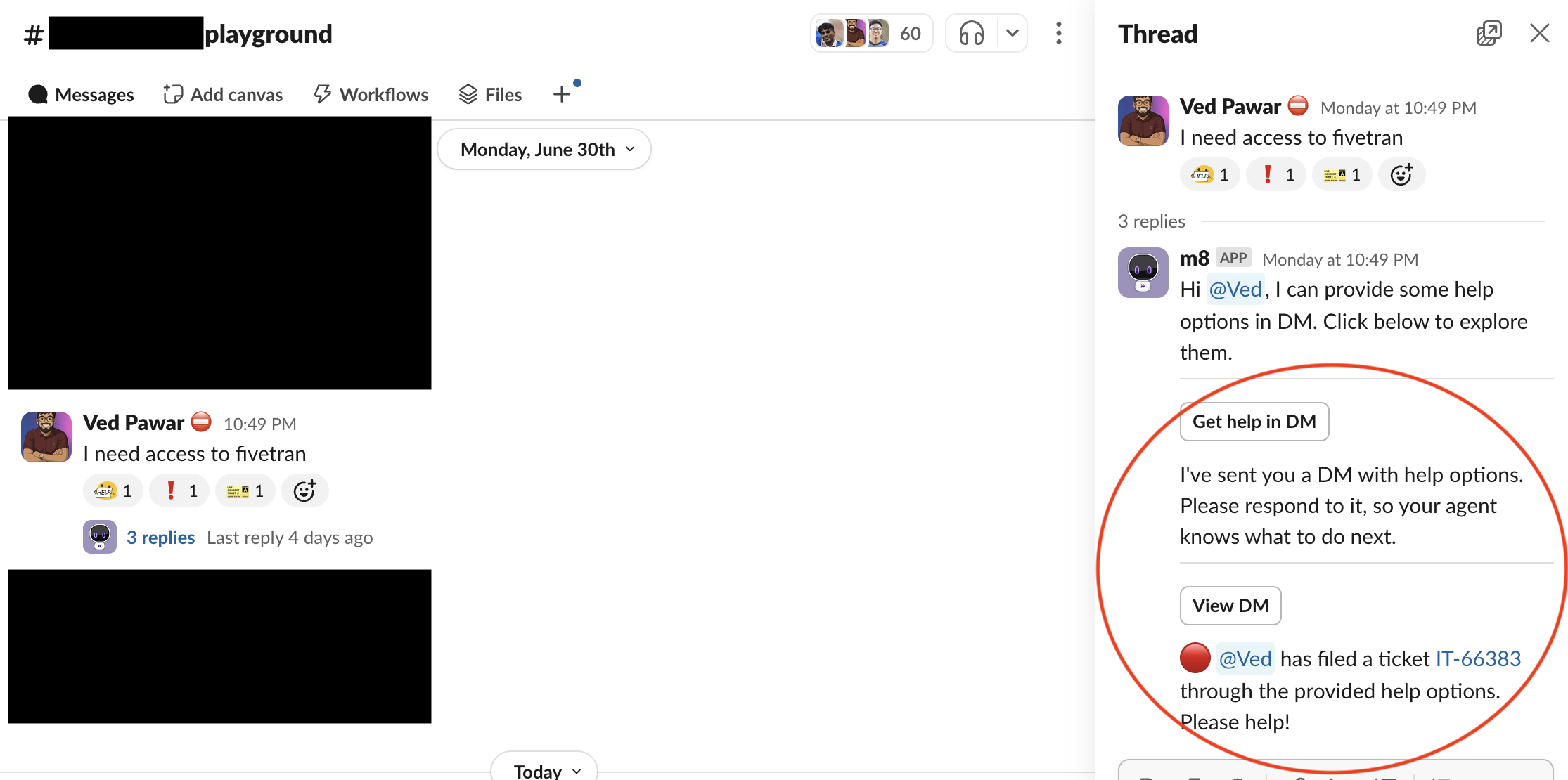
For more details, read our Smart Handoff for Channel Resolver post in Moveworks Community.
Agent Studio: New plugins available on the AI Agent Marketplace
A total of 50 new installable plugins are now available in the Moveworks AI Agents Marketplace. Below is the summary of new plugins across different systems👇
- DocuSign (2 plugins)
- Salesforce (7 plugins)
- ServiceNow (4 plugins)
- Okta
- SAP Success Factors (17 plugins)
- Look up Pending Time Off Approvals
- Look up Employee Hire Date
- Update Mobile Phone Number
- Look up Payroll Information
- Look up Timesheet Information
- Update Personal Email
- Look up Employee ID
- Look Up Employee Profile Details
- Look Up Direct Reports on PTO
- Look Up Open Jobs
- Add Personal Goals
- Look Up Personal Goals
- Look Up Your Time Off Balances
- Request Time Off
- Look Up Employee Hire Date
- Update Pronoun
- Look Up Job Offer Approval Status
- Workday (17 plugins)
- Look up Assigned Trainings
- Look up Stock Equity Grant
- Look up Personal Goals
- Look up Tax Elections
- Add Personal Goals
- Look up Employee ID
- Look up Start Date
- Look up Personal Employee Information
- Look up Bonuses
- Look up Team’s Training Completion
- Look Up Company Holiday Schedule
- Update Employee Address
- Look Up Payslips
- Look Up your Total Compensation
- Look Up Time Off Requests Needing Approval
- Look up Team’s Performance Rating
- Look Up Tasks Assigned to Me
- PagerDuty
- Greenhouse
May 2025 Product Release Notes
AI Assistant Analytics: New Interactions Table
The new raw interactions table comes with enhanced data quality, new accessibility and extensibility features.
Enhanced Data Quality
We have enhanced data quality of three important entities across MW analytics. Plugins, Domains & Topics. This is done via implementing a semantic data layer that translates raw data in conceptual formats for user to consume.
The new semantic layer data provides us with new plugin statuses, that helps in understanding what happened in a conversation, was a user successful or end up filing a case. What are scenarios where your AI assistant falls short & scenarios where it’s performing great.
👉 New Plugin Statuses introduced : Unsuccessful, Served, and Used plugins.
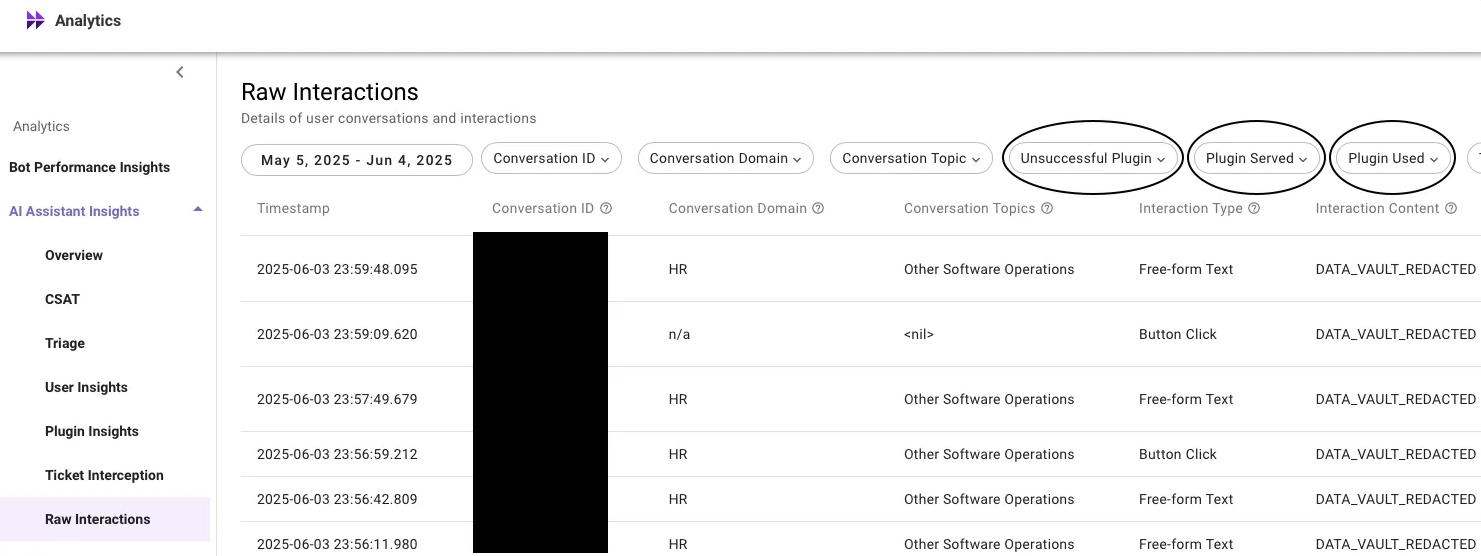
Enhanced conversation domains
A single domain per conversation powered by new domain detection model that comes with better prediction and configurability.
- New Model: Moveworks is moving from offline, utterance-level domain prediction to an online model that attributes domains at the conversation level.
- Improved Accuracy: This shift significantly enhances domain coverage and precision, with expected coverage increasing up to ~85%.
- Customization: Customers can further improve domain prediction accuracy by adding positive trigger examples via Moveworks Setup.
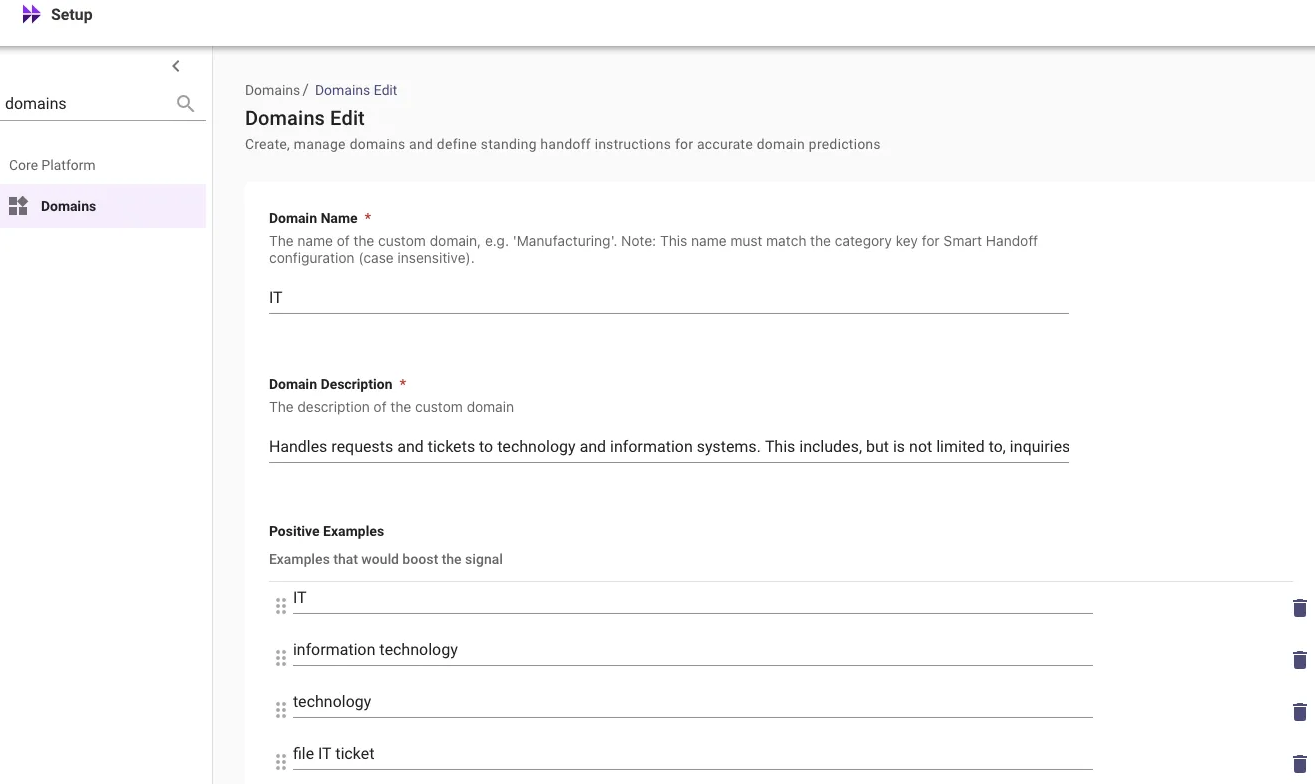
All interactions in the new raw interactions table will be tagged with a primary conversation domain, representing the overall domain of the entire conversation, which may include multiple interactions. All interactions within the same conversation share this domain.
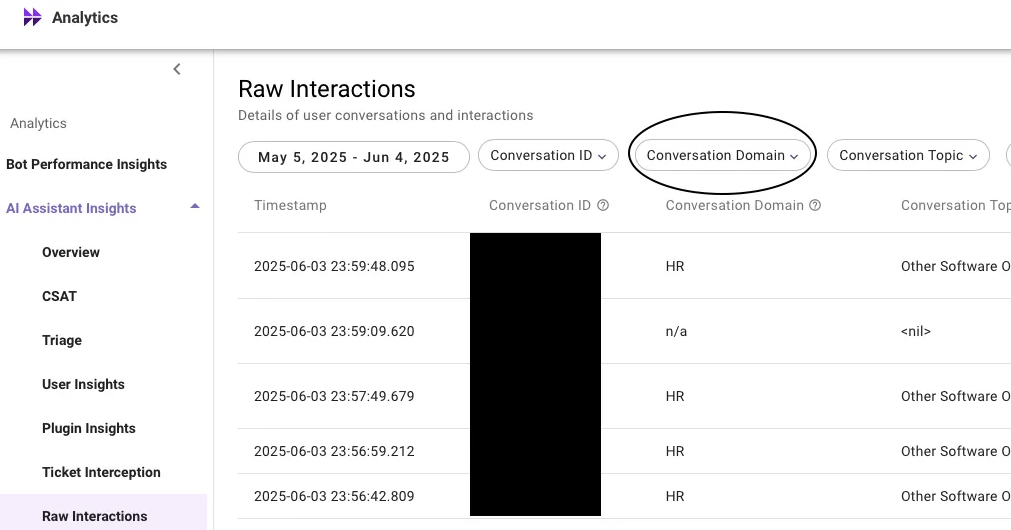
Enhanced conversation topics
We now predict topics by considering the entire conversation.
To enhance topic classification accuracy and overall coverage, we have started attributing topics at the conversation level. This approach boosts topic coverage to approximately 86%, with precision around 97% (based on manual annotation).
We’ve also added 6 new topics to cover previously unpredicted scenarios:
- Greeting
- Live Agent
- Lookup - Other
- Software - Other
- Knowledge Query - Other
Additionally, a new Conversation Topics column provides a comma-separated list of topics representing the entire conversation, rather than individual interactions.
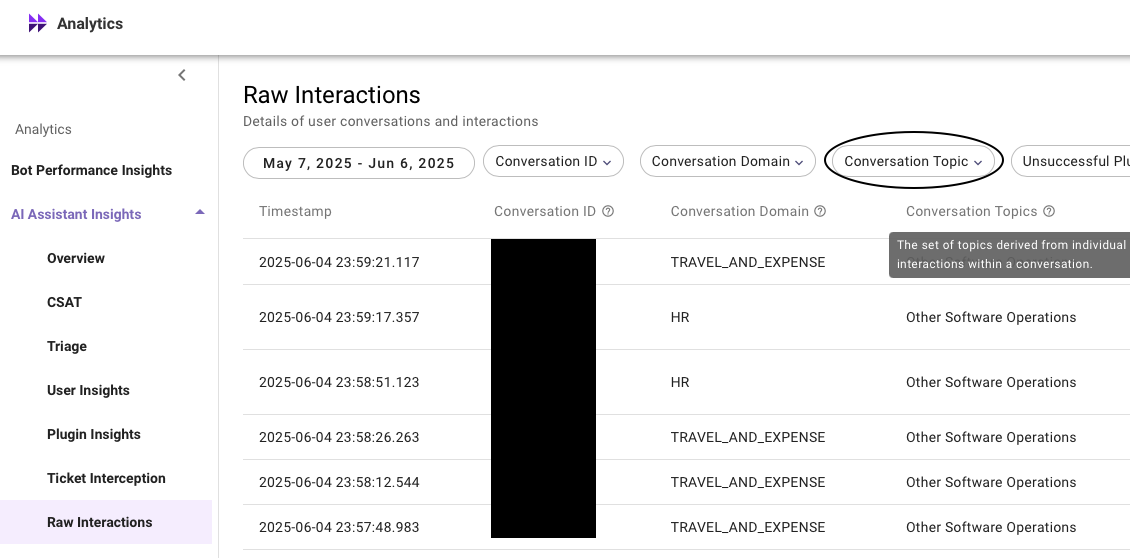
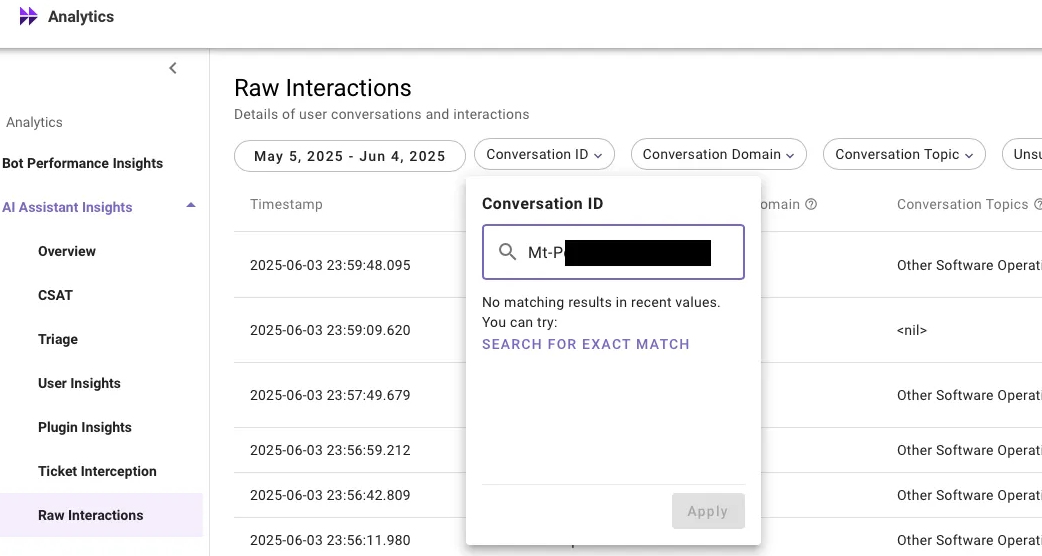
New filtering experience
There are no longer any restrictions on filterable entities. With the new filtering feature, users can search through any data seamlessly. Whether a data column has 100 unique items or thousands, users can easily filter interactions to pinpoint the exact data point they need.
Enhanced export limit
Users can now export the raw interactions data for upto 200K rows. A 10X increase from the existing limit.
For more information on this feature, please read our help documentation on Raw Interactions Table. For global availability, read the Introducing new interactions table post in Moveworks Community.
Moveworks Setup: New Features
Entity Catalog
Moveworks entities help AI assistant in detecting key elements of a user utterance (E.g. software apps, hardware devices, locations, events & more), thereby powering downstream skills like software provisioning, topics in EXI & Analytics, and more.
Entity Catalog serves as the repository of custom entities within MW Setup. It is designed to empower admins to independently create and manage custom entities within Moveworks Setup.
At the moment, we only support Software Entities within Entity Catalog. More entity types will be available in the future.
👉 Login to Moveworks Setup → Entity Catalog → Create New Entity (or) Edit existing Entities.
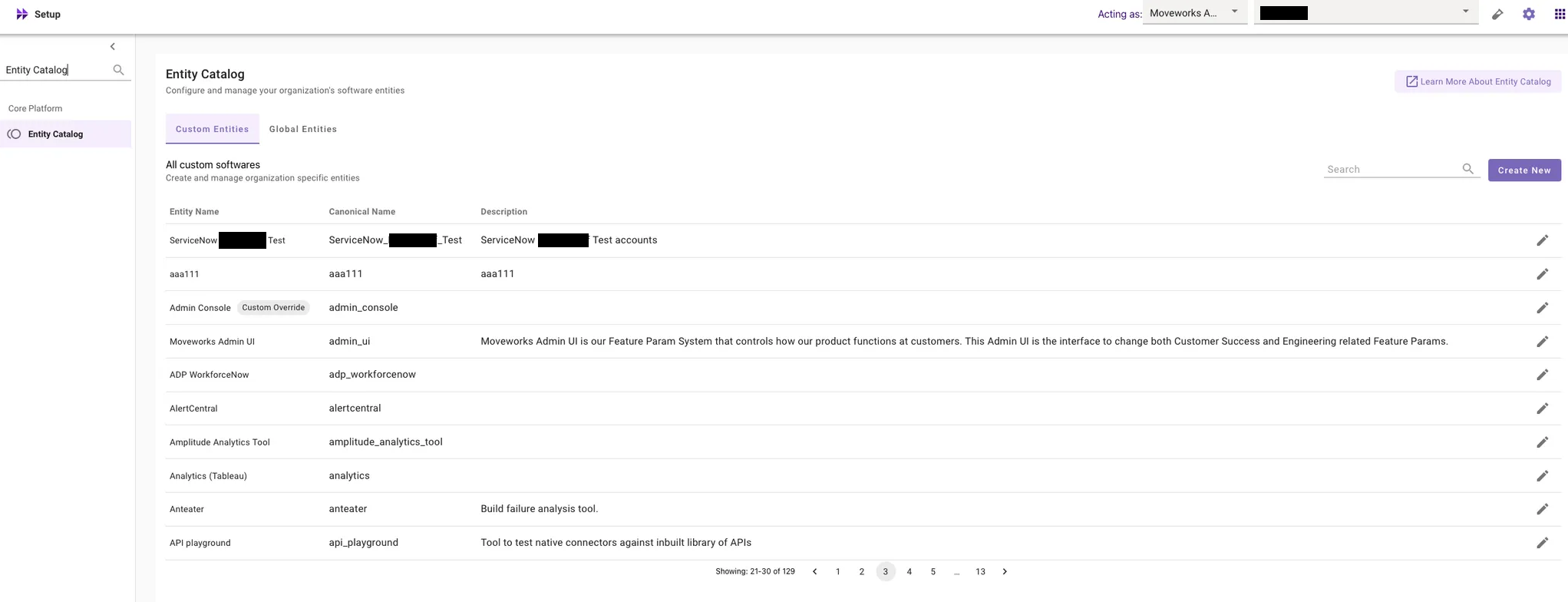
For more info, please read our help documentation on:
- Entity Catalog Overview
- Configuring Custom Entities within Moveworks Setup
- How to guide for Custom Entities within Moveworks Setup
For more details on the global availability, please read the Entity Catalog Release post in Moveworks Community.
Identify Duplicate Users
To improve user experience with the Moveworks bot, we have introduced a new feature within the Ingested Users screen in Moveworks Setup that identifies duplicate users in your organization.
What are duplicate users?
Duplicate users occur when key attributes such as Email Address, ITSM Identifier, or Chat Identifier are not unique across your source systems (e.g., ITSM, Chat, IDAM). This causes Moveworks to import conflicting user identities.
Why is this important?
Unique user attributes are essential for accurate user import and management. When duplicates exist, Moveworks cannot properly import these users, leading to inconsistent bot interactions and potential loss of access.
How does it work?
When Moveworks detects duplicate attributes, it halts the user import process until the duplicates are resolved, ensuring data integrity.
How to fix duplicates? What if duplicates are not fixed?
You can resolve duplicates by either deleting one of the conflicting user identities in your source system or filtering out the duplicate user within Moveworks. For detailed guidance on duplicate users filtering, please refer to our help documentation on How to filter out duplicate users in Moveworks Setup.
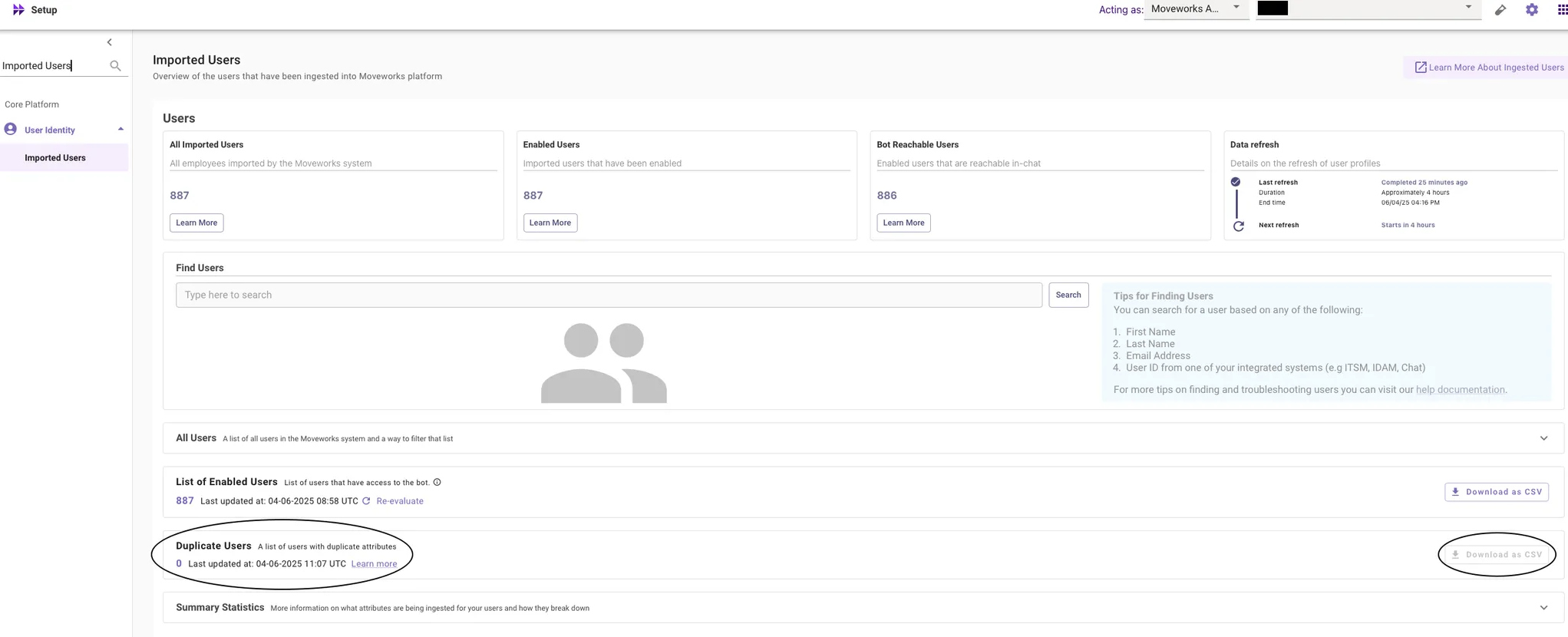
If duplicates remain unresolved, Moveworks will not import identity information for users with conflicting attributes. This results in those users experiencing inconsistent bot behavior and eventually losing access. This feature enhances visibility into user identity issues and helps maintain a seamless experience with the Moveworks bot.
For more details on the global availability, please read the Duplicate Users Release post in Moveworks Community.
Form Fillability Issues in Imported Forms CSV Downloads
CSV downloads from Imported Forms now include detailed insights into form fillability issues, helping you troubleshoot and resolve errors more efficiently.
👉 Login to Moveworks Setup → Ticketing → Forms → Imported Forms → CSV Download

Details Included:
- Type: Specifies whether the error is at the form level or the form field level
- Description: Provides a detailed explanation of the error
How does this improve your experience?
This optimizes the troubleshooting experience of fixing fillability issues by allowing bulk review of errors impacting form fillability – no longer need to click into each form individually to view them. This is especially valuable when managing a large volume of forms, saving time and reducing manual effort.
For more information on the feature, please read our help documentation on Imported Forms. For more information on the global availability, please read the Form Fillability Issues in Imported Forms post in Moveworks Community.
Control Roles and Permissions for Ecomms in Moveworks Setup
To streamline access to the Employee Communications tool within Moveworks, we have implemented a system that relies only on the Roles and Permissions that are granted to users.
👉 Login to MW Setup → Roles and Permissions App, verify who has access to Employee Communications User and Employee Communications Admin roles and make any changes necessary.
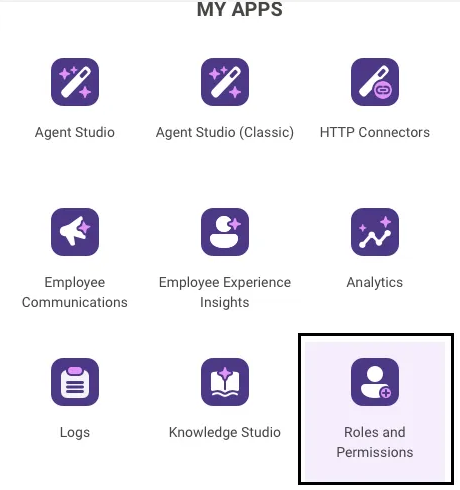
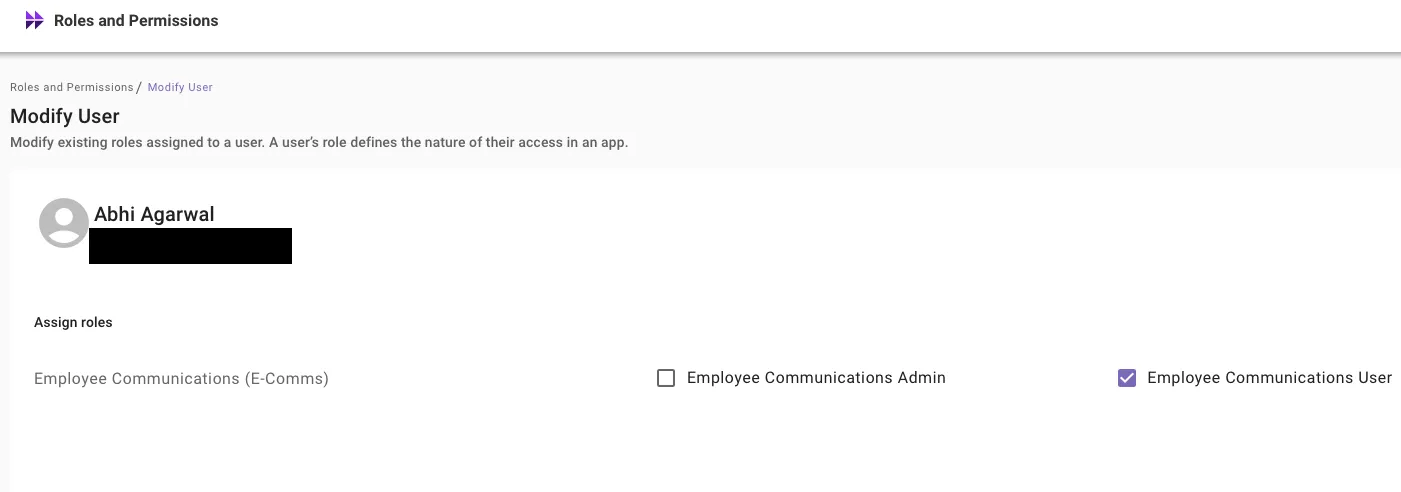
For more information on the global availability, please read the Simplifying access to Ecomms tool within Moveworks Setup post in Moveworks Community.
Moveworks Setup: UX Changes
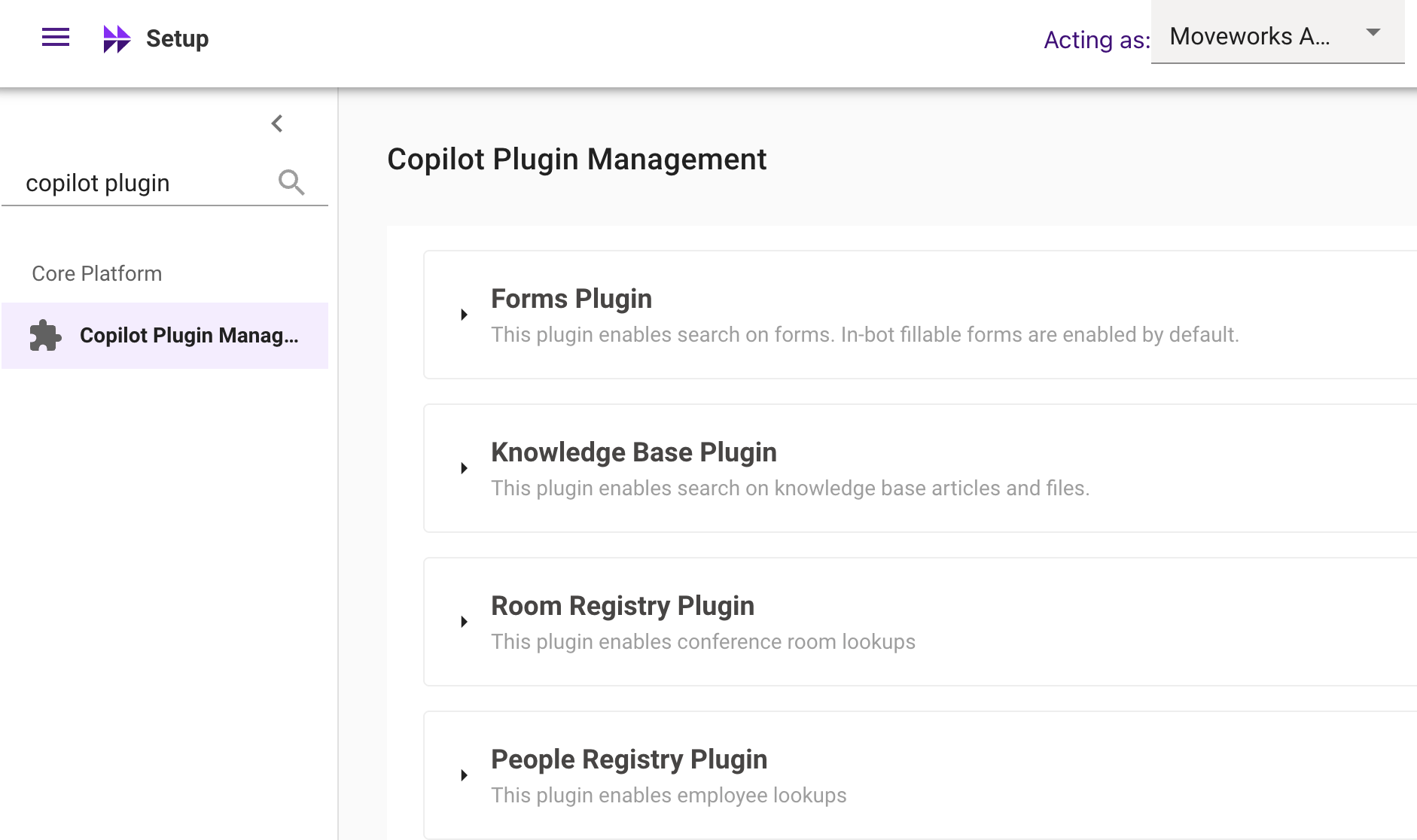
Restructuring of AI Assistant Plugin Management Configs
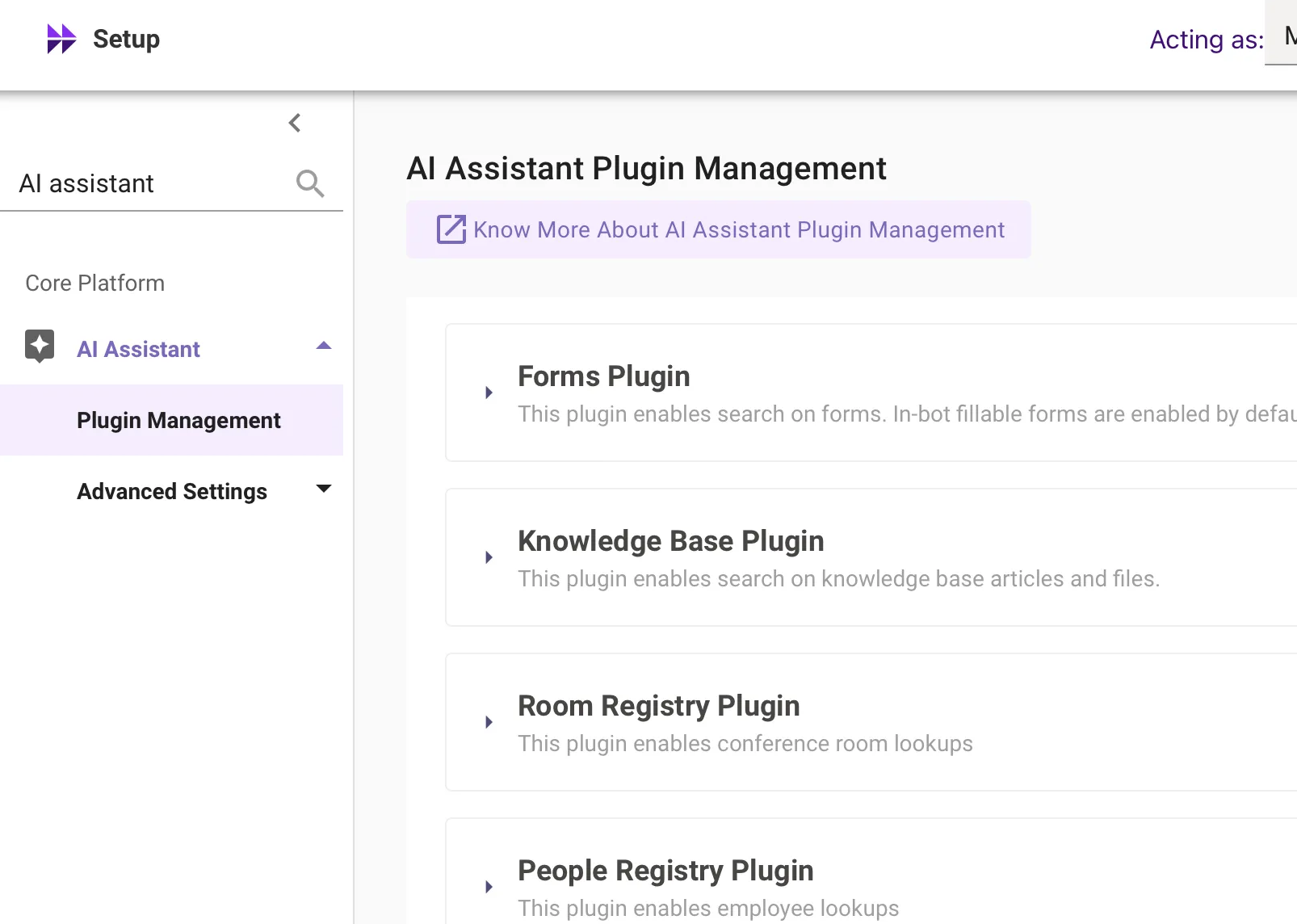
A new AI Assistant section has been added to the left navigation bar under Core Platform within MW Setup.
The AI Assistant Plugin Management (formerly Assistant Plugin Management) has been relocated to AI Assistant → Plugin Management for centralized access, allowing admins to manage MW AI Assistant capabilities more efficiently.
A new Conversation Settings configuration has been introduced under AI Assistant → Advanced Settings, enabling control over conversation history look-back for the AI Assistant.
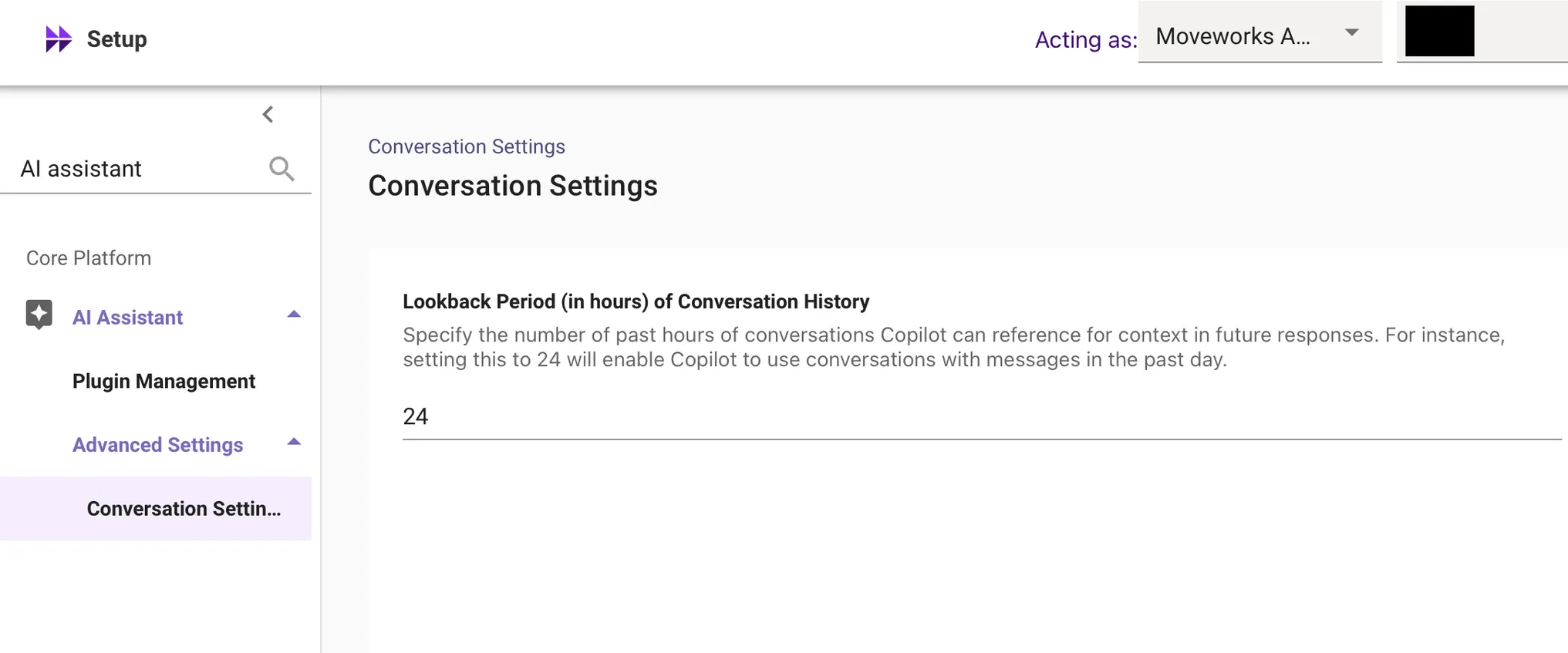
This restructuring consolidates all AI Assistant-related configurations in one place, improving navigation and usability within the Core Platform.
For more info regarding Plugin Management, please read our help documentation on AI Assistant Plugin Controls.
Changes in Slack Experience (Classic Customers Only) - RTF & Add Comments changes
Why was it built/what problem did it solve?
When a user takes a screenshot of an error message, they want to immediately paste the image into the file a ticket flow (without the need to save the image / file).
This is important for Slack customers in the classic version of the AI Assistant - Clicking on “File a ticket with RTF” or “adding a comment” will take them out to web instead of keeping the user in-modal.
Domain Removal from Ingested Knowledge within MW Setup
We have deprecated the domain label previously attached to knowledge base (KB) articles ingested by Moveworks under Setup → Answers → Ingested Knowledge → Internal Knowledge, Files.
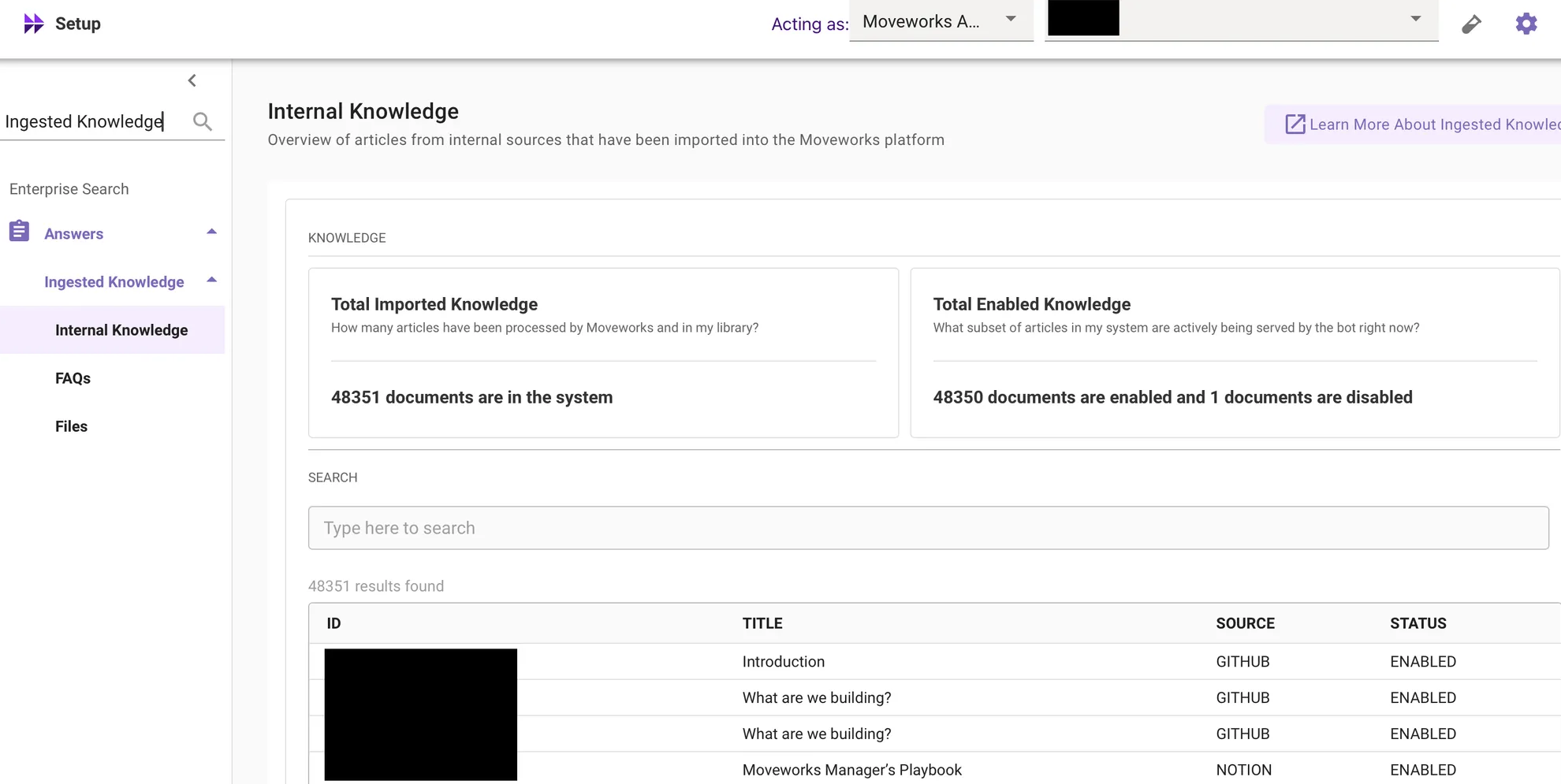
Key reasons for this change:
- Moveworks predicts domain based on the user query, not the document’s historical domain label.
- Specifying a single domain during ingestion often caused inaccuracies, especially when content connectors ingest knowledge spanning multiple domains.
- Domain requirement has already been removed for file ingestion configurations; PDFs, Word documents, and PowerPoint files no longer carry domain labels.
For more info about the UX Change, please read the Domain Removal from Ingested Knowledge post in Moveworks Community.
Splitting of Internal Knowledge and FAQs into into different pages
Internal Knowledge and FAQs have been split into two separate pages within the Answers module for improved usability and clearer differentiation:
- Setup → Answers → Ingested Knowledge → Internal Knowledge
- Setup → Answers → Ingested Knowledge → FAQs (newly introduced page)
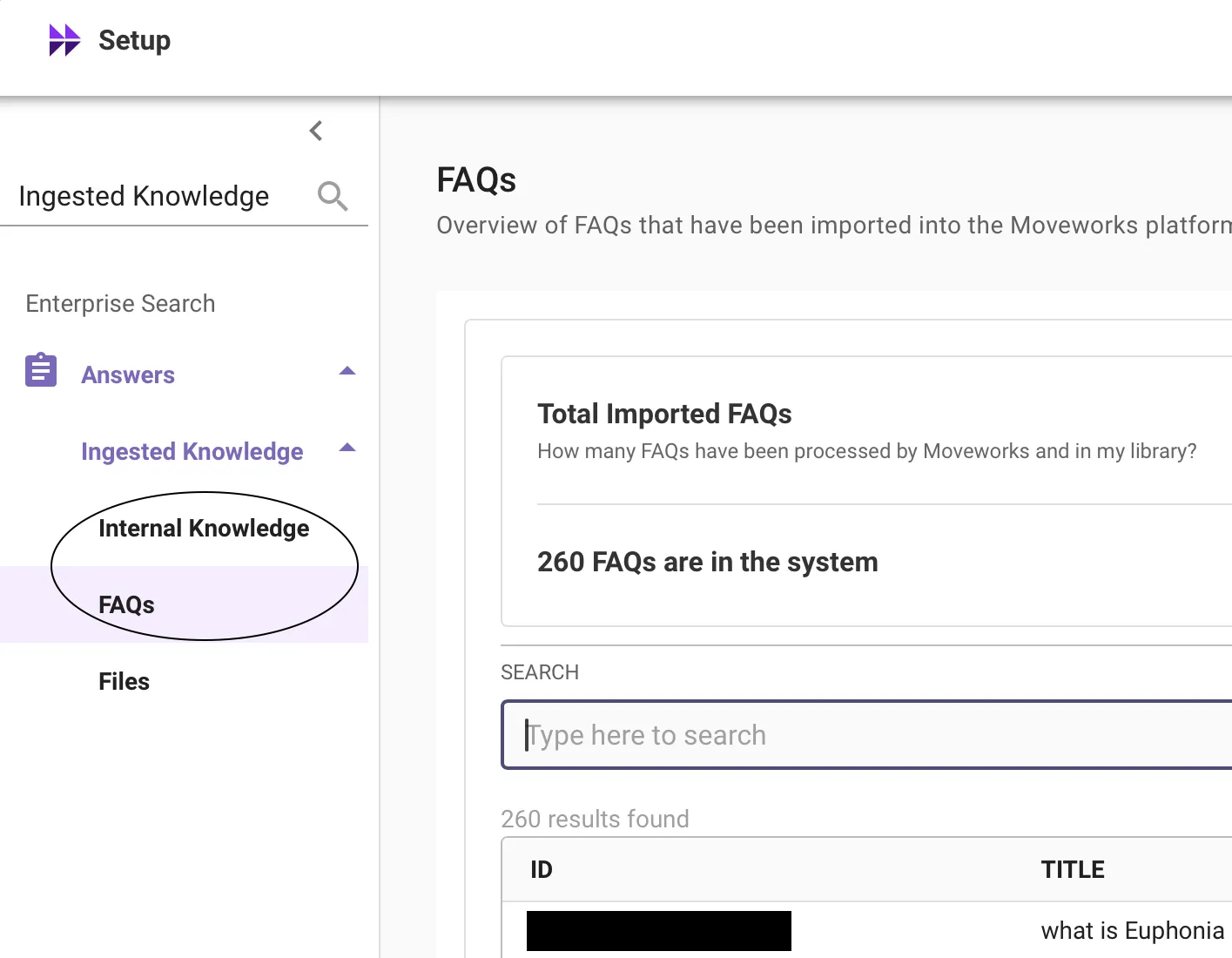
There are no changes to the core functionality or behavior of these modules.
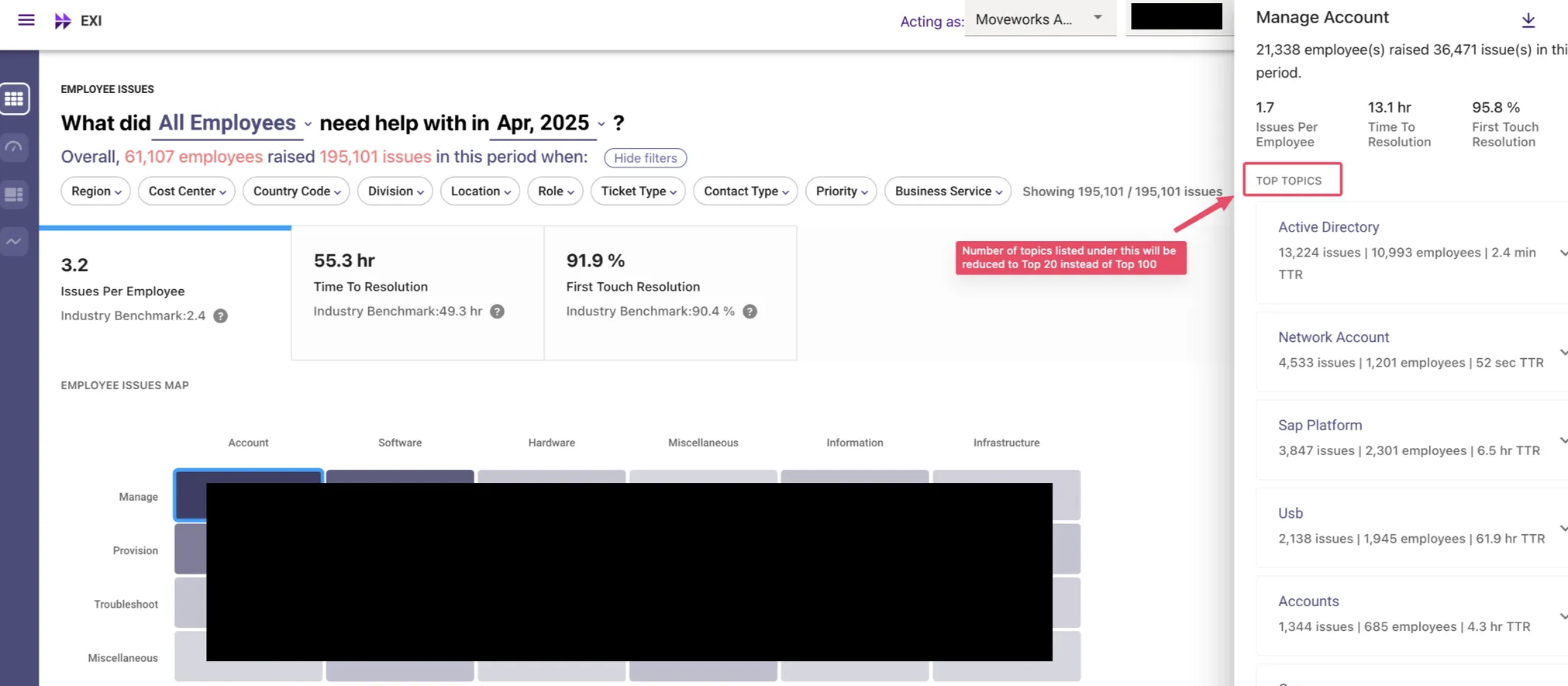
Employee Experience Insights - Reducing Number of “Top Topics” in Issue Heat-Map
The number of top topics displayed in the third pane has been reduced from 100 to 20.
This change has been implemented to reduce wait times and improve performance following the recent migration of EXI to a new database. The top 20 topics cover 80% of the issues, and customers can still access all topics via the “Download All” option.
Employee Communications: New Feedback Mechanism
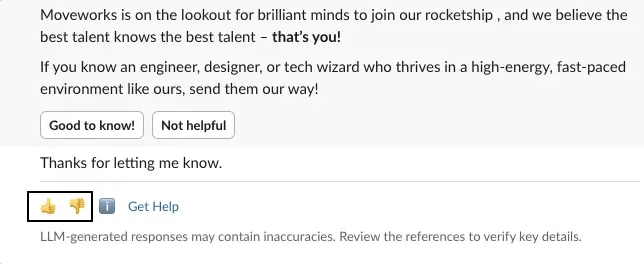
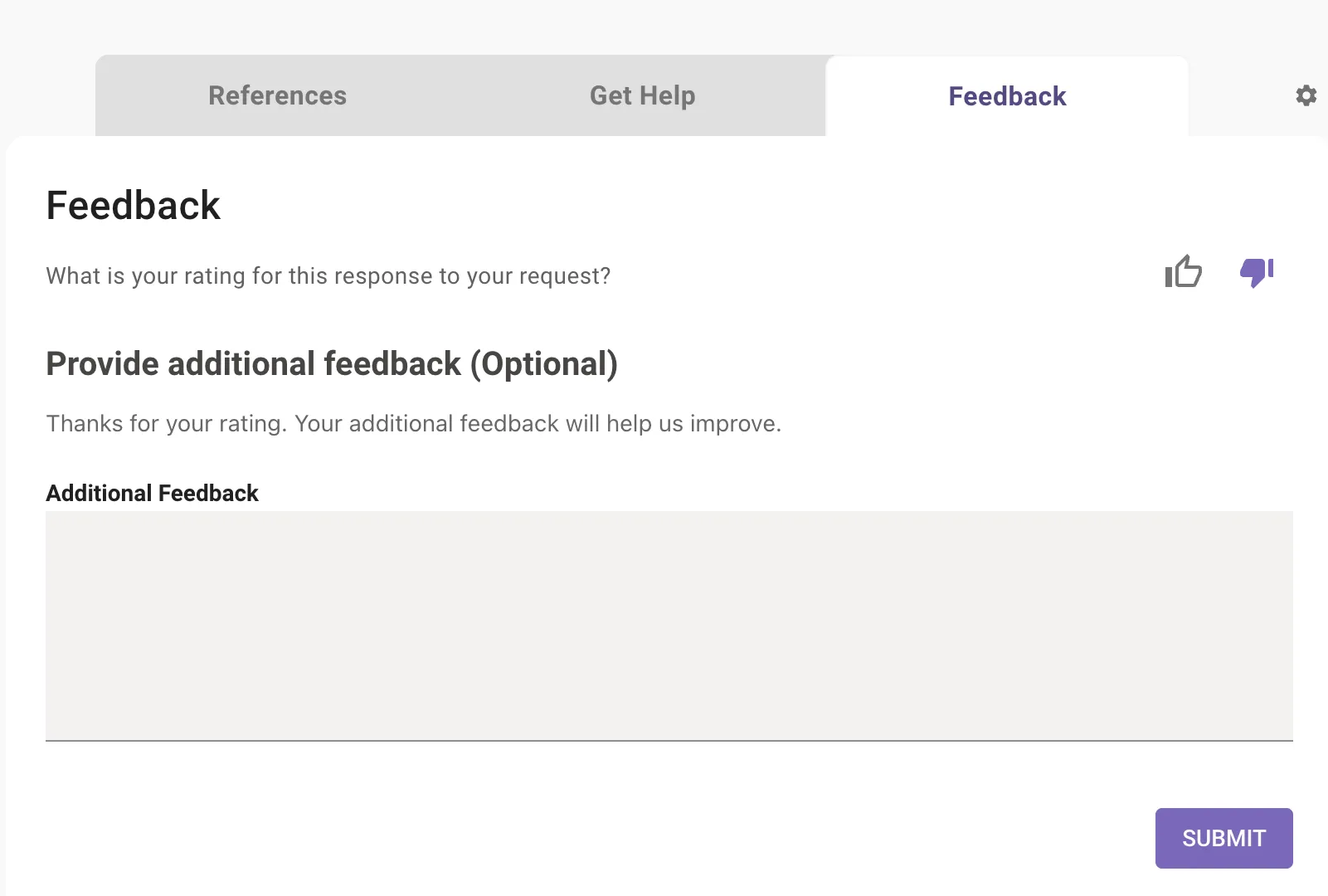
New Feedback Mechanism within Employee Communications
The new feedback mechanism in Employee Comms ensures capturing of all user feedback with 100% guarantee.
The current mechanism of users sharing feedback in chat is fraught with the risk of AI assistant assuming the text to be a start of a new conversation.
To mitigate this, when an user clicks on a button meant to capture feedback, we will display a follow up message with a “Submit Feedback” button which will open an in-chat modal within which users can type their feedback.
April 2025 Product Release Notes
AI Assistant: Automatic Conversation Clearing
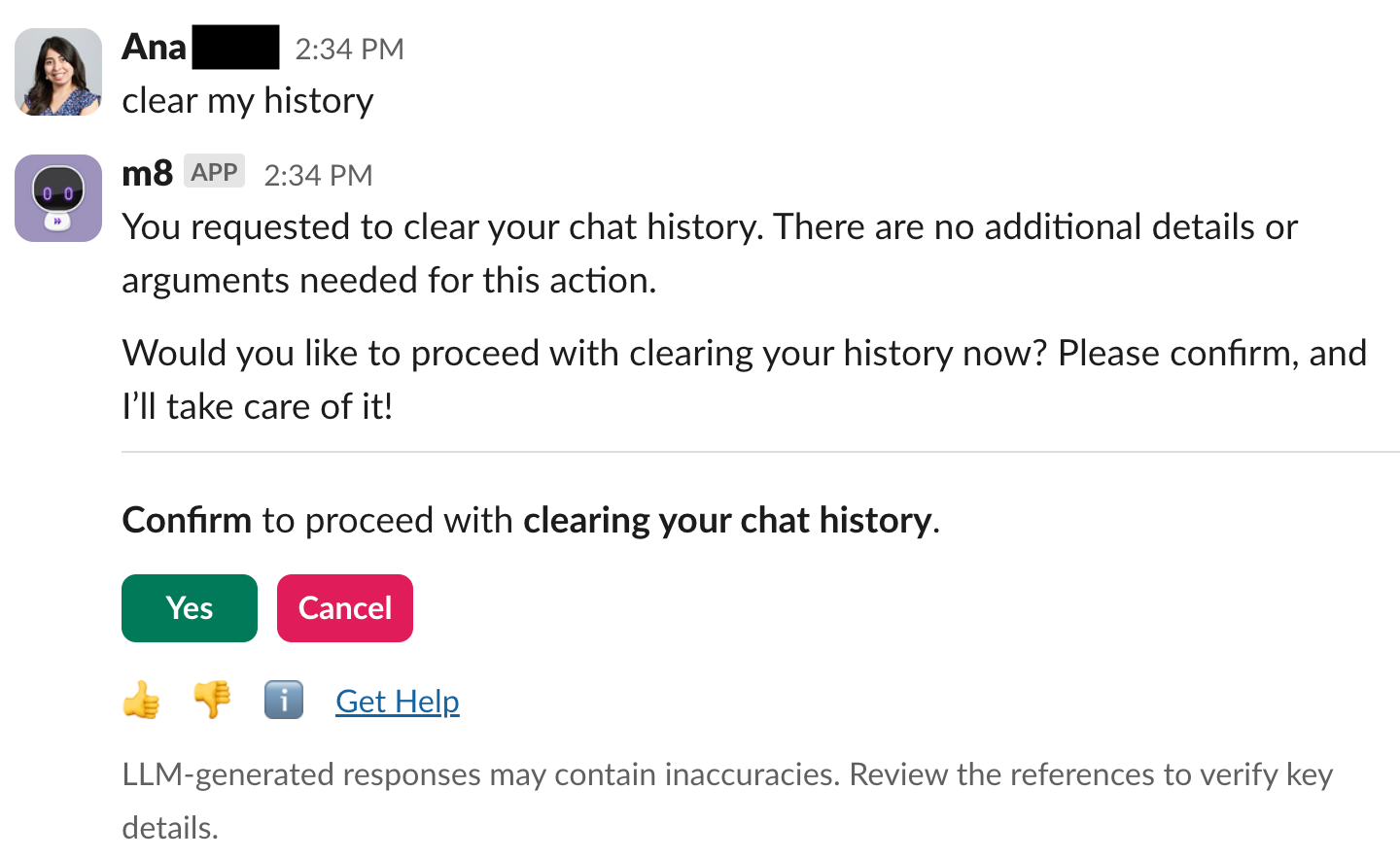
When chat history gets too long, it can confuse the LLM (large language model), leading to less accurate, less relevant, or slower responses. To tackle this, we’re excited to introduce a new feature within our AI Assistant: Automatic Conversation Clearing!
- Conversations are automatically cleared every 24 hours ⏰
With our latest update, your chat history will now be automatically cleared every 24 hours. This means that any conversation older than a day will be removed from the chatbot’s memory, ensuring that your interactions remain relevant and up-to-date. - The most recent conversation topic will always stay in context. 🧠
Even if a conversation spans multiple days, the most recent conversation will continue to be included in the model’s context. This overrides the standard 24-hour lookback window. - You can also clear the conversation history yourself 🗑
If you need to clear memory faster, simply tell your AI Assistant in your own words—it’s smart and will understand commands like “reset chat,” “clear context,” “start over,” “restart,” or “refresh context”. This user-initiated clearing will lead to a true blank state
We’ve created an Employee Comms template you can use to spread the word here.
AI Assistant: Revamped experience for References, Get Help, and Feedback
Interacting with our AI chatbot used to mean scrolling through a long, sometimes overwhelming page to find what you needed — whether it was citations, feedback, or support options. We’re making it much easier to navigate by breaking things into simple, clear sections.
What’s New:
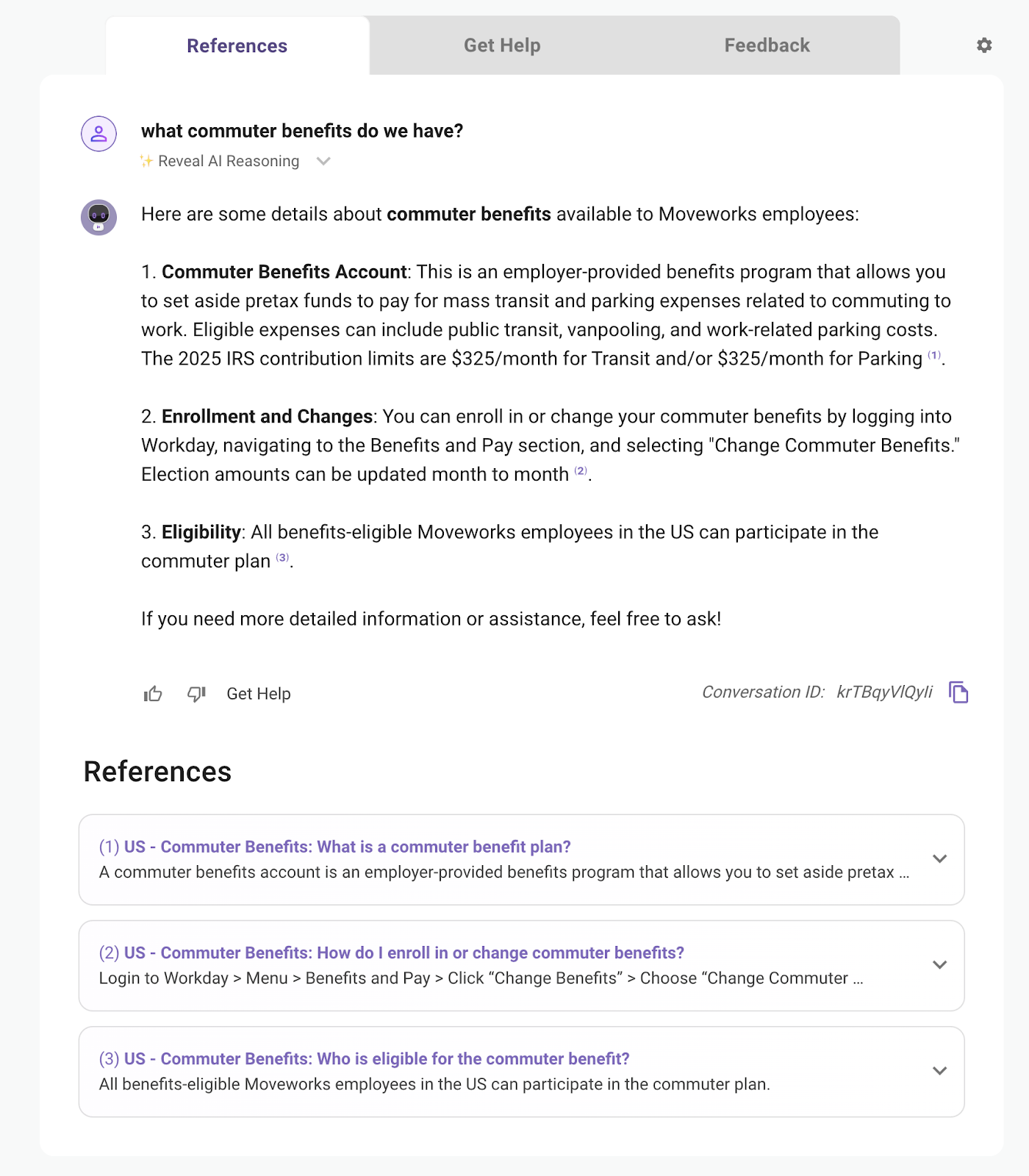
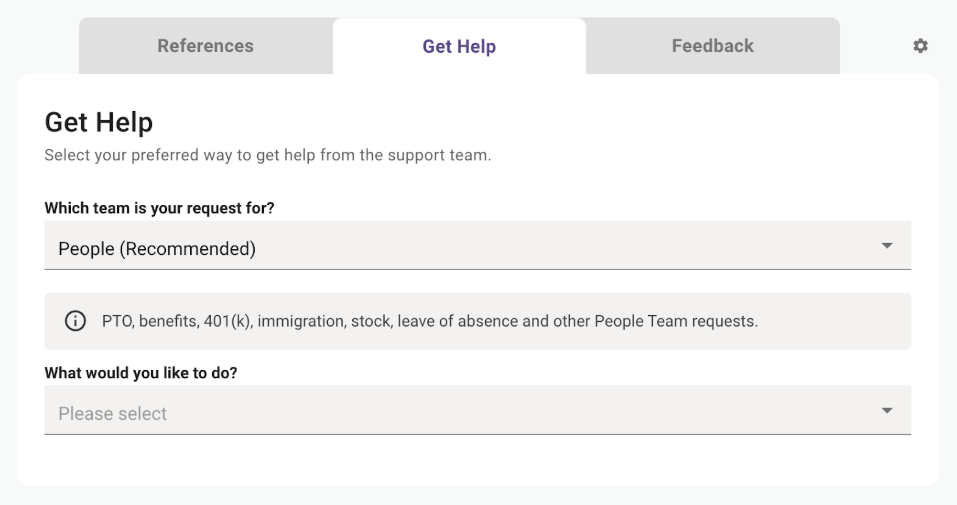
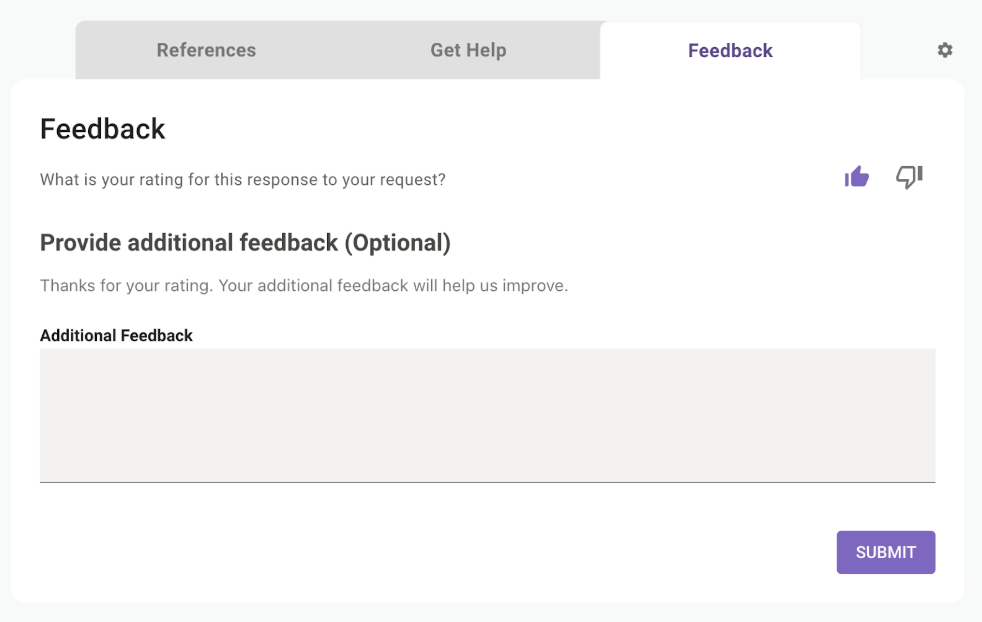
Now, everything is just a click away with our new 3-tab experience:
- References: Instantly view the sources behind the bot’s response
- Get Help: Quickly file a support ticket — or, for some customers, connect directly with a live agent.
- 👍 👎 Feedback: Easily submit in-app feedback with a thumbs up or down.
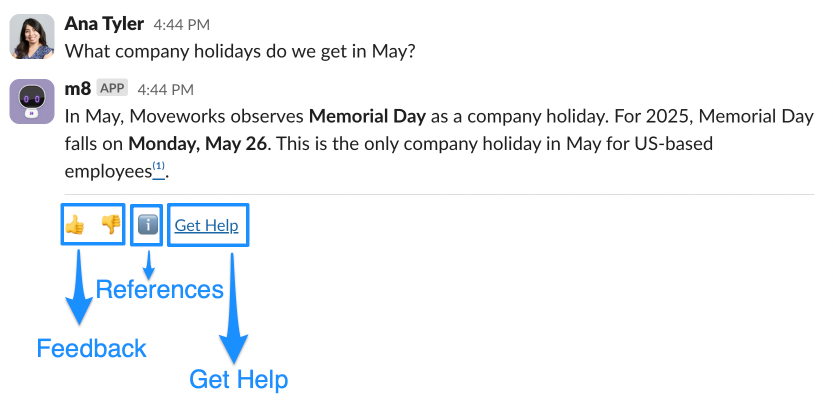
👉Note: This is just a visual update — the AI Assistant behavior and responses aren’t changing. The entry point for this experience also does not change. Depending on which entry point you select (ex. Thumbs up/ Thumbs down) you’ll be automatically navigated to the right tab (ex. “Feedback” tab).
AI Assistant: Additional Smart Handoff Enhancements
We rolled out two updates that will improve the Smart Handoff experience — making it more customizable and less disruptive for your employees.
Customize the “Get Help” Link Label 📝
You’ll now be able to rename the “Get Help” link to better match your company terminology. Prefer “File Ticket”, “Live Chat” or “File ticket/Live chat”? Go for it — it’s all up to you. We’ll share configuration details soon.
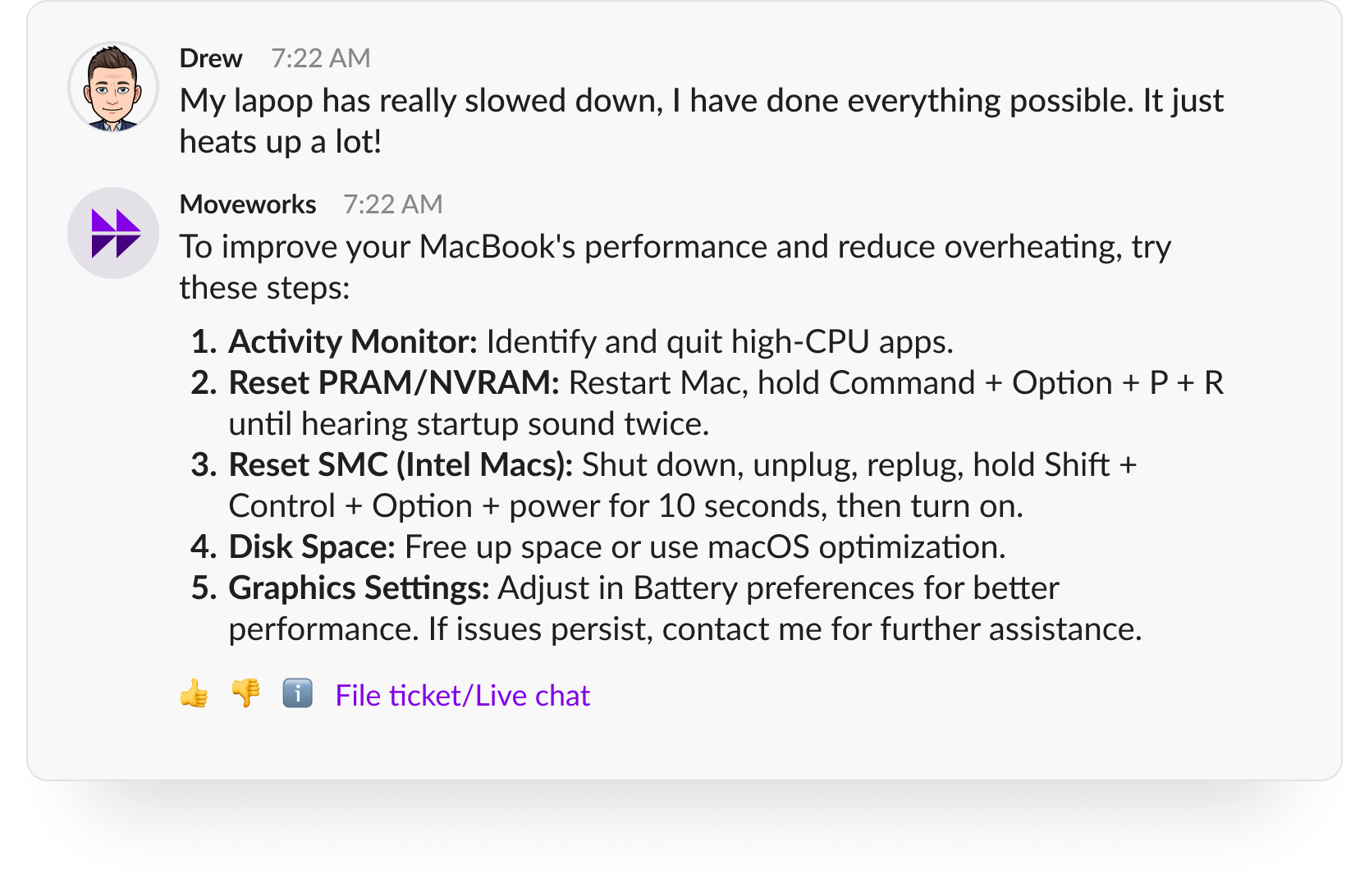
No Redundant “Get Help” Links 🖇
We’ve improved the logic behind when the “Get Help” (or your custom label) link appears. If a user is already confirming they want to file a ticket or chat with a live agent, there’s no need to show the link again — so we don’t.
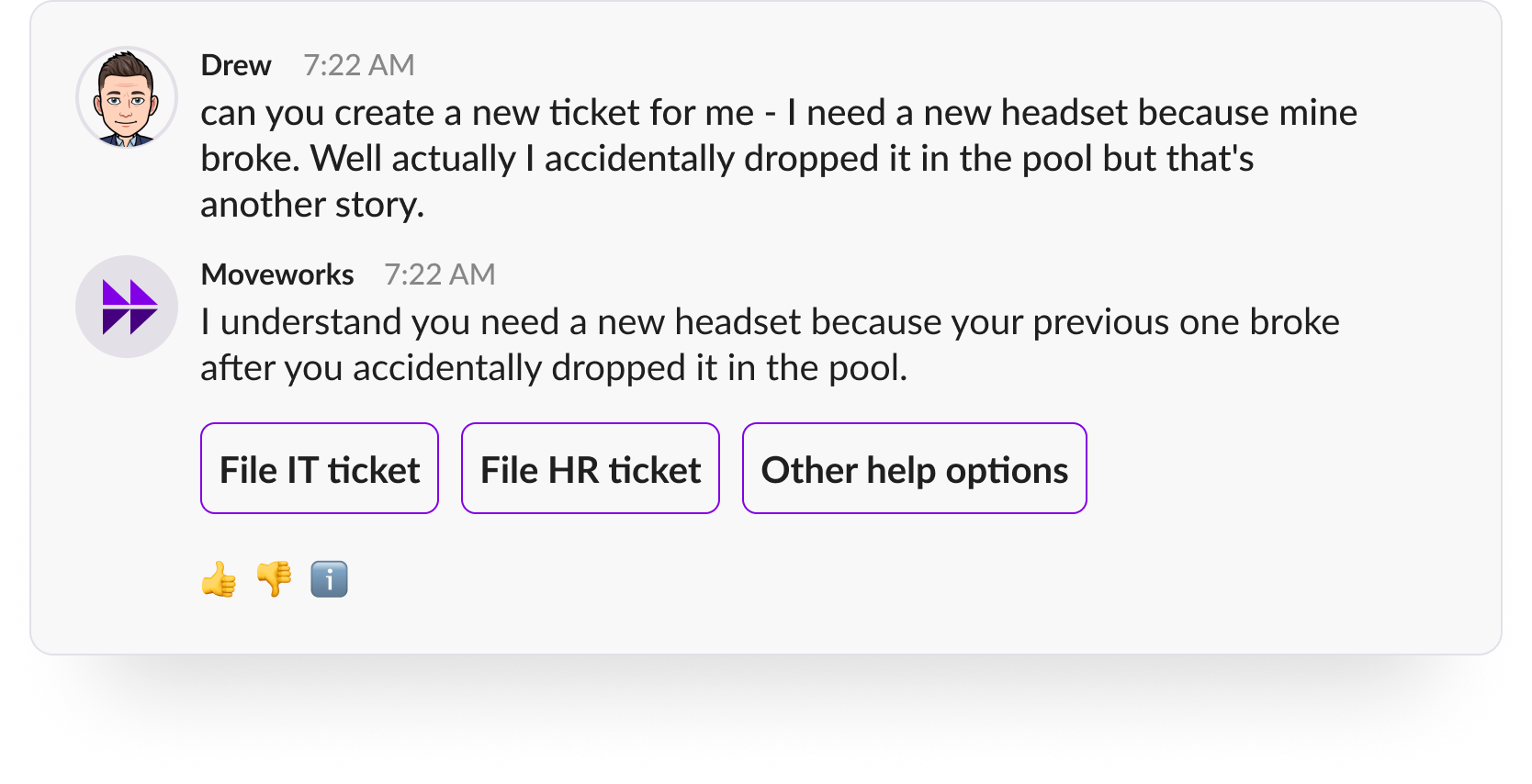
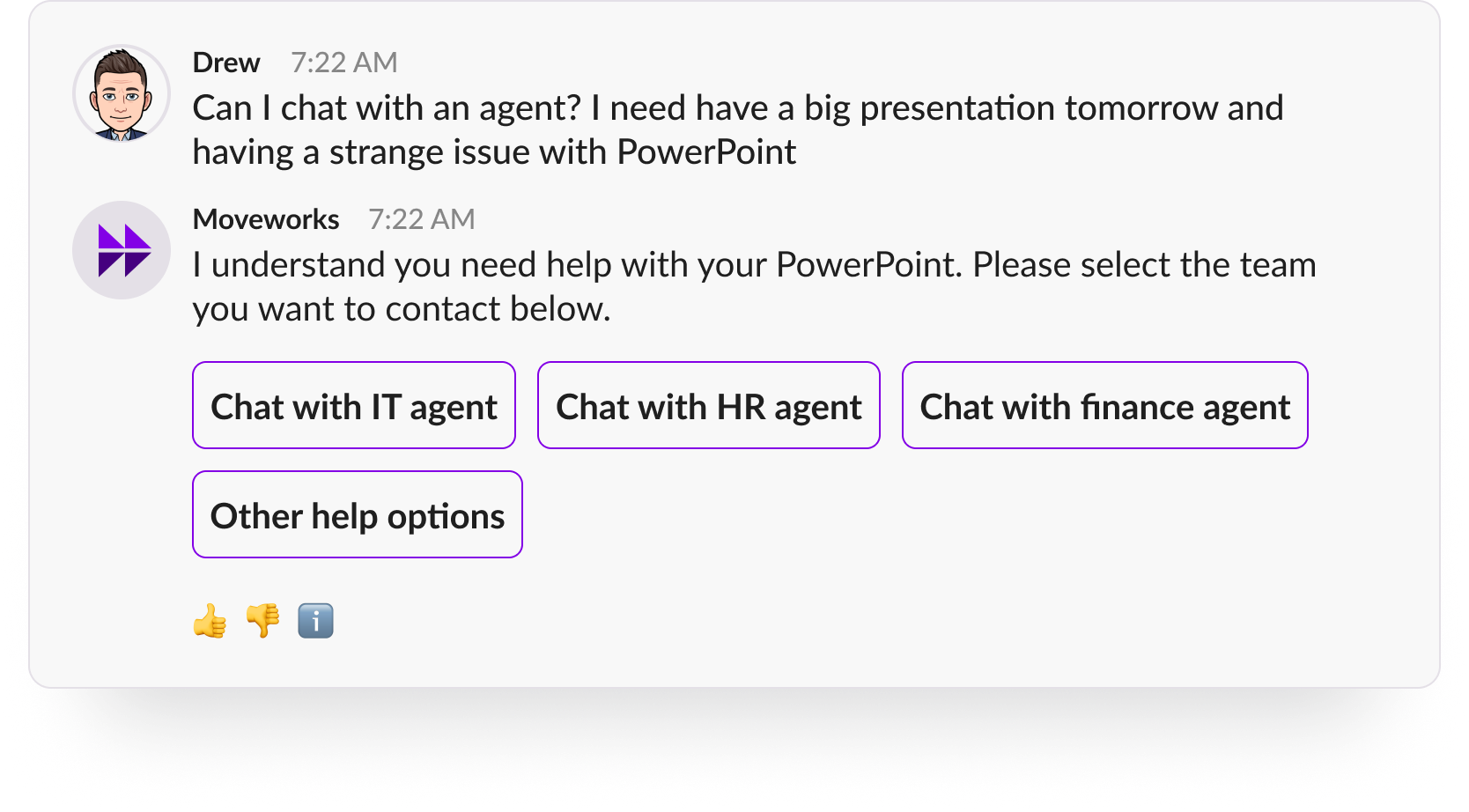
👉Note: If you’ve customized the label from “Get Help” to something like “File a Ticket,” “Live Chat,” or “Need Support,” the same logic applies: the link will be hidden in situations where it would be redundant.
AI Assistant: Update needed for Microsoft Teams customer
Earlier this year we encountered an issue with Microsoft Teams that caused problems for all our Microsoft Teams customers. We’ve been partnering closely with Microsoft Teams about this issue and they recently rolled out an update that would fix the problem.
Unfortunately the solution requires that all of your employees to update their Moveworks AI Assistant application. We’ve been informed by Microsoft Teams that this update has now been rolled out to all of our customers. Below is a screenshot showing a banner with an “Update” button that will appear for all your employees within your assistant application.
We understand this is not ideal and apologize for any issues that have been caused due to this update.
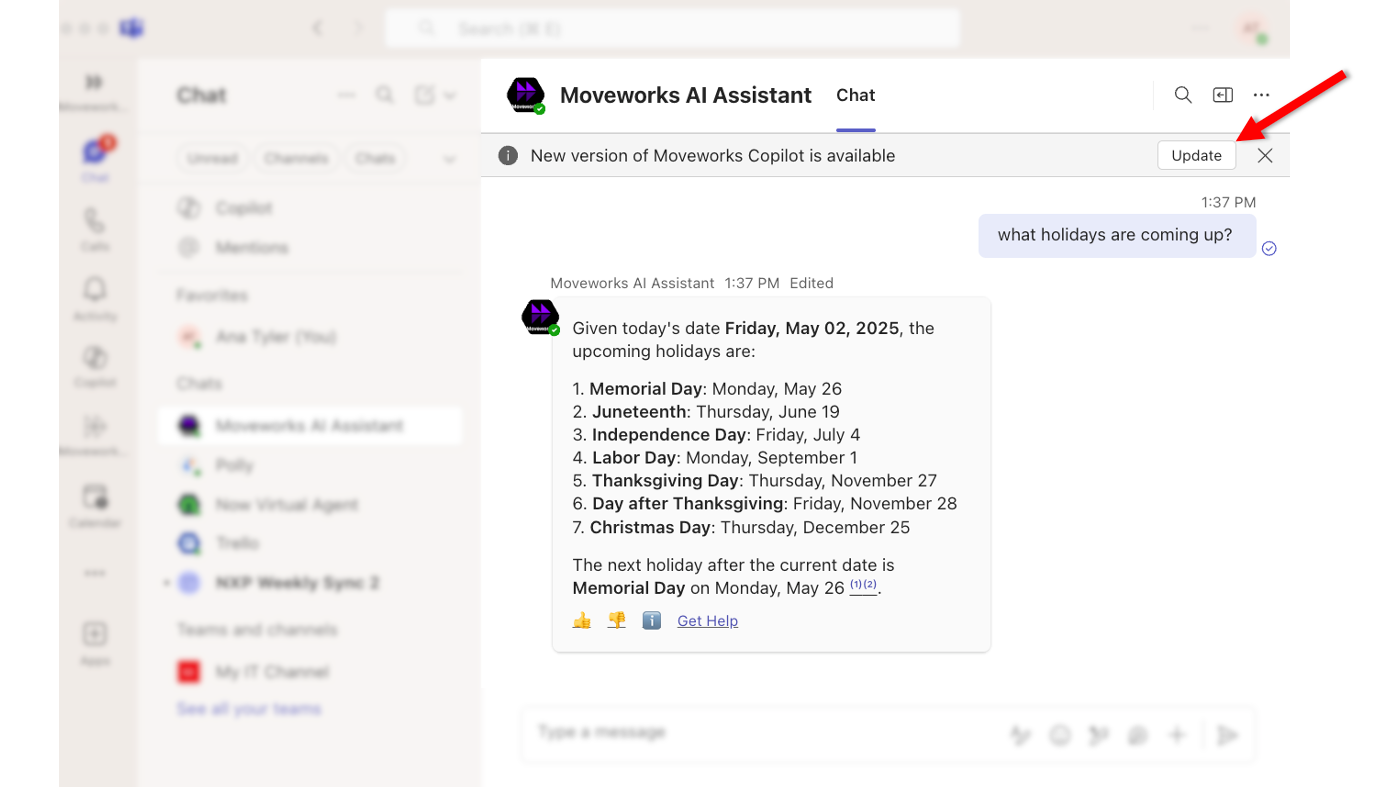
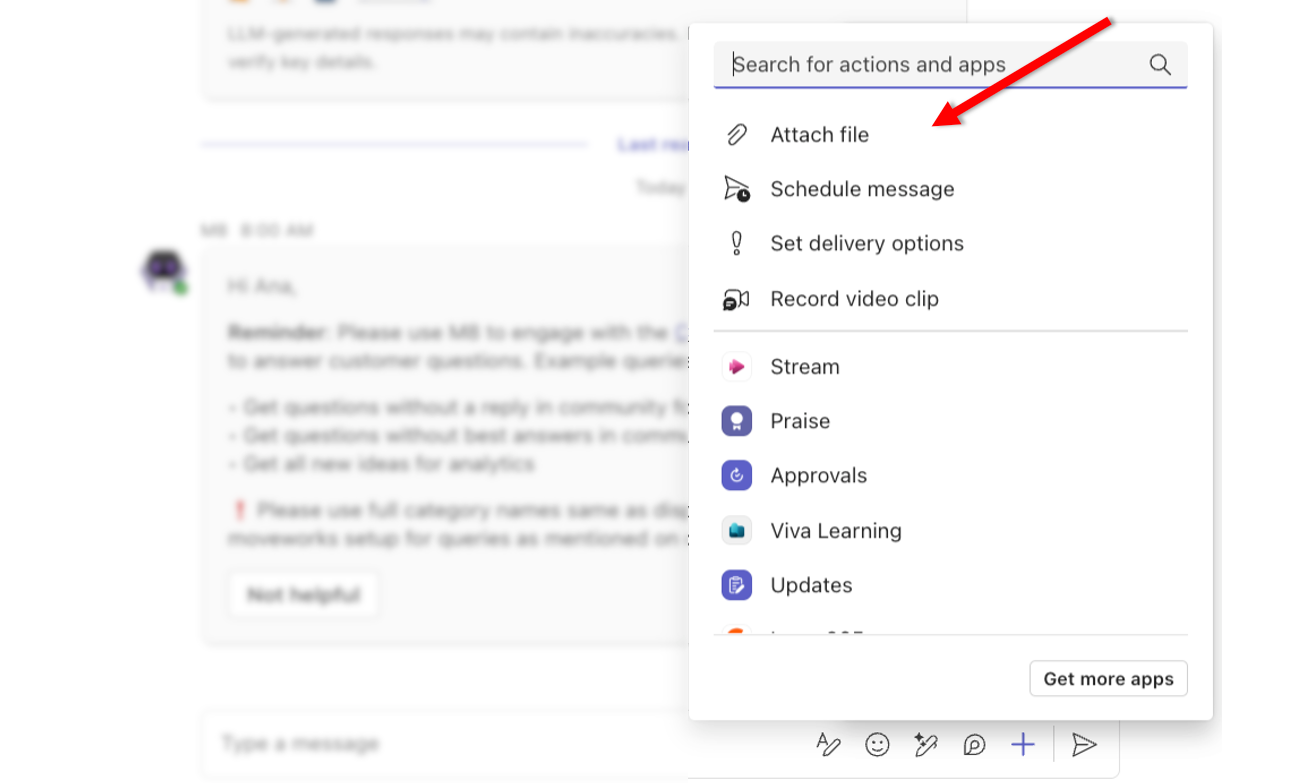
What was the issue? Microsoft Teams rolled out an update in February 2025 that caused issues with the attachment button within our Moveworks AI Assistant application. Customers started reporting that the following issues with the attachment button within their assistant:
- Users were not able to see the “Attach file” button.
- Users would notice that the “Attach file” button would appear and then disappear.
Brief Me: Instant File Deletion
Now when your employees are using Brief Me, any files that are uploaded with your AI Assistant are automatically deleted across all of our backend services within 24 hours.
Within the experience you’ll notice these updates:
- When your employees exit Brief Me, any uploaded files within their session will automatically be deleted. Users will see an updated message about this.
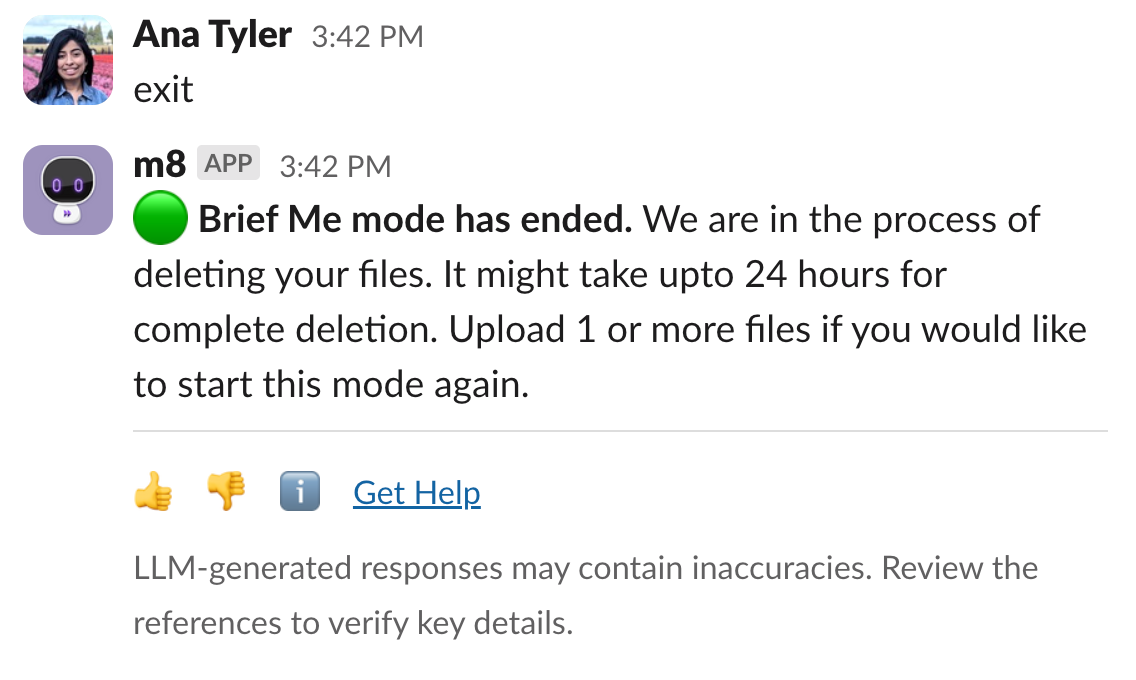
- If your employees forget to exit Brief Me and it’s been more than 24 hours since they’ve uploaded a file(s), they won’t be able to continue using those files for their Brief Me session and will need to re upload new files.
Moveworks Setup: Smart DSL Builder & Evaluator
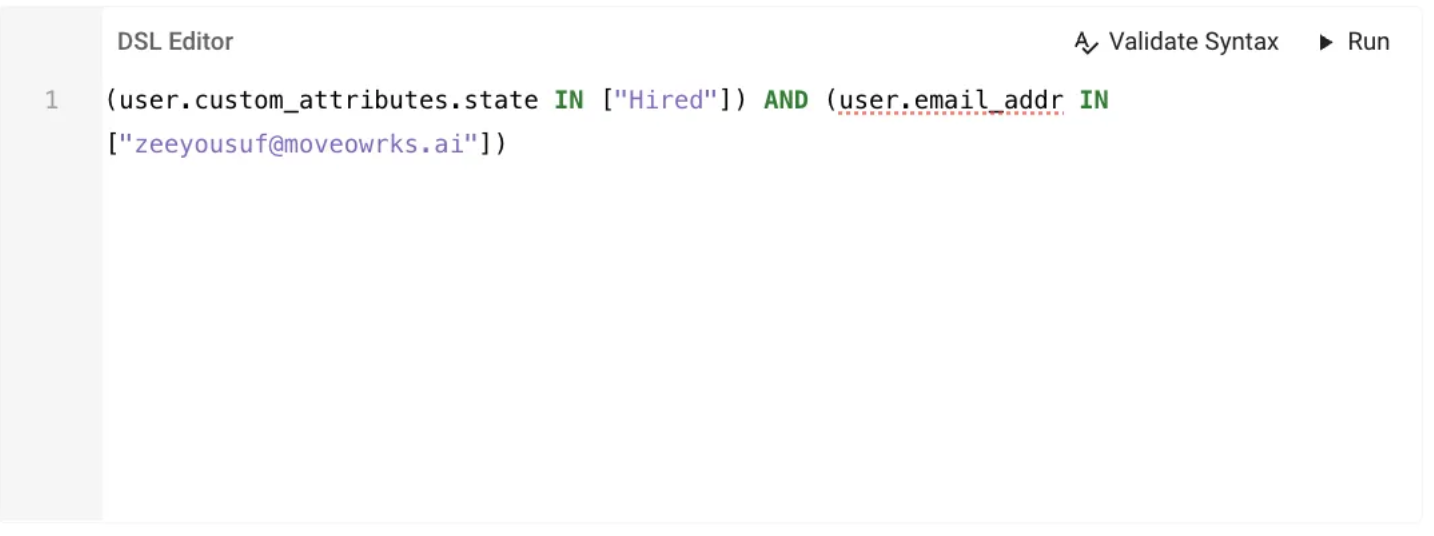
DSL Builder and Evaluator is a feature designed to simplify the creation, modification, and testing of DSL rules across the Moveworks Setup.
What’s new?
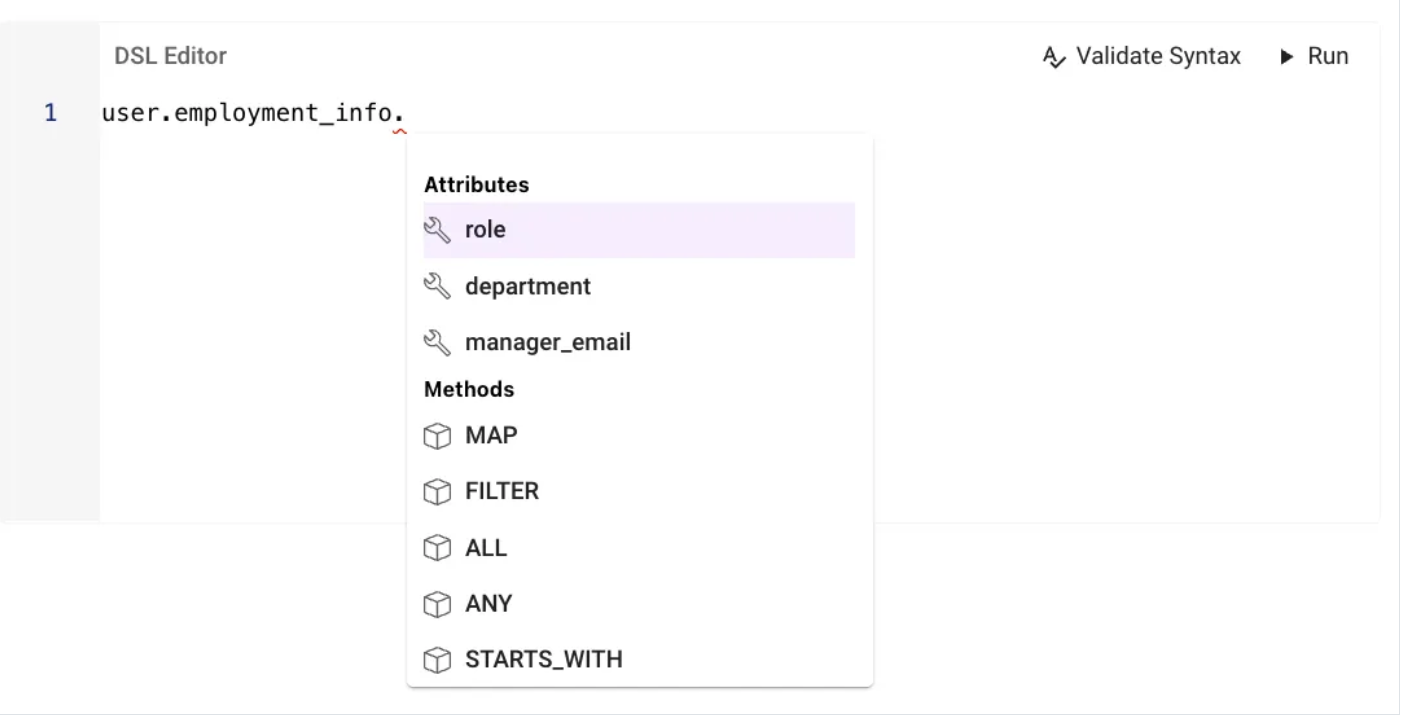
- A sufficiently trained admin/user can now configure DSL rules across Setup, we now provide attribute suggestions in each DSL rule so users are clear on what rules or contexts can be supported in that field.📍
- Users can now test their DSL rule real time in contexts of User, Tickets, Resource, Approvals etc. 🚀
- Users no longer need to rely heavily on CSE, Support or documentation for authoring DSL Rules, as the autocomplete feature now provides what the probable rule would be depending on the attribute selected.
Please refer to the following ressources to start using this feature:
- DSL Builder and Validator
- DSL Rules across Setup Plugins
- Custom Attributes in Moveworks (Used heavily in DSL rules)
Moveworks Setup: Lots of new configurations available
- New Workday Configs
Enable WQLcheckbox andReport URL for Approvals configare now available under Setup → Connectors → Built-in connectors → Workday System Connector- Enable WQL - Checking this Box will allow Moveworks Identity Ingestion configuration to leverage WQL (if defined)
- Report URL for Approvals config - This config can be used to add the URL of the report which will be polled from Workday to process approvals
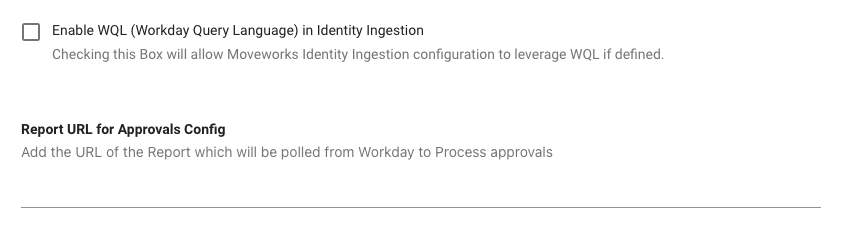
- New JIRA Service Desk Configs
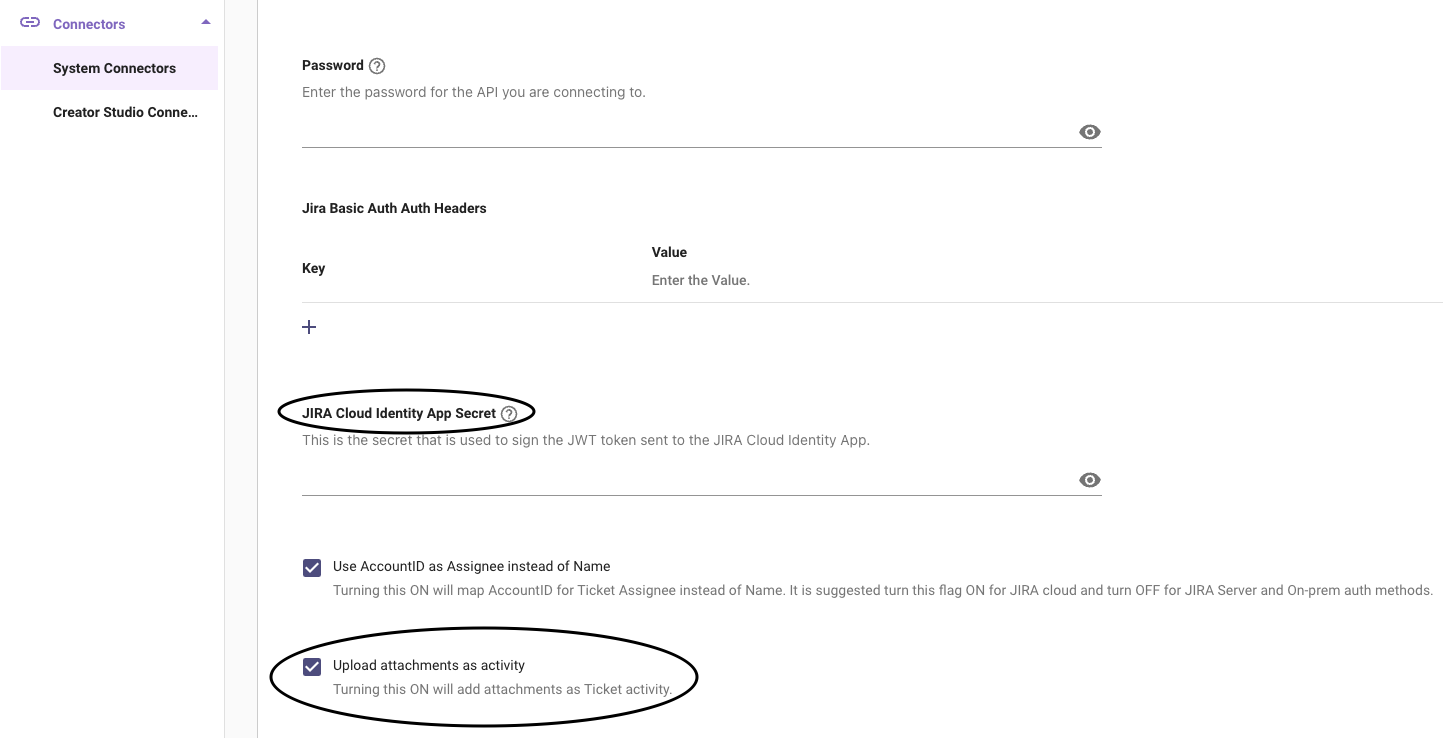
JIRA Cloud Identity App SecretandUpload Attachments as Activityare not available under Setup → Connectors → System Connectors → Jira Service Desk.- JIRA Cloud Identity App Secret - this is the client secret key used to sign the JWT token sent for authentication with the JIRA Cloud Identity App
- Upload Attachments as Activity - Checkbox used to allow attachments for tickets (attachments will be considered as ticket activities).
- GDPR Mode configuration in JIRA is now automatically enabled for Cloud and disabled for JIRA On-Prem. This is no longer a toggle but a fixed setting based on the deployment type.
Hide Default Agent Imageis now available under Snow Handoff Config in Setup → Handoff → Live Agent Handoff → Agent Broker Handoff configuration.- Hide Default Agent Image - This checkbox enables or disables the default agent image icon displayed in messages during live message brokering.
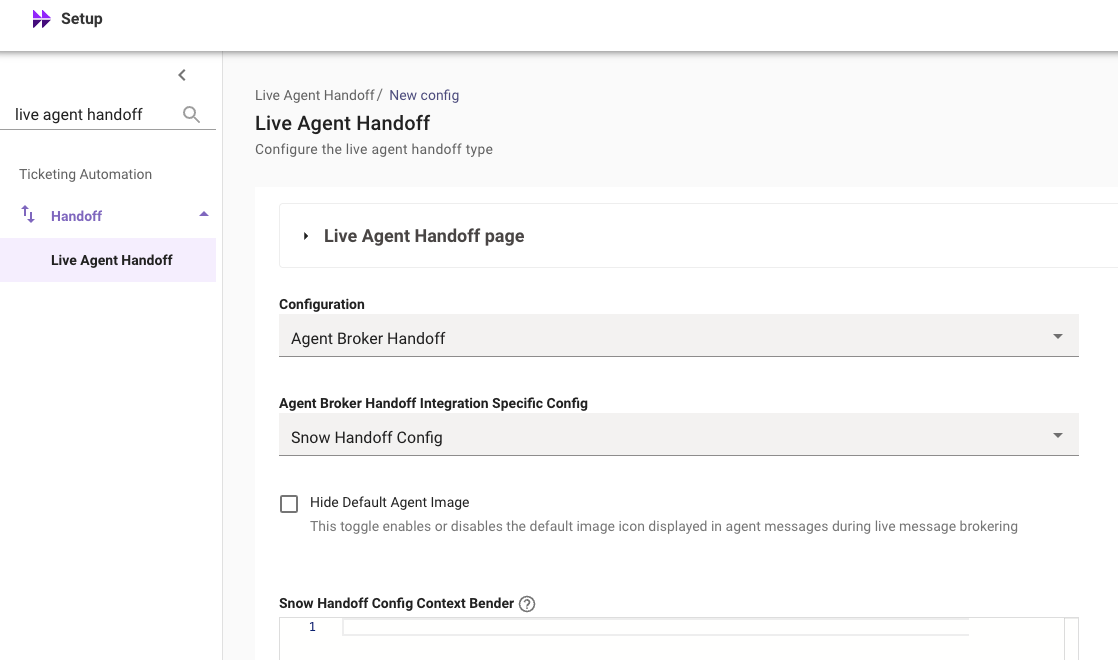
- Hide Default Agent Image - This checkbox enables or disables the default agent image icon displayed in messages during live message brokering.
- Dedicated page for
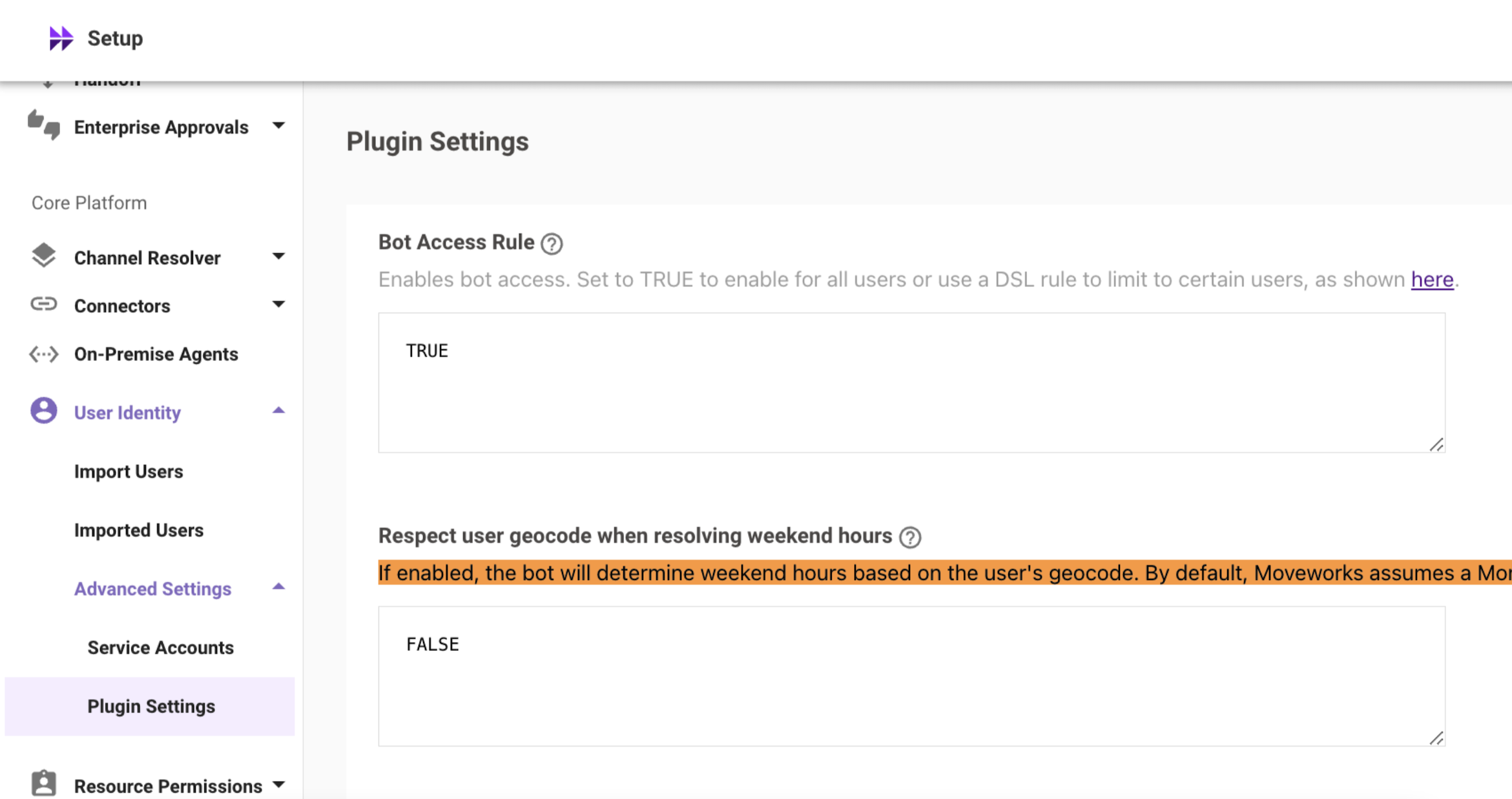
Bot Accessadded under User Identity A dedicated Bot Access page has now been introduced under Setup → User Identity, allowing users to configure the Bot Access Rule.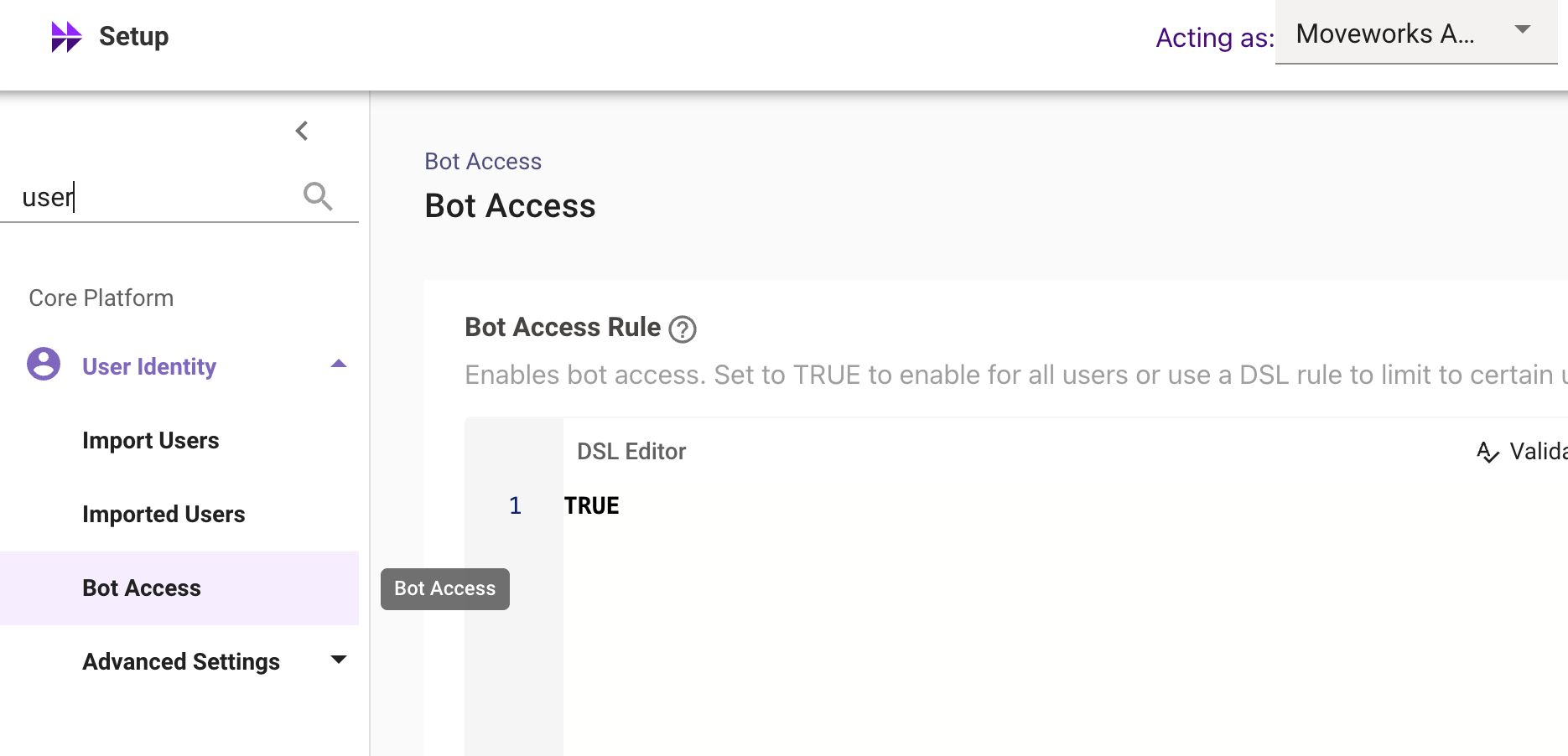 This was previously located under User Identity → Advanced Settings → Plugin Settings.
 Respect Geocodeconfiguration moved under Ticketing TheRespect user geocode when resolving weekend hoursconfiguration has now been moved to Ticketing → Concierge Settings → Notification Settings, since it is a notification setting rather than a bot setting.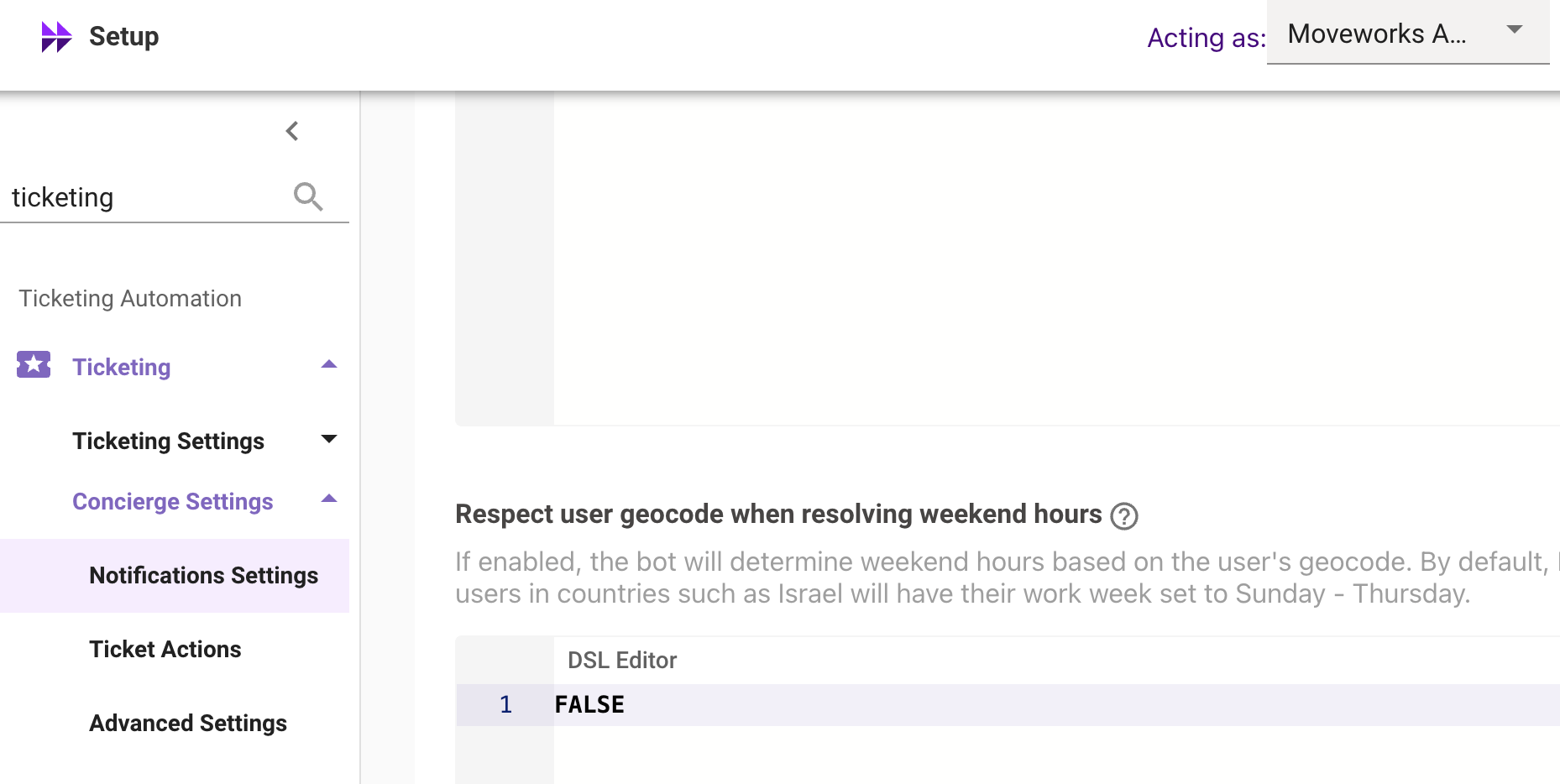
NAT Gatewayis now available in the GovCloud environment under Setup → Tenant Settings → General Information → Network details Section. The NAT Gateway section lists the Static IPs that identify requests originating from Moveworks core platforms & services. For more information on IP Address allowlisting, please read our Network Allowlisting documentation.
Moveworks Setup: Data Retention changes in Moveworks Setup Audit Logs
As we move to a new infrastructure, the config and permission logs data before March 11th 2024 will no longer be available under MW Setup → Audit → Configuration Logs, Permission Logs
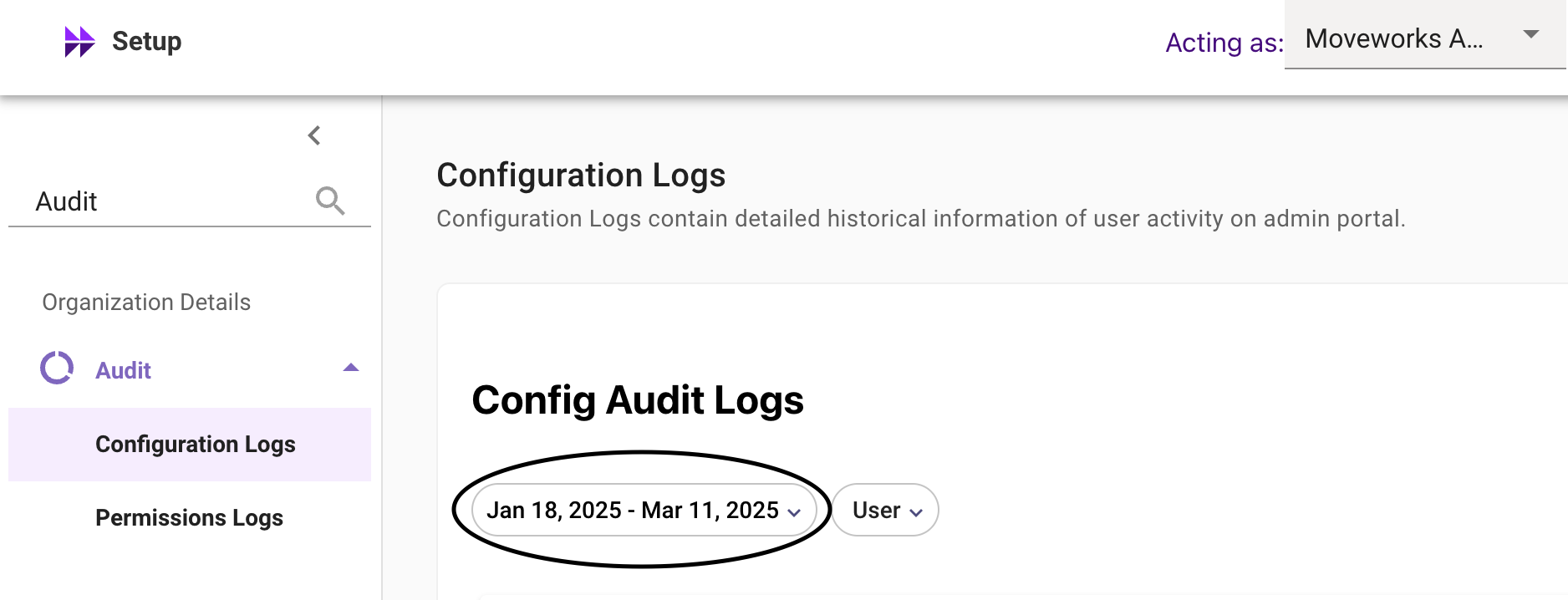
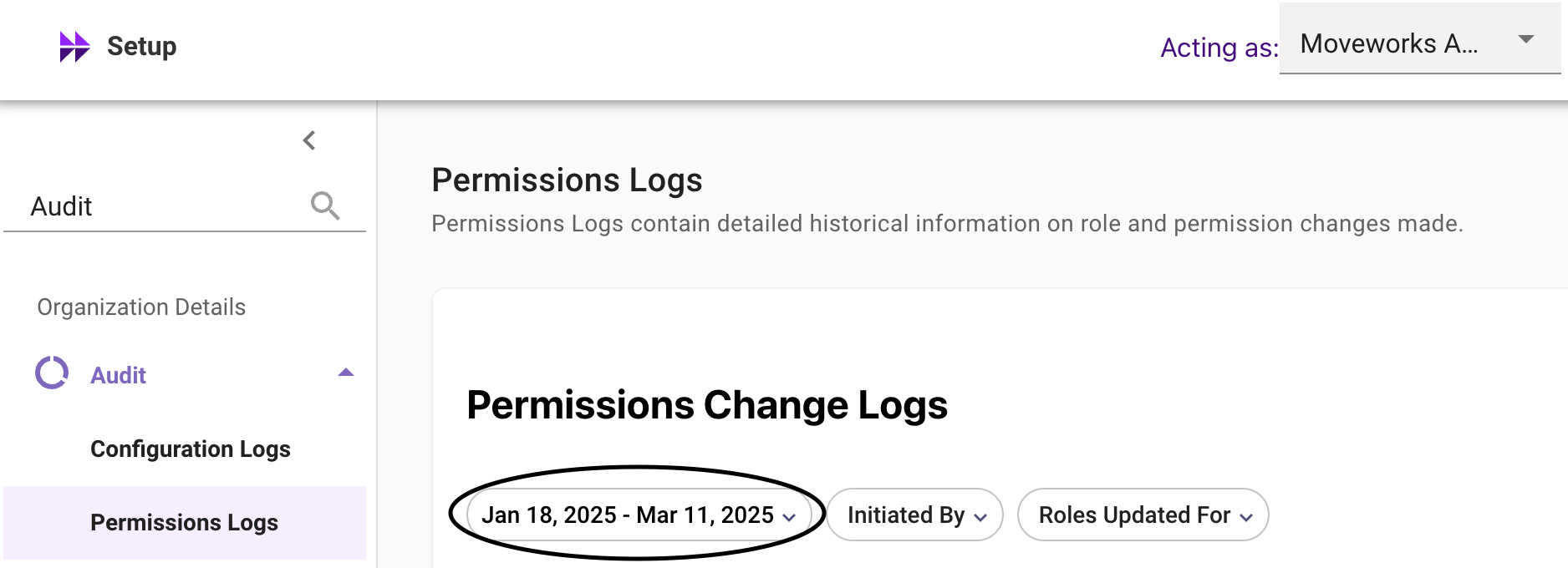
👉Note our data retention period remains 60 days. The first full retention cycle will end on May 11th, after which data will be retained on a rolling basis.
March 2025 Product Release Notes
Agent Studio: New Actions
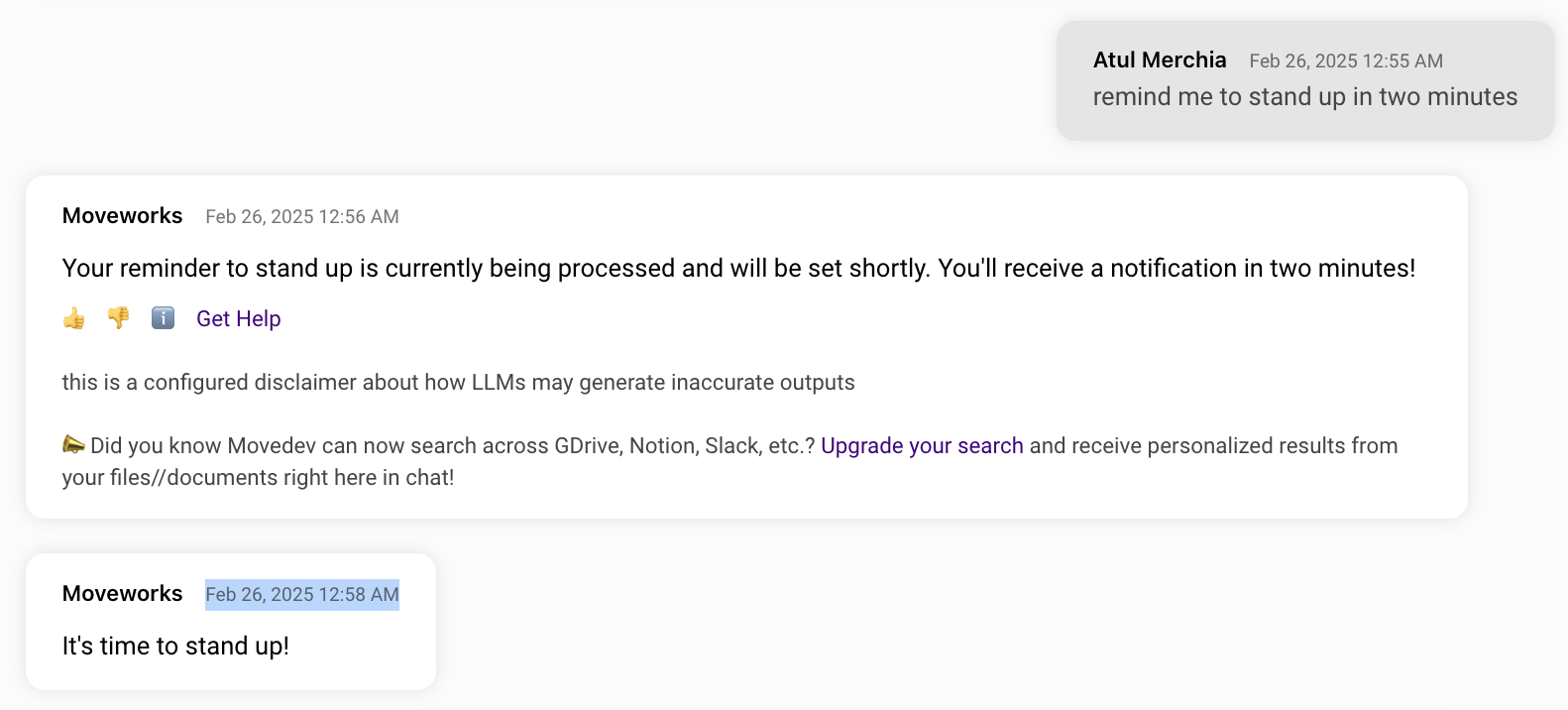
Actions: Delay Configuration (i.e. Sleep)
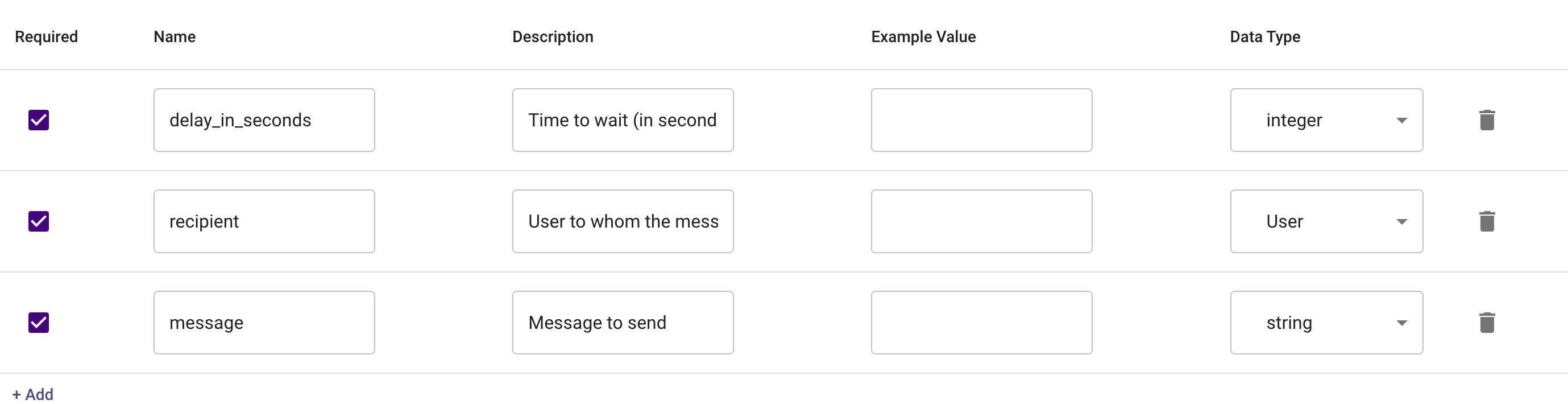
We’re excited to share that you can now delay the execution of actions! For developers building with APIs that have asynchronous behavior (e.g. a “start job” endpoint and a “get job results” endpoint), you’ll be able to “sleep” the action for a period of time.
Key features include
- Delayed Execution - Delay the execution of your action
- Multiple Units of Time - Support for milliseconds, seconds, minutes, hours, & days
- Dynamic Sleep Periods - You can vary the sleep period based on your compound action’s data. (e.g. if your “start job” endpoint returns an estimated processing time, you can sleep for that duration).
For more details, please see our Compound Action Reference in Agent Studio docs, or check out an example for a reminder plugin below:
Compound Action
Input Arguments
Chat Experience
AI Assistant: Ticket Interception
⚠️ Ticket interception is a legacy plugin for the Moveworks AI Assistant
- When a user files a ticket through the self-service portal or via email, the assistant can intercept these tickets and reach out in-chat with a solution it is confident can solve their issue.
- It leaves a comment on the ticket describing its proposed solution.
- If the assistant is able to fully resolve the user’s issue, users can give acknowledgement in-chat by responding to the reach out. Then, it will mark the ticket as resolved.
- If the offered solution does not solve the user’s issue, they can indicate that in chat and the assistant will leave a comment on the ticket, and leave it open for an agent to address.
❗Important - This feature is only available to customers who had previously enabled Ticket Interception in Moveworks Classic. For more information, please contact your account team.
For more details, please read more in our Ticket Interception in Moveworks Classic docs!
Moveworks Setup: UX Changes
Dedicated Bot Access Rule Page
A dedicated Bot Access page has now been introduced under Setup → User Identity, allowing users to configure the Bot Access Rule. This change was made to enhance the experience of configuring bot access rule in Moveworks Setup since it is a crucial configuration.
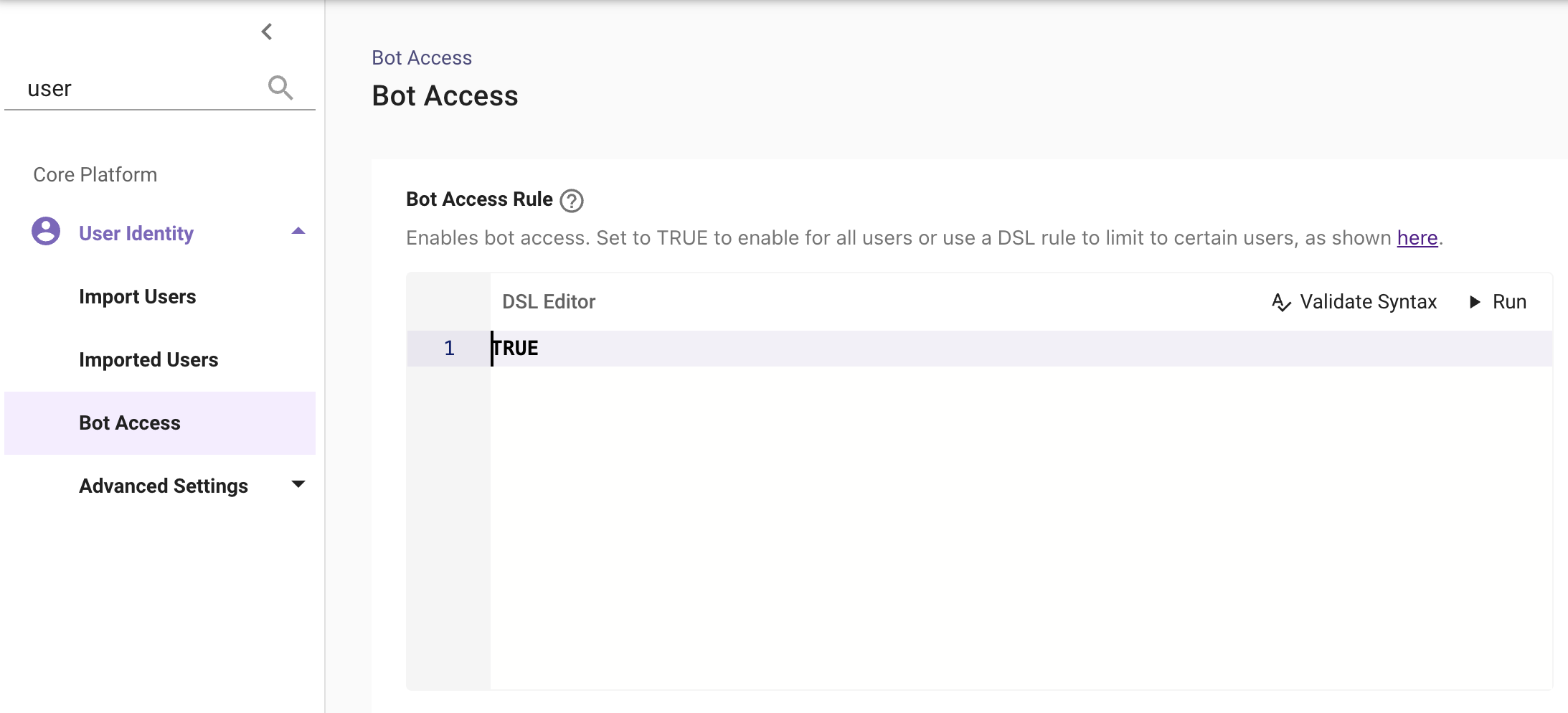
This was previously located under User Identity → Advanced Settings → Plugin Settings.
To learn more about the bot access rule, please see our Bot Access Rule in User Identity Plugin docs!
Page Performance Enhancements
The Assistant Plugin Management page under Setup contains a large number of DSL Editors, which was causing performance issues, including slow loading times and frequent browser session crashes.
To improve usability, configurations have now been grouped and in-page sections have been introduced, resulting in significantly faster load times and better responsiveness.
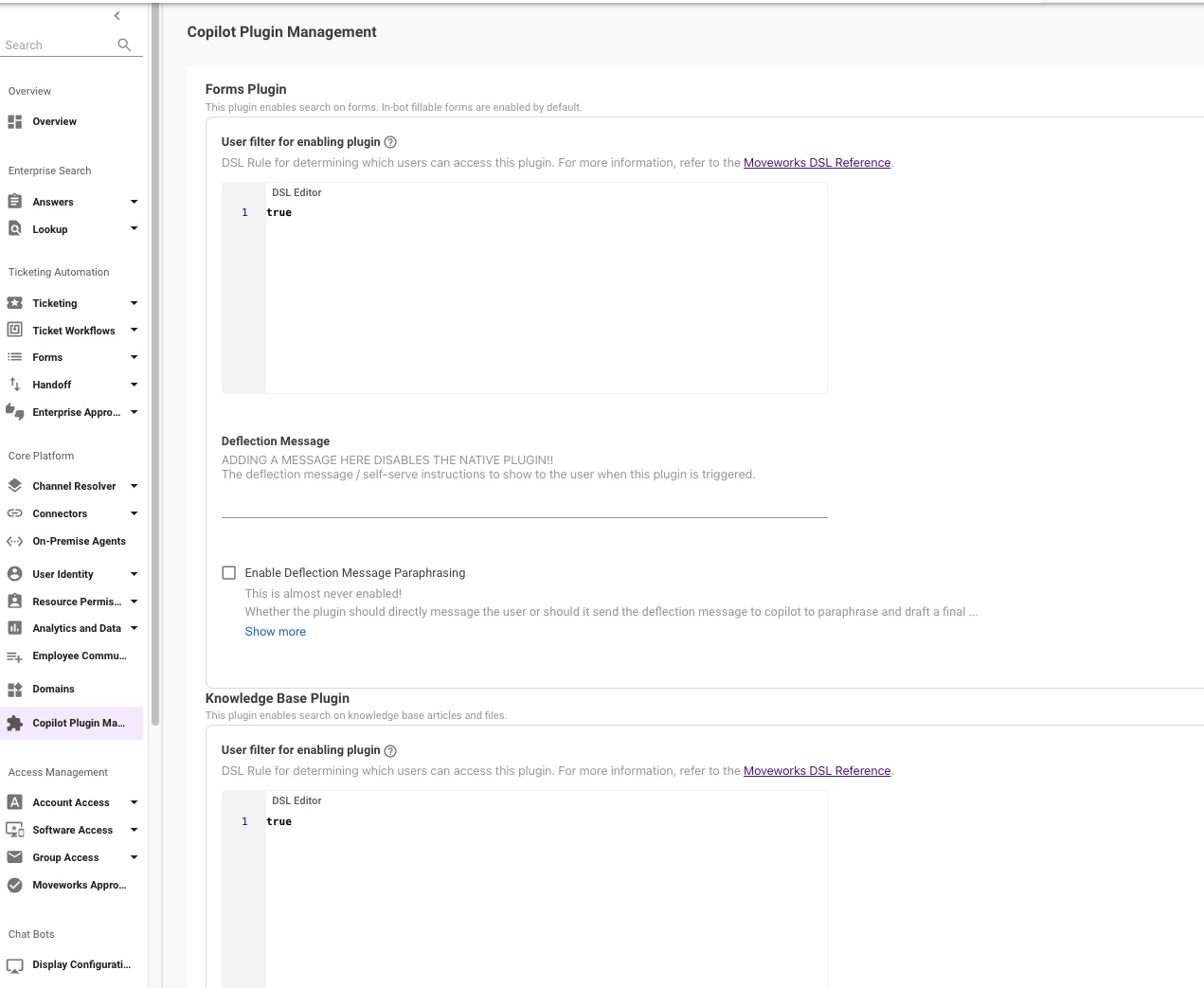
UX Change with In-Page sections and grouped configs
February 2025 Product Release Notes
Agent Studio: Agentic Automation Engine
We’re excited to share that all customers now have access to the Agentic Automation Engine in Agent Studio! Our new engine is purpose-built to bring powerful AI agents to life — fast. It interprets natural language, can plan actions, and help you execute complex tasks, enabling you to create AI agents that can transform the way teams work across your organization.
For more details on what the Agentic Automation Engine is capable of check out these resources:
- Agentic Automation Engine Product FAQ — Includes what is currently supported & what current limitations are
- Unlocking More Powerful AI Agents Blog — Breaks down 5 use cases built with Agentic Automation Engine
How do I access this new workspace in Agent Studio?
- Log in to https://my.moveworks.com/
- Click on the “Agent Studio” tile
- Click on the “Plugins” tab - this is your UI to build on the Agentic Automation Engine!
Do I need to do anything to get this enabled?
No, the Plugins tab will appear in your Agent Studio app automatically.
I’m still on Moveworks classic experience, can I still build?
Any plugins built will not trigger in the Moveworks classic experience. Plugins only operate in the Moveworks Assistant.
We recommend reaching out to your success team & upgrading to the Moveworks Assistant in order to start building & using plugins.
How can I get started?
- Roll up your sleeves and try it out Follow our quickstart guide to build your first plugin. No API docs, no logins, no credentials required.
- Need inspiration? Check out our Plugin Library to discover AI agents complete with guides and videos that you can build across your business workflows, or head over to Moveworks Academy to enroll in our Agentic Automation Engine course.
What else should I know?
To accelerate your AI agent development, our Professional Services team offers hands-on training for key enterprise systems through a program called Activate — sign up or let your Success Manager know you’re interested.
January 2025 Product Release Notes
Assistant: Citations for Software, Access DL, and Access Account plugins
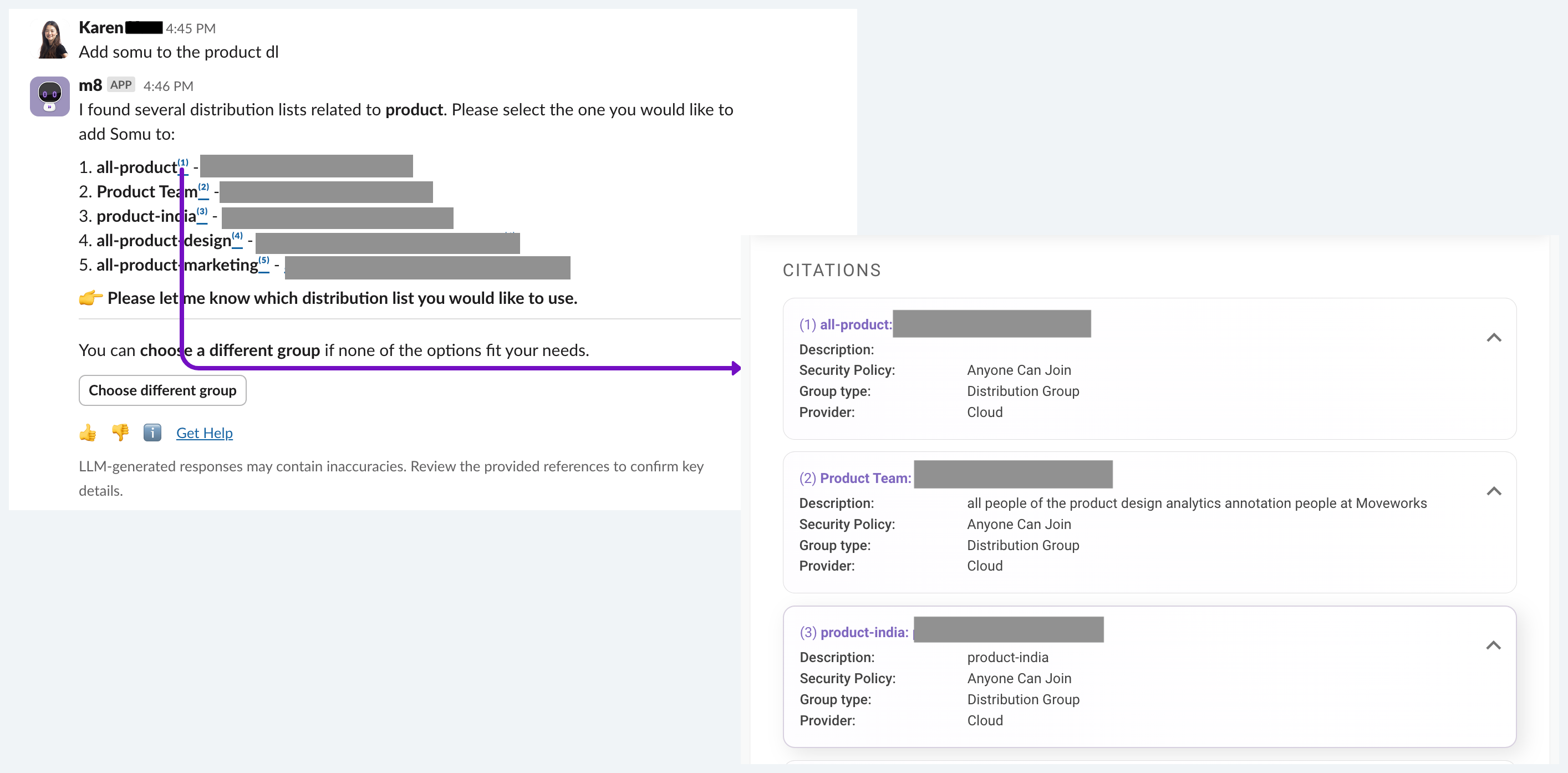
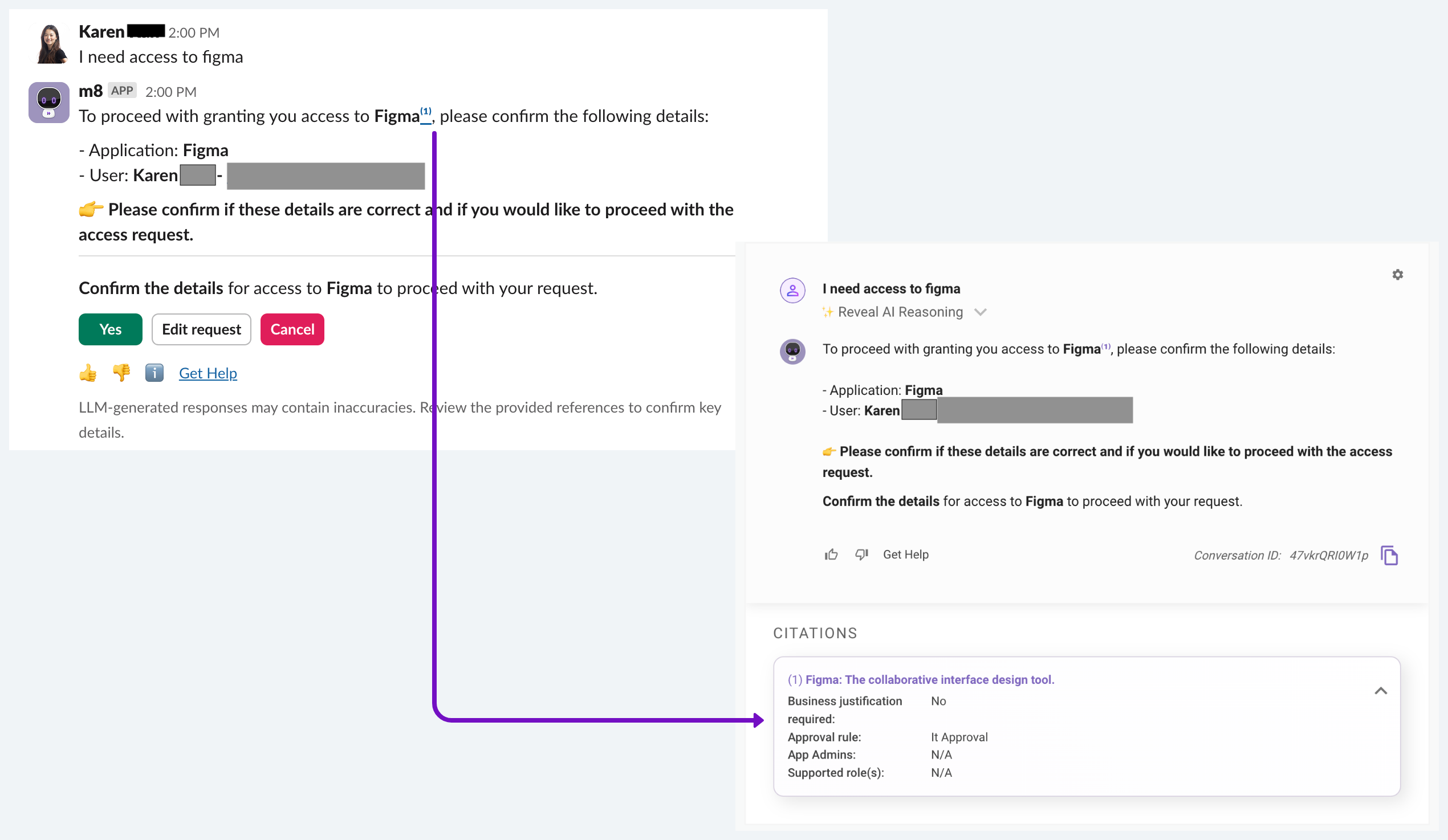
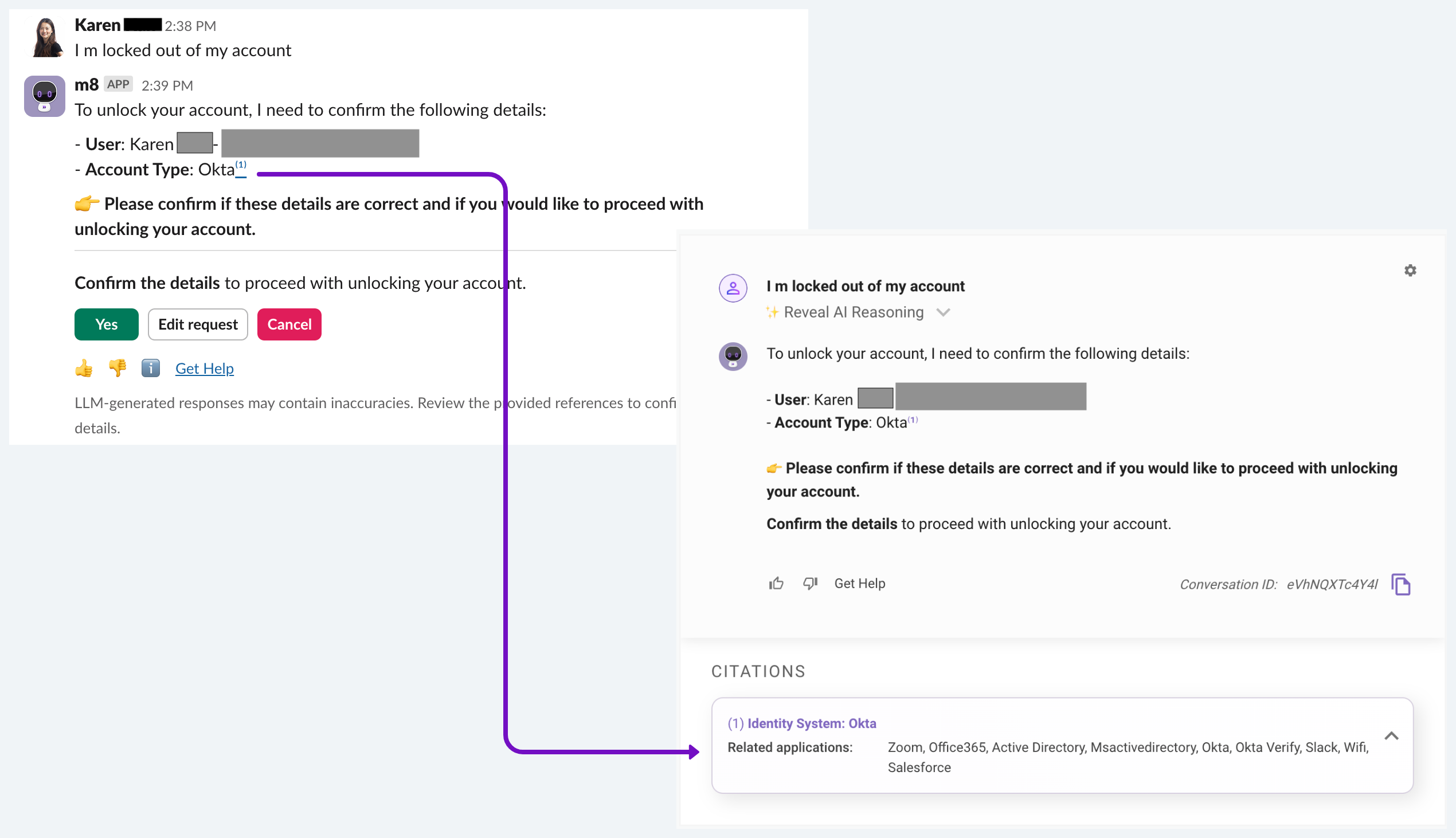
We’re thrilled to announce that you can now verify entities mentioned by action plugins (e.g. Software, Add to Distribution List, Unlock Account plugins) directly on the citations page. Just as you can validate sources from knowledge searches, this feature is now extended to action plugins. Review details about distribution lists, software, and identity systems before taking action, ensuring full confidence that the Assistant will execute the right tasks seamlessly. See below for some examples.
Adding someone to the distribution list
Sometimes, there might be multiple possible options that matches your request. If you want to see more details and be sure about the distribution list to pick, click on the citations and view the description, security policy, and group type.
Request access to a software
Get more details about the requested software, including the approver, the roles available, etc.
Unlock an account
Assistant: Improvements in self-service messages for Reset Password, Change Password, Reset MFA, and Unlock Account plugins
As you may recall, you can configure instructions and self-service messages for the Reset Password, Password Expiry, Unlock Account, and Reset MFA plugins. This allows the Moveworks Assistant to provide users with self-service messages or links to relevant portals, rather than directly executing actions on external systems.
We’ve improved the performance of self-service messages in triggering consistency, summarization, as well as analytics tracking.
What changes in the experience?
For end users, the experience remains largely unchanged. They will continue to see the same self-service messages, but with improved reliability in triggering and summarization.
For admins, you will see changes in the analytics. With the update, all self-service messages will be tagged with their corresponding native plugins. For example, if user asks to reset their password and you’ve configured a self-service message, you will see that interaction being logged with a reset password plugin call.
What are the benefits of this update?
- More deterministic triggering: Users can expect to receive an answer more reliably.
- Minimal summarization: Self-service messages will undergo minimal summarization to maintain their original text and formatting. Furthermore, these messages will not be combined with other relevant resources, guaranteeing the priority of the message.
- More accurate analytics tracking: Earlier, admins might have noticed that user requests for Access Account plugins - e.g. Password reset - were incorrectly categorized as the Knowledge plugin in the Assistant Insights dashboard, causing confusion due to the misalignment between user intent and the Assistant action. Now, these requests are correctly categorized under the respective Access Account plugin for greater clarity.
Can I customize the self-service messages?
Self-service messages configuration are not yet available in Moveworks Setup yet. We plan to make them available for admins in Moveworks set up in the coming months.
Brief Me: Product Enhancements
- Brief Me is now available on Google Chat providing all the same functionality as on Teams & Slack.
- Data Deletion reduced from 7 days to 24 hrs.
- What’s included? Deletion of the raw file, extracted snippets from the file, and meta data (file title, description, size, & number of snippets) from several internal databases after 24 hours. This is done across all Data Centers.
- What’s not included? Information in Moveworks logs for Assistant Analytics, including user utterances, Assistant responses, and file names during Brief Me mode.
Read more about Brief Me’s security overview here.
- Added a error handling message for non-supported files. Moveworks provides a clear error message in the case that a user uploads unsupported files.
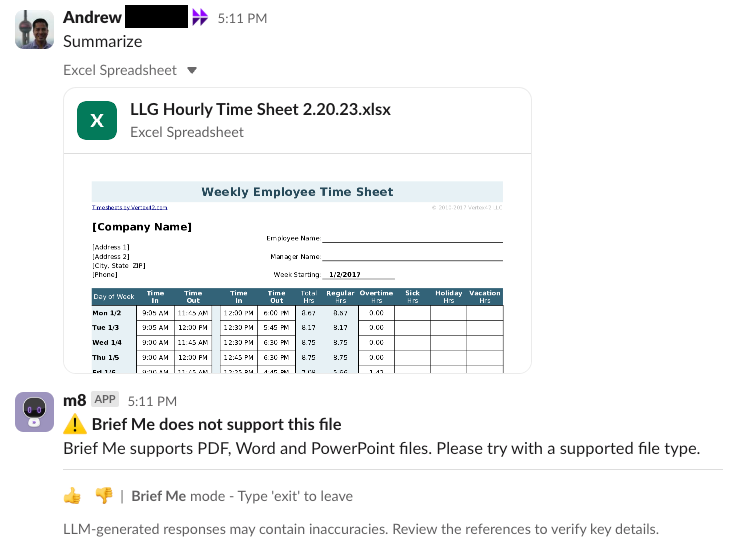
- Added backstop button if no resources are retrieved. If unable to retrieve any snippets to answer the question, Moveworks will show a backstop message and include the button
Exit this mode.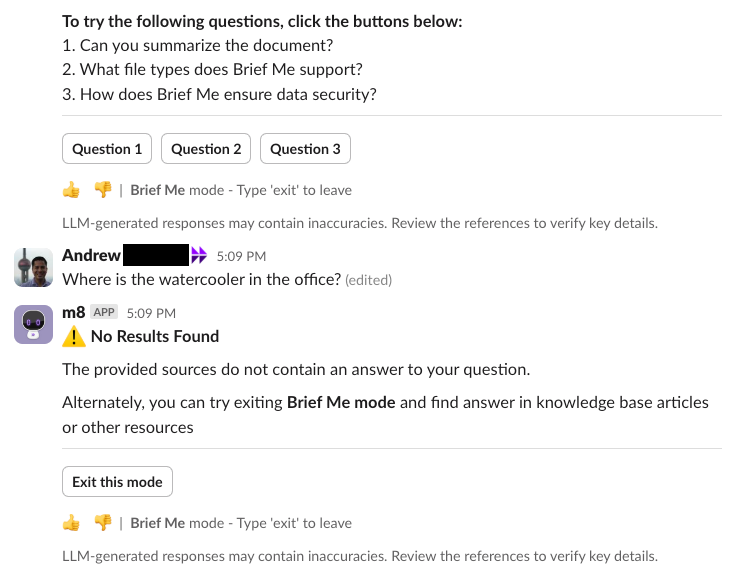
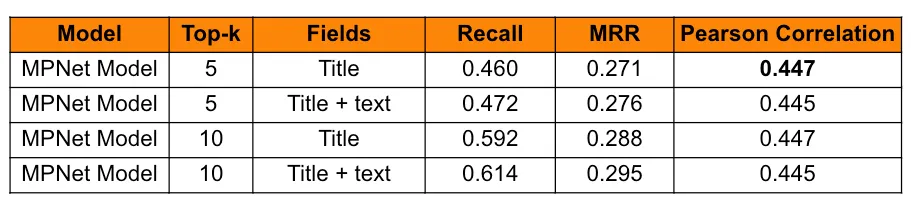
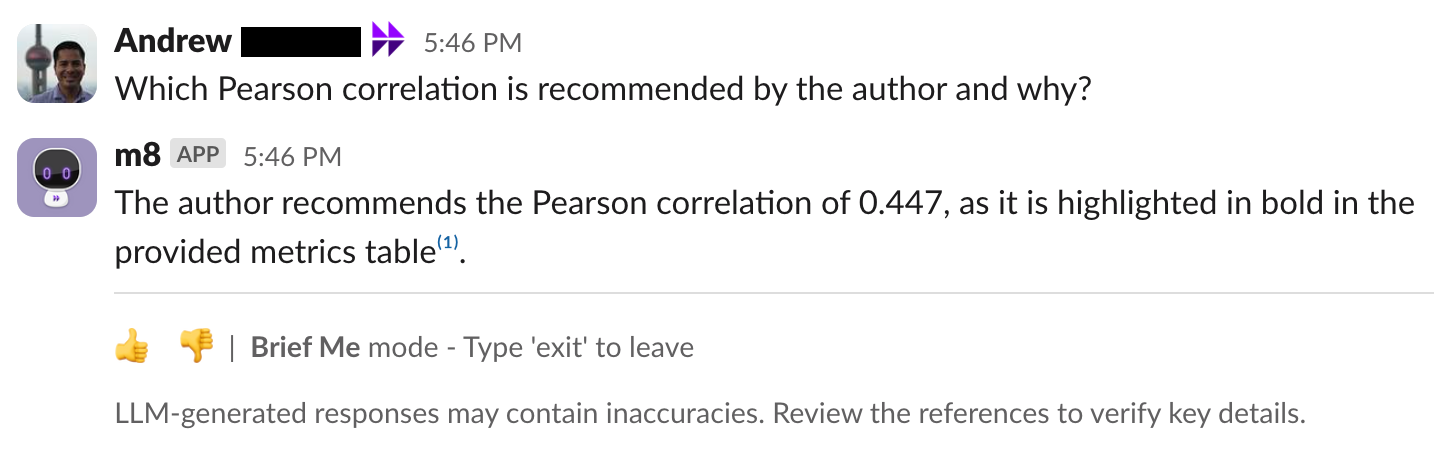
- Improved the processing of slides / PPT for more accurate insights. This incredible enhancement aims to better analyze complex slides that include multiple columns / diverse layouts, tables, and indented bullets & lists, to name a few elements.
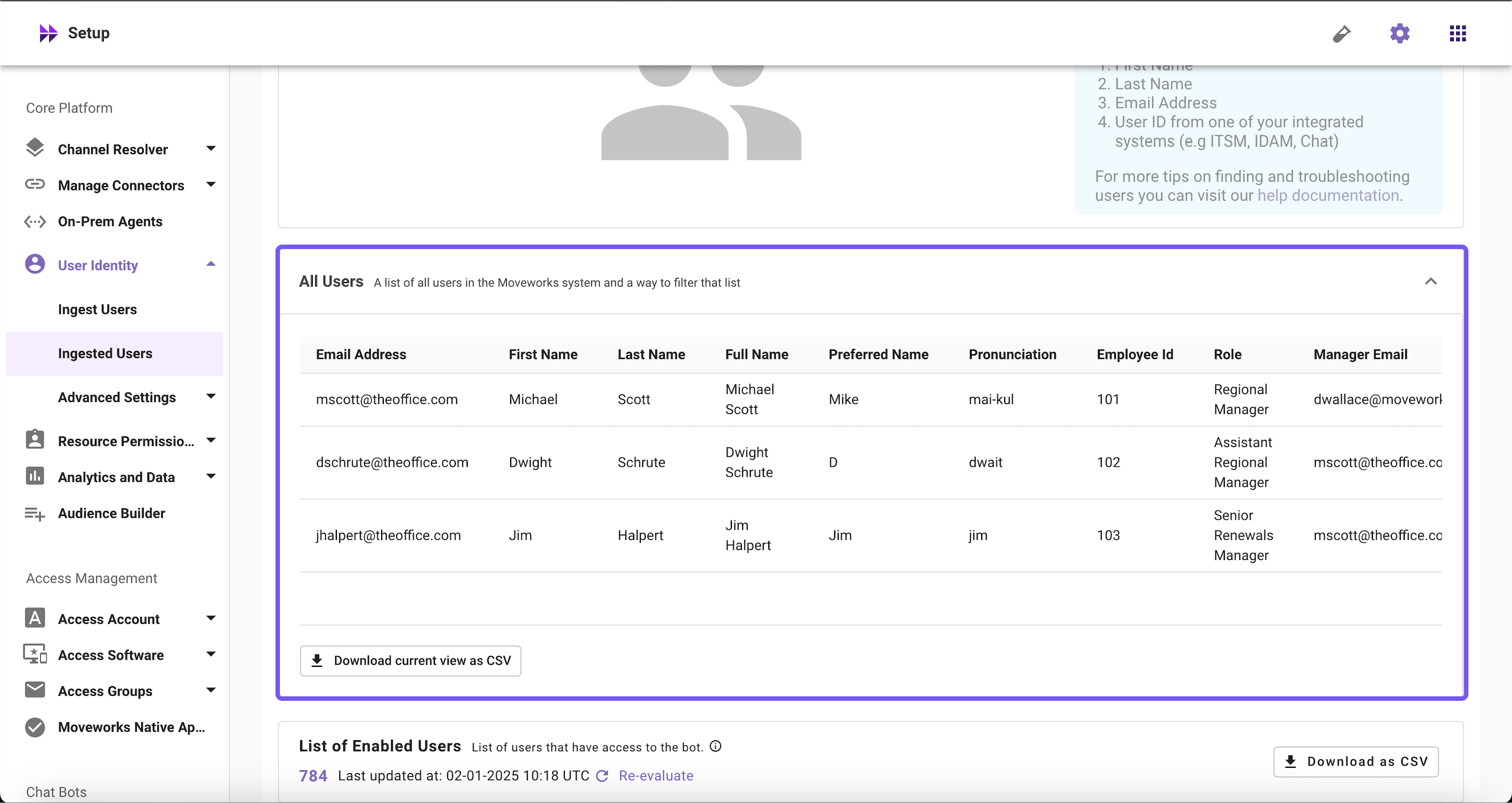
Moveworks Setup: additional User Attributes in Ingested Users
You can now view and download additional user attributes such as full name, role, manager email, and more in Ingested Users within Moveworks Setup.
How to view user attribute list in Ingest Users?
- Log in to Moveworks Setup
- Navigate to User Identity > Ingested User
- Scroll to find “All Users”, and Click on it
- View the user attribute list with additional user attributes
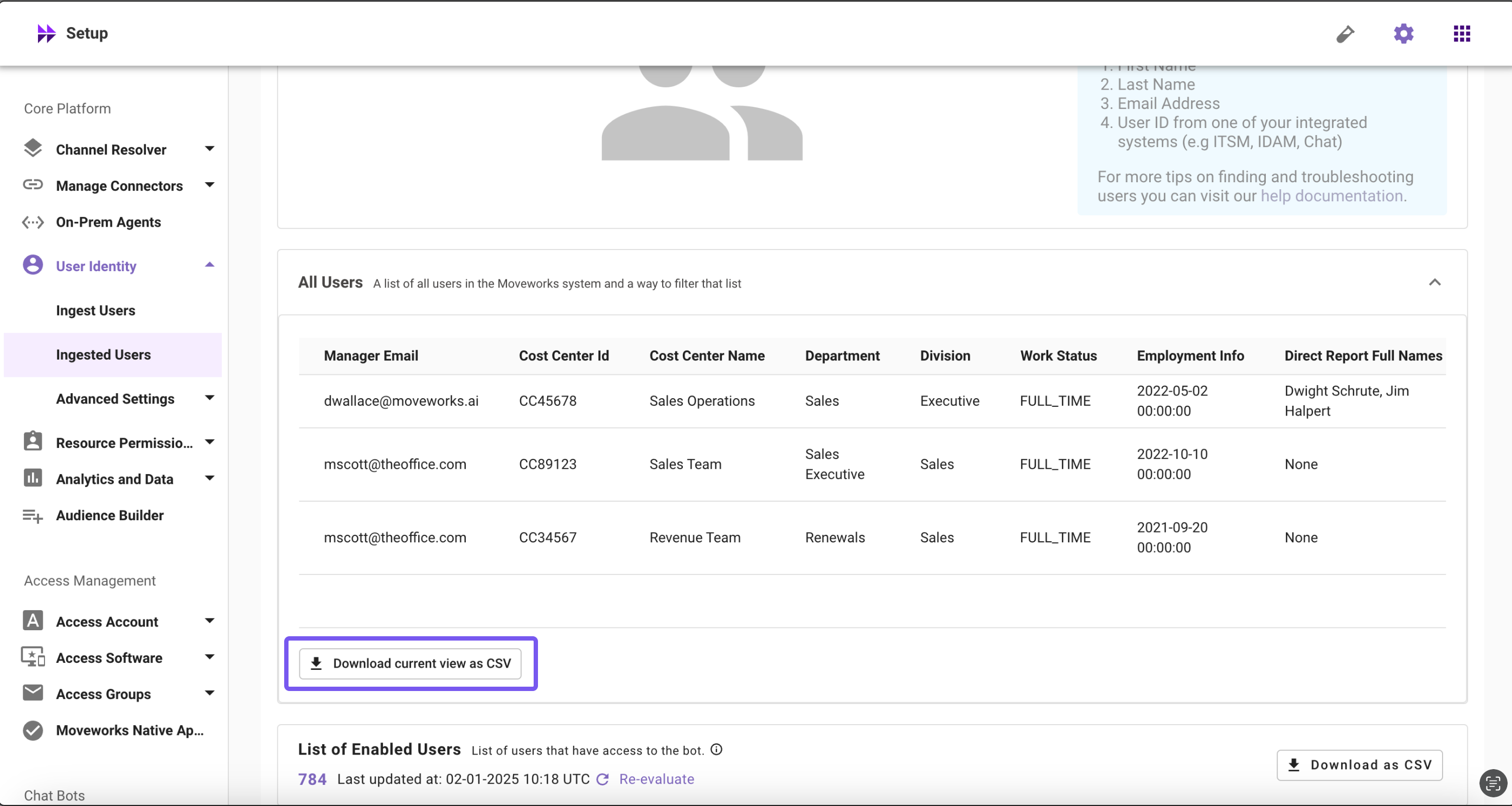
To download the user attribute list in CSV format, Click on the download button below in All Users widget.
Moveworks Setup: Custom Domains configurability
Moveworks now allows customers to configure multiple custom domains, each with unique handoff instructions.
There is a limit of 7 total domains, which could be a mix of out-of-the-box or custom domains. This limit exists because the handoff UI is limited to reduce the options for employees to select the handoff destination. For example, a list of 25 domains for an employee would be overwhelming and not useful in the product.
For details on how to configure a custom domain, read here.
Agent Studio: Purple Chat V2
Developers have built a TON of example chats with our Purple Chat Builder (over 10,000 mocks!). We’re excited to keep the energy flowing with Purple Chat V2!
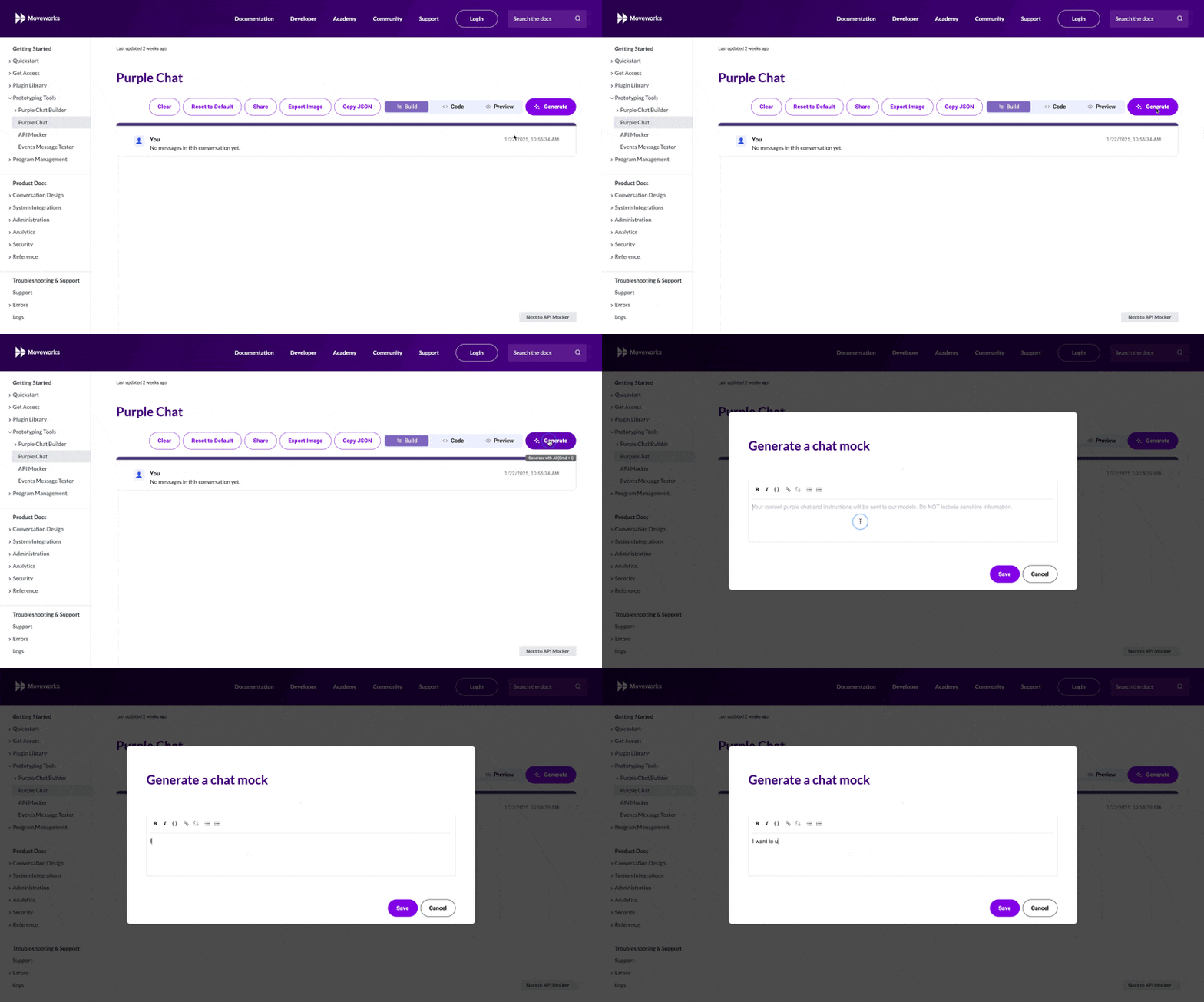
- Tired of building it by hand? Just ask. That’s right – GenAI Purple Chat is here! Simply prompt to create or edit. The prompt is designed to emulate the Moveworks Assistant’s typical behavior with confirmations, entity resolution, etc.
- Messages out of order? Stop copy & pasting your JSON around. Drag. Drop. Done.
- Need a custom bot name / avatar? Just change it to your own image (or steal from the case study site).
- Sick of ugly API call annotations? Me too. Introducing the
apiBlockcomponent. Your Connector Image. Your Method. Your Body. In an IDE you’ll LOVE. - Can’t figure out the JSON? Every SINGLE part of the new PC mocks is editable in low code. Just click on it! Message parts can be “dragged and dropped” within a conversation turn also. Just reorder the table.
- We’re on the Assistant now! Does your PC link look like it’s from 2024? Open that bad boy up in the legacy editor and migrate to the Assistant in a click! You’ve got everything from
reasoningStepstocitationsto the feedback tray at your disposal. - Giant purple chat links not loading? Browser security making your 13 turn mock-up impossible to share with a customer / prospect? Never fear, you can now create shareable short-links! (Just don’t put sensitive data in short links)
Go play with itNOW! (aka.mw/purple-chat).
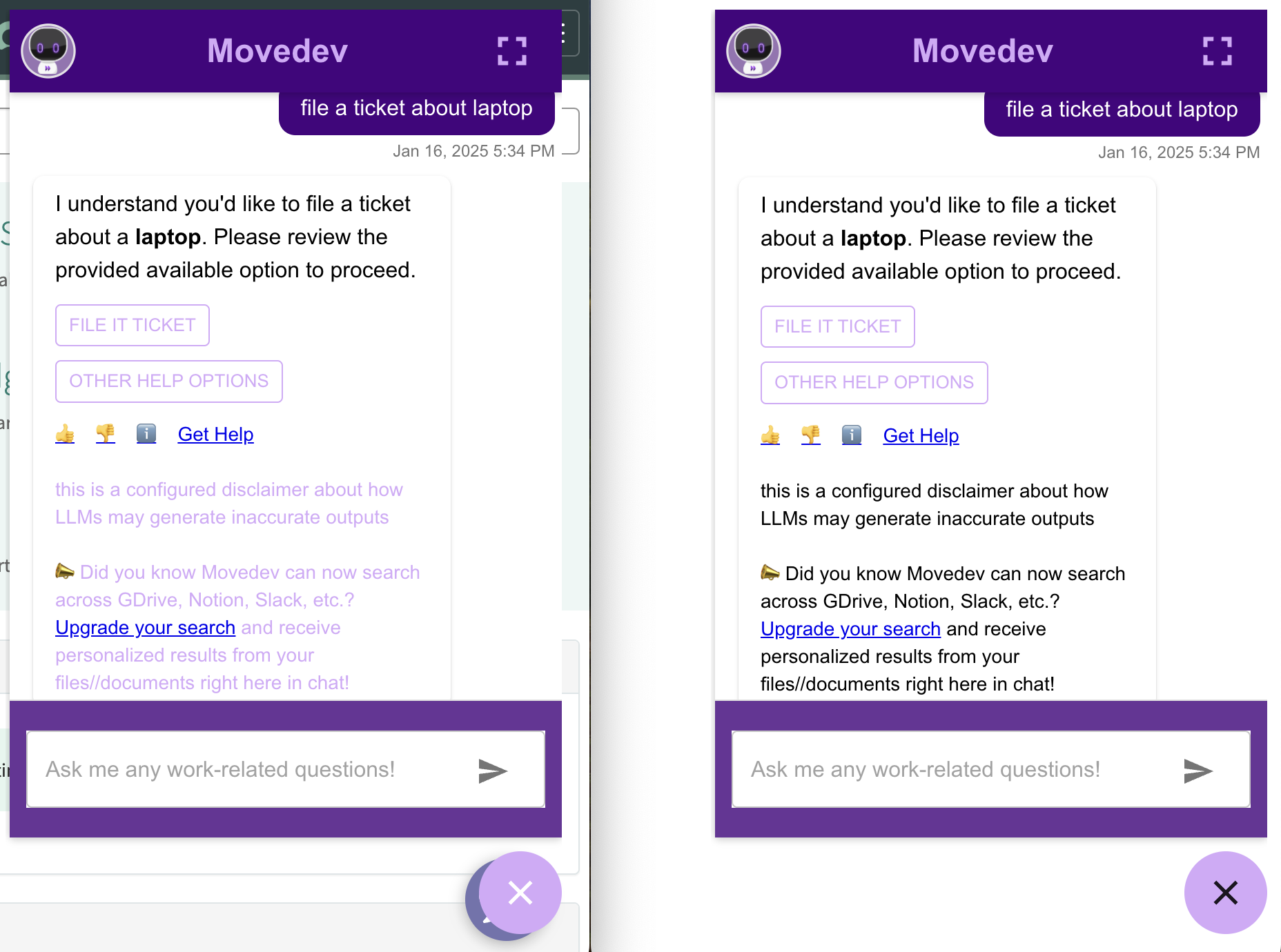
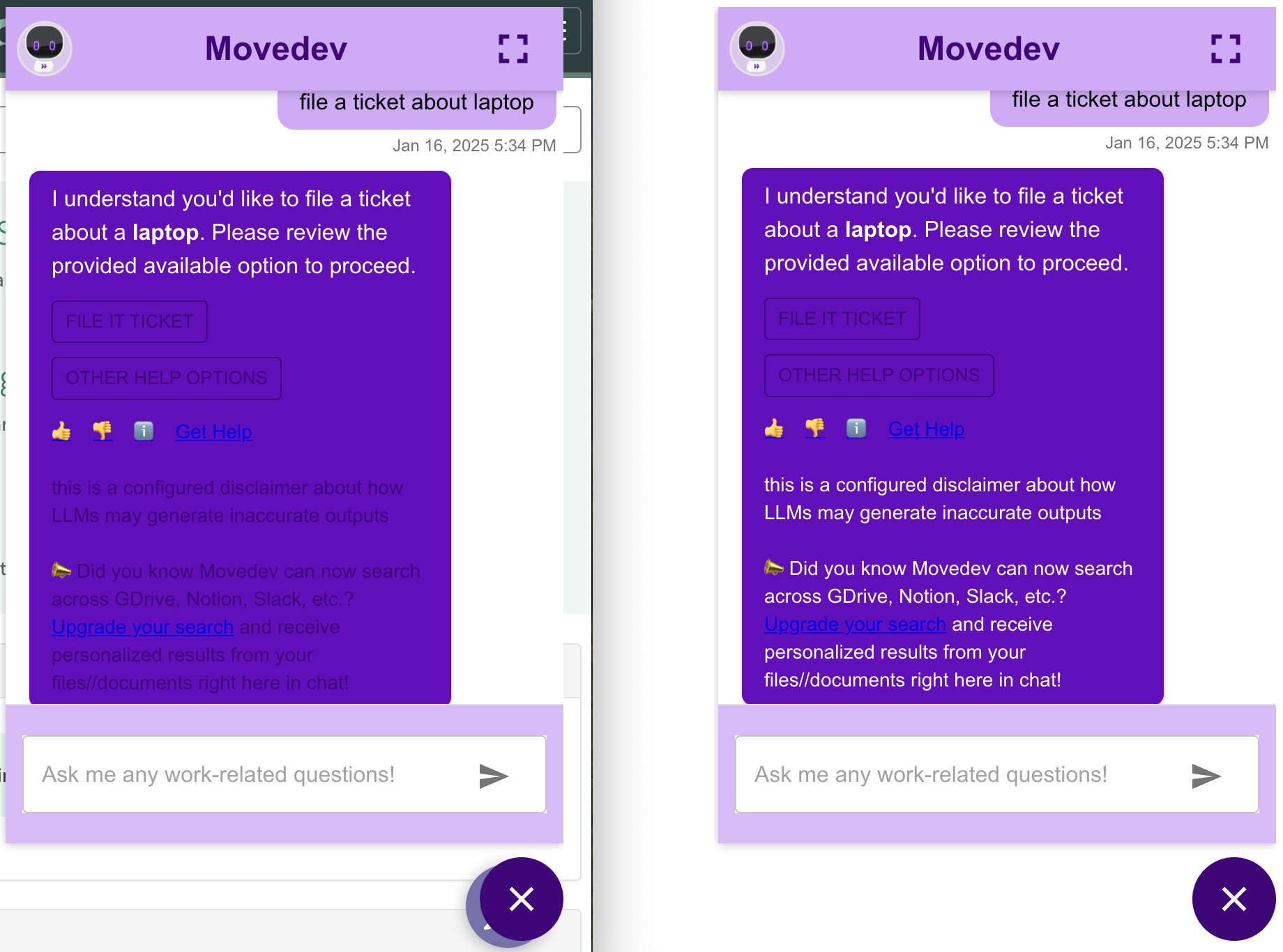
UX Change: Changing Bot Disclaimer text color and Close Button
- The bot disclaimer text was previously using the
secondarycolor set in M4W Customization -> It will now be either white or black depending on the contrast to the Response Card background (also set in M4W Customization) - The close button was previously always white -> It will now be either white or black depending on the contrast to the
buttonprimary color.
See the screenshots below for examples of light vs dark contrast and the before and after in each case.