
Deep Linking Moveworks AI Assistant
What is Deep Linking ?
Deep Linking is a practice used in digital platforms to direct users to a specific in-app location, bypassing the app’s homepage or other starting points. It enhances user experience by providing direct pathways to relevant content or functionalities, which can be critically useful in routing users to the Moveworks AI Assistant.
Purpose of Deep Linking the Moveworks AI Assistant
Moveworks employs deep linking to seamlessly integrate its AI assistant across different communication platforms. This approach allows users to quickly access specific features or support pages within the Moveworks app without unnecessary navigation. Deep links are pivotal for driving user engagement and facilitating rapid access to essential tools.
After going through the below steps on how to create Deeplinks for the Moveworks Assistant, you can then leverage those links in the below scenarios :
- Okta Footer Help Link to Bot : Provide support through a consistent and accessible link at the footer of the Okta portal, directing users to the Moveworks Assistant in the Chat interaction platform.
- Okta Chiclet Deep Link to Bot : Utilize chiclet links within the Okta portal to give users direct access to the Moveworks Assistant, streamlining their workflow.
- ServiceNow SSP Banner Link to the Moveworks Assistant : Include deep links within ServiceNow’s Self-Service Portal (SSP) banners, facilitating easier navigation to the Moveworks Assistant.
- ServiceNow SSP Hovering Bot Link : Configure a floating image of your Assistants avatar in the bottom corner of your Self-Service Portal (SSP) that directs users to your Assistant when clicked.
Creating Deep Links for Moveworks AI
Below are the steps on how you can create the Deeplinks using template based in the appropriate Chat Interaction System.
Microsoft Teams
To create a deep link of the Moveworks Assistant in Microsoft Teams we need to start by ensuring we have an Assistant deployed and is able to communicate with users.
Next we need to understand what the deeplinking supported template structure looks like, if you want to learn more about Deeplinking with Microsoft please use this Document :
Teams DeepLink Template
As you can see from the template we need to collect the below Parameters :
<appId>: The application ID of the Moveworks integration in Teams.<tenantId>: The tenant ID specific to your organization.
Both these field values can be collected by navigating to the Manage ChatBots Configuration under the Chat Platform Module
- Here you should come across an existing configuration which will contain the credentials and details around how we are connecting to Teams, this will contain the Client ID, Client Secret, App ID, Tenant ID.
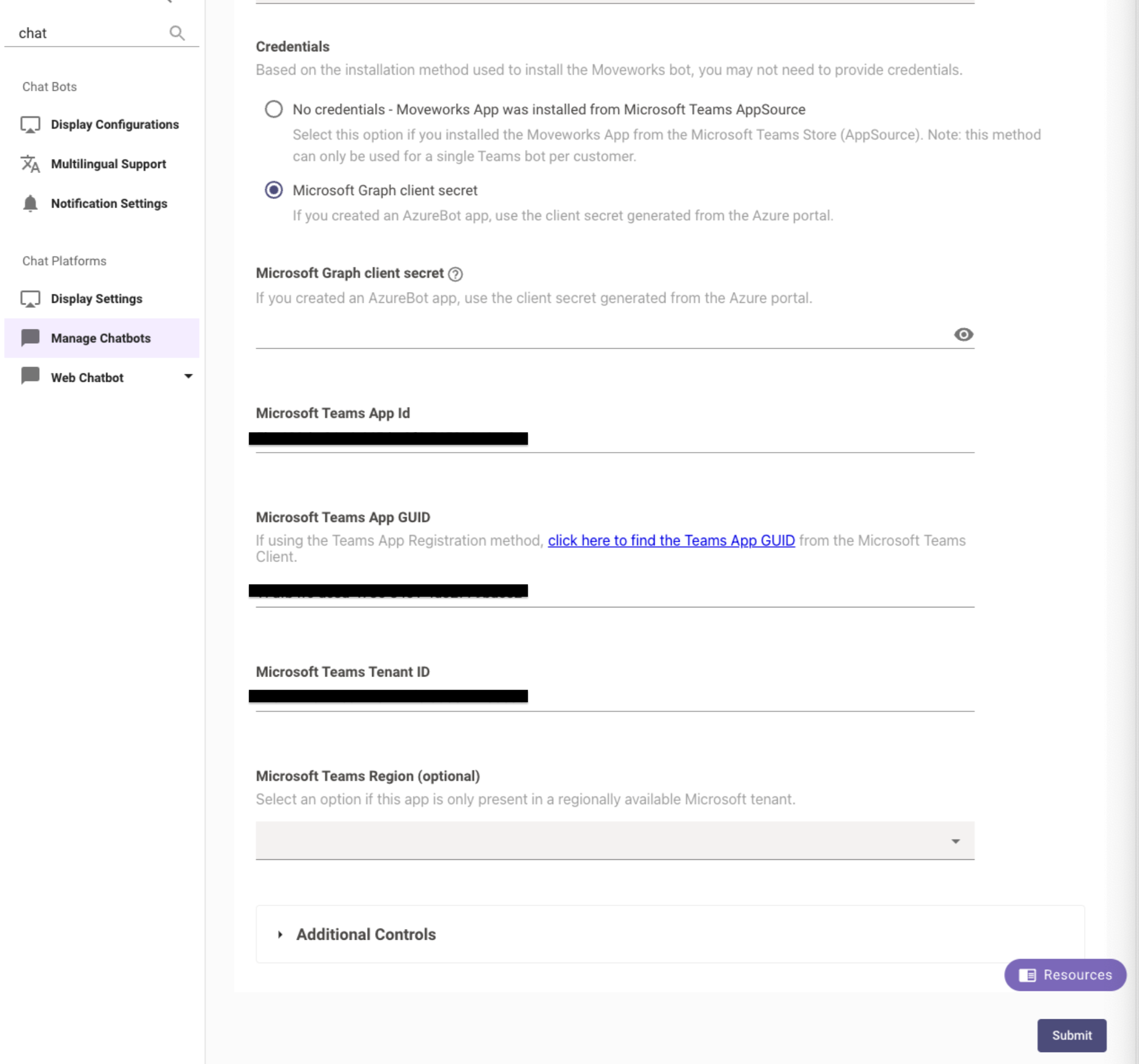
We will need to collect these IDs and then create the below Deeplink with this. This link directly opens the Moveworks AI Assistant in the Teams app under the provided tenant ID regardless of where it is being interacted with.
Example
Validation
Now that we have constructed the Deep link, please try interacting with it check the following :
- Is the user being redirected successfully to the Assistant in Chat Platform
- If you face any issues please reach out to the Moveworks Support Team.
Slack
To create a deep link of the Moveworks Assistant in Slack we need to start by ensuring we have an Assistant deployed and is able to communicate with users.
Next we need to understand what the deeplinking supported template structure looks like :
Slack DeepLink Template
As you can see from the template we need to collect the below Parameters :
<Slack_chat_system_URL>: The base URL for your Slack Workspace.<Slack_App_ID>: The application ID of the Moveworks integration in Slack.
Both these field values can be collected by navigating to the Manage ChatBots Configuration under the Chat Platform Module
- Here you should come across an existing configuration which will contain the credentials and details around how we are connecting to Slack.
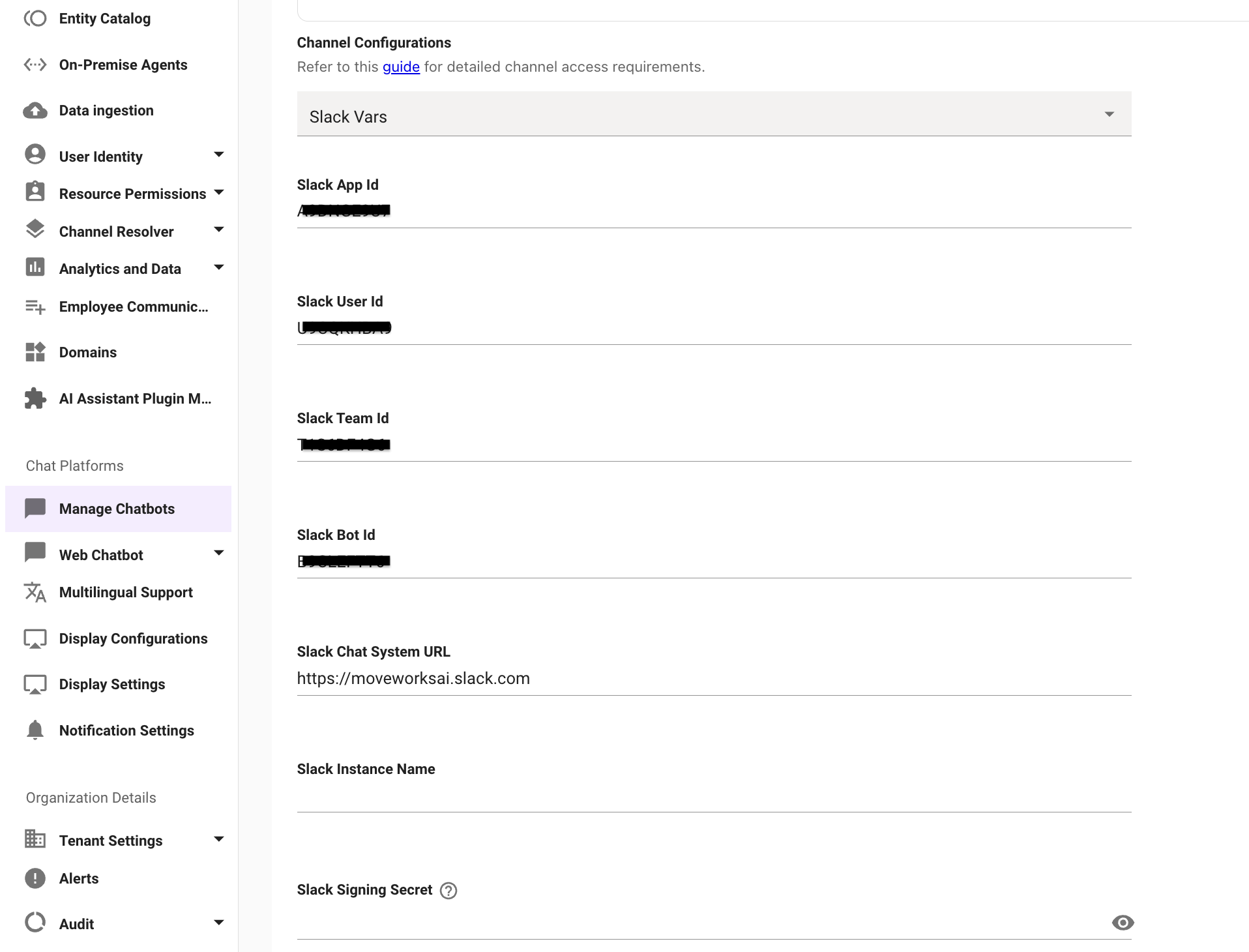
We will need to collect these IDs and then create the below Deeplink with this. This link directly opens the Moveworks AI Assistant in the Slack app under the provided Chat System URL.
Example
Validation
Now that we have constructed the Deep link, please try interacting with it check the following :
- Is the user being redirected successfully to the Assistant in Chat Platform
- If you face any issues please reach out to the Moveworks Support Team.
Web
You can deep link directly to the Moveworks AI Assistant or Search on the web with a query already populated. When the user opens the link, the Assistant or Search opens with the message pre-filled and submitted, so they immediately see the response.
Web DeepLink Template
For the Assistant:
For Search:
As you can see from the template we need to collect the below Parameters :
<Moveworks_web_URL>: The base URL for your Moveworks web instance (for example,https://servicenow.moveworks.com).<url_encoded_query>: The query you want pre-populated, URL-encoded. Spaces should be replaced with+or%20.
Example
Deep link to the Assistant with a query:
Deep link to Search with a query:
Validation
Now that we have constructed the Deep link, please try interacting with it check the following :
- Does the link open the Assistant or Search with the query pre-filled and submitted
- If you face any issues please reach out to the Moveworks Support Team.
EmployeeWorks
You can deep link directly to the Moveworks AI Assistant or Search within ServiceNow EmployeeWorks with a query already populated. The deep link uses ServiceNow’s EmployeeWorks chat interface and passes the route as a URL-encoded parameter.
EmployeeWorks DeepLink Template
For the Assistant:
For Search:
As you can see from the template we need to collect the below Parameters :
<ServiceNow_Instance_URL>: The base URL for your ServiceNow instance (for example,https://my.servicenow.com).<url_encoded_query>: The query you want pre-populated, URL-encoded. Spaces should be replaced with%20.
The mw_route parameter value is a URL-encoded path. For example, /assistant?message=who is my manager becomes %2Fassistant%3Fmessage%3Dwho%20is%20my%20manager.
Example
Deep link to the Assistant with a query:
Deep link to Search with a query:
Validation
Now that we have constructed the Deep link, please try interacting with it check the following :
- Does the link open the Assistant or Search with the query pre-filled and submitted within EmployeeWorks
- If you face any issues please reach out to the Moveworks Support Team.