
Microsoft Sharepoint
Overview
The Classic Ingestion connector for SharePoint Online indexes modern site pages, wiki pages, and files so employees can find relevant content through Moveworks Enterprise Search.
Access Requirements
See SharePoint Online Access Requirements for setup prerequisites.
Permissions
The Classic Ingestion connector for SharePoint Online mirrors source permissions for files and for knowledge pages stored in the SitePages library (modern site pages and wiki pages). Permission ingestion is not supported for classic publishing pages stored in the /Pages library. For supported content, employees can only find pages and files in search results that they have access to in SharePoint.
Configuration
To configure SharePoint Classic Ingestion in Moveworks Setup, see How to Configure SharePoint Knowledge Ingestion.
Supported File Types
*In Limited Preview
Supported Sharepoint Versions
Currently Moveworks’ SharePoint knowledge integration supports Sharepoint Online and Sharepoint On-prem. Sharepoint On-prem requires the Moveworks agent for integration.
Supported Sharepoint Pages
Within either Sharepoint implementation, Moveworks supports modern site pages and wiki pages only in classic pages.

A modern site page is made up of web parts that can store and display multimedia content like links, images, video, and libraries. Whereas a classic page is made up of single-document pages, such as wiki pages or blog pages. Users can tell the difference between a classic page and a modern page by the dynamic nature of the page.
Architecture
Modern
To accesses modern Site Pages in SharePoint, Moveworks uses the API: (_api/SitePages/pages). The content of these Site Pages are returned in the CanvasContent1 field, in the form of small “Web Parts” made from HTML snippets. Moveworks ingests these snippets, merges them when it makes sense to do so, and serves them to users.
Classic
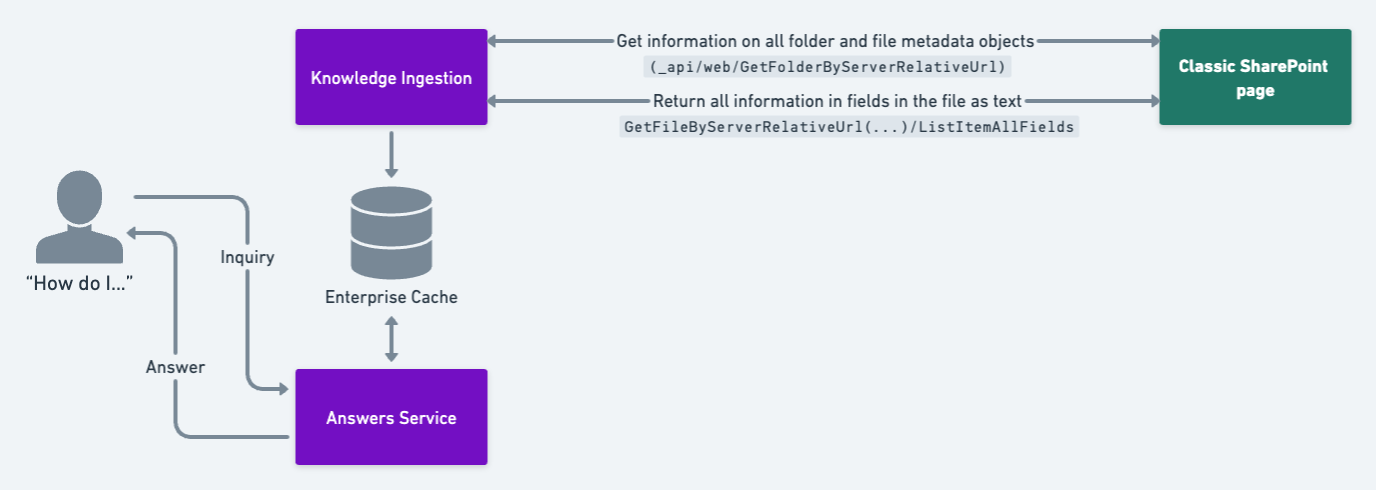
Classic Pages are accessed through the Folder API: (_api/web/GetFolderByServerRelativeUrl). Currently Moveworks only supports wiki pages which have their content in the WikiField field of the file API response.
In order to ingest wiki pages:
-
First, Moveworks calls the
GetFolderByServerRelativeUrlAPI with OData enabled to get information on all folder and file metadata objects in a Sharepoint folder:[http://test.sharepoint.com/is/sites/test/_api/Web/GetFolderByServerRelativeUrl(‘SitePages’)?expand=Folders,Files](http://test.sharepoint.com/is/sites/test/_api/Web/GetFolderByServerRelativeUrl\('SitePages'\)?expand=Folders,Files)
-
Using this information, Moveworks is able to navigate the SharePoint file tree and call the
GetFileByServerRelativeUrl(...)/ListItemAllFieldsendpoint on each file found in the folder and ask it to return all information fields that are a part of the file as text:[http://test.sharepoint.com/is/sites/test/_api/Web/GetFileByServerRelativeUrl(’/is/sites/test/SitePages/page.aspx’)/ListItemAllFields?expand=FieldValuesAsText](http://test.sharepoint.com/is/sites/test/_api/Web/GetFileByServerRelativeUrl\(%E2%80%99/is/sites/test/SitePages/page.aspx%E2%80%99\)/ListItemAllFields?expand=FieldValuesAsText)
-
This allows Moveworks to see the content of classic Pages which are found in the WikiField field. The content can then be ingested, snippetized, and served to the user in-chat.
FAQ
Q: Does the bot look at the keyword column in Sharepoint document lists to improve the relevancy of document searches?
A: Moveworks does not leverage ingesting any key words from additional columns in Sharepoint, but will extract entities and key words from the Site Page body itself.
Q: Does Sharepoint widget title text get associated with the relevant document for search results?
A: Moveworks does not support ingesting content widgets because there is typically no useful content to ingest.