
GitHub
Overview
The GitHub Classic Ingestion connector indexes Markdown files from your GitHub repositories, making that content searchable through the Moveworks AI Assistant.
Supported Content Types
The Moveworks GitHub content connector supports Markdown (.mdx) file types. It is recommend to use standard # notation to break up the article in relevant sections.
Snippet Titles
Note that Moveworks will also parse any front-matter to determine the title of your article.
In this example, Moveworks will create a knowledge article “snippet” titled “VPN Troubleshooting Guide: How to solve connection errors”
Article Links
Moveworks generates links to your articles based on the file path.
For example, if you created a file hosted at folder1/folder2/file3.md, Moveworks can convert that file path into a URL that looks like this: https://site.com/folder1/folder2/file3.md.
Unsupported Behavior: Advanced Content
Please note that images, tables, text formatting, lists or other multi-media formats will not be rendered in chat. Instead, the user will be able to click the article and view the source article.
Access Requirements
Before setting up the GitHub Classic Ingestion connector, review the GitHub Knowledge Access Requirements.
Permissions
The Classic Ingestion connector for GitHub does not mirror source permissions. All indexed content is visible to all employees in the AI Assistant search experience.
Knowledge Ingestion
Once you follow the steps in our Github Knowledge Access Requirements, the Moveworks connector will be able to communicate with your repository.
The Moveworks AI Assistant will only ingest the specific files and folders that it has been configured to ingest answers from. Even if the AI Assistant has full access to a GitHub repository it will only ingest data from the specified folder, and will not access the data in the other folders of the repository.
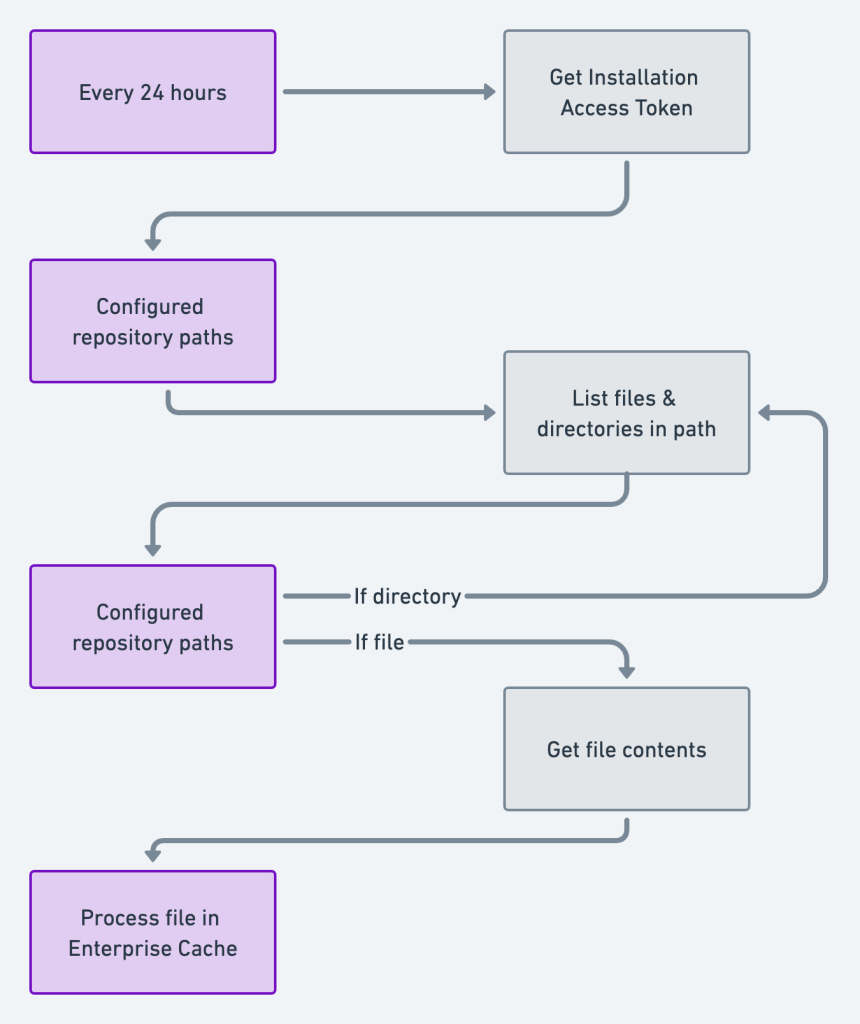
Moveworks leverages the following APIs to ingest your content:
- Get installation token
https://api.github.com/app/installations/{installation_id}/access_tokens - Get files / directories
https://api.github.com/repos/{acount}/{repo}/contents
Configuration
To configure GitHub Classic Ingestion in Moveworks Setup, see How to Configure GitHub Knowledge Ingestion.