
For AI agents: a documentation index is available at the root level at /llms.txt and /llms-full.txt. Append /llms.txt to any URL for a page-level index, or .md for the markdown version of any page.
Logo
DeveloperAcademyCommunityStatus
  • Service Management
    • Overview
    • Concierge & Ticketing Capabilities Overview
    • Forms
    • Forms - Integration Specific Guides
    • Live Agent Chat / Handoff
    • Triage
    • Approval Mirroring
    • Ticket Interception
    • Generic Ticketing Integration: Ticket Gateway
  • Administration
    • MyMoveworks
    • Organization Information
    • Roles and Permissions
    • MyMoveworks SSO
  • Moveworks Setup
    • Accessing Moveworks Setup
    • First-Time Login via Magic Link
    • Moveworks Setup Modules
    • Moveworks Setup: Module How To Guides
    • Plugin Management
    • Monitor Alerts
    • Audit Logs
    • DSL Fields Defaults
    • Data Crawling View
    • API Playground
    • Setup Homepage
    • Troubleshooting Hub
    • Security and Privacy Settings
    • Configuration Delete
    • Advanced Config Editor
    • Identity configuration
    • Onboarding Stage
  • Security
    • Security
    • Hyperlink & Button Expiry
    • Attachment Handling
    • Moveworks Subprocessors
  • Provision Management
    • Overview
    • Access Software
    • Access Groups
    • Access Account
  • Access Requirements
    • Overview
    • Update Set Modules
    • Ticketing Systems & ITSMs Access
    • Identity and Access Management Systems Access
    • Multi-Factor Authentication (MFA) Systems Access
    • Knowledge Access Requirements
    • Email Distribution List Systems Access
    • Facilities Management Access
    • Live Agent Chat Access
    • HR Information System Access
    • Expense Management Access
    • Calendar Management Access
  • Core Platform
    • User Identity
    • Moveworks On-Prem Agent
    • Approvals Engine
    • Entity Catalog
      • Configuring Entities in Moveworks Setup
      • How To Guide for Entity Catalog
    • Configuration Languages
    • Moveworks Data Objects
    • SIEM
  • Employee Experience Insights
    • Overview
    • Breaking Down the Dashboard
    • Understanding Industry Benchmarks
    • Apps & Services
    • Impact Module
    • EXI Common Use Cases
    • Configure EXI
    • Ticket Backpolling
  • Knowledge Studio
    • Overview
    • Knowledge Studio Configuration
    • AI Powered Recommendations
    • Inspecting & Verifying Sources
    • Publishing Articles
    • Creating Knowledge Articles
    • Resolving IT Tickets Guidance
DeveloperAcademyCommunityStatus
On this page
  • Overview
  • What is Entity Catalog?
  • How to access Entity Catalog in Moveworks Setup?
  • Read about configuring entities in this guide: Configuring Entities
  • FAQs
Core Platform

Entity Catalog

||View as Markdown|
Was this page helpful?
Edit this page
Previous

Configuring Entities in Moveworks Setup

Next
Built with

Overview

Moveworks entities help AI assistant in detecting key elements of user utterances (eg. software apps, hardware devices, locations, events & more), thereby powering downstream skills such as software provisioning, topics in EXI & AI assistant analytics, and more.

Entities are of two types:

  • Global entities: Predefined, commonly used entities that are available across all customers. Eg. Figma, Salesforce, Zoom, and more
  • Custom entities: Organization-specific entities configured by admins for internal use – these represent internal applications and tools specific to your enterprise. Eg. ExpenseIQ (expense management system), TimeOff (PTO request tool), EmployeeConnect (HR self-service portal) and more

What is Entity Catalog?

Entity Catalog serves as the repository of the custom entities within MW Setup. It enables admins to independently configure and manage their organizations’ entities.

Note: Currently, the Entity Catalog in Moveworks Setup supports only software application entities.

How to access Entity Catalog in Moveworks Setup?

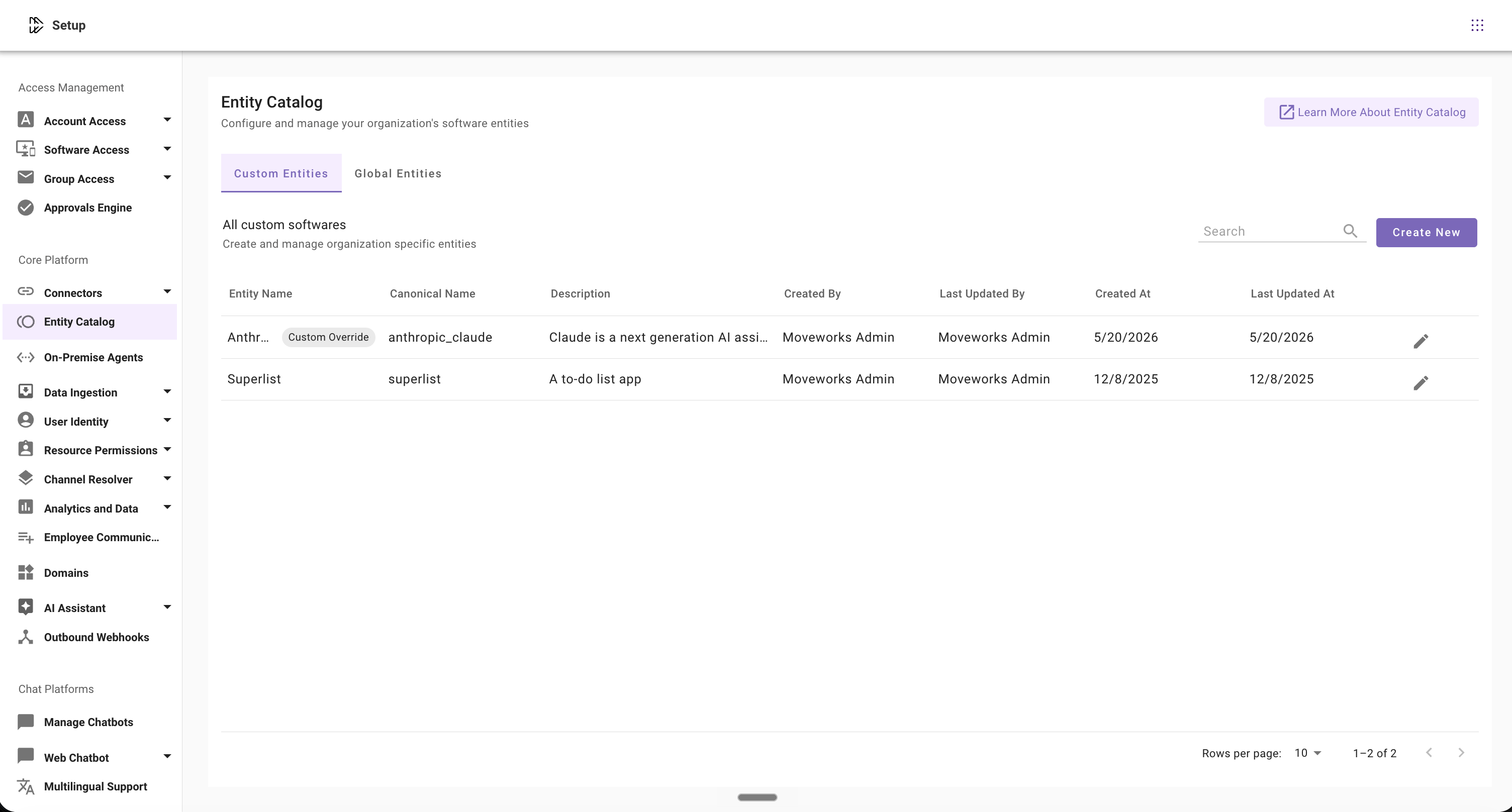
Navigate to MW Setup > Core Platform section > Entity Catalog to access custom software entities. Admins can view, create, and modify these entities.
image

Read about configuring entities in this guide: Configuring Entities

FAQs

Q: What entity types are supported in Entity Catalog?

A: Currently, only software entities can be configured and managed in Entity Catalog. More entity types will be supported in the future.

Q: I want to delete entities I no longer use. How to do that?

A: We do not support deleting entities at the moment, but it’ll be available in the future.

Q: Are my custom entities available to other Moveworks customers as well?

A: No, the custom software entities created by admins are only available to them, and not to any other Moveworks customer.

Q: Can I immediately start using software entities after creating them?

A: Yes, software entities are available for use immediately after creation.

Q: What is canonical name in Entity Catalog?

A: Canonical name is the Moveworks ID created automatically to recognize entities in the backend.

Q: What are Moveworks pre-defined entities?

A: Moveworks creates and manages a comprehensive library of commonly used softwares to help admins get started with Entity Catalog. This curated collection receives regular updates to ensure optimal performance.

Q: Can I add entities to the Moveworks pre-defined entities?

A:  No, admins cannot add new entities to the predefined global list, as these are fully managed by Moveworks. However, admins can select and customize existing entities as per organization’s requirements. Read Configuring Entities guide for details.