
For AI agents: a documentation index is available at the root level at /llms.txt and /llms-full.txt. Append /llms.txt to any URL for a page-level index, or .md for the markdown version of any page.
Logo
DeveloperAcademyCommunityStatus
  • Service Management
    • Overview
    • Concierge & Ticketing Capabilities Overview
    • Forms
    • Forms - Integration Specific Guides
    • Live Agent Chat / Handoff
    • Triage
    • Approval Mirroring
    • Ticket Interception
    • Generic Ticketing Integration: Ticket Gateway
  • Administration
    • MyMoveworks
    • Organization Information
    • Roles and Permissions
    • MyMoveworks SSO
  • Moveworks Setup
    • Accessing Moveworks Setup
    • First-Time Login via Magic Link
    • Moveworks Setup Modules
    • Moveworks Setup: Module How To Guides
    • Plugin Management
    • Monitor Alerts
    • Audit Logs
    • DSL Fields Defaults
    • Data Crawling View
    • API Playground
    • Setup Homepage
    • Troubleshooting Hub
    • Security and Privacy Settings
    • Configuration Delete
    • Advanced Config Editor
    • Identity configuration
    • Onboarding Stage
  • Security
    • Security
    • Hyperlink & Button Expiry
    • Attachment Handling
    • Moveworks Subprocessors
  • Provision Management
    • Overview
    • Access Software
    • Access Groups
    • Access Account
  • Access Requirements
    • Overview
    • Update Set Modules
    • Ticketing Systems & ITSMs Access
    • Identity and Access Management Systems Access
    • Multi-Factor Authentication (MFA) Systems Access
    • Knowledge Access Requirements
    • Email Distribution List Systems Access
    • Facilities Management Access
    • Live Agent Chat Access
    • HR Information System Access
    • Expense Management Access
    • Calendar Management Access
  • Core Platform
    • User Identity
    • Moveworks On-Prem Agent
    • Approvals Engine
    • Entity Catalog
    • Configuration Languages
    • Moveworks Data Objects
    • SIEM
  • Employee Experience Insights
    • Overview
    • Breaking Down the Dashboard
    • Understanding Industry Benchmarks
    • Apps & Services
    • Impact Module
    • EXI Common Use Cases
    • Configure EXI
    • Ticket Backpolling
  • Knowledge Studio
    • Overview
    • Knowledge Studio Configuration
    • AI Powered Recommendations
    • Inspecting & Verifying Sources
    • Publishing Articles
    • Creating Knowledge Articles
    • Resolving IT Tickets Guidance
DeveloperAcademyCommunityStatus
On this page
  • Accessing Moveworks Setup
  • Pre-requisites
  • Steps to access Moveworks Setup
  • How to grant permissions of Moveworks Setup to users
Moveworks Setup

Accessing Moveworks Setup

||View as Markdown|
Was this page helpful?
Edit this page
Previous

MyMoveworks First-Time Login via Magic Link

Step-by-step guide to logging into MyMoveworks for the first time using the magic link process.

Next
Built with

Moveworks Setup is an Admin Interface to configure, and manage various AI assistant functionalities.

Accessing Moveworks Setup

Pre-requisites

  1. First we need to ensure the SSO has been setup to enable access for users to login to MyMoveworks portal. You can follow the steps in the guide here.
  2. The user should have Moveworks Setup Admin or Moveworks Setup User role assigned to them.

Steps to access Moveworks Setup

  1. Login to your org’s MyMoveworks portal via https://org-name.moveworks.com

    1. Note: moveworks.com refers to the US Commercial region. If your tenant is based in Moveworks GovCloud, EU, APAC, or another region, you will need to use your region specific login URL.
  2. After successful SSO validation, you will land onto the MyMoveworks home page. Here you will see all the Products enabled for your user.
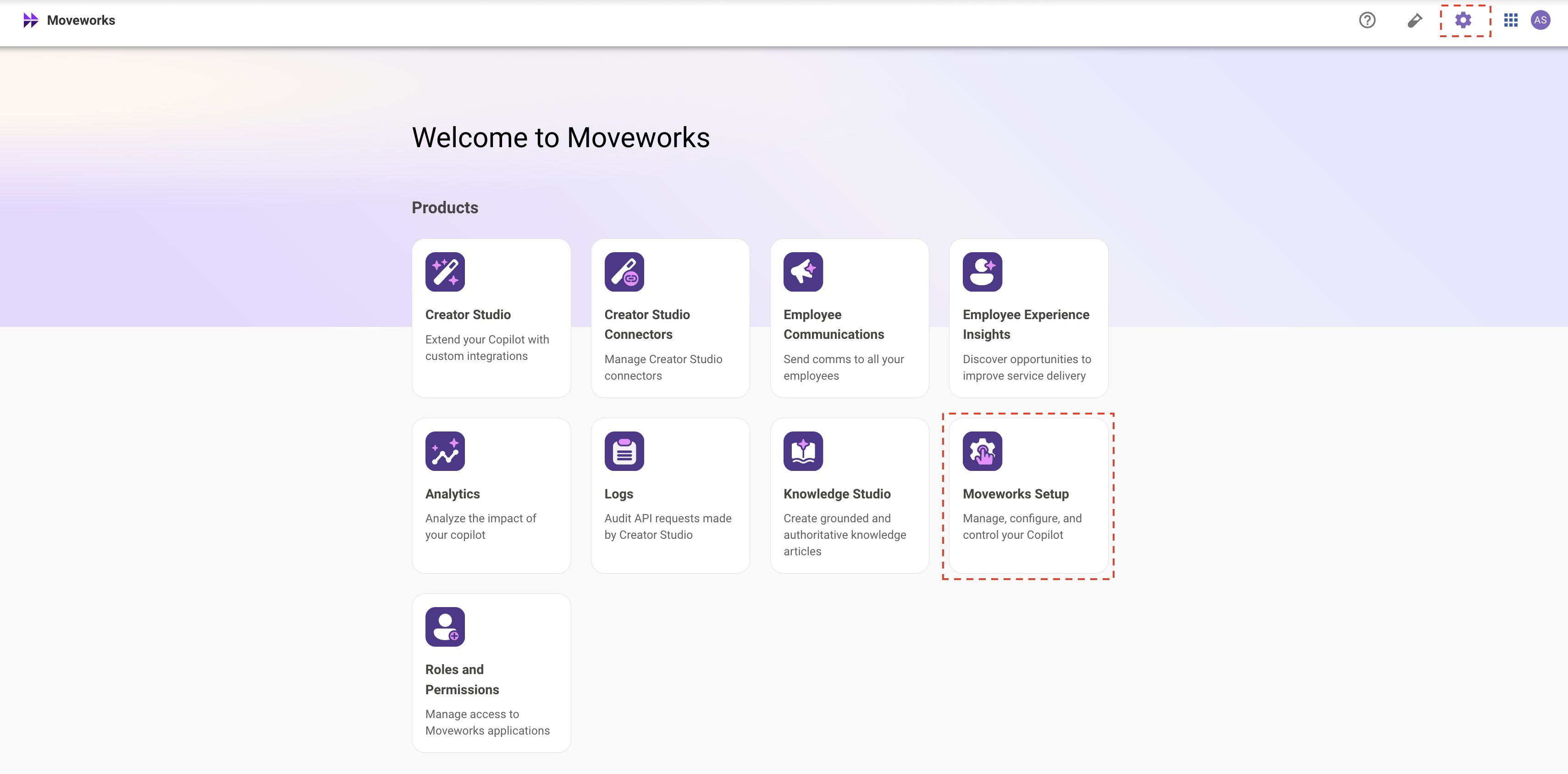
  3. On this screen, click on Moveworks Setup tile or click Gear ⚙️ icon located at the top right of the page.

    1. If you are unable to see the tile or gear icon, it is most likely that the org super-admin has not granted you access to Moveworks Setup. Reach to your org’s super-admin to grant you access.
  4. You are now logged into Moveworks Setup. ✅

    1. Leverage the side bar to search and navigate through different parts of the platform.


How to grant permissions of Moveworks Setup to users

  • Head over to this guide to learn more about how RBAC works in Moveworks Setup.
  • You can also learn how to assign roles to users for various applications by following this Guide