
Context Window Management
What is a Context Window?
Moveworks Assistant has a short-term memory, which we refer to as its context window. This allows the Assistant to remember recent interactions, ensuring responses are relevant and based on the ongoing dialogue. This allows the Assistant to adapt its response to user queries with the most recent information from the previous conversation, and ensures that the user gets a conversational and situation-aware response.
As a result, if two users ask the same question, or if the same user asks a question twice at different times, it is expected that the responses may be somewhat different based on the context.
Context is automatically cleared every 24 hours from our Agentic AI reasoner. This means that any conversation older than a day will be removed from the chatbot’s memory, ensuring that your interactions remain relevant and up-to-date. When chat history gets too long, it can confuse the LLM (large language model), leading to less accurate, less relevant, or slower responses. This is why we clear the contextual history automatically behind the scenes for users. Even if a conversation spans multiple days, the most recent conversation will continue to be included in the model’s context. This overrides the standard 24-hour look back window.
How to change the context window
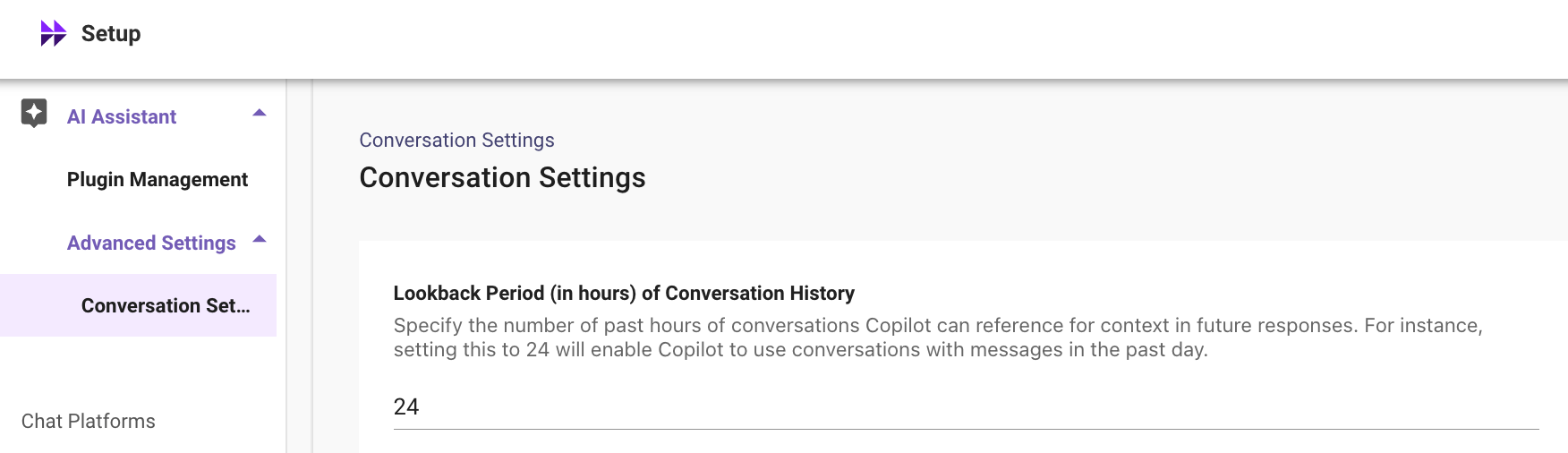
If you would like to change your context window from 24 hours to let’s say 12 hours, you can do so via Moveworks Setup. Navigate over to “AI Assistant” -> “Advanced Settings” -> “Conversation Settings”.
We recommend that you keep this setting at 24 hours as its rare that you will need to adjust it. If you were to adjust it, we recommend a minimum hour setting of 1 hour and a maximum of 48 hours.
How to manually clear your context window
If you need to clear memory faster, there’s 2 ways to do so:
-
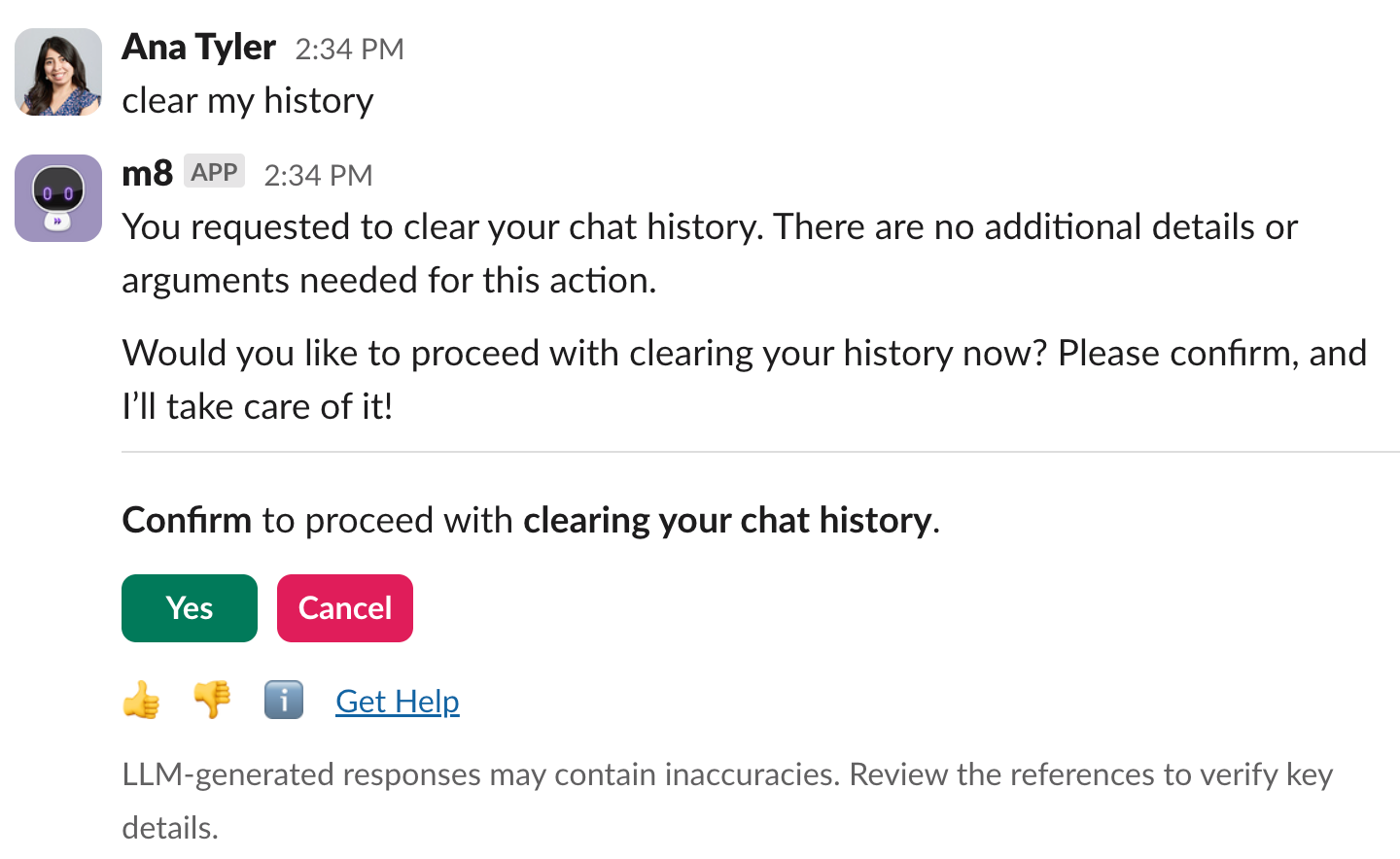
Intent based triggering: Simply tell your AI Assistant in your own words you want to clear your chat history. Our agentic reasoner is smart and will understand commands like “reset chat,” “clear context,” “start over,” “restart,” or “refresh context”.
When you express your intent through natural language, you will see a confirmation card to ensure you do in fact want to clear the conversational context as shown below.
✅ When to clear your context window
- Testing Plugin Triggering: When testing that the Assistant serves the specific plugin, it’s often useful to start with a clean slate to ensure past interactions & previous plugin selections from the bot do not affect the bot’s current decision. To solve this, and allow for better understanding of plugin selection, you can run
copilot clearhistoryto ensure prior interactions do not affect the response.- Note that plugin selection is done by the reasoning engine dynamically and if there are multiple plugins that are potentially capable of serving the request, there can be some variation in which plugin gets selected. Clearing context does not eliminate this variation, if it exists.
- Irrelevant Context Accumulation / Error Correction: When the context accumulated is incorrect or no longer relevant to the ongoing conversation, and you do not want the Assistant to leverage it, you can run
copilot clearhistoryto ensure prior interactions do not affect the subsequent responses.
The most important thing to remember is that users’ experience will be based on their context. So any testing with the use of copilot clearhistory will not capture those effects. When analyzing usage from your users, you should expect to see some differences from testing with cleared context.
❌ When to not clear your context window
- Context Switching: If a user shifts to an entirely different topic that requires a fresh contextual understanding. It is expected that the Assistant can naturally transition to new topic changes.
- Leveraging previous inputs to maintain conversation flow: In scenarios where past inputs are crucial for the Assistant to make sense of the current request or query.
- e.g: when chaining actions together e.g: Lookup of Status of a Record -> Update it to “in process”
- Leveraging previous language context to minimize repetition: When testing a conversation that benefits from continuity, and to avoid users having to repeat information they have already provided, the context window helps the AI maintain the flow and understand references from prior messages, such as pronouns in subsequent conversations.
- e.g: “How many offices do we have in San Francisco?” -> “Where are they located?”
Limitations
This tool does not eliminate variations that are not related to previous conversation context. As an example, sometimes more than one plugin (e.g. knowledge and forms) may have a potential option to show to the user. In such cases, the Assistant currently selects one of the plugins, and the plugin selection may be dynamic. Clearing context does not eliminate this source of variation. If you see that the Assistant is selecting other plugins more frequently than expected, please file a support ticket or speak with your CS team to discuss the use and possible options to modify the behavior.
Troubleshooting
If you get a “Hoo-hoo-hoo” message, that indicates that copilot clearhistory was NOT successful. This is likely because the feature is not enabled for your user.
