
Listener Configuration
Overview
A Listener serves as Moveworks’ receiver for incoming webhook requests from external systems. It validates these requests, transforms them into events, and triggers associated plugins to execute automations. Each listener generates a unique Webhook URL, which you configure in the provider system (e.g., GitHub, Workday, or DocuSign) to send events.
For an end-to-end setup, including creating a listener, refer to the Webhook Triggers Quickstart Guide.
The maximum payload size for a request received by a listener is 1 MB. If a request exceeds this limit, the payload body will not be available for processing — filters, debounce keys, and publish mappings that reference the body will not have access to it.
Security and Verification
Secure your listener to ensure only authorized providers can send requests, preventing unauthorized access and enabling higher rate limits for production use.
Why Secure Listeners Matter:
- Unsecured listeners are vulnerable to abuse and subject to strict rate limits (1 request per 10 seconds).
- Secured listeners support higher throughput (up to 50 requests per second across your entire organization) and protect your workflows.
Rate limits are organization-wide, not per listener. The 50 req/s limit for secured listeners is shared across all listeners in your org. If you have multiple listeners receiving events simultaneously, plan your throughput accordingly to stay within this combined limit.
Verification Options
Moveworks supports multiple methods to verify incoming requests:
- Signature Verification (HMAC): Recommended for verifying request origin and integrity using a shared secret. For setup guidance, see Webhook Signature Verification.
- One-Time Verification Challenges: Some providers require a one-time challenge response during webhook setup to confirm the endpoint. For details and configuration, see Webhook Verification Challenge.
- Credential Verification: Require an API key or OAuth 2.0 token in every request. Enable this in the listener settings and use Moveworks-generated credentials (details below).
- Verification Rules: Define DSL rules to validate request fields or headers. This does not count as a secured listener and listeners configured with this verification option will be subject to higher rate limits
If verification fails, Moveworks rejects the request with a 401 Unauthorized response and logs an ErrorSignatureVerificationFailed error.
Creating and sending Moveworks Credentials
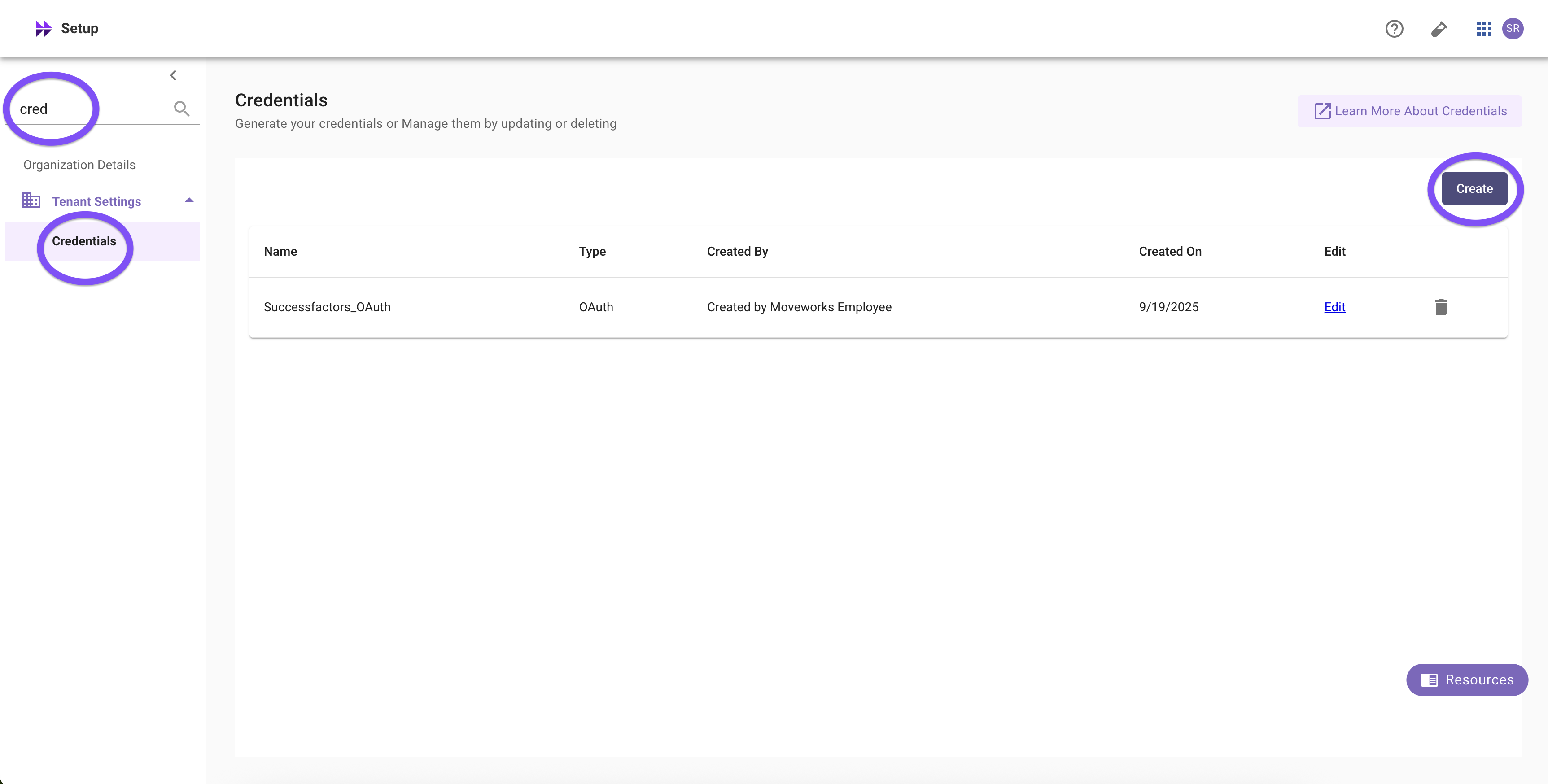
When Enable Credential Verification is selected, every webhook request to a Moveworks listener must include authentication. You can authenticate using either an API Key or an OAuth2 Client Credentials token generated in Moveworks Setup → Credentials → Create.
API Key Credentials
Include your Moveworks API key as a Bearer token in the Authorization header of your webhook request:
Example (curl):
OAuth2 Client Credentials
Obtain an access token by making a request to the Token URL with your Client ID and Client Secret:
- Token URL: https://api.moveworks.ai/oauth/v1/token
- Client ID: The client ID you generated in Moveworks Setup.
- Client Secret: The client secret you generated in Moveworks Setup.
- Grant Type:
client_credentials
Request (curl):
Response:
Use the returned access_token as a Bearer token in the Authorization header when calling your listener:
Example: Rule-based validation (non-cryptographic)
Use Rule-based checks to assert properties about the incoming request. These are great as additional guardrails (e.g., anti-replay, header presence, content-type) and as a fallback for providers that don’t sign payloads. Rule-based checks do not replace signature verification.
In the Moveworks Listener UI: Verification section → Add New → Validation Type: Rule-based → paste one of the expressions below. Add multiple rules with Add New; all rules must pass.
- Anti-replay window (Slack/Stripe-style timestamp). Reject requests older than 5 minutes.
$TIME() - $INTEGER(headers["x-slack-request-timestamp"]) <= 60 * 5- Change the header name to your provider’s timestamp header (e.g., t from Stripe-Signature).
- Require JSON content type. Only accept JSON bodies.
$LOWERCASE(headers["content-type"]) == "application/json"
- Require signature header to be present and well-formed. Fail fast if the expected signature header is missing or empty.
Unauthenticated Webhooks Governance
Learn more about org-level settings regarding whether unsecured listeners can be used in Security and Privacy Settings > Webhook Listener Security.
Advanced settings
Event Filtering
Apply listener-level filters to suppress specific events before they are processed. Filters are exclusion rules — when an incoming event matches a filter expression, it is dropped. All events that do not match the filter pass through and are processed normally.
For example, parsed_body.event_type == "issue_created" means events where event_type is "issue_created" will be excluded. Every other event type will still be processed.
Filters are negative filters (exclusion rules). A matching event is dropped, not kept. If you want to process only a specific event type, write a filter that matches everything except that type. For example, to keep only issue_created events, use parsed_body.event_type != "issue_created".
To understand how to use the DSL filters, let’s start with an example payload. Suppose we’re listening to a Jira webhook for newly created issues. The log might look like this for an incoming request:
Paths in the event model
Moveworks represents the entire incoming HTTP request as a structured object. Given that, that the DSL paths you’ll reference:
parsed_body→ the parsed JSON payload (most typical)headers→ all HTTP headersquery_params→ any query string valuesraw_body→ the unparsed body string (you likely will not use this)
Below are some specific event filter examples but see our full DSL Reference for more details on the syntax for MW DSL and other common examples.
Example filters on parsed_body
Remember: matching events are excluded. The descriptions below explain what each filter drops and what passes through.
Exclude issue_created events (process everything else)
Events where event_type is "issue_created" are dropped. All other event types pass through.
Keep only issue_created events (exclude everything else)
Events where event_type is not "issue_created" are dropped. Only issue_created events pass through.
Exclude open issues
Events where the issue status is "Open" are dropped. Issues with any other status pass through.
Exclude high-priority tickets
Events where the issue priority is "High" are dropped. All other priorities pass through.
Exclude tickets assigned to a specific user
Events assigned to "jdoe" are dropped. Tickets assigned to anyone else pass through.
Exclude tickets from the Engineering project
Events from the "ENG" project are dropped. Events from all other projects pass through.
Exclude events older than 7 days
Events with a creation date within the last 7 days are dropped. Older events pass through.
Example Filters on headers
Why use headers?
- Some providers encode event type, signatures, or content-type in headers.
- Good for coarse routing before parsing payloads (or to enforce security checks).
Exclude requests that have a Jira delivery ID
Requests that include a non-null X-Jira-Delivery header are dropped. Requests without this header pass through.
Exclude requests from non-Hookshot user agents
Requests whose User-Agent does not contain "hookshot" are dropped. Only requests from Hookshot-based agents pass through.
Complex Examples
Exclude high-priority, open issues in the ENG project
Events that match all three conditions are dropped. If any one condition is not met, the event passes through.
Exclude prod events with “security” in the summary
Events where env is "prod" and the summary contains "security" are dropped. Events that don’t match both conditions pass through.
Why filter at the Moveworks listener-level at all? Some webhook providers can’t pre-filter events. Listener-level exclusion filters in Moveworks let you drop noisy or irrelevant events before they reach your downstream plugins.
Redaction (Logs)
Redact secrets and PII from webhook logs. Use this to hide auth headers or sensitive fields while retaining enough context to debug
Deduplication
Prevent retries or duplicate sends from triggering the same workflows.
How it works You choose one or more Key Paths. For each request, Moveworks reads those fields from the incoming request (in order), concatenates the values, and hashes them to form a dedup key. If the same key is seen again within the configured window, the request is dropped as a duplicate.
Each Key Path must start with one of the top-level request objects, the same event model used by Event Filtering above:
parsed_body→ the parsed JSON payload (most typical)headers→ all HTTP headersquery_params→ any query string valuesraw_body→ the unparsed body string
A path that does not begin with one of these objects (for example requestId instead of parsed_body.requestId) will not resolve to a value. When that happens the request is deduplicated on the listener alone, which means distinct events inside the window can be silently dropped. Always validate your Key Paths against a sample payload from the event log.
Key Paths accept either snake_case or camelCase — match the casing used in your provider’s payload (e.g. parsed_body.user_email or parsed_body.userEmail).
Use deduplication with Verification (HMAC + optional timestamp rule). HMAC proves origin/integrity; dedup protects against provider retries and benign replays.
Mapping to the UI
- Deduplication key(s) → Key Paths Add 1–N paths into the request event model. Each path must begin with
parsed_body,raw_body,headers, orquery_params. Choose fields that uniquely and stably identify the event across retries. - Deduplication Window Choose how long Moveworks should remember a seen key (e.g., 5 mins, 10 mins, 30 mins, 1 hour).

Tip: Prefer a single provider-supplied event ID (or delivery ID) if available. If the provider does not supply one, combine a small set of fields that together make the event unique (e.g.,
parsed_body.action+parsed_body.issue.id+parsed_body.repository.full_name).
Good key choice examples (by webhook provider)
Below, enter the Key Paths exactly as shown (one per row), each starting with parsed_body. Then pick a sensible Window.
Slack (Events API)
- Window: 5 - 10 mins.
- Slack includes
event_idat the top level of the Events API payload. - I only care if there was a message in the slack channel in the last 10 minutes. More frequently I don’t care about.
ServiceNow (example: Incident updates)
- Window: 5 - 10 mins.
- Use the record
sys_idwith the event type you’re subscribing to.
Zoom (Event Notifications)
- Window: 5 - 10 mins.
- Zoom includes an event type and timestamp; include a stable object ID for uniqueness.
Do / Don’t
Do
- Prefer a single, provider-assigned event ID or delivery ID when available.
- Keep the key minimal but unique; 1–3 fields is typical.
- Set a window that comfortably covers the provider’s retry schedule (10–30 mins is a safe default).
Don’t
- Don’t include fields that change on retry (e.g., “received_at”, request UUIDs assigned by intermediaries).
- Don’t use short windows (e.g., 30s) unless you’re sure retries won’t extend past it.
- Don’t rely on large free-form objects (e.g., full body) unless necessary.