For AI agents: a documentation index is available at the root level at /llms.txt and /llms-full.txt. Append /llms.txt to any URL for a page-level index, or .md for the markdown version of any page.
Logo
DeveloperAcademyCommunityStatus
ReferenceGuides
ReferenceGuides
  • Agent Studio
    • Overview
    • Quickstart Guides
    • Core Concepts
    • Conversation Process
    • Actions
    • Connectors
    • System Triggers
    • Agent Architect
    • Cookbooks
    • Development and Testing
      • Logs
        • Log Type Reference
        • Log Data Security
      • End-User Access Control
      • Plugin Management
      • Common Errors
      • Plugin Go-Live Checklist
    • AI Agent Marketplace
    • Developer Tools
  • Agentic AI
    • LLM Fundamentals
    • The Agentic Reasoning Engine
    • Memory Constructs
    • Conversational Context
    • Guardrails
    • Grounding and Hallucinations
    • Continuous Learning
    • LLMs & SLMs
    • Steerability Tools
    • Multilingual Support
  • Core Platform
    • User Identity
    • Moveworks Agent (On-Prem)
    • Approvals Engine
    • Entity Catalog
    • Moveworks Data Objects
    • Security Information and Event Management (SIEM) Logs Overview
DeveloperAcademyCommunityStatus
On this page
  • Log Viewer
  • Filters
Agent StudioDevelopment and Testing

Logs

||View as Markdown|
Was this page helpful?
Edit this page
Previous

Log Type Reference

Next
Built with

Log Viewer

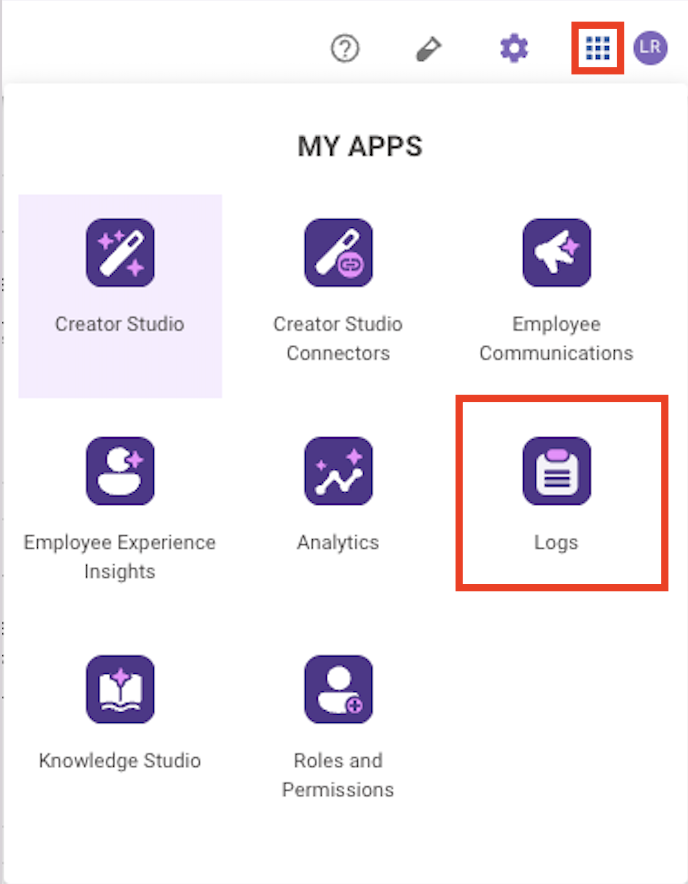
  1. Go to https://my.moveworks.com/ and log in
  2. Click the App Switcher in the top right
  3. Click on the “Logs” tile in the home page

Filters

  1. Time-range - This filters for logs between a lower & upper bound time range. It defaults to the last 6 hours & can go back a max of 14 days.
  2. Root UUID - This UUID that ties an entire Plugin execution together.
  3. Requestor - This is the user email of the user who triggered the Plugin.
  4. Log Level - This is the level of the log.
    1. By default it will be LOG_LEVEL_DEBUG.
    2. If an error occurred, it will be LOG_LEVEL_ERROR.
  5. Log Type - This can be compound_action.trigger, compound_action.step.execute, action.http.trigger
  6. Response Code - This is only applicable to action.http logs. It filters these logs based on the requests response code (e.g. 200, 404)